
Real-Time Notifications
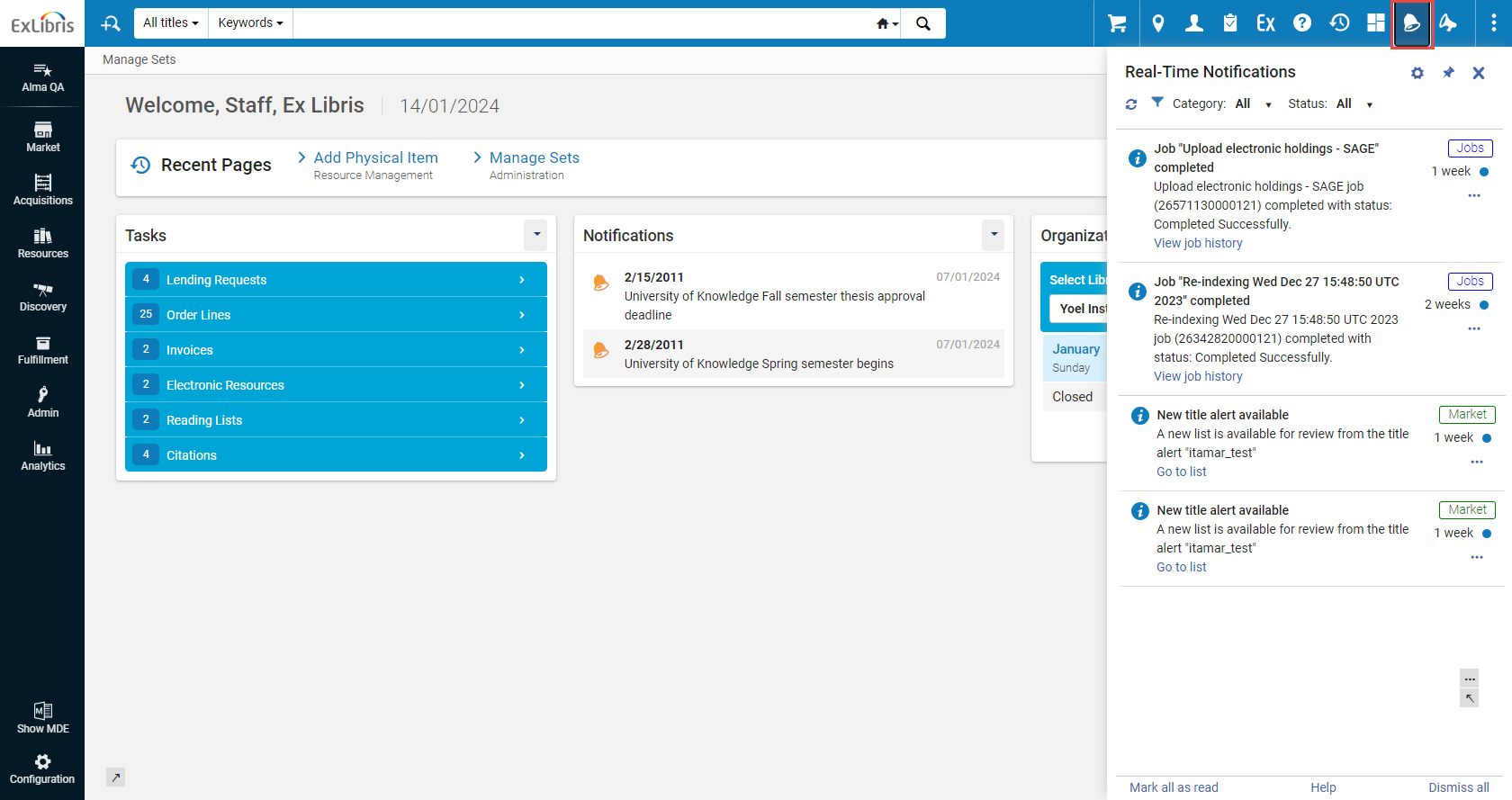
Real-Time Notifications is an opt-in, system-level interface that displays items requiring your attention such as manual jobs.Users who opt-in can receive a pop-up and/or email when exporting files, manual jobs, etc., are completed.All such notifications are accessible through the notification icon ( ) on the top menu bar.
For Rialto, notifications appear when orders are cancelled, rejected, require intervention, etc. Users will also see the message (with actionable links) in the Real-Time Notifications panel.For a walk through on viewing and managing user notifications, watch User Notifications (2:00 min).
The Notifications Panel
The Real-Time Notifications list is a helpful way to view notifications requiring your attention for the last month.After one month, all notifications are deleted.リスト内のエンティティの順序は、最新のものから降順で、日時順になっています。
To open the Real-Time Notifications panel:
- To open the Real-Time Notifications panel, select the
 icon on the persistent menu bar in the interface.The system checks for changes to your tasks every few minutes, and if new changes exist, a counter is displayed on the icon -
 .
- To have the panel constantly displayed, pin it to the screen by selecting the
 icon.
Alma and Esploro real-time notifications for jobs are indicated with the Jobs tag (
 ).Rialto real-time notifications are indicated with the Market tag (
 ).Analytics real-time notifications are indicated with the Analytics tag (
 ).
Configuring the Notifications
どの通知を受け取るか、受け取らないかを制御します。These selections can be made and configured at any moment.You can opt to receive notifications to your email box, or see them as pop-up messages.すべての通知はパネル内に表示されます。
To configure notifications:
- Click the icon on the persistent menu bar.
- Click the
 icon to open the configuration section of the Real-Time Notifications panel.
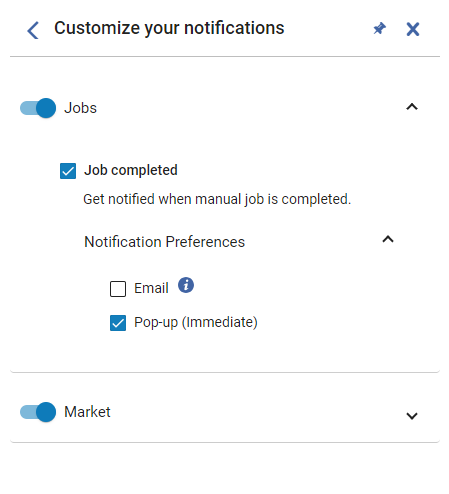
- To enable notifications of a certain category (for example Jobs or Market), toggle on the control.各カテゴリ内で、電子メールによる通知の送信を設定することもできます。The notification categories are listed below:
- Analytics– Configure notifications for when an administrator shares a report, dashboard, or DV workbook with you.
- Cataloging – Configure notifications for cataloging, such as for the AI Metadata Assistant (for example when the AI Metadata Assistant draft is ready to work on in the MD Editor).
- Export – Configure notifications for exported files.
- Jobs – Notify when manual jobs are completed.デフォルトではポップアップメッセージで通知します。
- Market – Configure notifications for the Rialto system.
- To enable specific notification types within the category (for example, notifications on the creation of new PO lines), select the relevant checkbox.
- To opt in to receive notifications to your email box, click Notification Preferences, and then select the Email checkbox.Emails are sent to the address defined as your Primary email address.Alma管理者は、メールがAlmaのメール許可リストに含まれていることを確認する必要があります。The letter that is sent is 'User Notifications (New Gen)', see Configuring Alma Letters.このレターを設定する際は、送信される全ての通知に編集内容が適用されることに注意してください。
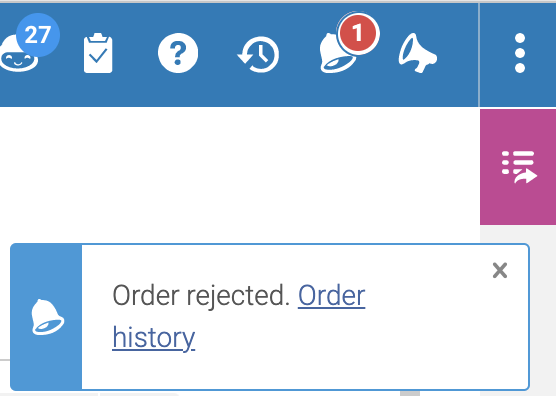
- To opt in to receive notifications as pop-up messages, click Notification Preferences, and then select the Pop-up (immediate) checkbox.Example of a popup notification:
Working with Notifications
| 変更後: | 次を行います: |
|---|---|
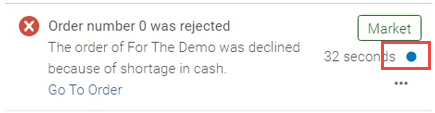
| Change the state from Unread to Read |
|
| 通知を閉じる |
却下された通知はすぐに削除され、復元することはできません。
|
| 新しい通知: |
次の方法で通知をフィルタリングできます。
|
| 項目へジャンプ | 移動リンクを選択します。これにより、Alma / Rialto で関連するアイテムが開きます。 |
| 特定の種類の通知をブロックする |
特定の種類の通知 (新しい注文明細の作成に関する通知など) を受け取りたくない場合は、それらの通知をブロックできます。
|
Currently Available Notifications
次の通知が利用可能です。
| Real-Time Notification | Available for | Description |
| ジョブ「[名前]」完了 | 全てのユーザー | Alma手動ジョブ(スケジュールされたジョブではない)が完了すると通知を受け取ります。 |
| 管理者がユーザーと新しいリポートを共有しました | 全てのユーザー | 管理者がレポート、ダッシュボード、またはデータ視覚化ワークブックをあなたと共有したことを通知します。 |
| カートへのリストの追加が完了しました | すべてのRialtoユーザー | リストからカートへの追加が完了すると通知を受け取ります。 |
| リンクされた取り寄せリクエストを閉じることができません | Rialto購入者 | チェックアウト時にリンクされた取り寄せリクエストを閉じるように要求したが、ステータスによりそれが不可能な場合に通知を受け取ります。 |
| 選択プランルールの予算残高制限 | Rialtoアドミン | 選択プランルールの予算が不足している場合は通知を受け取る |
| Partner Holdingsからオプトアウトした機関 | Rialto Administrators | パートナーが Partner Holderings からオプトアウトしたときに通知を受け取ります。 |
| 正常にインポートが完了しました | Rialtoユーザー | リストへのファイルのアップロードが正常に完了すると通知を受け取ります。 |
| ファイルのアップロードに失敗しました | Rialtoユーザー | リストへのファイルのアップロードが失敗したときに通知を受け取ります。 |
| ファイルのアップロードが中止されました | Rialtoユーザー | リストへのファイルのアップロードが中止されたときに通知を受け取ります。 |
| 作成されたタイトル | Rialtoユーザー | タイトルアラートが新しいリストを生成したときに通知を受け取ります。 |
| 注文には確認が必要です | Rialtoの購入者/承認者 | 審査が必要な注文に関する通知。 |
| 発注はキャンセルされました | Rialtoの購入者/承認者 | 注文がキャンセルされたときの通知。 |
| 注文がキャンセルされました。電子書籍はご利用いただけません | Rialtoの購入者/承認者 | 電子書籍が入手できないために注文がキャンセルされたときに通知を受け取ります。 |
| 注文が拒否されました | Rialtoセレクター | Get notified when an order has been rejected by approval staff. |
| 要求注文のキャンセルが拒否されました | Rialtoの購入者/承認者 | Get notified when an order cancellation request is rejected. |
| EBAスマートセレクションが完了しました | Rialtoアドミン | スマート選択が正常に完了したときに通知を受け取ります。 |
| EBA計画はまもなく終了します | Rialtoアドミン | Get notified when an EBA plan is approaching it's end date. |
| タイトルの選択を待機している終了したEBA計画 | Rialtoアドミン | EBA計画が終了し、タイトルの選択を確認したときに通知を受け取ります。 |
| EBA ジョブの失敗 | Rialtoアドミン | EBA ジョブが失敗したときに通知を受け取ります。 |
| EBAの購入完了 | Rialtoアドミン | EBA 購入プロセスが正常に完了すると通知を受け取ります。 |
| タイトルが利用可能になりました | Rialtoユーザー | Receive a notification when a title on a list you own (or that has been shared with you) has changed availability status from Not Yet Published to Available. |
| 承認待ちの新タイトル | Rialtoの購入者/承認者 | Receive a notification when titles are submitted by selection staff for approval. |
| コメントでユーザーをタグ付けする | Rialtoユーザー | これにより、別のユーザーがリスト内であなたをタグ付けした場合に通知を受け取ることができます。 |
