
その他の設定
一般的なパラメータを設定するには、下記の役職が必要です:
- 一般システム管理者
Overview
Almaの一般的なパラメータは、機関レベルでのみ設定できます。
Network zone administrators can view and configure the settings only through the Consortia Central Configuration Dashboard.
You configure parameters on the Customer Parameters mapping table (Configuration Menu > General > General Configuration > Other Settings).For more information about mapping tables, see Mapping Tables.
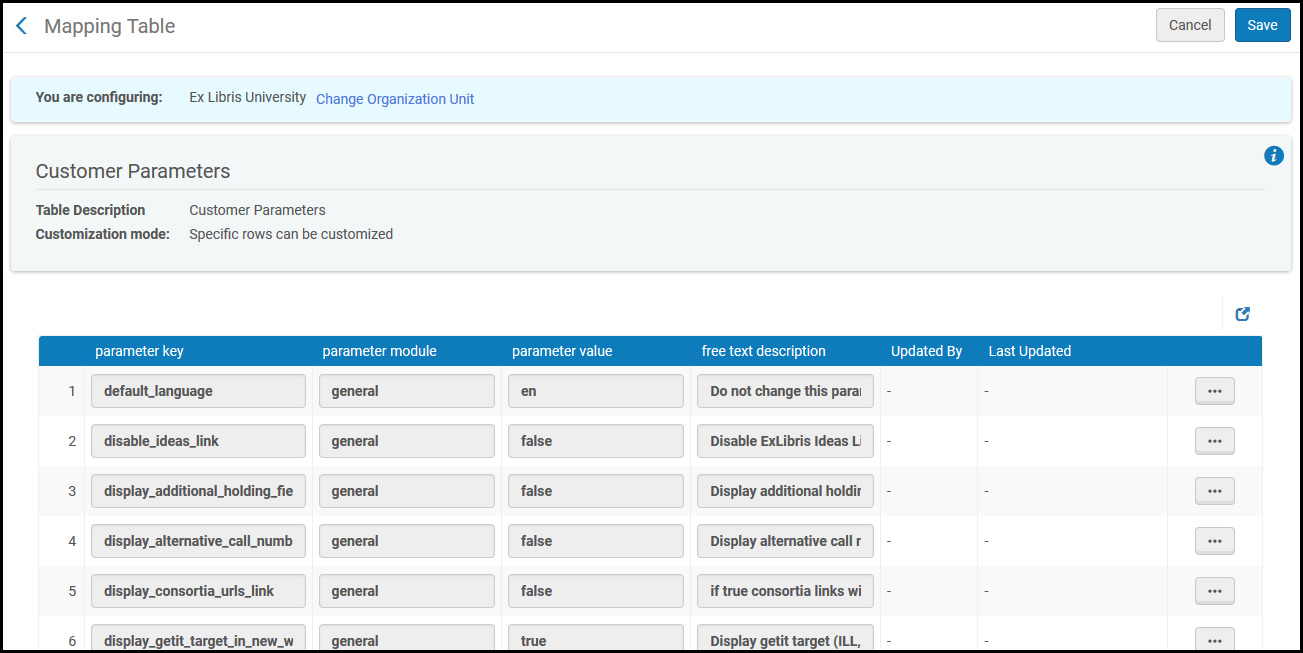
Customer Parameters
このページでは、下記のパラメータを編集できます:
| パラメータキー | パラメータの値 |
|---|---|
|
キャンパス |
使用しません。 |
|
default_language |
ユーザーのデフォルト言語。 デフォルト値は編集しないでください。 |
| detailed_creator_and_modifier_for_api_change(API 変更の詳細な作成者と修飾子) | When true, adds API Key Name to Modifier and Creator.This parameter does not impact the transactions triggered by payment—they are assigned to the Circulation desk and not to a user, so the name of the API key is not assigned. |
| detailed_creator_and_modifier_for_job_changes |
When true, the User ID is added to "System" in Alma entities that the job updated.例えば、ユーザーJohn_Bransonが手動ジョブを実行した場合、物理的な資料エディタの変更者フィールドに「System」と表示される代わりに、AlmaはJohn_Branson(System)」と表示します。This feature only applies to non-scheduled manual Jobs where Run Now was selected or scheduled jobs where the Run option was used.
|
|
disable_ideas_link |
Enable (true) or disable (false) the Suggest an Idea link in the persistent menu.See The Persistent Menu. |
|
display_additional_holding_fields_in_getit |
「真(true)」に設定すると、Primo/Primo VEの「取得する」タブで追加所蔵情報が表示されます。詳細については、お使いの環境に応じたドキュメントを参照してください。
|
|
display_alternative_call_number_in_getit |
「真(true)」に設定すると、Primoの「取得する」タブで代替の請求番号情報が表示されます。 代替請求番号 = アイテム請求番号 |
|
display_consortia_urls_link |
「真(true)」に設定すると、あなたの現在の場所を表示/選択した際に、機関変更のドロップダウンリストが表示され、共同ネットワークの機関を切り替えられるようになります。See Switching Between Institutions. |
|
display_full_user_name_in_more_info |
When set to true, the full user name is displayed for the operator information displayed in information pop-up windows.しない (デフォルト) に設定すると、プライマリIDが表示されます。 |
|
display_getit_target_in_new_window |
「真(true)」に設定すると、新しいダイアログボックスに「取得する」ターゲットが表示されます。 |
|
display_isbn_13_in_predefined_result |
When set to true, it displays the 13 digit ISBN number on the PO line description and PO line list.「偽(false)」に設定すると、標準の10桁のISBN番号がすべての場所で表示されます。See Manually Creating a PO Line. |
|
display_viewit_target_in_new_window |
「真(true)」に設定すると、新しいダイアログボックスに「表示する」ターゲットが表示されます。 |
|
email_contact |
使われていません。 |
|
email_contact_us |
The email addresses (in a format such as mailto:helpdesk@university.edu) or URL (http://...) to which the Contact Us link is directed.For more information, see Configuring Letter Labels. |
|
email_deposit_contact |
使われていません。 |
|
email_deposit_sender |
使われていません。 |
|
email_my_account |
The email addresses (in a format such as mailto:helpdesk@university.edu) or URL (http://...) to which the My Account link is directed.For more information, see Configuring Letter Labels. |
|
email_sender |
使用中でない。 |
|
enable_new_walk_me |
See GuideMe Frequently Asked Questions (FAQ). |
| encode_rss_link(エンコードRSSリンク) | Resolves the duplicated ampersand sign that encodes the data for specific customers.この問題を解決するには、パラメータを「偽」に設定する必要があります。デフォルトでは、「真」に設定されます。 |
|
font_for_special_characters |
This customer parameter is used for customers with special characters in their languages.サポートできるように、フォントをRobotoからCalibriに変更しました。 |
|
force_location_selection_on_login |
「真(true)」に設定すると、ログオン時にシステムがダイアログボックスを開き、スタッフユーザーに対してその場所を特定するよう要求します。Otherwise, the system will automatically set the physical location to the user's last specified location. |
| include_plain_text_in_emails (New for February 2026) | 「真(true)」に設定すると、プレーンテキスト・メールライアントを使用するユーザー向けに、HTMLバージョンの上にプレーンテキストが含まれます。 |
|
include_recipient_name_in_email_address |
When set to true, includes the receiver's name in the email address in emails sent from Alma.This may decrease the chances of having the email count as spam when it enters the recipients inbox. |
| limit_login_redirects | When set to true, redirects after a login process will be limited to sites within Ex Libris cloud and to exceptions configured in the 'Redirection Allowed List' mapping table. |
|
multi_campus_inventory_management |
When set to true, displays the Inventory Network Groups link in the configuration menu; see Configuring Distributed Access to Electronic Resources.この機能を実装する前に、Ex Librisに相談してください。 |
|
open_consortia_link_options |
Controls what happens when switching institutions (see Switching Between Institutions):
|
|
page_size |
システム内のすべてのリストに表示されるレコードの数。最大は20です。 |
| pgp_key_expiry_days | FTPベースの統合で暗号化されたファイルを操作する場合に、公開キーの有効期限を設定します。たとえば、1年後に期限切れにするには、365を設定します。空白のままにすると、有効期限はありません。 |
|
primo_patron_info_updatable |
「真(true)」に設定すると、ユーザーはPrimoから自分のユーザー情報を更新できるようになります。 |
|
primo_pds_url |
Primoから「見る」/「入手する」リクエストを取得する際、PDSからbor-infoを取得するためにAlmaが使用するURL。このURLは、PrimoがPDS (またはPrimoの認証ゲートウェイ) を呼び出すために使用するURLと同じでなければなりません。For more information, see Identify Patrons to Provide Relevant Services. |
|
primo_service_page_url |
AlmaサービスページAPIの使用時に、タイトルへのサービスページ直接リンクを受入するために使われる基本URLを決定します。For more information on this service, see https://developers.exlibrisgroup.com/alma/integrations/discovery/services_page. |
|
primo_test_pds_url |
Almaが2つの異なるPDSシステムと連携できるようにします。Primoの「見る」/「入手する」テンプレートがenv_type=testに設定されている場合、AlmaはテストPDSを使用します。For more information, see Delivery Subsystem. |
|
publishing_base_url |
このパラメータの詳細については、デベロッパー・ネットワーク上でBibレコードAPIの取得に関する資料を参照してください。このパラメータは下記のフォーマットである必要があります: http://<primo server host: port>/openurl/<primo_institution_code>/<primo_view_code>? |
|
retrieve_services_from_NZ |
(ネットワークゾーンを実装する共同ネットワークのメンバーの場合)「真(true)」に設定すると、AlmaリンクリゾルバへのOpenURLリクエストは、すべてネットワークゾーンを参照します。これは、ネットワークゾーンで管理され、当該機関が利用できるリソースに対する電子サービスを解決するためです。See Link Resolver for Consortia. |
|
rss_discovery_url |
機関レベルで設定されたディスカバリーシステム (Primoなど) のURL。For details, see RSS Publishing. |
|
smsDateFormat |
使用中でない。 |
|
standard_sandbox_override_link |
標準AlmaサンドボックスインスタンスのURLを構成します。To configure, enter the full path (including Protocol) of an override link for the Standard Sandbox of your institution.Note: This is not required, and will not work, for customers with Premium Sandbox. |
|
system_time_format |
Almaユーザーインターフェイス全体の時刻表示のフォーマット (日付なし) を設定します。空白、コンマ、ハイフン、またはコロンで区切られた下記の文字が使用されます:
例:
|
| temp_enable_feedback_tool | 新しいUXフィードバックツールを有効にします。 |
|
truncate_decimal_fraction_amount |
小数点を使って表示すべきでない通貨について、3文字の通貨コードを1つ以上入力します。たとえば、日本円や韓国ウォンについて小数点を表示したくない場合は、次のように入力します: JPY,KRW With this parameter configured, the following cases do not display decimal points/decimal point values:
すぐに使える下記のレターが、truncate-decimal_fraction_amountの設定を確認します:
Note that if you have manually edited any of these files to include additional price, fine, and/or cost information, you can either restore the letters; or you can manually modify these letters to not display decimal points/decimal point values.これは、下記のような構文を追加することで実現できます: <xsl:value-of select="substring-before(fee, '.')">
この顧客パラメータを設定する際、マイライブラリカードの「概要」タブに罰金および手数料の情報が表示されるという既知の問題があります。これは将来のリリースで修正される予定です。
下記の分野では、顧客パラメータtruncate_decimal_fraction_amountをカスタマイズする場合でも、小数点を表示し続けます:
Note that Analytics provides an option to hide decimal point values by using the Column Properties setting.
Excelでは、セルの書式設定を使用して小数点を非表示にするオプションが用意されています。ご注意ください。
|
|
view_historical_loans_in_primo |
Primoに貸出履歴の情報を送信できるようにします。For more information, see Displaying Historical Loans in Primo. |
