
PrimoのGet It
[Get It]タブと、追加情報を表示するために使用されるその他の設定について説明します。
If you are working with Primo VE, see Configuring Delivery Services for Primo VE for more details.
Primoの[Get It](PrimoのローカルなAlmaレコードを検出する間、サービスページで表示されます)により、ユーザーは、検索結果に表示される各物理的タイトルについて次の情報を決定できます。
- タイトルが見つかる排架場所
- タイトルの利用可否
- リクエストオプション
検索結果の順序を設定できます。See Configuring the Order of Primo Search Results.
ユーザーが共同ネットワークに属している場合、Primoの[Get It]でその他リンクを選択すると、追加の場所とサービスを表示できます。For more information, see The More Link and Institutions Lightbox.
タイトルあたりの排架場所の数、リソースのタイプ、およびログインしたユーザーのリクエストオプションに応じて、Primoの[Get It]は、所蔵情報、アイテムレベルの情報、またリクエスト情報を表示できます。
- [Get It]サービスは、Almaの認証とディスカバリーインターフェイスの認証の両方でSAMLに基づくIDプロバイダーを使用するように設定された第三者のディスカバリーシステムと統合できます。For detailed information, see https://developers.exlibrisgroup.com/alma/integrations/discovery.
- ブラウザのさまざまなタブで検索を実行し、最後の検索が実行されなかったタブで[View It]または[Get It]情報をリクエストすることは推奨しません。
所蔵リスト
タイトルに複数の所蔵(852フィールド)が存在する場合、システムは各場所を個別の行に表示し、各エントリに次の情報を含めます。
-
所有図書館(852 $$b)
-
排架場所(852 $$c)
-
請求番号(852 $$h - $$m)
-
受入番号(852 $$p) – 受入番号が存在する場合、システムは番号の前に「Accession:」を付け、請求番号を省略します。
-
コピー番号(852 $$t) – コピー番号が存在する場合、単一の所蔵表示でのみ、公開メモ(852 $z)の後にコピー番号が表示されます。コピー番号の先頭には、Copy:というカスタマイズ可能なテキストが付されます。
-
Public note (852 $$z) - For more information, see Displaying Public Notes.
-
Availability information - For more information, see Filtering the Library List for Availability in Primo.
例:
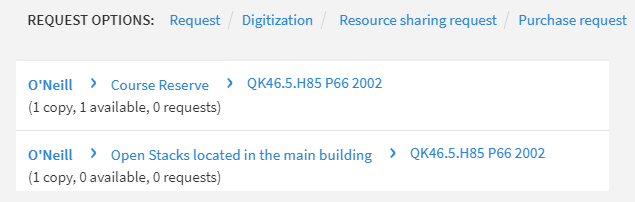 [Get It]タブ - 複数の場所にあり、逐次刊行物でないタイトル
For journal titles, the following information is also included:
-
所蔵ステートメントの概要(866 $$a)
-
Public note (866 $$z) - For more information, see Displaying Public Notes.
利用可否の情報は、逐次刊行物については省略されます。
例:
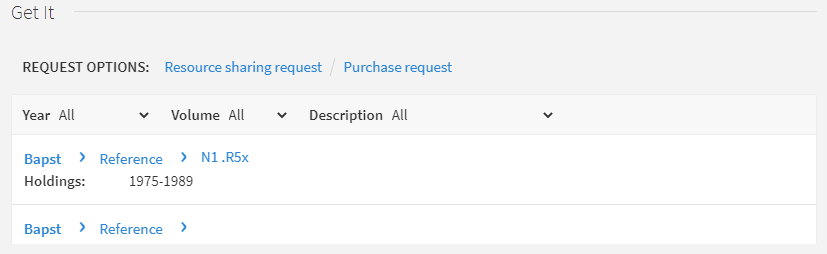
所蔵は、利用可否や、リクエストしたユーザーへの近さに従って表示できます。You configure this via the Locations Ordering Profiles setting in Fulfillment Configuration (see Configuring Locations Ordering Profiles).
For information on displaying additional holdings information in the Get It tab, see Displaying Additional Holdings Information.
物理的アイテムのソート順序の設定
[ソート手順リスト]ページでは、Primoの[Get It]にあるアイテムリストで使用されるソートを定義できます。For more information, see Configuring Physical Item Sort Routines.
-
[物理的アイテムのソート手順]ページ([設定メニュー] > [リソース] > [一般] > [物理的アイテムのソート手順])で、Primoの[Get It]で使用するソート手順を含む行のアクションリストから[編集]を選択します。
-
[設定を表示]タブを選択します。
-
リソース管理Get itの結果パラメータと、それに関連するデフォルトとして設定パラメータを選択します。
-
[保存]を選択します。
アイテムリスト
ユーザーは、[Get It]タブで所蔵エントリを選択することにより、特定の所蔵レコードに関連するアイテムを表示できます。エントリが選択されると、システムは、選択された所蔵レコードに関連付けられているアイテムを表示します(ページごとに最大10件)。システムは、各アイテムについて次の情報を表示します。
- バーコード
- 資料タイプ
- Policy – When a patron is signed in, the system calculates the loan terms of use that will be applied to the loan, and displays the name of the due date policy in this column.If the patron is not signed in, the system checks whether there are any terms of use rules (for that item's location, material type and item policy) that allows this item to be loaned.If so, the Loanable label is displayed.利用規約のルールが見つからない場合、貸与可能でないラベルが表示されます。
- 説明 – [説明]フィールドがあるアイテムについてのみ表示されます。
- アイテムのステータス
- 図書館
- 排架場所
- 受入番号
- 利用可否情報
- 代替請求番号
- 発行メモ
If users want to narrow the scope of a serial's list, they may use the following filters, which contain values that are relevant to the items in the list: Year, Volume, Description.
リクエストオプション
Primoの[Get It]では、ユーザーが許可した場合、選択したタイトルに対して、リクエスト、デジタル化、およびその他(リソースシェアリクエストやドキュメントデリバリーなど)のタイプのリクエストを実行できます。
すべてのリクエストオプションは、逐次刊行物の所蔵の上にある逐次刊行物のアイテムリスト内にボタンとして表示されます。例:
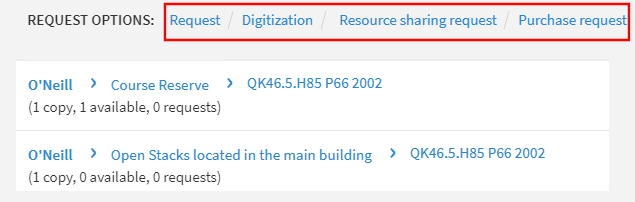
システムは、サインインしているユーザーにリクエストオプションを配置する資格がある場合にのみ、リクエストオプションを表示します。ユーザーがサインインしていない場合、システムは、所蔵リストやアイテムリストの上にリクエストオプションを表示するにはサインインしてくださいというメッセージを表示します。
リソースシェア図書館に一時的に配置されているアイテム(リソース共有パートナーに貸し出されたアイテム)の場合、リクエストオプションは、Almaで次の設定が行われている場合にのみ表示されます。
- A hold shelf is defined at the circulation desk of the resource sharing library (ensure that the Has Hold Shelf setting is selected when configuring a circulation desk; for details, see Configuring Circulation Desks).
- The resource sharing library has a Deliver To relationship with a library that has a defined hold shelf (for details, see Configuring Fulfillment Services Between Libraries Within an Institution).
The item's status is listed in Primo as: On ILL Process until <expiration date>
逐次刊行物タイトルの場合、ユーザーはタイトルと説明のレベルでリクエストを実行します。例:
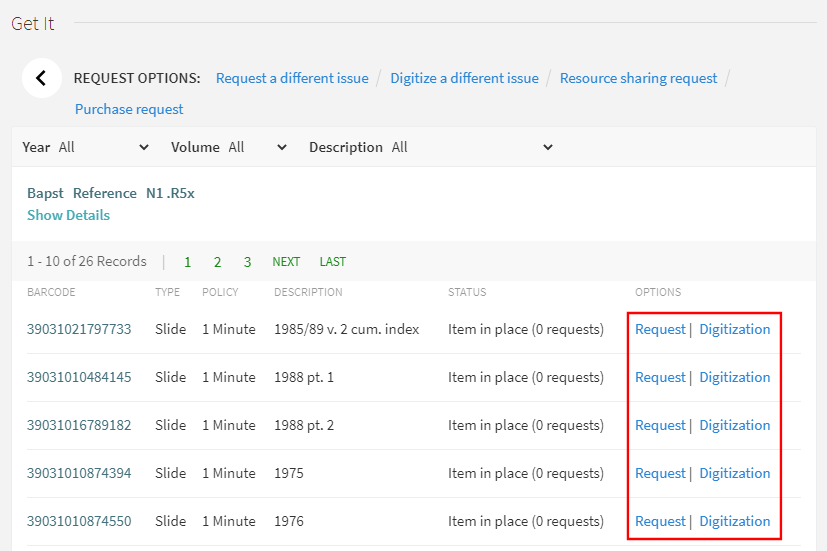
Primoからのリクエストはタイトルレベルです。逐次刊行物の場合、リクエストはタイトルと説明のレベルで行われます。To configure Primo to use item level requesting, contact Ex Libris support.
[Get It]タブに表示される情報(リクエストオプションを含む)は、完全にAlmaで設定されます。Almaでは、[Get It]タブで次の情報を設定できます。
- リクエストオプションを非表示にする – Almaでは、特定のユーザーグループからフルテキストサービスを非表示にするなど、配信タブの動作を設定できます。For more information, see Configuring Display Logic Rules.
- Labels used for various display fields – see Modifying Display Labels
- Look of the Get It tab – see Branding the Delivery Tabs
- Miscellaneous information such as how to define location map links – see Configuring the Template for the Location Map Link
If a serial title has both requestable and non-requestable items and has a large number of items, all items will appear on the request form.For performance reasons, Alma stops checking for requestability as soon as a requestable item is found.
冊子アイテムリクエストフォームでリクエストを送信するには、最初にフォームの任意のフィールドからフォーカスを削除してから、[リクエスト]ボタンを選択する(または[リクエスト]ボタンを2回選択する)必要があります。
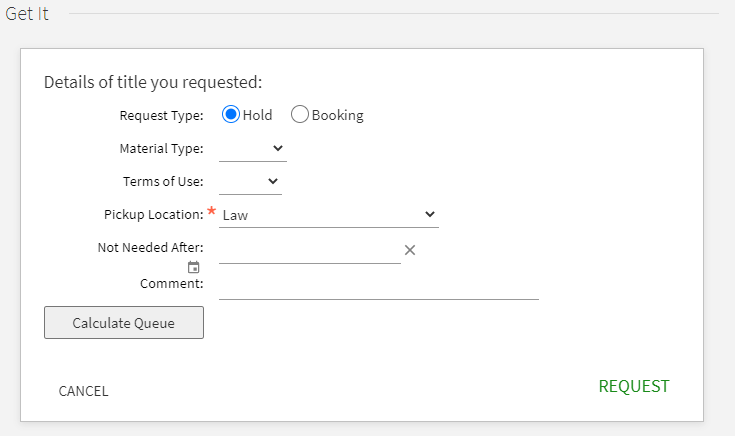
取り置きリクエストフォーム、予約リクエストフォーム、およびデジタル化リクエストフォームに表示されるフィールドを設定できます。See Customizing Primo Request Forms.
For information on configuring the request options, refer to Alma Fulfillment.
リンクされたローカルユーザーがいないその他の機関からのリクエスト
フルフィルメントネットワーク全体でPrimoのディスカバリーを使用する場合、元の機関からユーザー情報をコピーしたり、リンクされたアカウントを作成したりすることなく、別の機関の情報を取得できます。
The user parameter uresolver_remote_register controls whether the other institution's holdings may be retrieved without creating a local linked patron record (see Configuring Other Settings).パラメータの値は次の通りです。
- 自動 - リンクされたアカウントが自動で作成されます。これがデフォルトです。
- なし - [Get It]ページを介してリンクされたアカウントを作成するオプションはありません。所蔵情報のみが表示されます。
- 手動- 「Get It」ウィンドウに、他機関に登録するためのリンクが表示されます。リンクを選択すると、リンクされたアカウントのソースからリクエストフォームが開きます。
リソースシェアリクエストのために図書館を選択
ユーザーに対して複数のリソースシェア図書館が有効になっている場合、Primoの検索結果に使用するリソースシェア図書館を選択できます。
Primoユーザーのリソースシェア図書館を選択する前に、次を実行する必要があります。
- Ensure that the patron has multiple resource sharing libraries configured (see the Resource Sharing Library entry in Quick User Management Page Fields).
- Ensure that the ill_item_creation_lib_code setting on the Customer Parameters Mapping Table is set to ALL (see Configuring Other Settings).
-
Perform a search for an item in Primo and open its full display.
-
リソースシェアリクエストリンクを選択し、リソースシェアリクエストのフォームを表示します。
-
[図書館用]フィールドで、関連するリソースシェア図書館を選択します。The libraries display according to the ill_item_creation_lib_code value in the Customer Parameters mapping table see Configuring Other Settings), and/or those for which the patron's TOU are enabled.
-
[配送情報]セクションで、受取/配送場所フィールドから場所を選択します。ドロップダウンリストで受取/配送場所を指定します。
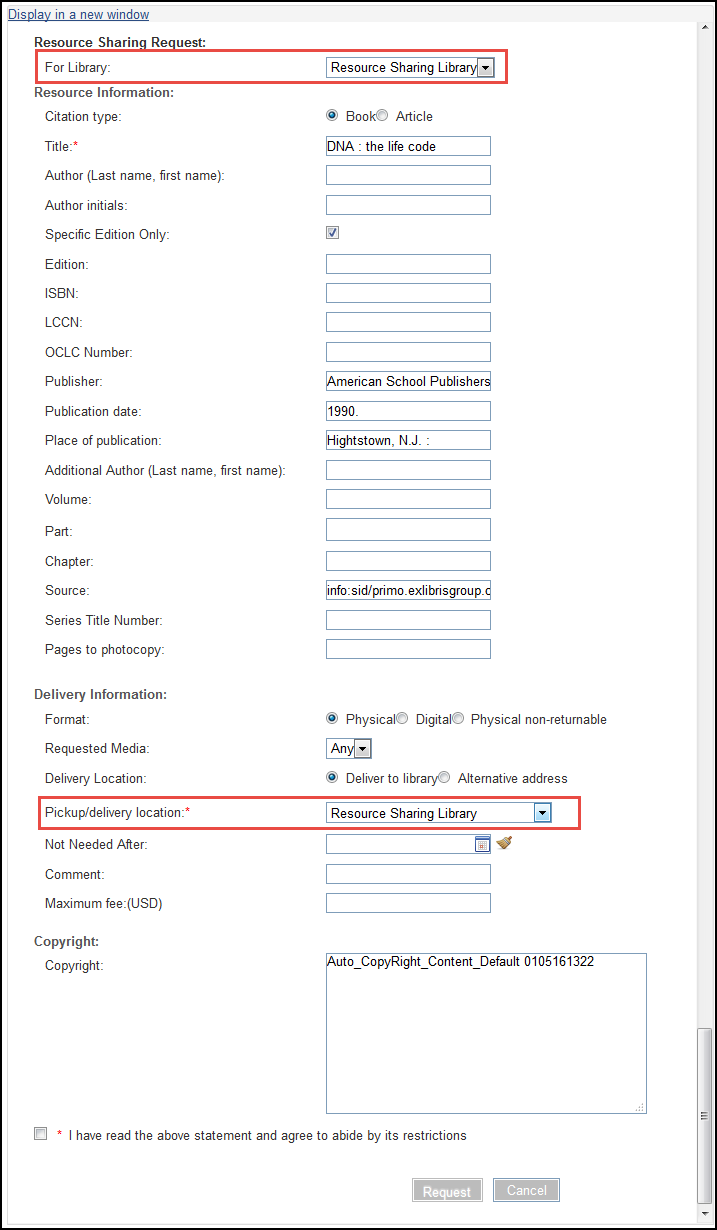 Primoの[Get It]タブ – 図書館および受取/配送場所のフィールド用
受取/配送場所ドロップダウンの値は、前のステップの図書館フィールドで選択された値に依存します。Fields to be displayed on the resource sharing request form can be configured on the Resource Sharing Form Customization page.
Displaying Real Time Item Descriptions for a Borrowing Request
Primoのユーザーは、リクエストしたいアイテムの説明のリストを見ることができます。アイテムの説明は、排架場所プロファイルに従って、リクエスト属性に一致するアイテムの説明フィールドの値に基づいています。Alma runs a locate process on all of the rota's partners in order to populate the list of items.This option is available when the rota partners are use an Alma locate profile.パートナーは、具体的な説明に基づいて、自身のリソースシェアリクエストを配置できます。
When a user opens up a request form, a spinner indicator appears and a message is displayed that the system is checking for item level descriptions.The descriptions are then loaded into a drop down list.When the values are loaded into it, the description field becomes mandatory.If no descriptions are available, a message is displayed that no item level descriptions were found.
This option is activated if the description field is made visible (see Customizing Primo Resource Sharing Forms).The field is disabled by default.
公開メモの表示
Primoは、Primoの[Get It]で次のように公開メモを表示します。
-
場所リスト:
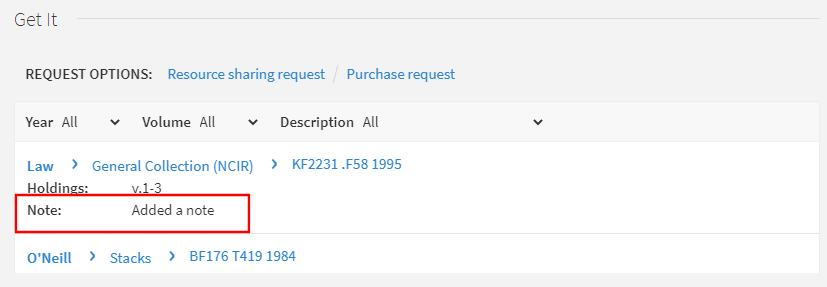 Public Notes in Get It > Locations List
-
アイテムリスト:メモを表示するには詳細の表示を選択する必要があることに注意してください。
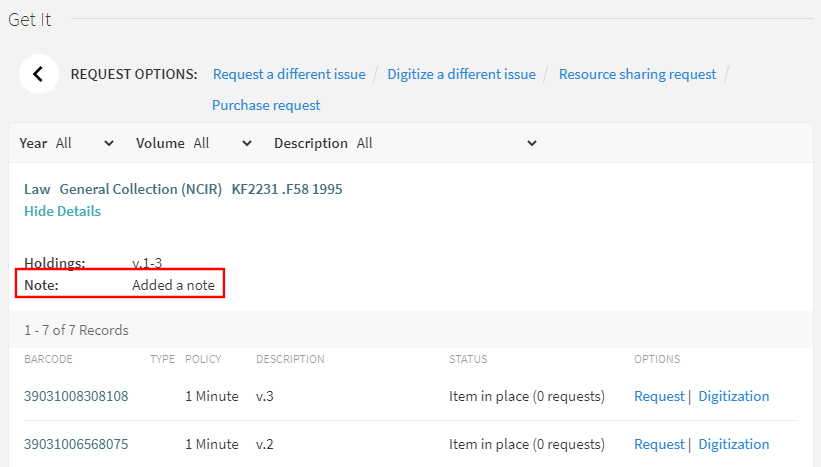 Public Notes in Get It > Items List
この機能を有効にする追加の設定は必要ありませんが、Primoに表示されるラベルは変更できます。
- フルフィルメント管理者
- 総合システム管理者
- On the Labels page (Configuration Menu > Fulfillment > Discovery Interface Display Logic > Labels), select Customize in the line containing the following code and modify the text in the Description field:c.uresolver.getit2.item_list.note.
- ページの下部にある[カスタマイズ]を選択して、変更したラベルをシステムに保存します。
追加の所蔵情報の表示
Almaでは、Primoの[Get It]タブで追加の所蔵情報を表示できます。
山括弧はHTMLタグで使用されるため、Get Itには表示されません。これに対する1つの例外は、請求番号です。HTMLが、一部の請求番号基準で使用されている山括弧をサポートするために無効になっています。
下表で、Primoに表示する追加情報を持つMARCフィールドのリストを示します。この追加情報のほとんどを表示するには、最初に次のパラメータのいずれかを有効にする必要があります。
-
display_additional_holding_fields_in_getit – When set to true, additional holdings fields appear in Primo Get It.次のフィールドがサポートされています。
所蔵フィールド サブフィールド Label (defined in the Discovery Interface Labels code table) Default (parameter = false): 852 z 公開メモ: code = c.uresolver.getit2.public_notes
852 t コピー: code = c.uresolver.getit2.item_list.copy
866(逐次刊行物) a、z ラベルは表示されませんが、メモ(サブフィールドz)は、サブフィールドaからの所蔵情報の後に引用符で囲まれています。 867 a、z 補足資料: code = c.uresolver.getit2.holding_list.supplementary_material
Additional (parameter = true): 868 a、z 索引: code = c.uresolver.getit2.holding_list.indexes
541 a、b、c、d 取得元: code = c.uresolver.getit2.holding_list.source_of_acq
561 a、3、u 所有と管理の履歴 code = c.uresolver.getit2.holding_list.ownership
563 a、3、u 装丁 code = c.uresolver.getit2.holding_list.binding
たとえば、所蔵レコードが次のように構成されている場合:
LDR 00429cy 2200133zn 4500
004 AEU3700
005 20210321033054.0
008 961003|| | |001|||||0000000
852 01 |a MNcBCL |b LAW |c NCIR |h KF2231 |i .F58 1995 |9 1 |t 2 |z Added a note 1
866 41 |8 0 |a v.1-3 |z Added note 2
867 30 |a ca.300 pieces |x incomplete vols.|z pub note 3
868 40 |a 1937-1942 |x complete vols.|z pub note 4
854 __ |a (*) |i (year) |o update |w a |8 1
LKR __ |a HOL |l BCL01 |b 000741068
所蔵情報は次のように表示されます。
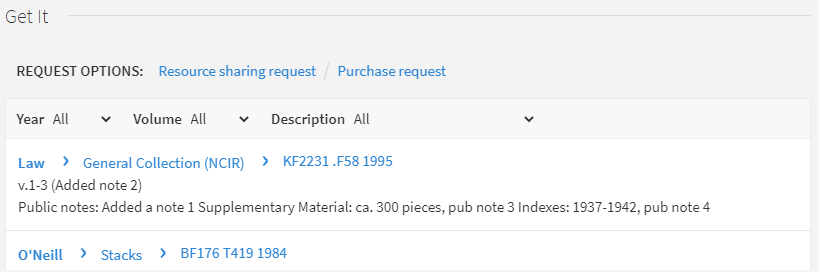 追加所蔵フィールドの表示
-
uresolver_enable_getit_holding_configuration – When set to true, the additional holdings fields appear in Primo Get It, but their configuration is determined by the Primo Customized Holding mapping table (Configuration Menu > Fulfillment > Discovery Interface Display Logic > Holdings Display Customization) and the Holdings Display Labels and Other code table (Configuration Menu > Fulfillment > Discovery Interface Display Logic > Holdings Display Labels).両方がtrueに設定されている場合、このパラメータは前のパラメータを上書きします 。
所蔵フィールド サブフィールド Label (defined in the Holdings Display Labels and Order code table) デフォルトで有効 866 a、z 所蔵 はい 867 a、z 補足資料: はい 852 z メモ: はい 868 a、z 索引: いいえ 541 a、b、c、d 取得元: いいえ 561 a、3、u 所有と管理の履歴 いいえ 563 a、3、u 装丁 いいえ たとえば、所蔵レコードが次のように構成されている場合:
LDR 00429cy 2200133zn 4500
004 AEU3700
005 20210321033054.0
008 961003|| | |001|||||0000000
852 01 |a MNcBCL |b LAW |c NCIR |h KF2231 |i .F58 1995 |9 1 |t 2 |z Added a note 1
866 41 |8 0 |a v.1-3 |z Added note 2
867 30 |a ca.300 pieces |x incomplete vols.|z pub note 3
868 40 |a 1937-1942 |x complete vols.|z pub note 4
854 __ |a (*) |i (year) |o update |w a |8 1
LKR __ |a HOL |l BCL01 |b 000741068
所蔵情報は次のように表示されます。
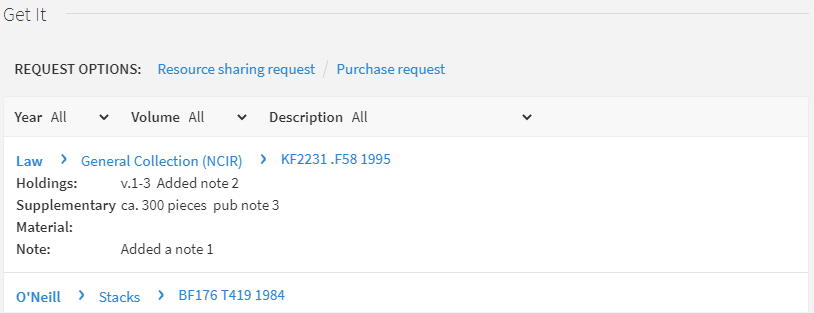 追加所蔵フィールドの表示
Page tags: article:topicproduct:almacontent:Documentationlang:englishPublic noteHoldings InformationGet It tabrequest optionsholdings listsort orderitems listselecting library
