
デジタルサービス
ディスカバリーインターフェイス表示のルールを設定します。
Configuring Viewer Services
- 一般システム管理者
- フルフィルメント アドミン
You can configure the digital file viewers that may appear after selecting to view a digital file (after selecting View It on the search results page; see Link Resolver for Institutions Using Distributed Electronic Resources).For more information, see the Developer's Network documentation at https://developers.exlibrisgroup.com/alma/integrations/digital/almadigital/access.Also see the parameter delivery_service_allowed_origins in Configuring Other Settings.
従来とは異なり、Almaは次のデジタルビューアをサポートしています:
-
Digital Viewer – Alma's default viewer uses the browser's HTML5 players, which are capable of displaying any format that is natively supported by the browser (such as low and high resolution image formats, PDF, textual, audio, and video (including HLS streaming) formats, ePub, and Microsoft Office formats.他のフォーマットの場合は、ダウンロードオプションが提供されます。さらに、キャプションの表示もサポートしています。
デジタルビューアによって提供される追加サービスには次が含まれます:
- ビューアCSSのカスタマイズ
- 全文をファイルと並べて表示
- ビデオファイルのクローズドキャプション/字幕
- 画像の拡大/縮小 + 回転
For information about configuring captions, see see Managing Digital Files from the Digital Representation Resource Editor.
- Universal Viewer – This is an open-source project that is deployed in Alma.This type of viewer is based on IIIF (International Image Interoperability Framework) and provides advanced capabilities for viewing high-resolution images for tiff, jpeg, and jpeg2000 formats (such as rotate and zoom-in/zoom-out actions), as well as PDFs and audio and video files.In addition, the Universal Viewer supports the 3D formats .glb and .gltf.(Note that for .gltf, only files that actually contain the data are supported, not those that are just pointers to the actual file.) The Universal Viewer supports the display of captions/subtitles, zoom in / out + rotate functionality for images, and IIIF interoperability.For information about configuring captions, see Managing Digital Files from the Digital Representation Resource Editor.
- Internet Archive Book reader – This type of viewer is based on IIIF and provides capabilities for viewing images and a book-like reading experience with zoom in/out + rotate functionality for images.さらに、全文ファイルをAlmaにアップロードすると、デジタルファイル内のテキスト検索ができるようになります。
ビューアサービスページ(設定メニュー>フルフィルメント> ディスカバリーインターフェイス表示ロジック> ビューアサービス)でデジタルビューアを有効化、無効化、編集、追加、削除できます。
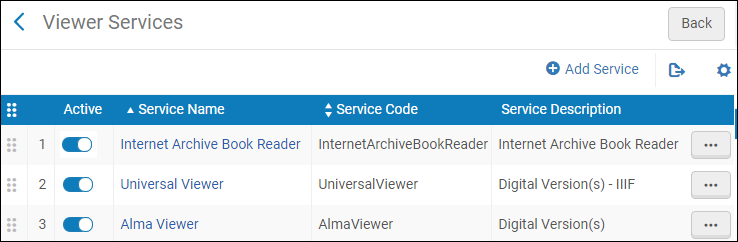
サービスをドラッグし、オーダーを並べ替えて、[表示]タブに表示されるオーダーを変更します。
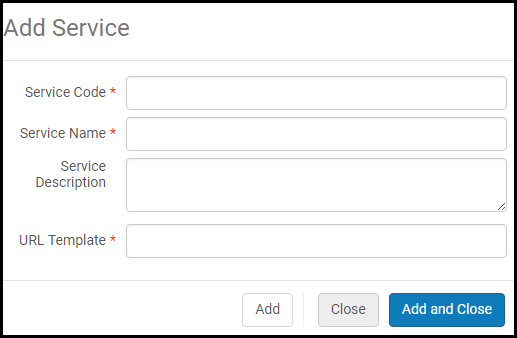
デジタルビューアを追加するには、サービスの追加を選択します。
ビューアのサービス利用可否ルールを設定する
ビューアのサービス利用可否ルールを設定できます。
- ビューアの編集を選択し、サービス利用可否ルールタブを選択します。
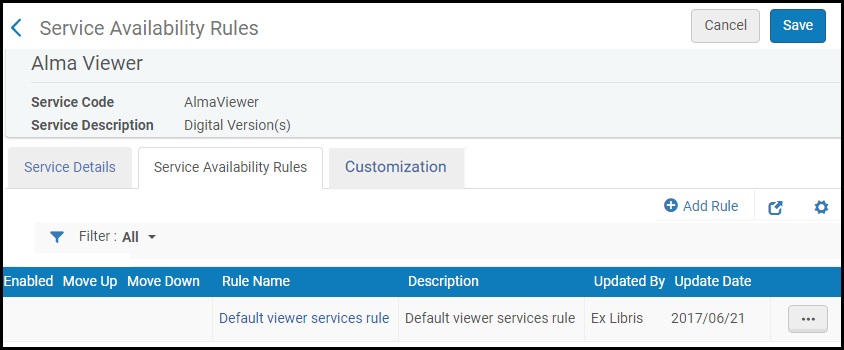 サービス利用可否ルール
- ルールの追加を選択します。以下が表示されます。
サービス利用可否ルールの追加 - 名前と説明を入力します。
- [入力パラメータ]セクションで、パラメータの追加を選択します。以下が表示されます。
パラメータを追加 - 名前、オペレータ、および値を選択して、パラメータの追加を選択します。
- [出力パラメータ]セクションで、表示ドロップダウンリストから真または偽を選択して、ルールが真または偽の場合にビューアを表示するかを決定します。
- [保存]を選択します。
ルールがサービス利用可否ルールのリストに追加されます。
デジタルビューアを設定する
デジタルビューアを設定できます。
デジタルビューアの編集を選択し、サービスの詳細タブを選択します。
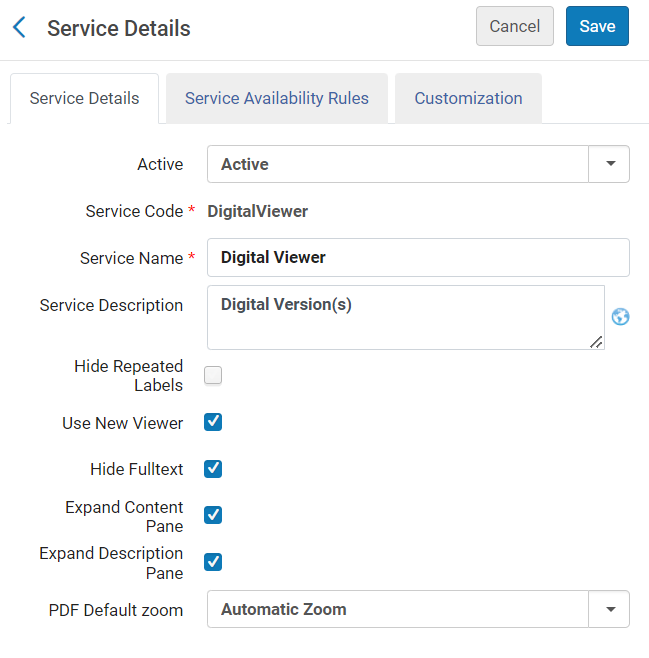
次の設定オプションが利用可能です。
- 繰り返しラベルを非表示にする - ラベルの下のリストに繰り返しラベルを表示します。[設定]> [フルフィルメント]> [ディスカバリーインターフェイス表示ロジック]> [その他の設定]にある繰り返し配送メタデータのグループ化の区切り記号フィールドに区切り記号を入力した場合、このフィールドは表示されません。表示するには、区切り文字を削除する必要があります。For more information, see Configuring Other Settings.
- Use New Viewer – display digital resources using the New Digital Viewer.
- 全文を非表示にする - 新しいデジタルビューアで全文の表示を非表示にします。
- コンテンツペインを展開 - コンテンツペインをデフォルトで折りたたむには、クリアしてください。
- 説明ペインを展開 - 説明ペインをデフォルトで折りたたむには、クリアしてください。ペインが折りたたまれている場合、ボタンとファイル ラベルはすべて同じツールバーに配置されます。
- PDF Default Zoom – select an option from the drop-down list to set a default zoom for PDF files
Primo Studioを使用したデジタルビューアのカスタマイズ
Primo Studioを使用してデジタルビューアをカスタマイズできます。
- デジタルビューアの編集を選択し、カスタマイズタブを選択します。
- Primo Viewおよび表現IDを選択し、ビューアを設定する際に例として使用します。
- [リンクを生成]を選択します。Open Primo Studioのリンクが表示されます。
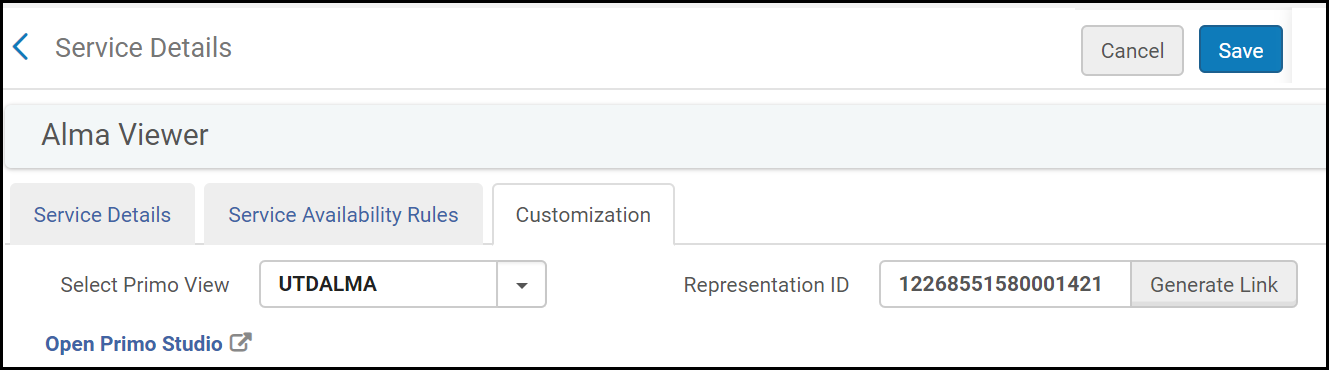 Primo Studioを使用してデジタルビューアをカスタマイズする
- Primo Studioを開くを選択し、Primo Studioを開き、ビューアをカスタマイズします。
For more information on using Primo Studio, see Using Primo Studio.
ユニバーサルビューアを設定して[元のファイルのダウンロード]アイコンを表示する
ユニバーサルビューアを設定して[元のファイルのダウンロード]アイコンを表示できます。
- ユニバーサルビューアの編集を選択し、サービスの詳細タブを選択します。
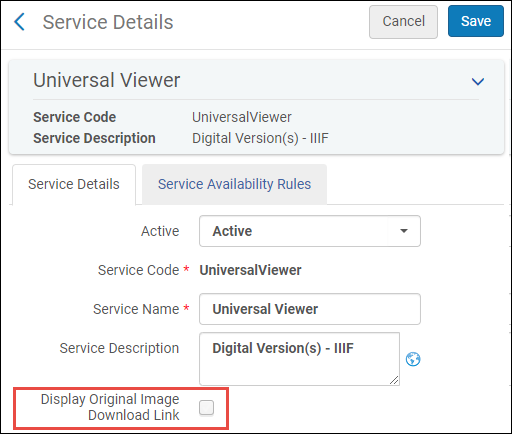
ユニバーサルビューアサービスの詳細 - 元の画像のダウンロードリンクを表示するを選択し、Universal Viewerの[元のファイルをダウンロードする]アイコンを表示します。
インターネットアーカイブブックリーダーのデフォルト表示を設定する
インターネットアーカイブブックリーダーのデフォルト表示を設定できます。
- インターネットアーカイブブックリーダーの編集を選択します。
- デフォルト表示ドロップダウンリストから、次オプションのいずれかを選択します:
- 1ページ
- 2ページ
- サムネイル表示
インターネット アーカイブ ブック リーダーの右から左へのページングの構成
You can configure the Internet Archive Book Reader to display right-to-left paging when reading books in right-to-left languages.この機能を構成するには、コンテンツ言語によるページング方向 [サービスの詳細] タブから (構成 > フルフィルメント > ディスカバリー インターフェイス表示ロジック > ビューアー サービス > インターネット アーカイブ ブック リーダー)を選択します。
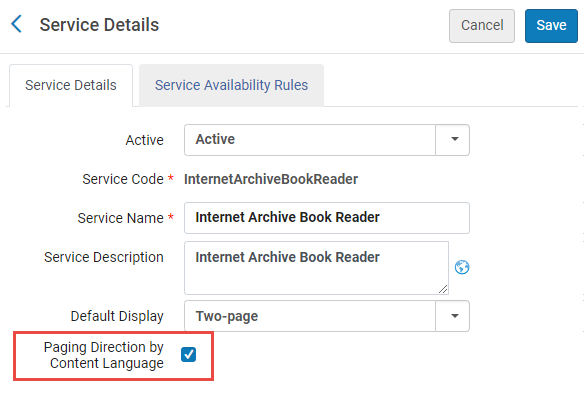
コンテンツ言語によるページング方向を選択すると、Almaはブックの書誌レコードで008フィールドまたはdc:languageフィールドを検索します。言語コードが次の右から左への言語のいずれかである場合、ブックは右から左へのページングで表示されます。
- ara - アラビア語
- arc - 公式のアラム語(紀元前 700 ~ 300 年)。インペリアル アラム語(紀元前 700 ~ 300 年)
- aze - アゼルバイジャン語
- div - ディベヒ語; ディヴェヒ語; モルジブ語
- per - ペルシア語
- fas - ペルシア語
- hau - ハウサ語
- heb - ヘブライ語
- kas - カシミール語
- khw - コワー語
- kur - クルド語
- pus - プシュート語; パシュトー語
- sam - サマリア・アラブ語
- syc - 古典シリア語
- syr - シリア語
- urd - ウルドゥー語
- yid - イディッシュ語
その他の設定
[その他の設定]ページ([設定メニュー] > [フルフィルメント ] > [ディスカバリーインターフェイス表示ロジック] > [その他の設定])で、PrimoでのAlma情報の表示方法を設定する追加の設定を使用できます。教育機関の設定によっては、異なるオプションが表示される場合があります。
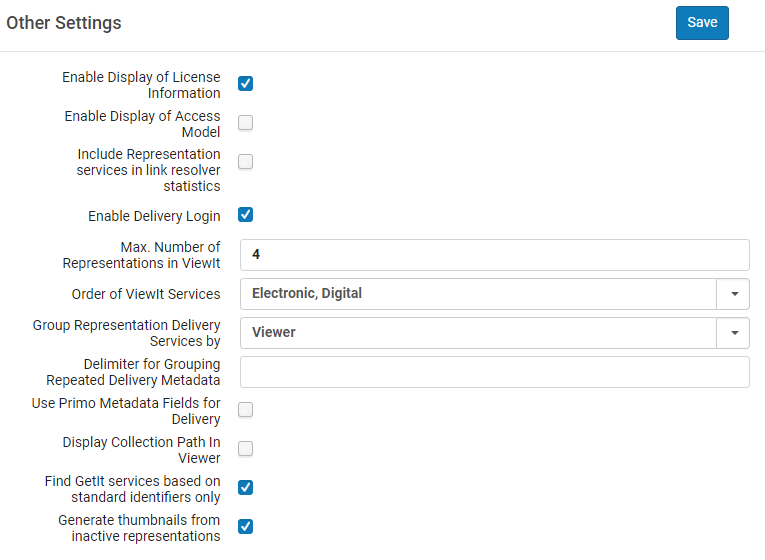
ライセンス情報の表示を有効化する
Almaでは、[表示]で電子リソースのライセンス情報を表示できます。表示されるライセンス条項は、[表示する]に表示されるライセンス関連のラベルと同様に、Almaで設定できます。See Displaying License Information.
Enable Display of Access Model
To control the presentation of the access model to patrons via Alma Link Resolver, institutions can use a designated configuration.Select the checkbox Enable Display of Access Model to display in Primo and Primo VE the access model information located on the portfolio.The Enable Display of Access Model option is disabled by default.Institutions that want to control the presentation of the access model to patrons via Alma Link Resolver, need to select the Enable Display of Access Model option.See also Managing Access Models.
アナリティックスに代表サービス統計を含める
リンクリゾルバ統計に表記サービスを含めるパラメータを使用すると、表記サービスの使用をアナリティックスリンクリゾルバ統計に含めることができます。
Enable Delivery Login
デジタルビューアおよびリンクリゾルバーのデジタルサービスから配送ログインリンクが表示するかどうかを決定できます。For more information, see The Digital Viewer.
ViewIt/Primoで代表の最大数を設定
[表示]での最大表記数パラメータにより、[表示]に表示されるデジタル表記の最大数を定義できます。ここで設定した数よりも多くの代表が表示される場合、詳細...リンクが表示されます。ユーザーは、詳細...を選択して、新しいブラウザタブで使用可能な代表の完全なリストを表示できます。
[表示する]サービスのオーダーを設定する
The Order of ViewIt Services parameter enables you to configure whether electronic or digital services appear first in View It.電子、デジタルまたはデジタル、電子を選択します。
ViewIt/Primoで代表をグループ化する方法を設定
[表示する]で表示をグループ化する方法を設定するには、ドロップダウンリストのグループ表示配送サービスからオプションを選択します:
- ビューア - 代表はビューアごとにグループ化されます
- 代表 - 代表は、各代表で利用可能なビューアとともに個別にリスト表示されます。
Configure a Delimiter for Grouping Delivery Metadata with Repeated Labels
To configure a delimiter for metadata with repeated labels in digital viewers, enter a delimiter to the Delimiter for Grouping Repeated Delivery Metadata field.
If you enter a delimiter in the Delimiter for Grouping Repeated Delivery Metadata field, the Hide Repeated Labels checkbox for the Digital Viewer in Configuration > Fulfillment > Discovery Interface Display Logic > Viewer Services > Digital Viewer does not appear.表示するには、区切り文字を削除する必要があります。For more information, seeConfiguring Viewer Services.
配送にPrimo VEメタデータフィールドを使用
Primo VEの顧客のみ、Primo VEのメタデータフィールドを設定するために使用するのと同じページで、Almaビューアに表示されるメタデータフィールドを設定できます。これにより、Primo VEで行うのと同じ記述情報をAlmaビューアで表示できます。To enable this feature, select the Use Primo Metadata Fields for Delivery check box.For information on how to configure metadata for Primo VE, see Configuring the Details Service for Primo VE.
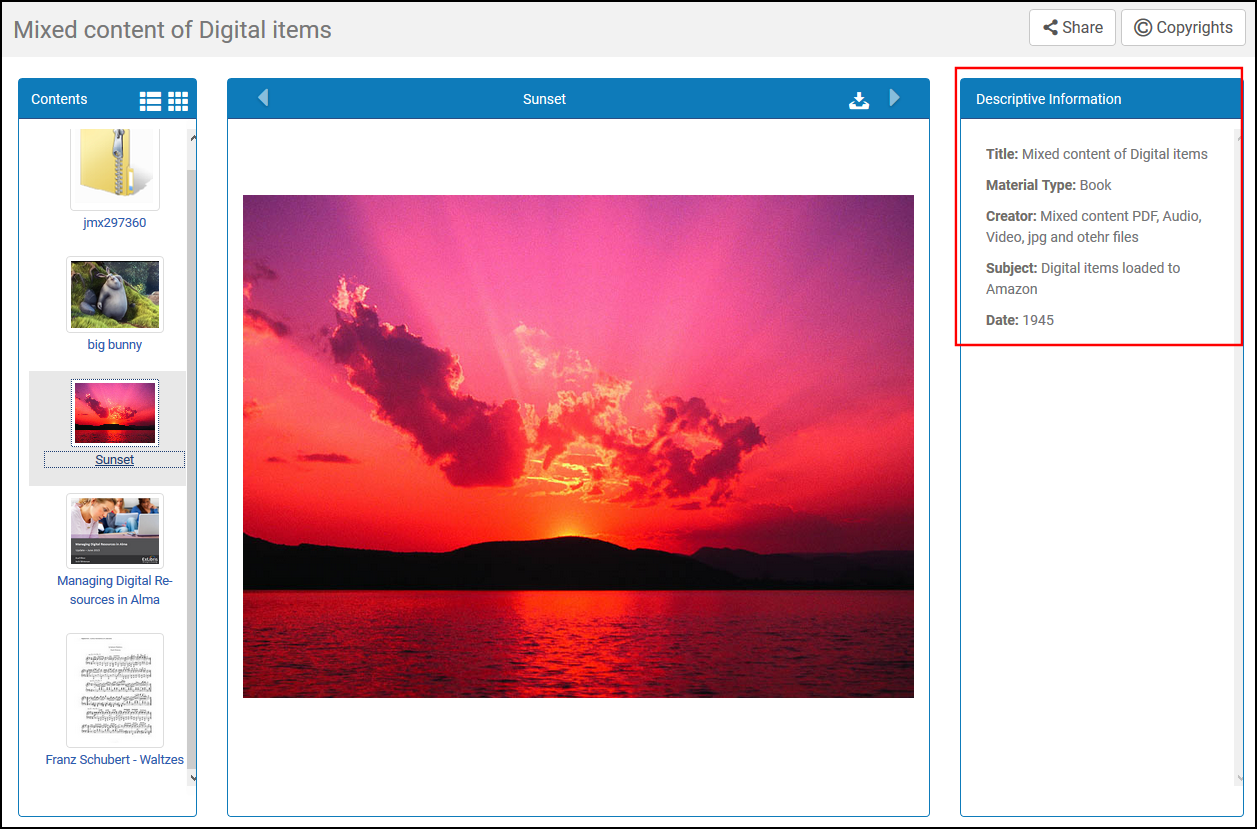
このチェックボックスをオンにすると、Primo VEのメタデータの設定に使用される方法がAlma方法に置き換わり、次のオプションが無効になります。
-
このページの繰り返し配送メタデータをグループ化するための区切り文字フィールドは無効になっています。
-
[配送プロファイルメタデータ]ページ([設定]> [フルフィルメント]> [配送プロファイルメタデータ])は非表示です。For more information on this method, see Configuring Delivery Profiles Metadata.
コレクションパスをビューアで表示する
[ビューアにコレクションパスを表示する]チェックボックスをオンにすると、すべてのビューアの[説明情報]ペインの下部にコレクションパスが表示されます。Selecting the path opens Primo VE's collection page in a new tab.
標準の識別子のみに基づいて GetIt サービスを見つける
Primo/Primo VE Get It (ローカルのAlma物理的所蔵をリクエスト/発見するために使用)は、特定の標準識別子を使用します。For more information see Using Standard Identifiers.
サムネイルの非アクティブな表記を有効にします
Select the Generate thumbnails from inactive representations checkbox if you want to enable the use of inactive representations to generate thumbnails for your records in Primo and Primo VE.Note that this refers to digital (non-remote) representations only.
Configuring the Collection Title Sorting Routine
The Collection Title Sorting Routine mapping table (Configuration Menu > Fulfillment > Discovery Interface Display Logic > Collection Title Sorting Routine) configures the sort options that display in the Sort titles by drop-down list on the Discovery tab of the Electronic Collection Editor (Resources > Manage Collections > Edit Collection > Discovery Tab).For more details, see Configuring the Default Sorting for Titles in Collections.
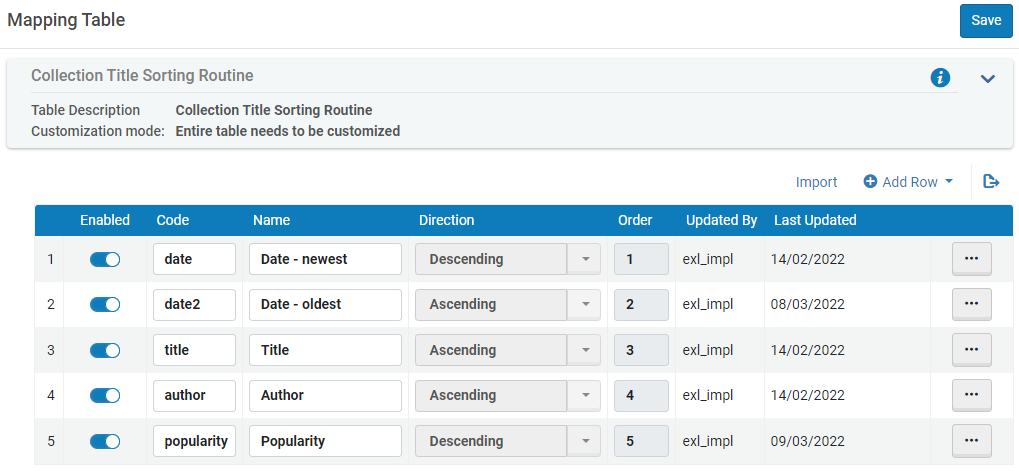
For Alma-Primo environments only, the active codes in this table must match the codes defined in Primo's Sort Fields Config mapping table (Primo Home > Advanced Configuration > All Mapping Tables > Sort Fields Config).
Page tags: article:topicproduct:almacontent:Documentationlang:englishgeneral electronic servicediscovery interface displaydisplay logic rulesdiscovery interface service labelscommonly used labelsrelated records for electronic servicesdirect linkingorder of online servicesorder of primo search resultsprimo request formsprimo resource sharing request formsprimo fines and fees currency symbols
