
[フォーム]
ディスカバリーインターフェイス表示のルールを設定します。
Customizing Primo Request Forms
- 一般システム管理者
- フルフィルメント管理者
Primoリクエストフォームの必須ではないフィールド(取り置きリクエスト、予約リクエスト、デジタル化リクエスト)を非表示にできます。デフォルトでは、一般用ラベルフィールドを除くすべてのフィールドが表示されます。
For the digitization request form, you can customize the default value for the Partial field using the uresolver_partial_digitization_default_value parameter on the Other Settings page and then hide it using this feature.これは、たとえば、ユーザーの電子化リクエストを部分的なデジタル化リクエストに制限する場合に便利です。You can also use the display_additional_digitization_attributes parameter to add more fields to the partial form (see Configuring Other Settings).
一般用ラベルフィールドにより、各リクエストフォームに自由なテキストラベルを追加できます。デフォルトでは、各ラベルは空です。To configure these labels, modify the description and translation for the the following codes in the MashUpLabels code table (Configuration Menu > Fulfillment > Discovery Interface Display Logic >Labels):
- c.uresolver.request.hold.generalUseLabel
- c.uresolver.request.booking.generalUseLabel
- c.uresolver.request.digitization.generalUseLabel
For more details regarding display labels, see Configuring Service Labels in the Discovery Interface.
Primoのユーザーがリクエストを送信する前に列内の自分のリクエストのロケーションを確認できるように、取り置きリクエストフォームと予約リクエストフォームで列の計算ボタンを使用できます。ボタンはデフォルトで非表示になっていますが、calculateQueueButtonの一般発行する値に真に設定することで表示できます。
アイテムの利用可否オプションは、リソースシェアフォームで利用できます。フィールドが選択されると、ユーザーがPrimoの[取得する]タブでリクエストフォームを開くか、空のリクエストフォームを使用して、勤務表パートナーにリソースのリクエスト可能なコピーがあるかを判断するときに、リアルタイムのバックグラウンドチェックが実行されます。このチェックは、他のAlmaパートナーまたはブローカーと連携し、レギュラーのを見つけるプロセスと同じルールで機能します。An indication is displayed as to which partners have the item available.コピーが利用できないように見える場合、警告がユーザーに表示されます。If one of the partners does not have a locate profile, an error message is displayed,Availability information can't be retrieved.
The Manual Description field is a free text field which allows patrons to place a request on a physical holding with no cataloged items (“General Hold” or “General Digitization” requests), or on an uncatalogued item of a serial title (“Request a different issue” or “Digitize a different issue” requests).Alternatively, the library can expose structures description fields, which are easier for patrons to fill in and are auto-populated from openURL when available:Volume,Issue,Part,Publication Date – these fields then populate the manual description of the request in a structured way to help librarians find the requested item (for hold requests Chapter/Article Author,Chapter/Article Title,Start Page and End Page are also mapped to Manual Description in Alma).For digitization requests, these fields have their own dedicated fields in Alma.目録化されていないアイテムのリクエストが図書館でサポートされている場合は、手動の説明または構造化された説明のフィールドを表示し、それに応じてmanual_description_or_alternative_fields検出ラベルを構成することをお勧めします。
The Relevant For column is only for information and shows which scenarios each field is "relevant for" if displayed: A regular hold/digitization request, General Hold or Digitization” requests (a request on a physical holding with no cataloged items) and/or Another Issue requests (requesting an uncatalogued item of a serial title where none of the catalogued items suit the patron's needs).
フォームは、次のページでカスタマイズされます。
-
Hold Request Form –Configuration Menu > Fulfillment > Discovery Interface Display Logic >Hold Request Form Customization
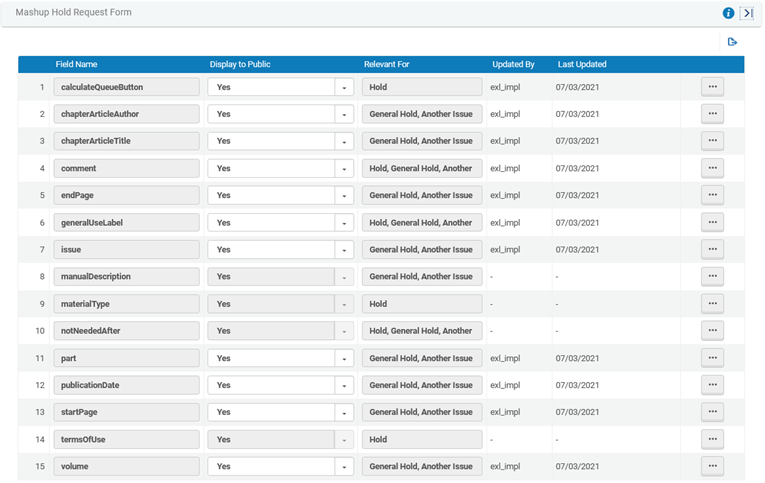 取り置きリクエストフォームのカスタマイズページ
- Booking Request Form –Configuration Menu > Fulfillment > Discovery Interface Display Logic >Booking Request Form Customization
 予約リクエストフォームのカスタマイズページ
- Digitization Request Form –Configuration Menu > Fulfillment > Discovery Interface Display Logic >Digitization Request Form Customization
 デジタル化リクエストフォームのカスタマイズページ一般的なデジタル化以外の部分的なデジタル化リクエストで次のフィールドを表示したり、別の発行をデジタル化するには、display_additional_digitization_attributesパラメーターをtrueに設定する必要があります。
- chapterArticleAuthor
- chapterArticleTitle
- startPage
- endPage
For more information, see Configuring Other Settings (Fulfillment).
- Purchase Request Form –Configuration Menu > Discovery > Getit Configuration > Purchase Request
 購入リクエストフォームのカスタマイズページ
- On the relevant page (see above), for each field that you want to change, select Customize and then select the desired option from the Display to Public drop down box (No to hide the field,Yes otherwise).受け取りロケーションフィールドなどの必須フィールドは非表示にできません。
- [保存]を選択します。
Customizing Primo Resource Sharing Forms
- 一般システム管理者
- フルフィルメント管理者
Primoリソースシェアリクエストフォームの必須ではないフィールドを非表示にできます。デフォルトでは、すべてのフィールドが表示されます。
You must enable the rs_use_new_mashup_form parameter on the Other Settings page (see Configuring Other Settings) for the Resource Sharing Form Customization link to appear on the Fulfillment Configuration menu.
Access the Resource Sharing Form Customization page (Primo:Configuration Menu > Fulfillment > Discovery Interface Display Logic >Resource Sharing Form Customization;Primo VE:Configuration Menu > Discovery > GetIt Configuration > Resource Sharing Request).
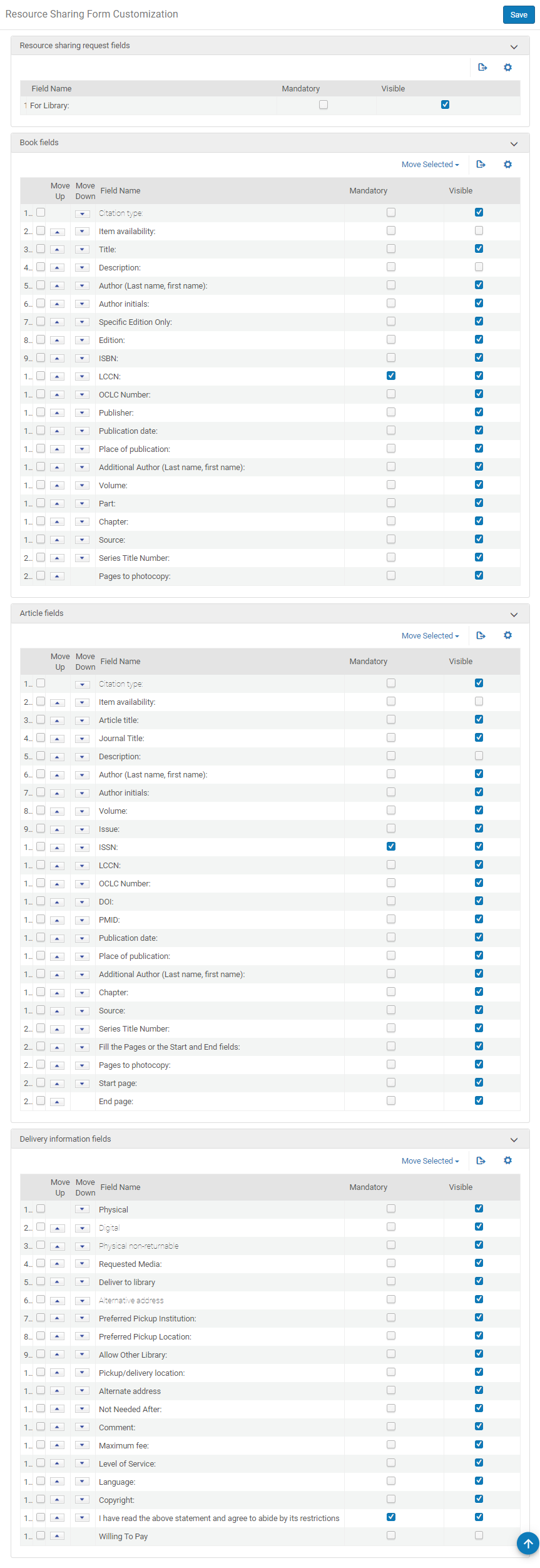
- このマッピングテーブルのフィールドをソートすることで、リクエストフォームのフィールドのオーダーを設定できます。リスト内のフィールドのロケーションを変更するには、2つの方法があります。
- フィールドが目的のオーダーになるまで移動するには、フィールドの横にある上矢印または下矢印を選択します。
- 矢印の左側にあるチェックボックスを選択します。セクションの下のドロップダウンボックスで、フィールド名または最初または最後を選択します。選択を移動ボタンを選択します。フィールド名を選択すると、チェックされたフィールドはドロップダウンボックスのフィールドのすぐ上の位置に移動します。図書フィールドセクションと記事フィールドセクションの斜体フィールドは移動できません。配送情報フィールドセクションの斜体フィールドは、グループとして一緒に移動し、非斜体フィールドがすぐ上に表示されます。The Copyright and Copyright statement fields in the Delivery information fields section must be kept together but are not programmatically restricted to move together as a group.Note that the copyright content only appears if configured previously, see Configuring a Resource Sharing Copyright Declaration.
- 必要に応じて、必須および可視チェックボックスをオンまたはオフにします。
- 保存を選択します。
デフォルトのサービスレベルは、新しいフォームを使用する場合(Primoでのみ選択(rs_use_new_mashup_formパラメータを真に設定することにより))。
