
リーディングリストを管理
図書リストは、コースの学生が読んだり表示したりする必要があるコース資料のリストです。
This page describes how to work with reading lists.For an overview of the workflow for courses and reading lists see Workflow.For links to all the main fulfillment documentation pages see Fulfillment.
- コース部署に所属するコースリザーブオペレータ/管理者
- コースリザーブビューア(読み取り専用アクセス)
- コース部署に所属するフルフィルメントサービスオペレータ/管理者
コースを追加した後、コースの図書リストを管理できます。図書リストは、コンテンツを追加するまで空白です。通常、図書リストには、教科書、追加の本、本の章、雑誌記事、新聞記事、ウェブサイトが含まれます。リストの各アイテムは引用と呼ばれます。
See also Managing a Course's Reading Lists for reordering or copying reading lists within or between courses.For information on citations, see Managing Citations.To publish course and reading list information to Primo, see Configuring Course Reserves in Primo.
[コース]ページの特定のコースの行アクションリストで図書リストを選択するか、[フルフィルメント]> [コースリザーブ]> [図書リスト]に移動して、図書リストタスクリストページで図書リストにアクセスします。This page has Assigned and Unassigned tabs (see Assigned to Me, Unassigned, and Assigned to Others Tabs).さらに、このページには、他のタブに表示されるすべての図書リストを含むすべてタブがあります。常設メニューからこのページにアクセスする場合、デフォルト表示は、部署に設定された処理部署フィルターを備えた自分に割り当て済みタブです。
For more information, see Populating Reading Lists.(5分11秒)
You can also access this page by searching for reading lists; see Searching in Alma.
You can also access this page by selecting one of the Reading List tasks in the task list (see Tasks in the Task List).
For a video on how to view reading lists in Alma and Primo, see Viewing Reading Lists.(1分30秒)
- If the task contains the words Assigned to Me,Unassigned, or Assigned to Others, then that tab is pre-selected by default.それ以外の場合、デフォルトですべてタブが事前に選択されています。
- タスク名の最後の部分は、ステータスファセットまたはアラートフィルタ用に事前に選択されたオプションを示します。
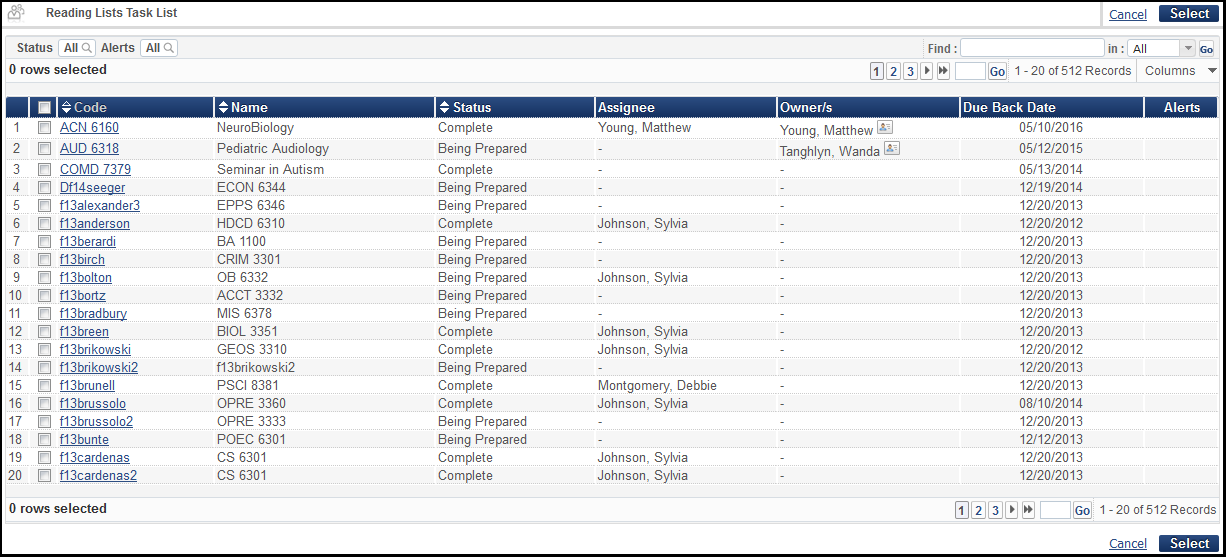
このページのフィールドは次のとおりです(一部の列はデフォルトで最初は非表示になっていることに注意してください)。
-
Code- The reading list code
-
Name- The reading list name
-
Status- The reading list status.For a list of predefined reading list statuses, see Reading List, Citation, and Publication Statuses in the Leganto Administration Guide.You can define other reading list statuses, see Configuring Additional Reading List Statuses.
リーディングリストのステータスは、リーディングリストのPrimo/Primo VEでの発行には影響しません。
-
Assignee- The user assigned to manage this reading list.(この列は、他に割り当て済みタブでのみ役立ちます。)
-
Owner/s- The reading list's owners; ownership is relevant only to Leganto customers (see Configuring Reading List Ownership).If there are multiple owners,Multiple appears.
-
Due Back Date- The default due back date for the citations on the reading list.この値はコースから継承されます。
-
Alerts- A checkmark appears if there is at least one alert about the reading list
-
Request for Review(Leganto only) - The date that the instructor submitted the list to the library for processing
-
Review Requester(Leganto only) - The name of the instructor who submitted the list to the library for processing
-
Academic Department(hidden by default) - The course's academic department
-
Processing Department(hidden by default) - The course's processing department
-
Start Date(hidden by default) - The course's start date
-
End Date(hidden by default) - The course's end date
-
Course Code(hidden by default)
-
Course Section(hidden by default) - The course section (not the reading list section)
-
Course Terms(hidden by default)
-
Publication Status(Leganto only; hidden by default) - The read list's publication status in Leganto.For a list of publication statuses, see Reading List, Citation, and Publication Statuses in the Leganto Administration Guide.
- A course must be active for links to the Primo record to be displayed.
- For Leganto customers, a list must be published links to the Primo record to be displayed.
- Primo VEの場合、リーディングリストがLegantoで非公開になっていると、関連するコース情報は、レコードの全表示の同じセクションの詳細から非表示になります。In addition, course information that is associated with an unpublished reading list is not searchable in Primo VE after re-indexing.For more course reserve configuration information, see Configuring the Course Information Field in the Details Service for Primo VE.
-
Creation Date(hidden by default)- Reading list creation date
-
Modification Date(hidden by default) - Reading list last updated date
-
Advisor Score(Leganto, only; hidden by default) - The reading list's advisor score, if enabled
-
Campus(hidden by default) - The course's campuses, if defined
図書リストは、それぞれのコースではなく、個人の割り当て(自分に割り当て済みタブまたは未割り当てタブ)に基づいて司書によって管理されます。To manage reading list assignments, see Releasing and Reassigning a Reading List.他の人に割り当てられている図書リストをノートおよび再割り当てできるのは管理者のみです。
図書リストには複数の所有者と共同編集者を含めることができます。図書リストの所有は、Legantoにのみ関係します。For more information, see Managing Reading List Owners and Collaborators.
図書リストには複数のセクションを含めることができます。セクションは、Legantoを使用してのみ管理できます。Almaで作成されたリストまたはAlma ウェブサービスAPIを使用した図書リストには、単一のデフォルトセクションがあります。
-
図書リストは、Alma ウェブサービスを使用してコース管理システムにエクスポートできます。For information the relevant Alma Web services, see https://developers.exlibrisgroup.com/alma/apis/courses.
-
機関でLegantoが有効になっている場合、インストラクターはLegantoを使用して図書リストを作成できます。For more information, see the Leganto Product Overview.リストを作成した後、インストラクターはリストを処理のために図書館に送信します。司書は、ここで説明するAlmaインターフェイスを使用して、リストを変更できます。
-
アーカイブされた図書リストは引き続きアナリティクスに表示されます。削除およびパージされたリストは表示されません。
ファセット/フィルタ:
The page (depending on the tab) includes the facets Processing Department,Academic Department,Terms List,Course Year,List Assigned To,Assigned Date,Status(see Reading List and Citation Statuses),Publication Status(see Reading List and Citation Statuses),List creation date,List modification date, and Request for review, as well as the filter Alerts(see Removing alerts from citations).
The following descriptions of the possible values are true for the facets Assigned Date, List creation date, List modification date, and Request for review:
- 今日 – 現在の日付に作成されたリクエスト
- 昨日 – 現在の日付の前日に作成されたリクエスト
- 3日前まで – 現在の日付の2日前または3日前に作成されたリクエスト(今日と昨日を除く)
- 1週間前まで – 現在の日付の4~7日前に作成されたリクエスト(上記の3つのオプションを除く)
- 1か月前まで – 現在の日付の8日前から1か月前に作成されたリクエスト(上記の4つのオプションを除く)
- それ以前 – 現在の日付の1か月以上前に作成されたリクエスト
-
処理中ステータスは、非アクティブまたは拒否を含む、完了としてマークされていない図書リストと一致します。
-
For publication status,Published matches that are not Draft,Archived, or Deleted, and Active(which is selected by default) matches all reading lists that are not Archived or Deleted.
-
未定義の処理部署は、コースが関連付けられていない図書リストと一致します。
-
複数のコースに関連付けられた図書リストがある場合、一部のファセット値はコースごとに1回カウントされるため、それらの合計はページ上の図書リストの数よりも多くなる可能性があります。
図書リストタスクリストページで、図書リストに対して次のアクションを実行できます。
-
表示-行アクションリストで表示を選択します。図書リストを表示すると、変更することはできません。
-
View all reading lists of one course - Select All Reading Lists for this Course in the row actions list; see Managing a Course's Reading Lists.図書リストが複数のコースに関連付けられている場合、このアクションは使用できません。You can view all reading lists associated with a course on the Courses page; see Managing a Course's Reading Lists.
-
Legantoで表示(Legantoのみ)-行アクションリストでLegantoで表示を選択します。アクティブリストに関連します。
-
コースに関連付ける、またはコースの関連付けを変更する-行のアクションリストでこのリストをコースに関連付けるを選択します。See Editing a Reading List.アクティブリストに関連します。
-
コースとの関連付けをクリア-行アクションリストで関連付けられたコースを削除を選択します。See Editing a Reading List.アクティブリストに関連します。
-
自分への割り当てを解除する-自分に割り当て済みまたは他に割り当て済みタブの行アクションリストで割り当てを解除を選択します。See Releasing and Reassigning a Reading List.アクティブリストに関連します。
-
他の人に再割り当て-行アクションリストで再割り当てを選択します。See Releasing and Reassigning a Reading List.アクティブリストに関連します。
-
編集(ジョブ)-行アクションリストでジョブを選択します。See Editing a Reading List.アクティブリストに関連します。
-
アーカイブ解除-行アクションリストでアーカイブ解除を選択します。リストの発行ステータスをドラフトにリセットします。これはアーカイブ済みリストに関連します。
-
重複-行アクションリストで重複を選択します。必要に応じて新しい図書リストを変更します。When you duplicate a course in Alma via the Reading List Task List, the course associated to the original list will not show up in the duplicated list.
-
削除-行アクションリストで削除を選択し、確認ダイアログボックスで確認を選択します。コースがアクティブなときに図書リストを削除すると、満たされた引用リクエストはすべてキャンセルされます。満たされたリクエストは、期限が切れるまで貸出・返却受付に残ります。If you are using Leganto, then you can configure whether deleted reading lists are immediately purged or remain in Alma, where they can then be purged or restored (see Configuring What Happens to Deleted Lists).それ以外の場合、図書リストはAlmaからすぐに削除されます。これは、削除されたリストには関係ありません。
-
パージ-行アクションリストでパージを選択します。削除されたリストをパージします(Almaから完全に削除)。このアクションは元に戻せません。削除されたリストに関連します。
-
復元-行アクションリストで復元を選択します。削除されたリストを復元します。このアクションは元に戻せません。削除されたリストに関連します。
図書リストを追加する
コースインストラクターが特定した図書リスト資料に基づいて、コースの図書リストを1つ以上定義できます。通常、各図書リストは特定のトピックに固有です。
- [コース]ページ([フルフィルメント]> [コースリザーブ]> [コース])で、図書リストを追加するコースの行アクションリストで図書リストを選択します。The Course's Reading List page appears.
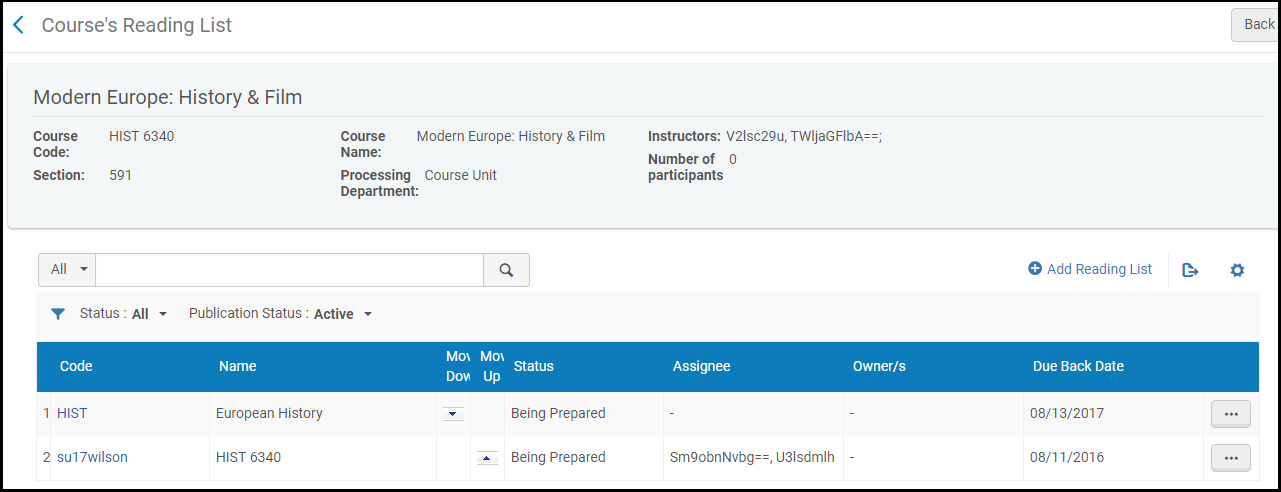 コースリーディングリストページ
- 図書リストの追加を選択します。[図書リストの追加]ダイアログボックスが表示されます。
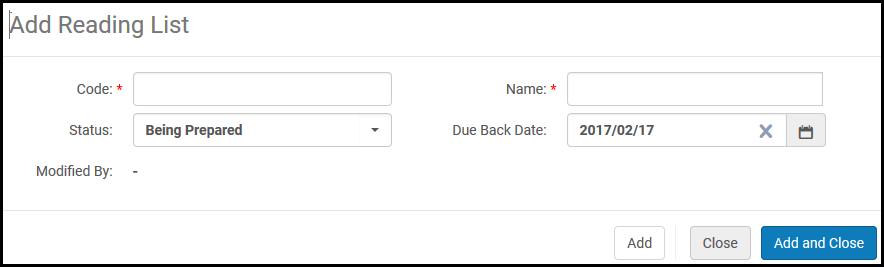 図書リストの追加ダイアログボックス
- 図書リスト情報を入力します。設定可能なフィールドの説明は、次のテーブルに表示されます。
図書リストフィールドを追加する フィールド 説明 コード(必須) 図書リストコード 名前(必須) 図書リスト名 ステータス 図書リストの初期ステータス。For a list of predefined reading list statuses, see Reading List and Citation Statuses in the Leganto Administration Guide.You can define other reading list statuses, see Configuring Reading List Statuses. 返却期限日 コースのリソースの返却期限日。The default date is the course's end date.For details on managing a course's due back date, see Managing Reading List Due Back Dates - 以下のうちの1つを入力してください:
- 追加-図書リストを追加し、ダイアログボックスを開いたままにして、追加の図書リストを設定します。
- 追加して閉じる–図書リストを追加して、ダイアログボックスを閉じます。
- The new reading list appears in the Course's Reading List page.
Editing a Reading List
図書リストが作成されたら、必要な図書資料をリストに追加できます。リポジトリ内のリソースから選択するか、システムを使用してアイテムを提案して見つけることができます。その後、図書リストを編集して、リスト上の資料を変更できます。
For information about managing citations, see Managing Citations.このセクションでは、一般的な図書リスト情報を編集する方法を示します。
- 編集できるのは、未割り当てまたは自分に割り当てられている図書リストのみです。
- 未割り当て図書リストを編集すると、自分に割り当てられます。To configure this, set the rl_auto_assign parameter; see Configuring Other Settings.
- 図書リストを編集している間、図書リストはロックされ、他の図書館スタッフが編集することはできません。
図書リストを複数のコースに関連付けることができます。このリストをコースに関連付けるを選択すると、[図書リストの編集]ページのコースタブが開きます。関連付けられたコースを削除を選択すると、リストに関連付けられたコースが1つしかない場合を除き、[図書リストの編集]ページのコースタブも開きます。
Legantoを持っている場合、図書リストを複数のコースに関連付ける機能を有効または無効にできます。See Managing Multiple Courses for Reading Lists.無効にすると、ワークフローは少し異なります。このリストを行アクションリストのコースに関連付けるを選択し、ダイアログボックスのリストに関連付けるコースを選択または検索し、コースの関連付けを変更を選択します。

コースの関連付けを削除するには、行のアクションリストで関連付けられたコースを削除を選択します。
[図書リストタスクリスト]ページ([フルフィルメント]>[コースリザーブ]>[図書リスト])で、図書リストを選択するか、行のアクションリストでジョブを選択します。[図書リストの編集]ページの引用タブが表示されます。
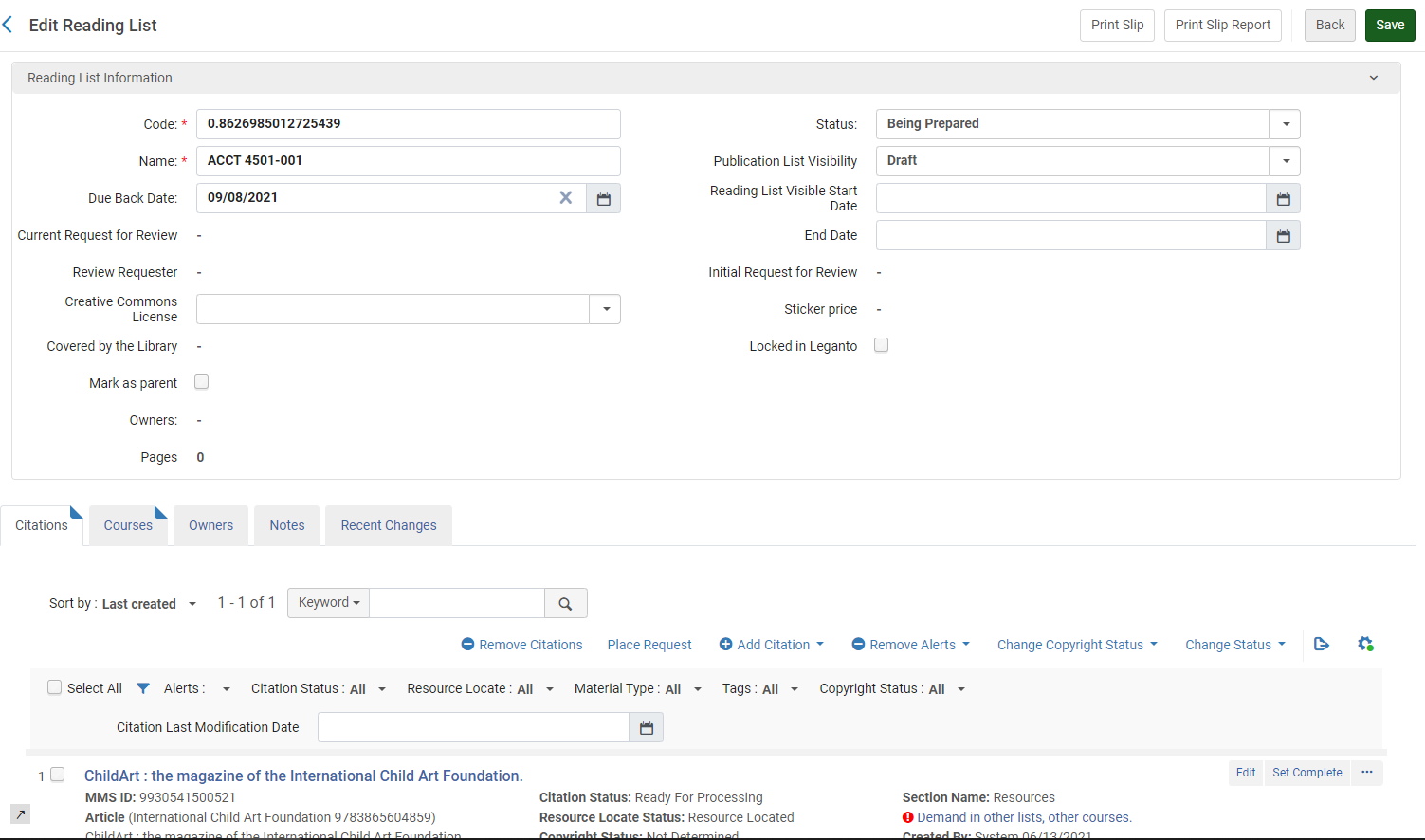
このページでは、次のアクションを使用して図書リストを管理できます。
- In the Reading List Information pane, you can edit the reading list parameters, including the Code,Name,Status(the reading list status), and (the default)Due Back Date.The reading list parameter fields are described in Adding a Reading List.
すべての引用のすべてのページの合計がこのパネルに表示されます。合計には、ページで定義されている各引用の合計ページ数が含まれます。合計は、各引用の開始ページおよび終了ページフィールドから決定されます。これらのいずれかが定義されていない場合、合計はページフィールドから決定されます。ページのない引用、またはページがAlmaによって解析できない引用は、合計に含まれません。
- If your institution has Leganto enabled, you can perform the following Leganto-related tasks in the Reading List Information pane (for more information, see Leganto Administration Guide):
- The course must be active for links to the Primo record to be displayed.
- For Leganto customers, a list must be published links to the Primo record to be displayed.
- Legantoの図書リストの発行設定(発行ステータス)を編集します(これは図書リストのステータスではなく、Legantoの学生にリストが表示されるか否かとその方法です)。The statuses are described in Reading List and Citation Statuses in the Leganto documentation.
- Select a creative commons license for the entire reading list, if your country supports this license type (see copyright_region in Configuring Other Settings).Also see Configuring the Default Creative Commons Value for a Reading List.
- Legantoのリストのロック/ロック解除 - Legantoのリストへの変更を防ぐには、Legantoでロックを選択します。Legantoユーザーは、引用に非発行ノートを追加したり、お気に入りにしたり、既読のマークを付けたりすることができます。リストのロック解除は、司書がAlmaで、またはロックしたユーザーがLegantoで行うことができます。
- Legantoでこの図書リストを開きます-ページヘッダーでLegantoで表示を選択します。
- 図書リストドバイザスコア(上記には表示されていません)を表示し、所有者をリスト表示します。
- ソートフィールドを使用して、リスト内の引用のオーダーを変更できます。引用は、引用タイトル(昇順)、著者(昇順)、最終変更/作成日、請求番号でソートすることができます。Legantoを実装している場合、インストラクターのオーダー(インストラクターが引用をソートしたオーダー)でソートすることを選択できます。
- On the Citations tab, you can manage citations, as described in Managing Citations.
- コースタブでは、図書リストに関連付けられたコースを管理できます。(Legantoのみ)複数のコースを図書リストに関連付ける機能が有効になっていない場合、このタブは表示されません。If you are using Leganto, see Managing Multiple Courses for Reading Lists.
- On the Owners tab, you can manage Leganto owners or collaborators (see Configuring Reading List Ownership).
- ノートタブでノートを追加、編集、または削除します。For more information about this tab, see Notes Tab.ノートのアップデートテーブルアクションでオプションを選択して、ノートを未読(ノートをアクティブ化)または既読(ノートを却下する)としてマークします。図書館ノートタイプを追加すると、他の司書のみがノートを閲覧できます。インストラクタータイプのノートを追加すると、インストラクターもLegantoでノートを見ることができます(Legantoユーザーのみ)。ノートの作成後にノートのタイプを変更することはできません。
- 主題ラベルタブでは、主題タグを図書リストに手動で追加または削除できます。これらのタグは、主にLegantoの顧客について役立ちます。インストラクターは、Legantoでこれらの主題を追加または削除できます。Administrators can configure this list; see Configuring Reading List Subjects.
- 図書リストの主題は、引用の主題書誌レコードフィールドとは関係ありません。
- This tab can be disabled by Leganto customers; see Disabling Reading List Subjects.
- In the Recent Changes tab you can view changes made to the list (starting from when the list was created).For more information about these changes, see Configuring Notifications in the Leganto Administration Guide.
必要に応じて[図書リストの編集]ページを変更した後に、保存を選択します。
図書リスト内の引用を検索する
You can search for a citation within a reading list in Alma.You can search by the following criteria (for descriptions, see Managing Citations):
- キーワード(デフォルトの選択) – このオプションを選択すると、次の引用のメタデータフィールドで一致が検索されます:
- 追加の人物名、著者、本の著者、本のタイトル、章の著者、
- Chapter Title, Citation ID, DOI, Edition, Editor
- ISBN, ISSN, Issue, Journal Title, LCCN
- MMS ID, OCLC Number, Pages, Place of Publication, Publication Date
- Publisher, Resource Note, Source, Title, and Volume
Keyword searches for citations do not support the use of Boolean operators (such as AND or OR), and if these operators are specified, they are treated as keywords.
特殊文字(ハイフン、ダッシュ、スラッシュなど)が検索語として指定されている場合、検索では、特殊文字を含むものと含まないものの両方の結果が返されます。
- 引用ID
- Creator – The citation author's name.Note: Additional person names are not included in the search.
- ISBN
- ISSN
- MMS ID
- Title – Citation title
図書リストの返却期限日の管理
An item shelved at a temporary location can be assigned a due back date either from the Change Item Information tab (see Changing Item Information) or by the bulk items update job (see Change Physical Items).However, when a reading list is attached to a course and an item is moved to a temporary location, the item's due back date is derived from the course's end date.
返却期限日が来ると、自動ジョブは一時的なロケーションに棚上げされたアイテムを受け取りし、それらに復元リクエストを出します。これにより、アイテムを恒久的なロケーションに戻すプロセスがトリガーされます。(この段階では、説明記録の発行が制止されたり、削除されたりする場合があります。
次の手順では、図書リストがコースに添付されている場合の返却期限日を管理するプロセスについて説明します。
- The reading list's due back date is by default identical to the course's end date.返却期限日は、図書リストの追加ダイアログボックスで変更できます。For details on the fields displayed in the Add Reading List dialog box, see the Add Reading List Fields table in Adding a Reading List.
- Citations are created in the reading list (see Managing Citations).
- If a move request is generated to temporarily move an item linked to a citation and the item moves to the specified location, the item automatically inherits the reading list's due back date and is labeled with it.
- 自動ジョブは、一時的に移動されたすべてのアイテムを取得し、復元リクエストを送信して、返却期限日が来たときにアイテムを恒久的なロケーションに復元します。For details on this job, see Viewing Restore Request Jobs.
If a reading list citation is linked to an item with a due back date earlier than its own due back date, the Update move expiry action in a row actions list on the List of Items page advances the item's due back date to the due back date of the citation's reading list.See Working with the List of Items.
例:
- アイテムAの返却期限日は3月1日です
- 引用Bの返却期限日は4月1日です
- 引用Bは一時的にアイテムAにリンクされています
When selecting Update move expiry in a row actions list on the List of Items page (see Managing Citation Fulfillment Options), the due back date of Item A updates to April 1.
図書リストのリリースと再割り当て
図書リストは、コースリザーブオペレータ/管理者またはフルフィルメントサービスオペレータ/管理者に割り当てられます。自分に割り当てられている図書リストはリリースできます。これにより、タスクから図書リストが削除されます。
[図書リストタスクリスト]ページ([フルフィルメント]> [コースリザーブ]> [図書リスト])で、行アクションリストで割り当てを解除を選択します。
図書リストは未割り当てタブに移動します。
- [図書リストタスクリスト]ページ([フルフィルメント]>[コースリザーブ]>[図書リスト])で、図書リストの行アクションリストで再割り当てを選択します。割り当て先ダイアログボックスが表示されます。
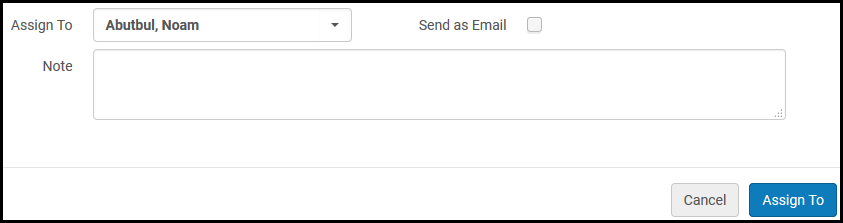 割り当てダイアログボックス
- 割り当て先ドロップダウンリストで、図書リストを割り当てるユーザーを選択します。このリストには、関連する役職を持つユーザーのみが表示されます。
- 図書リストタスクの割り当てを新しい担当者に通知するには、Eメールとして送信を選択します。
- 必要に応じて、新しいユーザーにノートを追加します。
- 割り当て先を選択します。ユーザーは図書リストでジョブするように割り当てられています。
リーディングリストを自動で割り当てる
When a reading list is associated with a course and auto_select_list_assignee(Configuration > Fulfillment > General > Other Settings) is set to true, a processing department operator from the Configuration > Fulfillment > Courses > Processing Department > Operators tab is automatically assigned at random to a reading list.これはロールオーバーされたリストにも適用されます。
false に設定すると、担当者は手動でのみ設定できます。このパラメータのデフォルト設定はfalseです 。
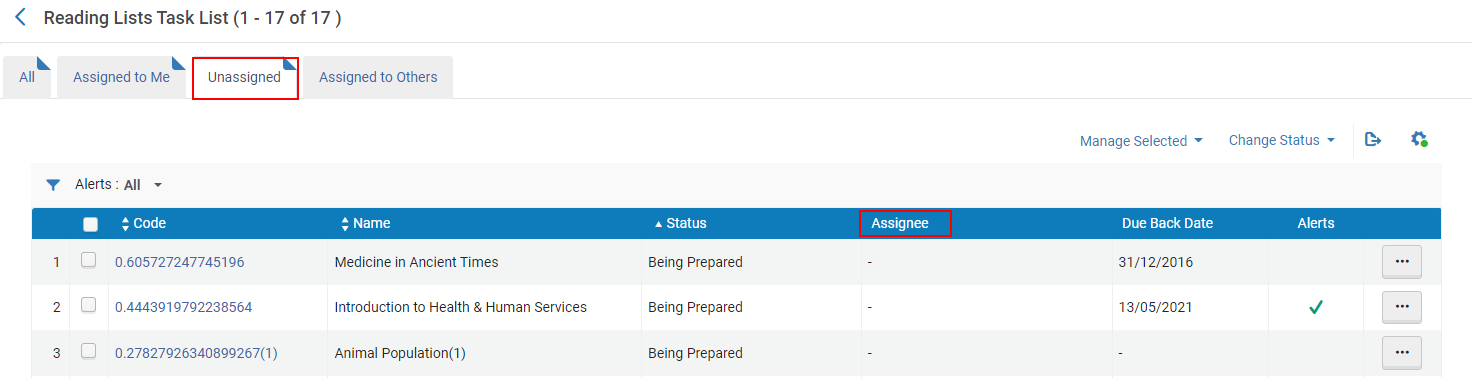
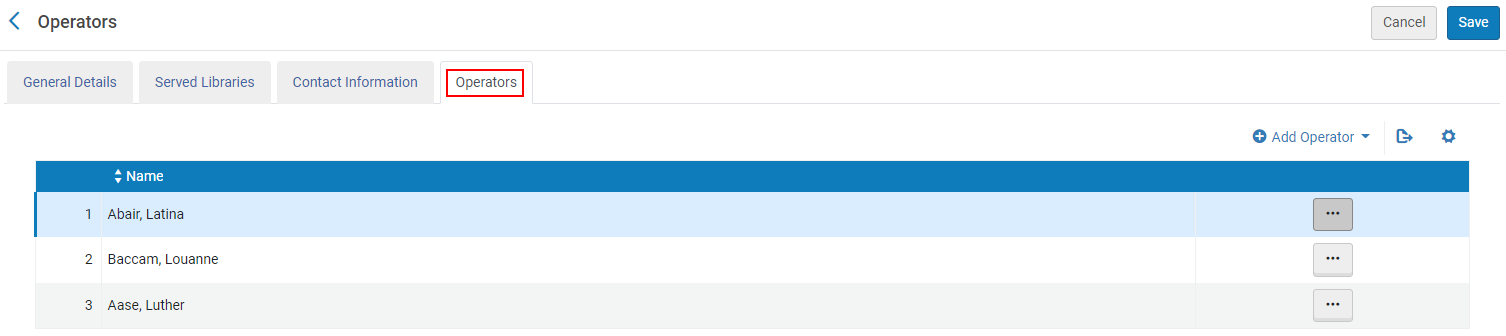
1}オペレータリストが空白の場合、割り当て先リストも空白のままです。
複数のコースがリストに関連付けられている場合、担当者はリストに関連付けられていた最初のコースから選択されます。
For imported reading lists, if the imported file includes an Assignee, the Assignee from the file is assigned to the reading list.If the file Assignee is blank, a random Operator is assigned.
コースが削除されたり、リストとの関連付けが解除された場合、現在の 担当者 はリーディングリストに割り当てられたままとなります。
図書リストの一括管理
You can edit reading lists in bulk using the Reading List Bulk Update job.For more information, see Managing Search Queries and Sets to create a set of reading lists and then Running Manual Jobs on Defined Sets.
Also see Matching Reading List Citations to Inventory in Bulk and Rolling Over Courses.
Page tags: article:topicProd:Almacontype:documFulfillmentCourses and Reading Listsproduct:almacontent:DocumentationReading Listlang:englishEdit Reading ListReading Lists Task Listreading list statusreading list due back dateadd reading listdelete reading listmanage reading list
