
OCLCへの公開
OCLCへの公開の概要とOCLC公開プロファイルの設定手順。
- 目録管理者
- リポジトリ管理者
- 一般システム管理者
OCLCへの公開の概要
OCLCは、AlmaユーザーがWorldCatでの所蔵を更新するために使用できる2つの異なるタイプのWorldShareデータ同期オプションを提供します。
- 一般的な公開方法は、書誌レベルに基づいており、目録の存在を示しています。This can be done by using the predefined publishing profile Publish bibliographic record (DataSync) to OCLC.
- また、電話番号、所有場所、配架場所などの所蔵レベル情報を公開することもできます。This option of publishing is necessary for physical journals and other multi-volume works where the range/coverage is important (such as for ILL purposes).This can be done by using the predefined publishing profile Publish your Local Holdings Records (LHRs) to OCLC.「ローカル所蔵レコード(LHR)をOCLC公開プロファイルに公開する」を使用して、OCLCへ公開する際に、抑制された所蔵資料を除外することはできません。
OCLCへの公開は、事前定義されたFTPロケーションにレコードをエクスポートします。OCLCはそのFTPロケーションからレコードを取得し、WorldCatレコードと同期します。For information about publishing to OCLC in a collaborative network implementing a Network Zone, see the note in Managing Records in a Network Zone.Also see the job Bib OCLC Republish Set of Titles for a republishing titles when, for example, the institution changes its name.
- 関連する所蔵レコードが削除された書誌レコードは、削除済みレコードとして公開されます。
- When publishing on Holdings level, all holdings linked to the bibliographic record are published, including the deleted holdings.
For importing records from OCLC, see Importing Records from OCLC Connexion.
For use case examples, see Publishing to OCLC.
When are Records Exported?
レコードは、次の場合にエクスポートされます。
-
最後のエクスポートジョブの実行後にレコードが変更または追加されました。Changes include any modifications made to a bibliographic record and to any information that enriches it (such as changes to holdings and items) according to the configuration of the publishing profile that you use, such as the Publish bibliographic record (DataSync) toOCLC publishing profile or the Publish your Local Holdings Records (LHRs) toOCLC publishing profile (see the procedure Publishing Print Holdings to OCLC for more information).Changing only the Management tag will not trigger republishing by Publishing profile (see How to publish a set of records from Alma to OCLC/WorldCat regardless of the current Management Tags (force publish)).After changing the Management tag, the job "Bib OCLC Republish Set of Titles" should be used Note that if you use the Publish bibliographic record (DataSync) to OCLC publishing profile, changes to bibliographic records get updated to OCLC.For more information, see What do the categories on the OCLC Publishing job report mean?また、所蔵レコードがアップデートされると、削除された所蔵を含む、書誌レコードにリンクされているすべての所蔵レコードと一緒に再公開されます。
-
A staff user has manually selected the record to be exported (which is also known as forced export).これはメタデータエディタのWorldCatへの強制エクスポート([レコードアクション].> [管理タグの設定] > [WorldCatへの強制エクスポート])で実行できます。
どのレコードがエクスポートされるのですか?
The record is set to Publish bib/Publish holdings only in the Metadata Editor (Record Actions > Set Management Tags > Force Export to WorldCat).
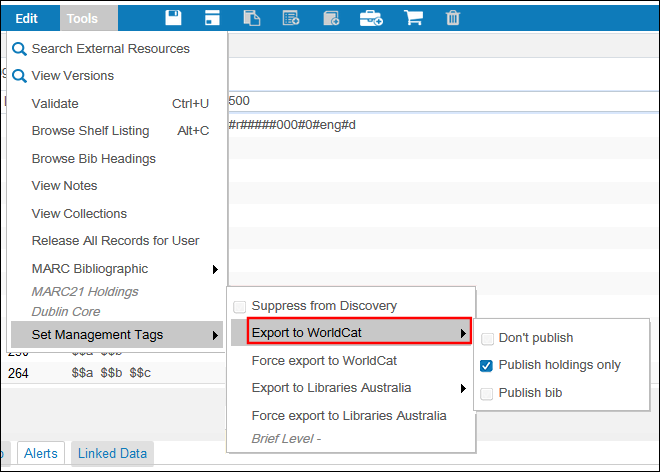
See Export to WorldCat in Metadata Editor Menu and Toolbar Options for more information.
OCLC公開ジョブとAlmaセット管理タグの概要については、以下の表を参照してください。
セット管理タグは、一般プロファイルを介してスケジュールされたジョブを使用する場合にも、各レコードの公開ポリシーを制御します。
|
ジョブ名 |
管理タグの設定 (メタデータエディターの書誌レコードに設定) |
OCLCと同期されたレコード |
|---|---|---|
| 書誌OCLCタイトルセットの再公開 | 公開しない | なし |
| 所蔵のみを公開する | なし | |
| 書誌を公開する | 書誌事項レコード | |
|
Republish Holdings Records to OCLC (LHRs) (主に逐次刊行物に使用) |
公開しない |
なし |
| 所蔵のみを公開する | ホールディングレコード | |
| 書誌を公開する | なし |
以下のシナリオでは、外部カタログ(OCLC)管理タグへの公開の[書誌レコードの公開]値がデフォルト値です。
- Metadata Editor (new bibliographic record and copy cataloging)
- クイック目録(新しいアイテム、新しいポートフォリオ、フルフィルメントの引用)
- コミュニティゾーンから書誌レコードを注文する
- Simple view - copy to catalog / link.When viewing a bibliographic record in the Community Zone (or Network Zone, if you're a member of a network), some actions enable catalogers to link their catalog to it or create their own local copy of it.
When you use the Publish your Local Holdings Records (LHRs) toOCLC publishing profile, only holdings records related to a bibliographic record with a System Control Number in the 035 field are published to OCLC.
It is possible to use the index Tag sync external catalog in the advanced search to locate records that are marked for publishing (see Using Advanced Search for more information).

エクスポートされたレコードの内容はどのようなものですか?
次のコンテンツが、OCLCに公開する際にエクスポートされます。
-
書誌レコード(DataSync)をOCLCに公開する公開プロファイルこのプロファイルでは、所蔵情報を含む書誌レコードデータ(プロファイルがそれを含むように設定されている場合)が公開されます。If the bibliographic record does not include a System Control Number, OCLC sends a file with the mapping of the System Control Number to the library's MMS ID.More information about loading this file can be found in How to create/import System Control Number from an Excel file into existing Alma records.In addition, this profile enables the inclusion of the deleted record without its holdings.For more information, see Publishing Deleted Records.
-
Publish your Local Holdings Records (LHRs) toOCLC publishing profileWith this profile, data from the holdings record along with field 004 with the System Control Number taken from the related bibliographic record is published.
ファイル名の構造
The filename is hardcoded and is created in accordance with the OCLC requirements.
Behavior of the Publish to OCLC Set Management Tag when Ordering an NZ Record
ネットワークゾーンから書誌レコードを公開する:
- 発注明細がAPI(またはインポートEOD以外の外部システム)から作成される場合:
- タイプNEW_ORDER_APIの統合プロファイルが存在する場合、管理タグはこの統合プロファイルから取得されます。
- If no integration profile is found, then the default is used.これは実行時に作成されるデフォルトのプレースホルダインポートプロファイルであり構成を変更できません。
- 発注明細を手動で作成する場合:
- 値は書誌レコードの操作レコードから取得されます。
埋め込み所蔵情報
When you use Publish bibliographic record (DataSync) to OCLC, it is possible to publish embedded holdings information within the published record.これを行うには、以下の設定を行う必要があります。
- [設定メニュー] > [リソース] > [レコードのエクスポート] > [所蔵フィールドを書誌レコードOCLCにマッピングする]
- [設定メニュー] > [リソース] > [レコードのエクスポート] > [機関OCLCシンボル]
See Initial Publishing Activities with OCLC for more information.
Publishing Deleted Records
Records are published as deleted (LDR/05 = ‘d') in one of the following cases:
Note that if publishing the holdings level (LHRs), the holdings records are republished only if they were changed.Note also that when a holdings record is updated, it is republished together with all the holdings records linked to the bibliographic record, including the deleted holdings.
-
書誌レコード(DataSync)をOCLCに公開する公開プロファイル
- 書誌レコードがAlmaで削除されている
- 書誌レコードのすべての所蔵が削除されている(書誌レコード自体がまだ存在している場合であっても)
- The bibliographic record was marked as Don't publish after it has been published at least once
Publish Bibliographic Records to OCLC job does not support publishing of holdings 852 fields for deleted bib records.
- This profile enables the inclusion of the deleted record without its holdings.Institutions can customize this profile to include all deleted holdings of the bibliographic record in the published file.This facilitates OCLC in matching their OCLC symbols and processing the deletion.To enable this feature, institutions can set the customer parameter:oclc_add_hol_to_deleted_bib to true.Access the customer parameter through:Configuration menu > Resources > General > Other Settings.
- このパラメータを true に設定すると、公開された削除済み書誌レコードには、削除された時期に関係なく、削除された所蔵がすべて含まれます。これにより、すべての書誌レコードの所蔵がシステムから確実に削除されるようになります (この機能はOCLCで確認済みです)。The included holdings data will adhere to the mapping specified in the "Map holdings fields into Bib record" table.
-
Publish your Local Holdings Records (LHRs) toOCLC publishing profile
- 所蔵レコードがAlmaで削除されています。
- The bibliographic record related to the holdings record was marked as Don't publish after it has been published at least once.
- 所蔵レコードは LHR ジョブを通じて少なくとも 1 回公開されています。After that, the bibliographic record related to the holdings record is marked as Publish Bib, see the table Summary of the OCLC Publishing Jobs and the Alma Set Management Tags.
When publishing on Holdings level, all holdings linked to the bibliographic record are published, including the deleted holdings.
Publishing Related Records to OCLC
AlmaのOCLCへの公開プロセスは、書誌レコード(DataSync)をOCLCに公開する公開プロファイルとあなたのローカル所蔵レコード(LHRs)をOCLCに公開する公開プロファイルが実行されているとき、関連レコードの処理をサポートします。提携関係の一部である書誌レコードの所蔵情報は、所蔵図書館の目録の正確な情報を提供するために適切に公開されます。
See Configuring Related Records for Physical Inventory for more information regarding related records.
関連レコードを目録化(作成または削除)する場合、関連レコード情報をOCLCに公開する前に、MMS - レコード関係の構築ジョブを最初に実行する必要があります。MMS - レコード関係構築ジョブは、1日に1回実行されるようにスケジュールされています。See Viewing All Scheduled Jobs for more information.
OCLCとの最初の公開活動
Prior to running your ongoing automatic synchronization process with OCLC, you need to communicate with OCLC regarding your institution symbol and library codes and coordinate your configuration requirements.以下の手順を参照してください。
For more information, see Resource Management - Publishing to OCLC using separate library codes and symbols.
When configured for separate library codes and symbols, Publishing to OCLC profile adds holdings and removes holdings when inventory still exists, but does not add deleted holdings information to the deleted record in Alma.
For institutions configured for separate library codes and symbols, the 852$a field is mandatory.This field is not added by Alma to the deleted records, and therefore customers with multiple library symbols should use the OCLC Connexion client to remove holdings for deleted records.
-
OCLCに連絡して、機関コードシンボルを取得します。特定の図書館または特定の場所の組み合わせに、機関レベルのシンボルを上書きする独自の個別コードシンボルを設定したい場合、これをOCLCと調整し、図書館コードまたは場所コードを、[機関OCLCシンボルマッピングテーブル]で割り当てられたシンボルにマッピングする必要があります([設定メニュー] > [リソース] > [レコードのエクスポート] > [機関OCLCシンボル])。

機関OCLCシンボルマッピングテーブル - In OCLC Worldshare, create a Data Sync collection for bibliographic records.If you are also using LHR (Local Holding Records), then create one for the LHR as well.Note that in the FTP connection:
- データ同期コレクション(複数)にはコレクションIDがあり、後で「書誌レコード(DataSync)をOCLCに公開する」および「ローカル所蔵レコード(LHR)をOCLCに公開する」で使用されます。
- OCLCでData Syncコレクションを設定する場合、機関はOCLCのData Syncコレクションスペシャリストに相談することをお勧めします。
- これは、修飾子のないocn(システム制御番号)または修飾子のあるocnのいずれかによって書誌レコードを照合するために役立ちます。
- Read more about the Data Sync collections at Data Sync Collections.
- AlmaおよびOCLCで使用されるS/FTP接続を設定します。See Configuring S/FTP Connections.
- 「フルパスである」を確認する必要があります,
- サブディレクトリはスラッシュで始まる必要があります,
- ユーザー名はfx_で始まる必要があります,
- FTP接続をテストすると、「FTP削除に失敗しました」というメッセージが表示されることに注意してください。This is fine because the file is almost immediately moved into a queue so it is no longer available to be deleted.同じ理由で「FTPダウンロードに失敗しました」というメッセージも表示されます。
- For the server, use the OCLC exchange server (see Update files with SFTP).
For example: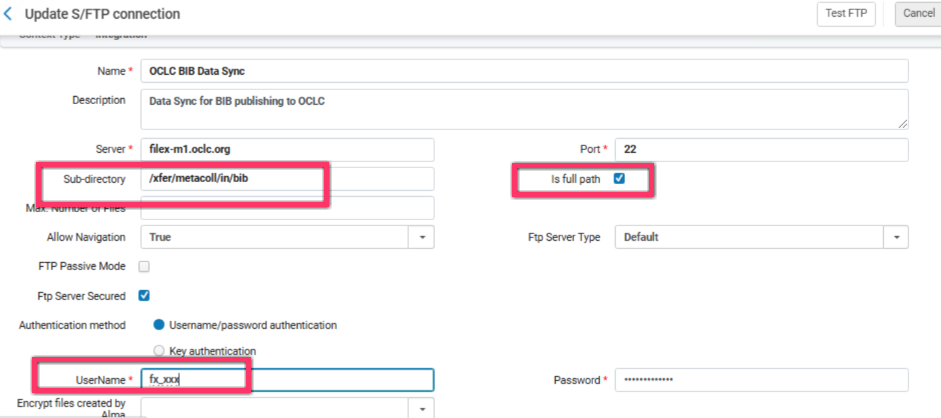
For more information regarding the OCLC FTP servers, see Exchange Files with OCLC.
- When you use the Publish bibliographic record (DataSync) to OCLC publishing profile, it is possible to publish embedded holdings information within the published record.In order to do this, you need to configure the Map Holdings fields into Bib record OCLC mapping table (Configuration Menu > Resources > Record Export > Map Holdings fields into Bib record OCLC).You can enter any number as the targetCode field: this field is for internal use to keep the uniqueness of each field, and is not published.A holdings tag can be mapped to a single bib tag.複数の所蔵フィールドがマッピングされている可能性がありますが、それぞれを1つの書誌タグのみにマッピングする必要があります。このテーブルではデータフィールドのみを使用でき、固定フィールドは使用できません。
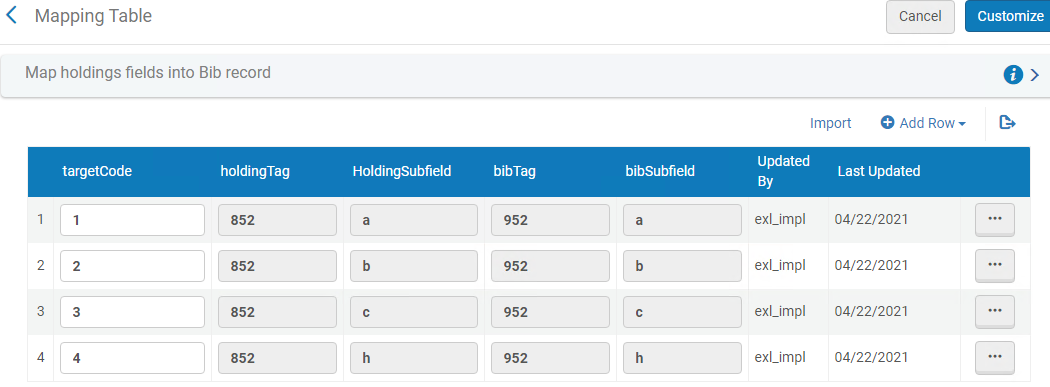 所蔵フィールドをOCLCの書誌レコードにマッピングするこの情報は、同期プロジェクトが開かれたときにOCLCに提供され、OCLCがあとで解釈可能なように、書誌レコードを所蔵情報で強化するためにAlmaによって使用されます。When you publish to OCLC, the 852 $a is set to/replaced by the institutional symbol (as specified in the OCLC institution symbol parameter in the publishing profile) or the library / location symbol (defined in Configuration Menu > Resources > Record Export > Institution OCLC symbol) when the 852 $b matches one of the mapping table's keys.ステップ1を参照してください。
- Customize one of the following types of print publishing profiles provided in Alma or create an electronic publishing profile to meet your requirements: See the procedures Publishing Print Holdings to OCLC and Publishing Electronic Holdings to OCLC for more information.
- OCLCへの書誌レコード(DataSync)の公開 – このプロファイルを使用して、埋め込み所蔵情報を含む書誌レコードと、機関または図書館で利用可能なOCLC WorldCat目録情報とを同期します。
- Publish your local holdings records (LHRs) to OCLC – Use this profile to synchronize holdings information only with the holdings information available for your institution / library in the OCLC WorldCat catalog.
印刷物所蔵をOCLCに公開する
Synchronizing your libraries' print holdings from Alma to WorldCat can be accomplished with the Publish bibliographic record (DataSync) to OCLC or Publish your local holdings records (LHRs) to OCLC publishing profiles provided with Alma.これらのプロファイルのいずれかを必要に応じて調整するには、次の手順を参照してください。A scheduled job for Publishing to OCLC - Bibliographic Records is created.
- [公開プロファイルの詳細]ページを開きます([リソース] > [公開] > [公開プロファイル])。
- On the Publishing Profile page, edit either Publish bibliographic record (DataSync) to OCLC or Publish your holdings records (LHRs) to OCLC(see Initial Publishing Activities with OCLC).[公開プロファイル詳細]ページが開きます。
公開プロファイルの詳細ページ
- 次の表を使用して、[公開プロファイルの詳細]ページのパラメータを完了します。
プロファイル詳細ページのパラメータの公開(OCLC) パラメータ 説明 [プロファイルの詳細]セクション : プロファイル名 プロファイルの名前。 プロファイル説明 プロファイルの説明(任意)。 OCLC機関シンボル
すでにOCLCと合意済みの機関コードシンボル。See the Institution OCLC Symbol mapping table configuration described above in the Initial Publishing Activities with OCLC section for more information.The value specified in the OCLC institiution symbol parameter can be overridden by the library or library and location level OCLC symbol code specified in the Institution OCLC Symbol configuration (Configuration Menu > Resources > Record Export > Institution OCLC symbol).
これは必須フィールドです。
プロジェクトID
The synchronization project ID previously agreed upon with OCLC (see the configuration process outline above).
プロジェクトIDまたはコレクションIDは、必要なOCLC機関シンボルとともに入力する必要があります。古いOCLCフォーマットで作業している場合は、プロジェクトIDを入力します。If you are working with the new OCLC format, enter a Collection ID.
コレクションID
すでにOCLCと合意済みのコレクションID(上記の設定プロセスの概要を参照)。このフィールドに値が入力されている場合、公開されたファイル名には機関のシンボルとコレクションIDが含まれます。このフィールドが入力されていない場合、公開されたファイル名にはコレクションIDが含まれません。OCLCがこれをいつ要求するかについては、OCLCにお問い合わせください。
プロジェクトIDまたはコレクションIDは、必要なOCLC機関シンボルとともに入力する必要があります。古いOCLCフォーマットで作業している場合は、プロジェクトIDを入力します。If you are working with the new OCLC format, enter a Collection ID.
Publishing Parameters section: 公開モード:逐次更新型 Almaで進行中のOCLCレコードの変更(前回の更新以降の変更)をOCLC公開に使用されるFTPサーバーに定期的に公開し、最終的にOCLCで処理できるようOCLCに公開するかどうか。公開ジョブのスケジュールは、OCLC公開プロファイルで選択したスケジュールオプションによって決まります。この公開モードは、定期的に実行することを目的としています。 公開モード:ベースライン これは1回限りのオプションです。Select this if you are an institution that is migrating from a different ILS where OCLC records have been maintained and exchanged with OCLC, and the goal is to continue the exchange of records with OCLC on the Alma system from where the other ILS left off (using the existing OCLC account that was used with the previous ILS). このオプションは、データベースがAlmaに移行された直後、AlmaでOCLCレコードが変更される前に、一度だけ使用することを目的としています。This option publishes the whole set of OCLC records (that is, all the records that are marked for publishing to OCLC as described in When Records are Exported) to an Alma publishing index (an internal manifestation of the set in Alma specific to Baseline publishing to OCLC), but does not create any files on the FTP server used for OCLC publishing.公開ジョブが完了すると、OCLCとの継続的な逐次更新のために、Almaは自動的にOCLC公開プロファイルの公開モードを逐次更新型に設定します。ベースライン公開ジョブのスケジューリングと実行は、Almaへの切り替えが終わり次第、すぐにプロセスに組み込む必要があります。公開モード:完全型 Alma publishes all the OCLC records (that is, all the records that are marked for publishing to OCLC as described in When Records are Exported) to the FTP server used for OCLC publishing.このオプションは、レコード処理のためのOCLCアカウントを初めて新規作成する機関(例えば、Almaの前に使用していたシステムではOCLCと提携していなかった図書館など)や、または以前にOCLCと提携はしていたが、すべてのレコードをAlmaからOCLCに再公開するため、OCLCとのこれまでのプロジェクトの完全再構築をしようとするウェブサイトのために用意されています。公開ジョブが完了すると、OCLCとの継続的な逐次更新のために、Almaは自動的にOCLC公開プロファイルの公開モードを逐次更新型に設定します。 ステータス [アクティブ]を選択します。 スケジューリング スケジュールオプションのいずれかを選択します。If you select Not scheduled, the export job for this publishing profile does not run. Eメール通知 公開プロファイルが完了したときにEメール通知を受け取るユーザーとメールアドレスを指定します。 提出フォーマットセクション: FTP設定 S/FTP接続の名前を選択します。For detailed information on FTP requirements, see the OCLC documentation. サブディレクトリ S/FTP接続の作成時に指定されたパスのオプションのサブディレクトリ。たとえば、S/FTP接続の設定中に[サブディレクトリ]フィールドで Almaを指定し、このフィールドにOCLCと入力すると、データはAlma/OCLCにエクスポートされます。 Almost immediately after a file is uploaded to OCLC's DataSync server, it is moved into a queue for processing. - [保存]を選択します。変更された公開プロファイルが保存されます。定義された基準を満たすデータは、プロファイルの実行時に指定されたFTPロケーションにエクスポートされます。For information on monitoring a publishing export job, see Viewing Running Jobs.For information on the job report, see Viewing Completed Jobs.書誌レコードをOCLCに公開する場合、公開できるファイルごとのレコードの最大数は90Kです。This complies with OCLC standards described in the OCLC documentation.If there are more than 200,000 records to be exported, multiple data files are created with up to 200,000 records in each file.
OCLCへ電子所蔵を公開する
Synchronizing your libraries' electronic holdings from Alma to WorldCat can be achieved using Alma's publishing platform.
これらのレコードは電子レコードの数です。公表はされませんが、カウントされます。
これらのレコードは「更新済み」としてジョブにカウントされます(つまり、レコードの日付が最後に公開された時点よりも後であるためです)。ただし、公開されるレコードの内容自体は最後に公開された時とまったく同じであるため、出力には含まれません。
公開プラットフォームを(以下の手順に従って)セットアップすると、Almaは定期的に電子所蔵をWorldCatに発行し、電子所蔵に対するすべての変更がWorldCatと同期されます。A scheduled job for the general publishing profile is created.
- WorldCatと同期する電子所蔵のセットを作成します。See Adding Logical Sets for instructions.
- 一般的な公開プロファイルを作成します。See Publishing and Inventory Enrichment, and use the details provided in the following table to customize your profile configuration.
OCLC 電子所蔵のプロファイル詳細 パラメータ 説明 プロファイル名 一意のプロファイル名。 プロファイル説明 説明を使用して、OCLC電子所蔵の発行プロファイルをさらに特定します。 Publishing Parameterssection: ステータス [アクティブ]を選択します。 スケジューリング スケジュールを選択します。 Eメール通知 公開プロファイルが完了したときにEメール通知を受け取るユーザーとメールアドレスを指定します。 Content section: セット名 ステップ1で電子公開用に作成したセットを選択します。 公開日 書誌レベルを選択します。 出力フォーマット MARC 21 書誌を選択します。 Publishing Protocol section: FTP、OAI、またはZ39.50 FTPlチェックボックスを選択します。 FTP設定 Select the FTP configuration that you created for OCLC (see Configuring S/FTP Connections).FTP設定には、次の設定パラメータが含まれている必要があります。 - FTPサーバー = ftp2.oclc.org
- UserName = OCLCによって割り当てられたもの
- パスワード= OCLCによって割り当てられたもの
- サブディレクトリ=wckb/in/data
冊子フォーマット XMLを選択します。 ファイル内のレコード数 1つのファイルを選択します。(OCLCに公開されるすべてのレコードは1ファイルである必要があります。) デフォルトのファイル名を使用 いいえを選択します。 ファイル名 HOLDINGS_ <REGISTRY_ID> .xml-marcを指定します。<registry_id>には、あなたの図書館のWorldCatレジストリID(またの名はOCLC機関ID)が入ります。If you have questions regarding your WorldCat Registry ID, contact OCLC customer support (support@oclc.org). - 次を選択して、次の表に示す詳細を使用し、残りのプロファイル設定を完了します。
OCLC 電子所蔵のデータ強化 パラメータ 説明 Electronic Inventory Enrichment section: 電子ポートフォリオ情報を追加 これを選択してください。 繰り返し可能なフィールド 866 アクセスURLサブフィールド u リンクリゾルバベースURL リンクリゾルバベースURLを入力します。 Enter the base URL for the Primo service page redirect to the Alma Link Resolver using the following format and inserting your institution's information where indicated:http://<primo server host:port>/openurl/<primo institution_code>/<primo view_code>?コレクション名サブフィールド x 対象範囲ステートメントサブフィールド a CZ蔵書識別子サブフィールド t 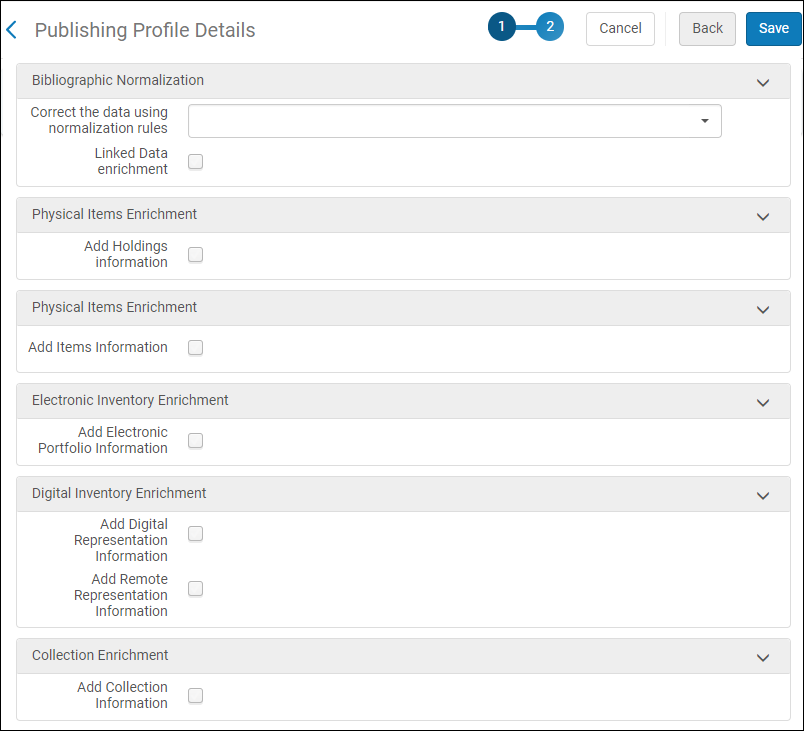 OCLC電子公開プロファイル-データ強化
- [保存]を選択します。
OCLCへの関連レコードの公開
BIBFRAME records can be published to OCLC as part of the existing profiles.If the bf:instance includes an identifier with a bf:assigner having rdf:resource =http://id.loc.gov/vocabulary/organizations/ocolc,, then the BIBFRAME record is published to OCLC as a MARC record, as part of the existing job, based on the modification history and management tags.
さらなる展開があれば、このセクションは更新されます。
OCLC WorldCatと同期するために使用された以前のシステムからAlma Productionへの移行
以前のシステムからAlma Productionに切り替える際、(データベース全体をリロードするかわりに)OCLC WorldCatへの増分更新の処理を継続することができます。それには以下の手順が必要です:
- ワンタイムベースラインオプションを使用してOCLC公開プロファイルを作成する
- ワンタイムベースラインオプションを設定してOCLC公開プロファイルを実行し、AlmaがOCLCの増分更新を続行できるデータベースに開始点を作成します。AlmaがOCLC WorldCatの増分更新を続行できる開始点を確立するための1回限りのベースラインオプションを使用してOCLC公開プロファイルを設定する方法については、次の手順を参照してください。特別な1回限りの公開プロファイル/ジョブは、Alma productionの最初の日またはそれに非常に近い日、かつ目録レコードに変更を加える前に実行する必要があります。OCLCプレフィクス035フィールドを持つ書誌レコードには、書誌OCLC発行の移行中に自動的にフラグが立てられます。レコードに異なるフラグを付ける必要がある場合:
- Use Alma's Repository Search to create a set that reflects your relevant OCLC records at that point in time.
- 書誌レコードを外部目録と同期するジョブは、OCLCに公開するレコードセットにマークまたはフラッグをつけるため、書誌レコードを公開または所蔵のみを公開に設定されたTaskParameters: MmsTagSyncExternalセクションの外部目録と同期するパラメータとともに実行します。このステップは、一連のレコードのマークを解除して、公開されないようにするためにも使用できます。If Don't publish is selected, the records are published as deleted (a d is added to the LDR position 5).See Running Manual Jobs on Defined Sets for more information.For marking individual records (versus a set of records), use the Metadata editor and the Publish bib/Publish holdings only tools options (Record Actions > Set Management Tags > Export to WorldCat).See Export to WorldCat in Metadata editor – Tools Menu for more information.
- Once your OCLC records are flagged, search the repository using Tag Sync External Catalog to verify the records that have been marked for OCLC processing.
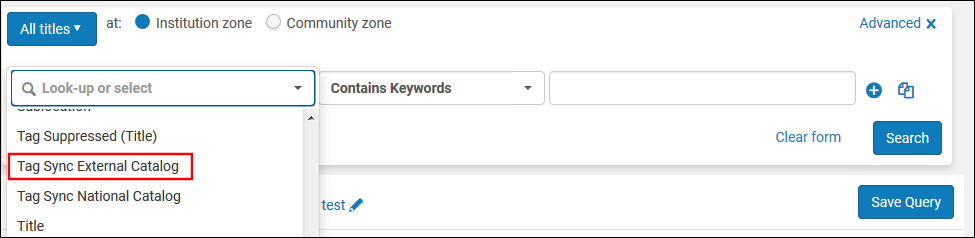
タグ同期外部カタログの詳細検索パラメータ After you have addressed these workflow considerations, you are ready to configure your OCLC baseline publishing profile and run the publishing job using this profile.
- See Publishing Print Holdings to OCLC to create your one-time-use OCLC publishing profile except use the Publishing Profile Details page settings described in the table below.
プロファイル詳細ページのパラメータの公開(移行プロファイル用) パラメータ 説明 [プロファイルの詳細]セクション : プロファイル名 一意のプロファイル名。 プロファイル説明 説明を変更して、このプロファイルをさらに識別します。 OCLC機関シンボル OCLCとすでに合意済みの機関/図書館コードシンボル(上記の設定プロセスの概要のステップ1を参照)。 プロジェクトID 同期プロジェクトIDは以前にOCLCと合意しました(上記の構成プロセスの概要のステップ2を参照)。 Publishing Parameters section: ステータス [アクティブ]を選択します。 スケジューリング スケジュール未定を選択します。このジョブを手動で実行するには、Ex Librisに連絡する必要があることに注意してください。 After you complete your transition (Baseline) publishing job, change the scheduling option to enable ongoing, incremental publishing.公開モード:ベースライン これは1回限りのオプションです。Select this to migrate from a different ILS where OCLC records have been maintained and exchanged with OCLC, and the goal is to continue the exchange of records with OCLC on the Alma system from where the other ILS left off (using the existing OCLC account that was used with the previous ILS). このオプションは、データベースがAlmaに移行された直後、AlmaでOCLCレコードが変更される前に、一度だけ使用することを目的としています。このオプションは、OCLCレコードのセット全体をAlma公開索引(ベースラインでのOCLCへの公開に特定されたセットのAlmaシステム内での表示)に公開しますが、OCLC公開に使用するFTPサーバー上のファイルは作成されません。公開ジョブが完了すると、OCLCとの継続的な逐次更新のために、Almaは自動的にOCLC公開プロファイルの公開モードを逐次更新型に設定します。ベースライン公開ジョブのスケジューリングと実行は、Almaへの切り替えが終わり次第、すぐにプロセスに組み込む必要があります。提出フォーマットセクション: FTP設定 OCLCと確立/調整したS/FTP接続の名前を選択します。このFTPから、OCLCはWorldCatレコードと同期するレコードを取得します。 公開モードとして選択するベースラインオプションはOCLC公開に用いるFTPサーバーにファイルを作成せず、またAlmaは ベースライン公開が完了すると、公開モードを増分公開に自動設定します。このため、OCLCで確立した、継続的増分FTP構成を選択できます。サブディレクトリ S/FTP接続の作成時に指定されたパスのオプションのサブディレクトリ。たとえば、S/FTP接続の設定中に[サブディレクトリ]フィールドで Almaを指定し、このフィールドにOCLCと入力すると、データはAlma/OCLCにエクスポートされます。 - Save your profile settings.
- 移行ジョブが完了したら、スケジューリングパラメータを再設定して、OCLC WorldCatレコードを使用した、継続的な増分公開用にOCLC公開プロファイルを設定します。
Page tags: article:topicproduct:almacontent:Documentationlang:englishOCLCOCLC publishing profilepublish holdings
