
Authority Record Validation and Duplicate Checking
Leap performs record validation and duplicate checking when you save an authority record. You can also check for duplicate authority records at any time without changing or saving the authority record.
This section covers the following topics:
Saving an Authority Record
When you save an authority record, Leap does the following:
-
Verifies that the record contains both a Leader and an 008 control field. See Leader and 008 Verification.
-
Performs record validation (if automatic MARC validation is enabled). See Authority Record Validation.
-
Performs duplicate detection. See Authority Record Duplicate Detection.
Leader and 008 Verification
Both a Leader and an 008 control field are required to save an authority record, even if your library has disabled all other MARC record validation.
If you attempt to save a record that lacks a Leader or an 008 field, Leap prompts you to add the missing field(s).
Authority Record Validation
If automatic MARC validation is enabled, Leap performs the record validation specified in your library's MARC Validation: Authority profile. For more information on enabling or configuring MARC validation, search for "Administering MARC Validation and Display" in the Polaris staff client help.
If record validation determines that there are errors that prevent Leap from saving the record, Leap displays the errors and prompts you to return to editing the record. If record validation determines that there are other validation errors, Leap displays the errors and prompts you to do one of the following:
-
Select CONTINUE to save the record despite the validation errors.
-
Select CANCEL to stop saving and return to editing the record.
If you return to editing a record with validation errors, Leap displays a MARC Validation Results notification that lists the validation errors.

You can edit the record and then select SAVE to perform validation again and attempt to save the record.
Authority Record Duplicate Detection
Leap identifies potential duplicate records based on the rules your library has configured in the Authority Deduplication table. For more information, search for "Managing Duplicate MARC Records" in the Polaris staff client help.
If duplicate detection identifies possible duplicate records when you save an authority record, Leap displays duplicate detection results.
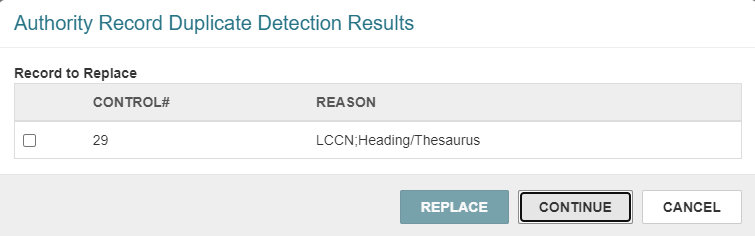
You can do one of the following:
-
Save the record. To do this, select CONTINUE.
-
Replace one or more duplicate records with the record you are saving. To do this, select one or more records in the Record(s) to Replace list , and select REPLACE.
Leap deletes the selected records and saves the authority record that will be retained.
-
Stop saving and return to editing the record. To do this, select CANCEL.
Checking for Duplicate Authority Records
Leap identifies potential duplicate records based on the rules your library has configured in the Authority Deduplication table. For more information, search for "Managing Duplicate MARC Records" in the Polaris staff client help.
To check for duplicate authority records
-
Find the authority record you want to check, and open it in the Authority Record workform.
-
Select Actions > Duplicate Check.
Leap performs the duplicate check and displays results on the Authority Record Duplicate Detection Results dialog.
Note:
Leap displays the Authority Record Duplicate Detection Results dialog regardless of whether the system finds potential duplicate records using your library's duplicate detection rules.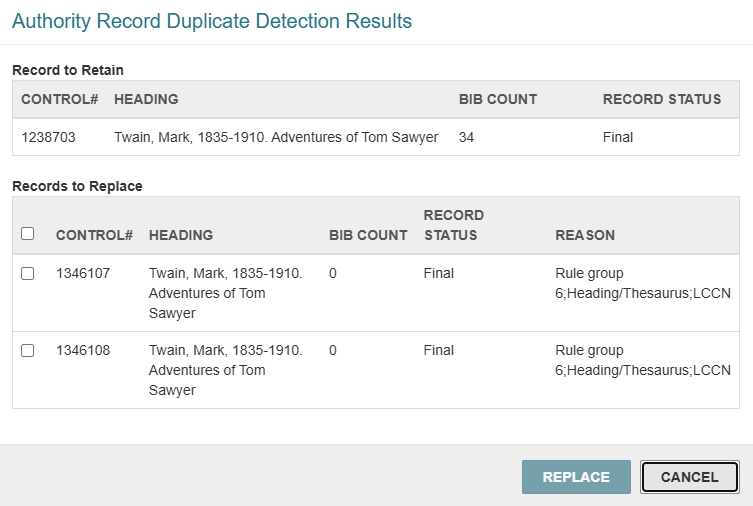
-
On the Authority Record Duplicate Detection Results dialog, do the following:
-
Replace a duplicate record with the current record. To do this:
-
Select one or more records in the Records to Replace list.
-
Select REPLACE.
Leap deletes the selected records, moves the linked bibliographic records to the authority record that will be retained, and saves the record that will be retained.
-
-
Select CANCEL to return to the authority record without making any changes.
-
