
Copy an Authority Record
You can copy an authority record in Leap if you have the Authority records: Create permission enabled in Polaris System Administration (web-based). For more information about cataloging permissions, see Cataloging Permissions Reference.
Tip:
You can use keyboard shortcuts to catalog MARC records without using the mouse. See Keyboard Shortcuts for a list of all available shortcuts.
To copy an authority record
- Find the authority record you want to copy, and open it in the Authority Record workform.
-
Select ACTIONS > Copy.
The New Authority Record workform appears. Leap populates the workform fields with the MARC data and record settings from the record you are copying.
-
Add or edit MARC tag data by doing one or more of the following:
 Edit the Leader or the 008 control field
You can edit the Leader and the 008 control field. You cannot edit the 001 tag (Control Number) or the 005 tag (Date and Time of Latest Transaction).
To edit the Leader or the 008 control field
-
Select the arrow
 next to the field you want to edit.
The view expands to display editable fields that correspond to the MARC field you selected.
Note:
You can also edit 008 field data without expanding the view.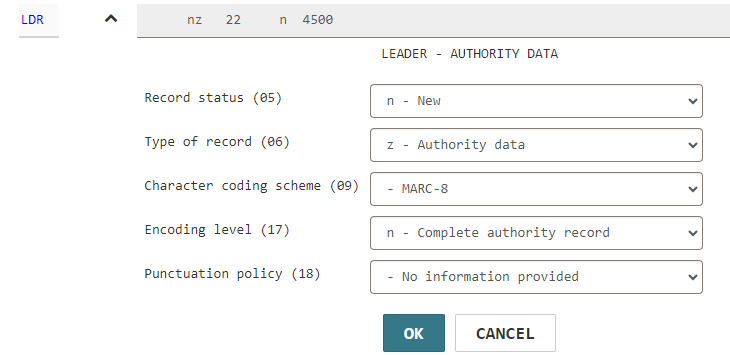
-
Edit MARC data.
- Select OK to collapse the editable fields and retain your changes.
Edit an existing data field tag
To edit a data field tag
-
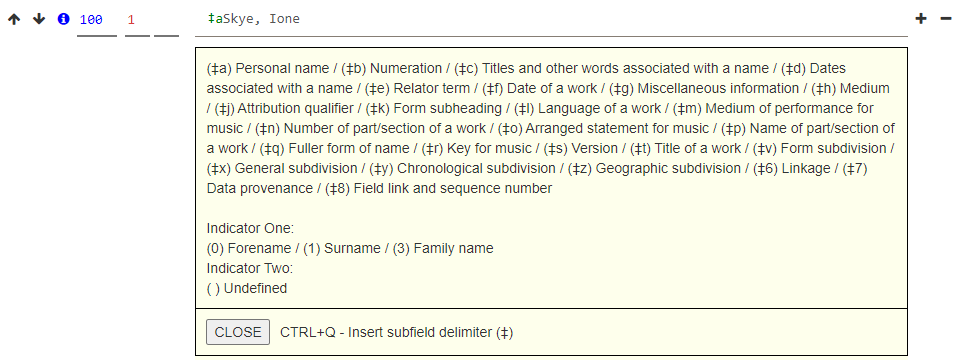
Select the tag you want to edit.
Note:
If you have enabled MARC format hints, an information icon appears next to the tag number. Select the icon to see information about the valid MARC subfield definitions for a tag. For more information, see Set Workform User Defaults.
 -
Edit any of the following elements of the tag data:
- Tag number
- First indicator value
- Second indicator value
- Subfield data
Add a new control field
You can add an 008 control field to the authority record only if the record does not already contain one.
To add an 008 control field
-
Select the plus sign
 next to a control field.
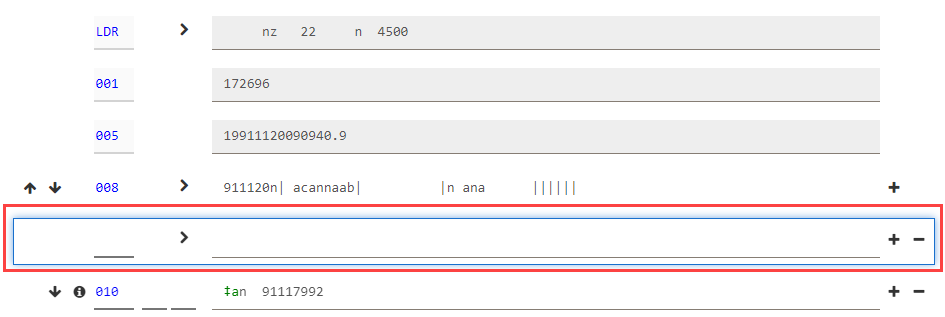
Leap adds a new control field below the existing one.
-
Enter the control field number (008).
-
Select the arrow
next to the new 008 field.The view expands to display editable fields that correspond to the control field number.
Note:
You can also edit 008 field data without expanding the view. - Edit MARC data.
- Select OK to collapse the editable fields and retain your changes.
Add a new data field tag
To add a data field tag
-
Select the plus sign
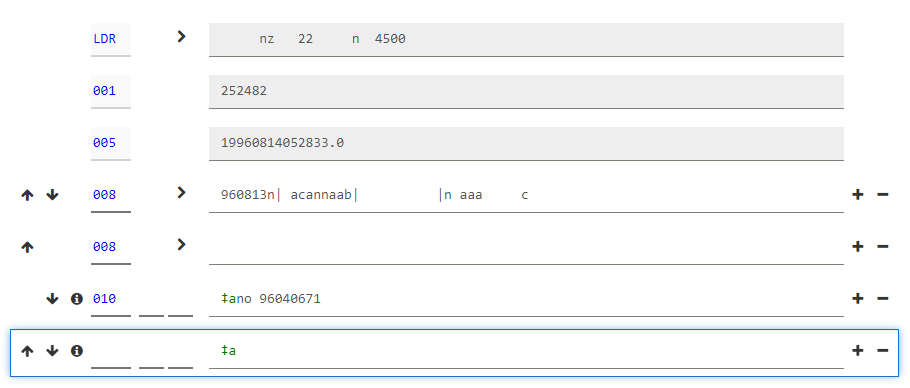
next to a data field tag.Leap adds a new tag below the existing one.
-
Enter tag data:
- Tag number
- First indicator value
- Second indicator value
- Subfield data
Note:
If you have enabled MARC format hints, an information icon appears next to the tag number. Select the icon to see information about the valid MARC subfield definitions for a tag. For more information, see Set Workform User Defaults.
Reorder tags
Note:
If your library has enabled automatic MARC tag sorting for authority records, Leap sorts the tags in the authority record in the order specified in the MARC validation profile when you save the record. You don't need to manually reorder tags, and Leap doesn't save any changes to the tag order that you make manually. (An exception to this rule is that if a tag is repeated -- for example, if a record contains three 100 tags -- you can reorder the repeated tags.) For more information about automatic tag sorting, search for "Turn Automatic MARC Tag Sorting On or Off" in the Polaris staff client help.If your library has not enabled automatic MARC tag sorting for authority records, you can change the order of the MARC tags in an authority record. The following conditions apply:
- You can't move the Leader, the 001 tag, or the 005 tag.
- You can't move an 008 control field below a data field tag. You also can't move a data field tag above an 008 control field.
To reorder tags in the authority record
-
Select the up arrow
 or the down arrow
  next to a tag.
Leap moves the tag up or down.
Delete a tag
You can't delete the 001 tag, the 005 tag, or any tag that your library has defined as a required authority record tag. For more information about required tags, search for "Administering MARC Validation and Display" in the Polaris staff client help.
To delete a tag
-
Select the minus sign
 next to a tag.
Leap deletes the tag.
-
-
Select SAVE to save the new record to the database.
Leap performs record validation and duplicate detection and then saves the record. For more information, see Authority Record Validation and Duplicate Checking.
