
Registering ExpressCheck Workstations
You can register ExpressCheck workstations in Polaris System Administration (web-based) the same way you register a Leap workstation.
Important:
Be sure your ExpressCheck workstation is added to your Windows network before you do this procedure. Contact your Polaris Site Manager to enable the Polaris ExpressCheck license if you have not already done so.
To register an ExpressCheck workstation
-
From the Home Page in Polaris System Administration (web-based), select Workstations.
The Workstations page appears.
-
Select +New Workstation.
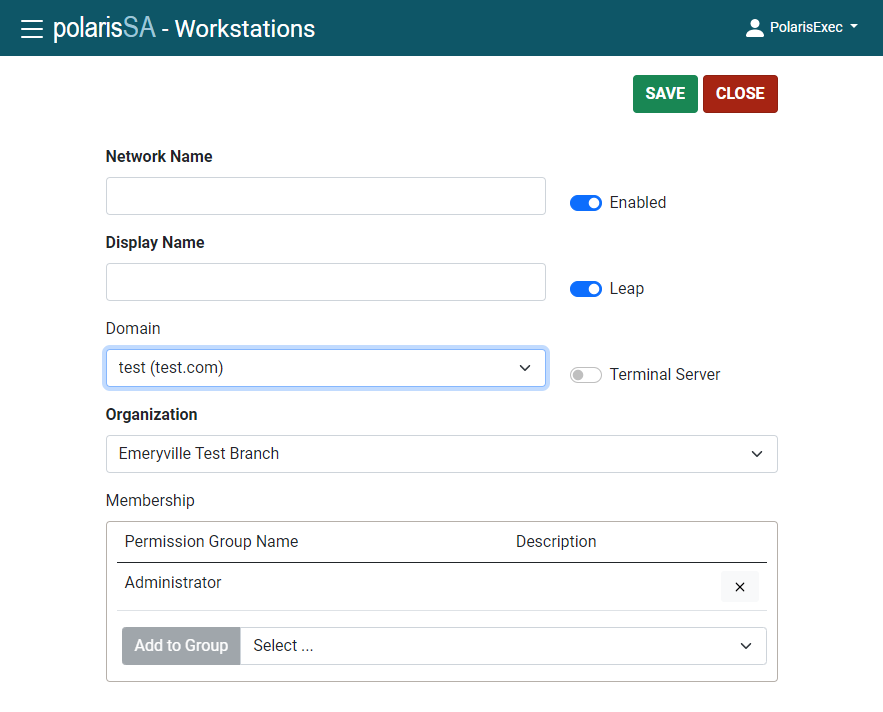
The New Workstation screen opens.
-
In the Network Name box, enter the network name of the workstation.
-
In the Display Name box, enter the label used to identify the workstation.
-
Select your Organization.
-
Select permissions for the workstation.
Note:
Set the same permissions for the Polaris ExpressCheck workstation that you would set for a staff circulation workstation. See “Setting Circulation Permissions” in the Polaris staff client help. -
If your library will use RFID with ExpressCheck, set RFID: Use local security manager to Yes on the Settings tab.
-
Select SAVE.
