
Restricting ExpressCheck Circulation by Material Type
You can restrict the circulation of specific material types in Polaris ExpressCheck using the SelfCheck Material Types table. You can set this option at the system level only.
To restrict ExpressCheck circulation by material type
-
From the Home Page in Polaris System Administration (web-based), select Settings and Tables.
The Settings and Tables page appears.
-
On the left side of the screen, select the System tab.
-
Select the Tables tab.
-
In the Search box, search for "SelfCheck Material Types", and then select the SelfCheck Material Types table in the results.
The SelfCheck Material Types table appears.
-
Select the checkbox next to the material type you want to block, and select Edit
 .
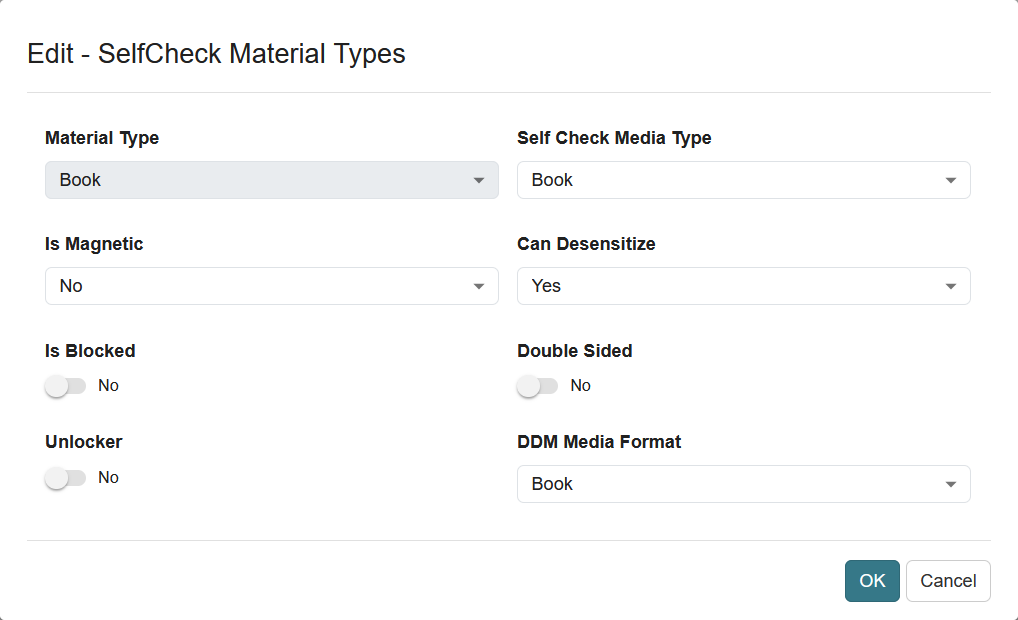
.The Edit - SelfCheck Material Types dialog opens.
Note:
The SelfCheck Media Type setting applies only to self-check units that rely on SIP communication, and not to ExpressCheck workstations.
-
If you want to block the material type from ExpressCheck circulation, set Is Blocked to Yes.
-
If you use Polaris ExpressCheck on hardware with electromagnetic (EM) strip security, set these options:
-
In the Is Magnetic box, indicate whether the material type is magnetic by selecting one of the following options:
-
If the material type is not affected by magnetic fields, select No.
-
If the material type is a magnetic medium (such as a video tape or cassette tape), select Yes.
-
If you are not sure if the media can be damaged by magnetic fields, select Unknown.
-
-
In the Can Desensitize box, indicate whether the security strip for the material type can be desensitized by selecting one of the following options:
-
If the material type is not a magnetic medium, has a security strip, and can be desensitized, select Yes.
-
If the material type is a magnetic medium (such as a video tape or cassette tape), select No.
-
If the material type is not circulated, select No.
-
If you do not know if the material type can be damaged by magnetic fields or if it has a security strip, select Unknown.
-
-
In the Double Sided box, specify whether both spine and main magnets should be used when desensitizing an item.
-
-
Select OK.
The Edit - SelfCheck Material Types dialog closes.
-
Select SAVE.
