
Release Date: April 26, 2023
Hold Logic Updates
New Logic has been applied to the Holds process in Vega when a work contains multiple editions. When placing such a hold Vega now chooses the edition that has the most items available at the patron's selected pickup location to both reduce patron wait time for items and reduce library logistics costs. When items are unavailable at the pickup location, Vega uses holds:copies ratios logic to choose the edition that is most likely to fulfill the patrons loan with the shortest wait time. Holds for materials with volumes information will similarly choose the edition with the most available copies at the pickup location or best holds:copies ratio when items are currently unavailable. Holds for materials with items as volumes will continue to provide the selected item to the patron.
Patron Location Updates
Vega Patrons now have access to a Preferred Pickup Location. Polaris Patrons will see their existing Preferred Pickup Location in Vega. Sierra Patrons will see their Home Location has been copied to their Preferred Pickup Location. The Preferred Pickup Location is the default selected pick up location when a patron begins placing a hold and can be changed in the Patron Profile. When placing a hold a patron can always select any other available location as their the pickup location for that particular hold.
Polaris Patrons will also now be able to update their Home Location in Vega. The default Home Location for Polaris patrons will be the same as their Registered Library location. This location does not exist in Polaris and is recorded in Vega only. It can be used by the patron to set their home library which causes Vega to display the call numbers of available books in that library when the patron is logged in and browsing Vega search results. Additionally the Polaris Registered Library Location will display in the patron profile. This field is not editable.
Collections Facet for Polaris Libraries
Polaris Libraries can now turn on a Collections Facet for display. The collection facet allows users to filter search results by Collection and will allow staff to create Collection filtered searches for creating showcases.
Grid View Preview
The sneak peak of Grid View for Vega search results now includes a tool tip to describe each icon. A screen reader will read the title, author and formats when the patron tabs into each title.
On the Search Results page, you can switch between list view and grid view.
The following image shows the Search Results page grid view.
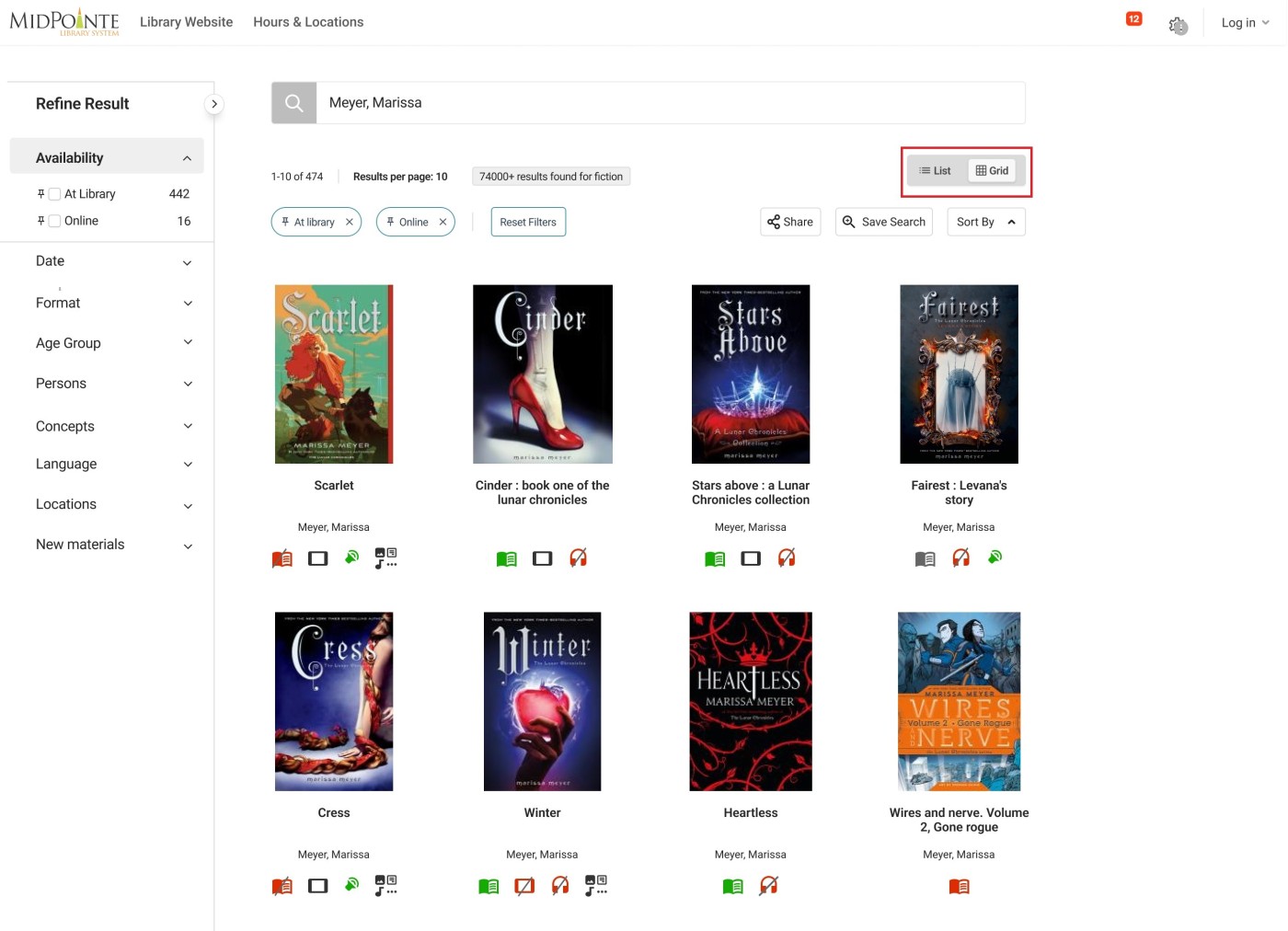
Grid view icons
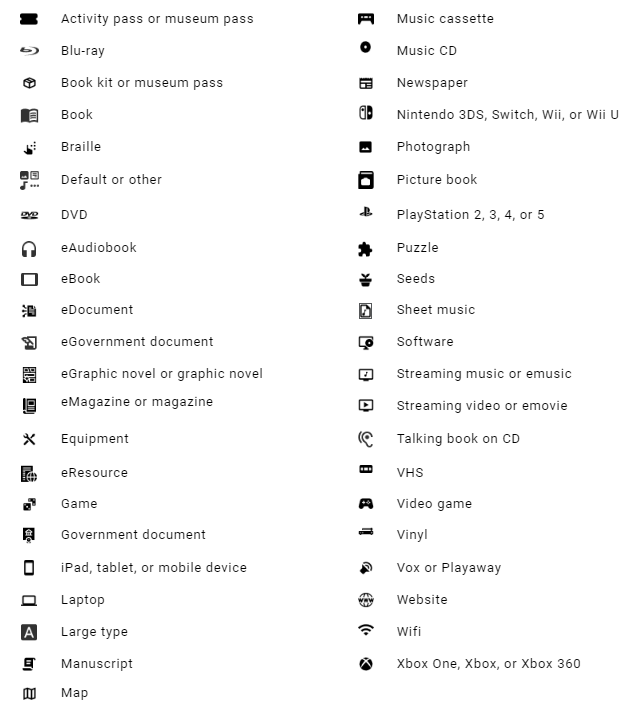
The icons in grid view indicate real-time availability of materials and the media type. The icons indicate the following statuses:
-
Green: available
-
Gray: check for availability
-
Red: unavailable
-
A slash over a gray or red icon indicates no copies are available.
The following table lists the icons and their definitions:
To use the search results grid view:
-
On the Search Results page, select Grid View.
-
Select a cover, title, author, or format icon to go to the Resource page
-
To go back to the search results, select Back.
Bug Fixes
Search and Spin Fix for Sierra Libraries
A problem was fixed where patron sessions that had been active overnight were being disrupted in Vega. When Vega was unable to automatically reconnect the patron, searches would not complete and patron data would not load until the patron refreshed the browser. This problem has been fixed and Sierra patrons should no longer experience this problem after remaining logged in over the 90 day session time period.
Stop Words in Serial Titles Fix
A problem was fixed with search relevance for series titles that contained a lot of stop words such as "Chronicles of the One" resulting no matches for the series title.
Missing Strings for Location and New Materials Facet Now Available for Translation
Two Facets were previously unable to be translated in the Vega language strings. Location and New Materials facets and the New Materials search sort drop-down string are now able to be translated for all languages.
