
Release Date: December 7, 2023
Bulk Renew
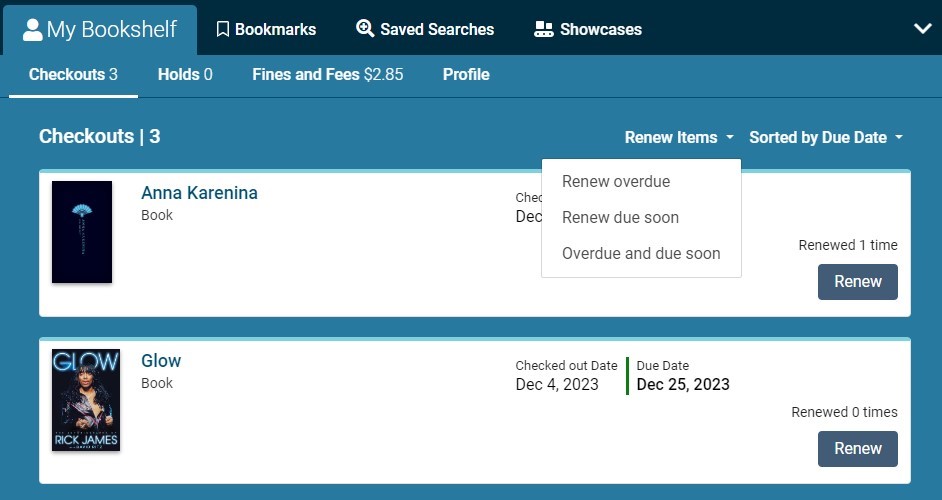
Bulk Renewal options have been added to the Patron Checkouts tab of Vega Discover. Patrons can choose from 3 options to make a bulk renewal of their currently checked out materials. "Renew overdue" will attempt to renew all items that have become overdue. "Renew due soon" will attempt to renew all items that will become due within the days threshold selected by the patron. "Renew overdue and due soon" will attempt to renew all overdue items & items that will become due within the days threshold selected by the patron. The date threshold accepts whole number values 1-14 days.
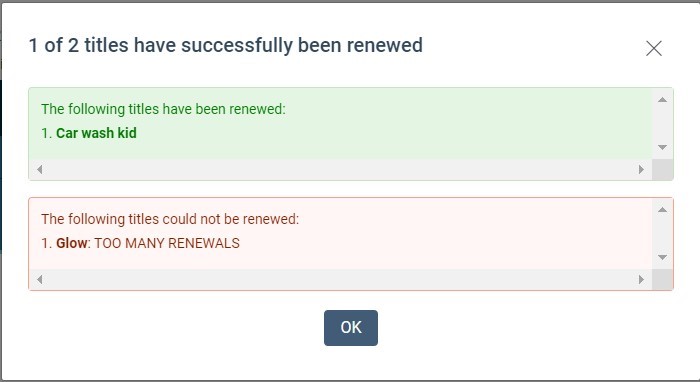
Please note that Vega processes items selected for bulk renewals one by one and will display a progress popup while performing the renewals. Once the renewal process is complete, a summary of the renewed and not renewed items details will be displayed with details of why any failures occurred. See examples below.
Announcements Menu
Announcements requires post deployment work and will not appear until that process has been completed by Innovative. We will send a follow-up announcement when the process is completed across all regions.
Discover+, Premium, and Consortia libraries can add 1 announcement message.
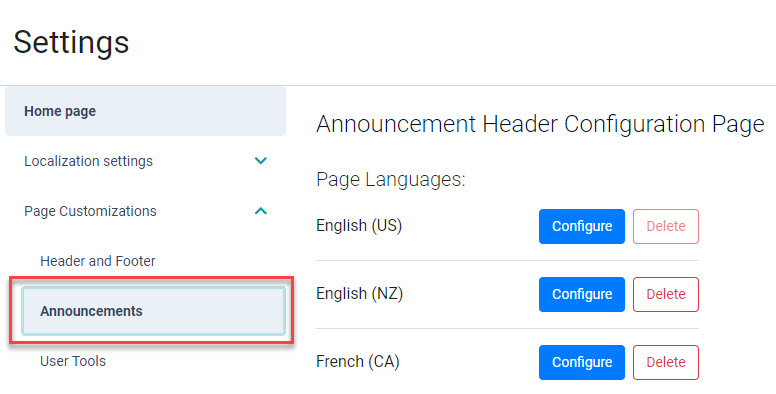
These libraries will see a new Announcements sub-menu found under Page Customization. As part of this change, we've removed creating an announcement from the Header and Footer page.
If you have a live announcement, you will need to recreate it in the new Announcement menu.
Announcement Translations
The Announcement page mirrors the languages configured on your Header and Footer page. You can add a new language form the Announcement page, please note that after saving you will be taken to the Header and Footer page. Click on the Announcements sub-menu to configure the announcement for the new language.
To add an announcement:
-
Click the blue Configure button for a Page Language
-
Create the announcement
-
Repeat as needed for any other languages you have configured
BUG FIXES
Fix for Sierra Home Location Holds
Previously we released a feature to support the Sierra Home Location setting for placing holds. There was a problem with holds placed when this setting was enabled. This problem has been fixed and Sierra's 'home' setting for holds that restricts the pickup location for holds to the patron home location should now be fully supported in Vega Discover.
Fix for Left Click of eContent Links
When econtent displayed Check Availability due to multiple links being available to retrieve materials the displayed links would only work if center clicked or right clicked and choosing open in a new tab. The multiple link display now supports left click for following the displayed link as expected.
Facets are Not Centered on Screens Larger than 767 Pixels
A fix was made to the facets so they are centered on larger screens.
Home Page URLs
URL handling has been improved to make it clearer where links are optional vs required, as well as accepting different URL styles.
-
https://, for example, https://vegasierra.experience.iiivega.com/
-
http://, for example, http://vegasierra.experience.iiivega.com/
-
Does not start with http:// or https://, for example, vegasierra.experience.iiivega.com/
Missing Generated Covers on the Home Page
A fix was made to generate missing covers for home page components.
Release Date: December 19, 2023
Games Do Not Rollup
A new work type was added for multimedia materials that have been cataloged as games. Materials that meet the following fixed field criteria will now be considered as 'multimedia' in Vega Discover. Multimedia instances are unable to rollup with other instances.
Criteria for Multimedia workType for Bibliographic Instance Records
-
bibliographic instance record contains 006/00 'm' and 006/09 'b', 'g', or 'i';
-
or, bibliographic instance record contains no 006/00 'm', but contains LDR/06 'm' and 008/26 'b', 'g', or 'i'
Cataloging Notes:
-
If 006/00 'm' exists, 008 is ignored.
-
If a bib has the Video Game format due to its ILS-assigned material type, but does not contain 006/00 'm' and 006/09 'b', 'g', or 'i' or LDR/06 'm' and 008/26 'b', 'g', or 'i', it will not be assigned work.type=multimedia and will continue to roll up with bibs of work.type=text as before. We suggest libraries run any required batch metadata updates needed in order to normalize bibliographic records for game materials.
Admin Users Recognized In Patron Interface of Vega Discover
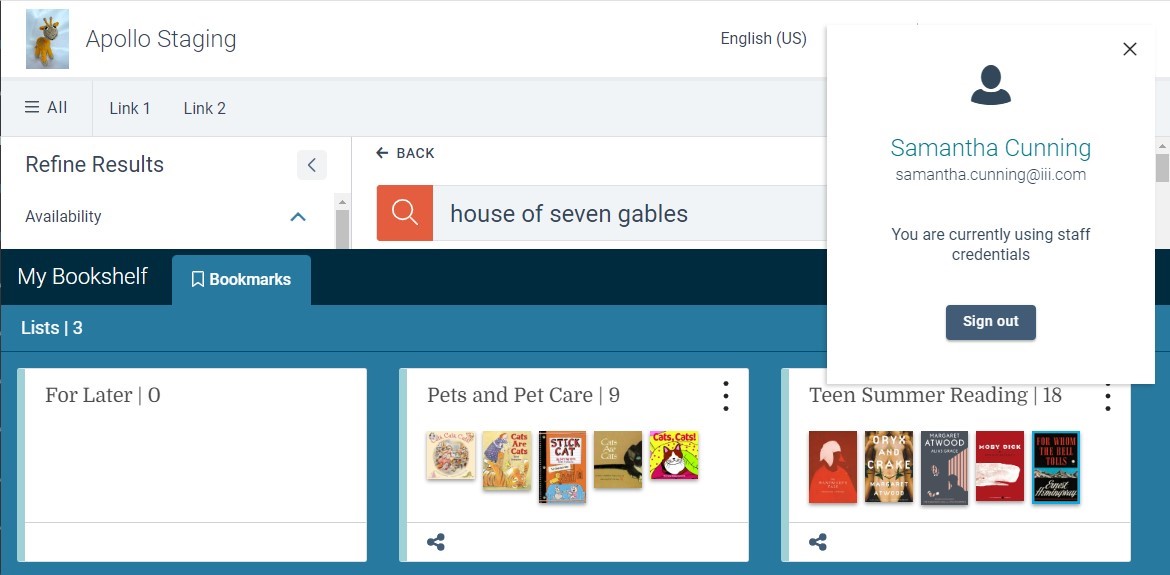
Your Vega Admin User will now display your User Name in the Patron Information pop-up in Vega Discover if you have logged into the admin and without logging out, navigate to the Patron Interface of Vega Discover. Admin Users have also been granted the ability to create Bookmark Lists. More features will be added to the Admin User functions (such as Saved Searches and Showcases) as we continue work to create and apply various Administrative Roles and Permissions for Vega Discover.
Announcement Preview
Limited to Discover+, Discover Premium, and Consortia libraries
After saving an announcement, use the Preview button to see how it will look with your published home page.
If when attempting to preview your Announcement, you are unable to either:
-
Preview the Announcement without saving it first.
-
When previewing the Announcement, you are taken to the last selected language, not the one you are attempting to view.
This indicates that you may need to remove the stored language. Please follow the Vega Discover: Removing Stored Language Key from Browser instructions.
BUG FIXES
Grid View Items Overlap
A bug has been fixed where covers on some mobile devices would overlap.
Author Biography
A bug has been fixed where the author biography displayed on the preview and published page after it was deleted using the home page builder.
Announcement Character Limit
A bug has been fixed where the 250 character limit for an announcement wasn't being applied.
