
Release Date: October 4, 2023
Library Info and Help button components available for custom headers
Two new Custom Header components are now available for Consortia and Premium Discover customers that use custom headers.
-
Help Button: <vega-help-button></vega-help-button>
-
inserts the Vega default documentation ? button and link
-
-
Library Info Button: <vega-library-info-button></vega-library-info-button>
-
inserts the Vega default library information button displaying configured library hours pop-up information and links
-
BUG FIXES
Hero Image
A fix has been released and the entire hero image displays as expected.
Grid View
A fix has been released where the grid view was not displaying for certain format types.
All Facet View
Minor indentation fix for all view of facets popup.
Release Date: October 12, 2023
Series Search Index and Linked Series Updates
This fix requires post deployment indexing and will not appear until that process has been completed by Innovative.
A new Series Index has been added to the available search indexes. As a result of this change Series metadata is no long included in the Title Index but can still be found with all other data in the default ALL Search index.
Series Display logic has been updated to prefer series data selection for display in the following order: 830 Series Added Entry - Uniform Title, 490 Series Statement, 800 $t Series Added Entry - Title of a Work. Series for a title rollup has also been enhanced to include volume information if available.
The search action performed when displayed Series Title information for a title rollup is clicked has been updated to perform a phrase search within the new Series Index to improve relevance of retrieved titles.
Search Edition, Location Drawer and Volumes for Particular Volume
This fix requires post deployment work and will not appear until that process has been completed by Innovative.
-
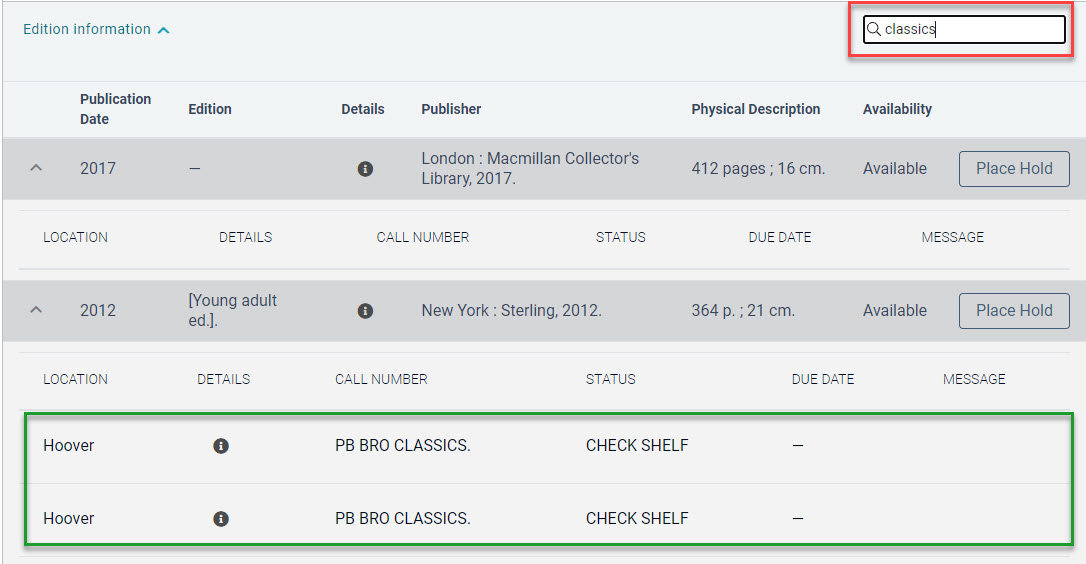
Editions table: Enter a contents search term to expand the details of any editions that match. Deleting the search term will expand all editions in the edition table.
-
Location drawer: Keeps your search term when moving between locations in the drop down.
This can be useful for searching:
-
A title that has multiple call numbers, you could search for Classics.
-
Titles with multiple volumes, you could search for 15.
-
Serials, you could search for Oct 2023.
Announcements V1 for Discover+, Premium, and Consortia Libraries
This fix requires post deployment work and will not appear until that process has been completed by Innovative.
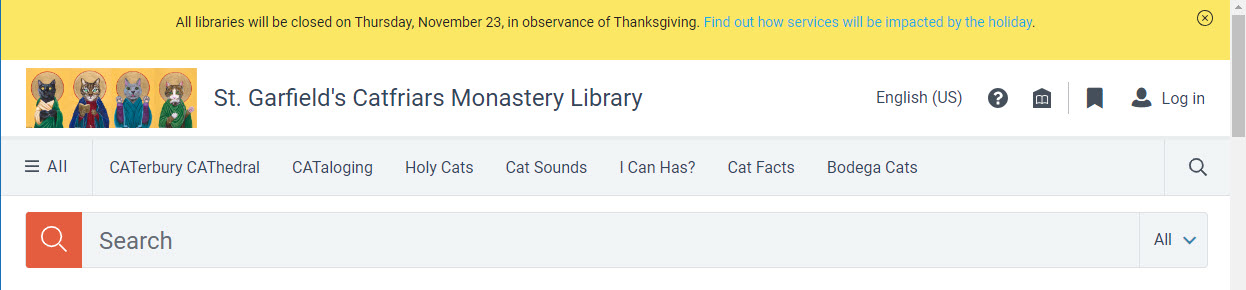
Discover+, Premium, and Consortia libraries can add 1 announcement message to the global header.
-
From the Settings menu, select Docking framework > Global Header.
-
Choose between Notice (yellow background) or Urgent (red background).
-
Choose a status of Draft or Publish.
Add optional hyperlinks.
BUG FIXES
Sierra Item Suppression Update
This fix requires post deployment indexing and will not appear until that process has been completed by Innovative.
Item suppression for Sierra items using icode values will be correctly suppressed in Vega Discover. This update requires Sierra 5.5+
Long Titles Display on Home Page
Long titles are truncated with an ellipsis, and when hovering, the full title appears on the home page.
Empty Showcases Warning
A warning message is shown when an empty showcase has been selected as a home page component. You will need to remove the empty showcase or add content for the preview and published home page to display.
Refine Results Display Fix
When using the Refine Results filters, the number that shows the number of results was cut off and looked incorrect. The spacing has been fixed and will display up to 9,999,999 results.
Release Date: October 23, 2023
880s General Release
This requires post deployment work and will not appear until that process has been completed by Innovative. We will send a follow-up announcement when the process is completed across all regions.
We have completed all outstanding updates to our 880s support for the display of alternate titles, series, and authors. This release we have fixed the last issue that was affecting authors and now have full coverage for existing 880 author data for display. We will be applying the features for alternate expressions to all customers and running the required post deployment indexing to apply this update. If your records contain 880 references for alternate display for titles, authors or series these expressions will display in addition to the expected data fields they provide alternate metadata for after indexing is complete. If your catalog does not contain records with 880 content for these fields you will see no changes in your data display.
Support for Sierra Home Setting for Holds
In order to support Sierra Libraries that use the Home setting for Holds to restrict the pickup location for holds to the patron home location we have added a setting to the Vega Staff Administration Settings under the Cog Menu > Library Defaults > Patron Settings > Hold Setting. The default setting is Ask and will continue to allow patrons to select any available Pickup Location for their Hold. If your library uses the 'home' setting in Sierra you can change this setting to 'Home' and the following changes will be made for your patrons:
-
When placing a hold the patron will only see their home location in the Pickup Location selector.
-
In the Patron Profile the Preferred Pickup Location selector will not be present.
-
In the Patron Profile the Patron will not be able to modify their Home Location.
Grid View Icons
This requires post deployment work and will not appear until that process has been completed by Innovative. We will send a follow-up announcement when the process is completed across all regions.
Material Type Settings has a new column for the Material Icon. Admins can set a material type to the grid view icon of their choosing.
-
A blank space indicates the default icon is being used.
-
When an icon is selected, it will show in the Material Icon column.
Announcements V1 for Discover+, Premium, and Consortia Libraries
This requires post deployment work and will not appear until that process has been completed by Innovative. We will send a follow-up announcement when the process is completed across all regions.
Discover+, Premium, and Consortia libraries can add 1 announcement message to the global header.
-
From the Settings menu, select Docking framework > Global Header.
-
Choose between Notice (yellow background) or Urgent (red background).
-
Choose a status of Draft or Publish.
-
Add optional hyperlinks.
Please contact your account rep if you aren't sure which Discover package you have.
OAI-PMH Beta Open
If your library has a digital repository and you're interested in beta testing OAI Harvesting you can reach out to Samantha Cunning to have OAI harvesting enabled. I will need your OAI Base URL and a link to a single object in your repository that has a thumbnail image. Currently the OAI harvesting feature supports:
-
Harvesting at the Vega Main Site and/or Collection Site Levels, and sharing content down to collection sites from a main consortia site.
-
Harvesting multiple OAI sources.
-
Harvesting all OR specific collections (sets) from the source repository.
-
Building thumbnail links to content via metadata references
-
Insert a dc field value into a URL.
-
dc field contains URL to thumbnail.
-
Use a single image URL for all harvested content.
-
What we're still working on:
-
Facet filtering by OAI collection (set)
-
Thumbnail builders for repositories that cannot use metadata references to link to thumbnail images like ContentDM.
BUG FIXES
Fix to support 'fancy quotes' for phrase searches
Some phrase searches were failing to limit to the input phrase on mobile devices due to the type of quotations used by default on the device platform. Vega now supports all types of quotation marks as indicating a phrase search should be run.
Polaris Item Volume Information Fix
Previously we were receiving duplicate information in separate updates from the Polaris APIs when the volume information of an item was updated in Polaris. We have fixed how we process item volume updates to address this on the Vega side to prevent duplicate volumes information from displaying.
OPAC Message Dashes in Display
When the Sierra OPACMSG was 'empty' but contained one or more dashes in it's empty state, Vega was displaying these dashes in the Availability message directing patrons to the call number and location information for these items. This data was also displaying in the Message field of the Editions table. Dashes should no longer appear if that is the only data present in the OPACMSG field.
