
Release Date: November 8, 2023
Change to how we display checked out and on hold status materials
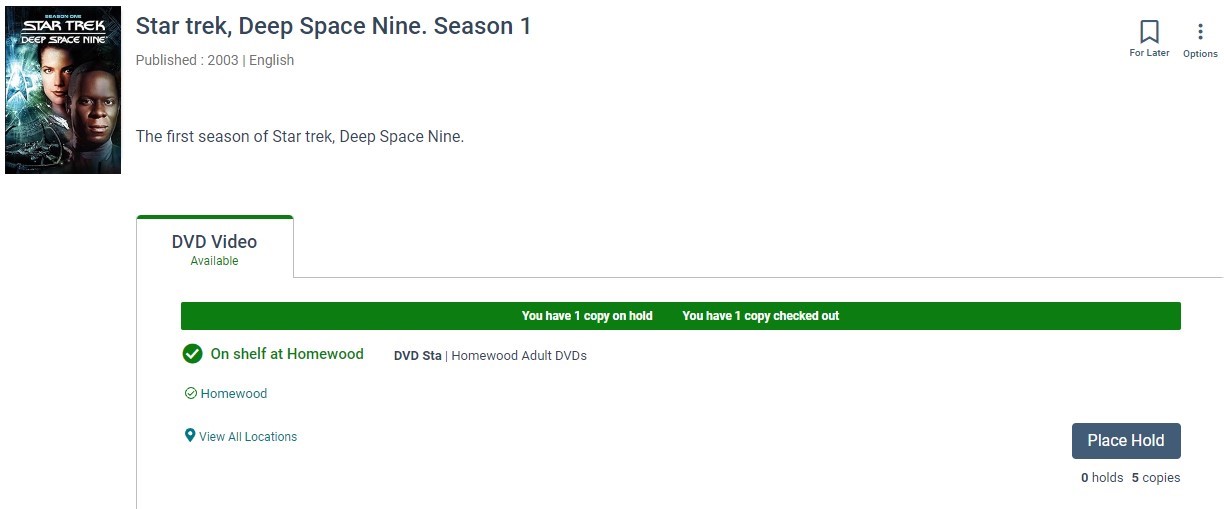
In order to support multiple holds on the same work we have made a change to how we display materials to patrons that they have on hold or checked out. Previously this circulation status was displayed by changing the Place Hold button to read 'On Hold' or 'Checked Out. When clicking the button the patron would be taken to their Holds or Checkouts. Now when a patron has an item checked out or on hold they will see a green banner at the top of work display in the search results and full resource page. The banner will display text indicating how the patron is currently using the title and that text will link the patron to their Holds or Checkouts if clicked. The Place Hold button will remain useable as a result. If the material has volumes the patron will be able to place another hold on a different volume. If the material allows multiple transactions such as a checkout and a pending hold or multiple holds, the patron will be able to place a hold. If the material does not allow these transactions an error will display as a result of clicking the Place Hold button.
Default Grid View Icon
As a reminder, you can use the Material Type Settings to change the icon displayed in the grid view. Please see the full list of icons available, you can choose from the complete list when making changes.
(Default) is displayed in the Material Icon column if Vega is determining the icon to display. If you change the icon and then decide you want to return to the default icon, (Default) is available at the top of the icon drop down list. Your clue that an icon has been selected is the icon will be in the Material Icon column.
BUG FIXES
Grid View Icon Status for eContent Availability
The availability of eContent icons has been improved to better shows an accurate status.
-
The status for online vendor eContent items (including eBook and eMagazine) displays as "Check Availability".
-
After the FRC has been opened, the status is cached for the grid view icon. Please note that the search result page needs to reload to update.
-
ILS (At Library) eBooks, eMagazine, and other eContent status is "Available" until the cache expires.
If an item has been cached recently, you will see the status of "Available" or "Unavailable".
If an item has not been cached recently, you will see the icon status of "Check Availability".
Release Date: November 29, 2023
Recently Returned Status Customization
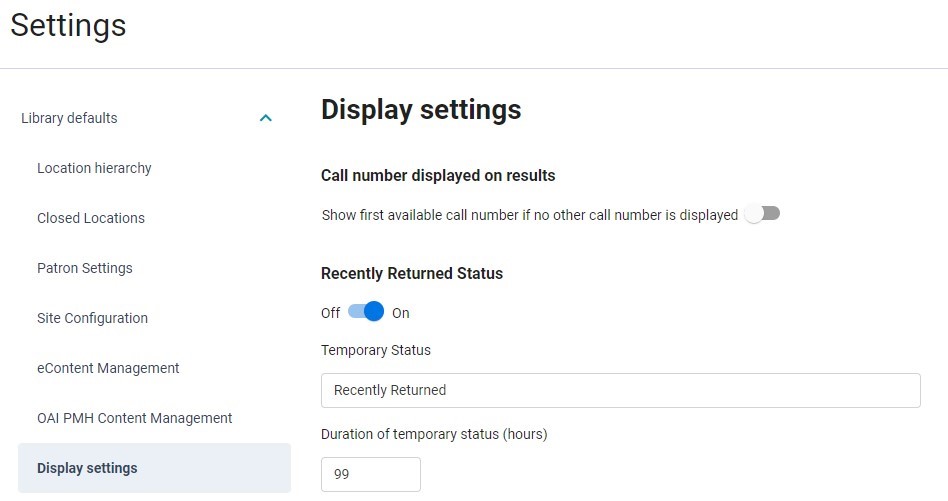
The Recently Returned Status configuration allows libraries to set a custom status that will display when an item becomes Available. When Vega Discover receives an update from the ILS as materials are checked in to the library and become available, Vega will apply the configured temporary timed status (1-99 hours) to this item so that patrons can be alerted that while the item is now available, it might still be in transit to the shelf. The Recently Returned Status can also be inherited from the Main Site or optionally configured individually at the Collection Site/Kiosk level if different libraries desire varying statuses or workflows dictate that shelving may take more or less time at each library site.
Recently Returned Statuses can be configured in the Cog Menu > Library Defaults > Display Settings or for Sites, in the Site Administration Settings > Display Settings
Support for Additional Currencies for Display and PayPal Fine Payments
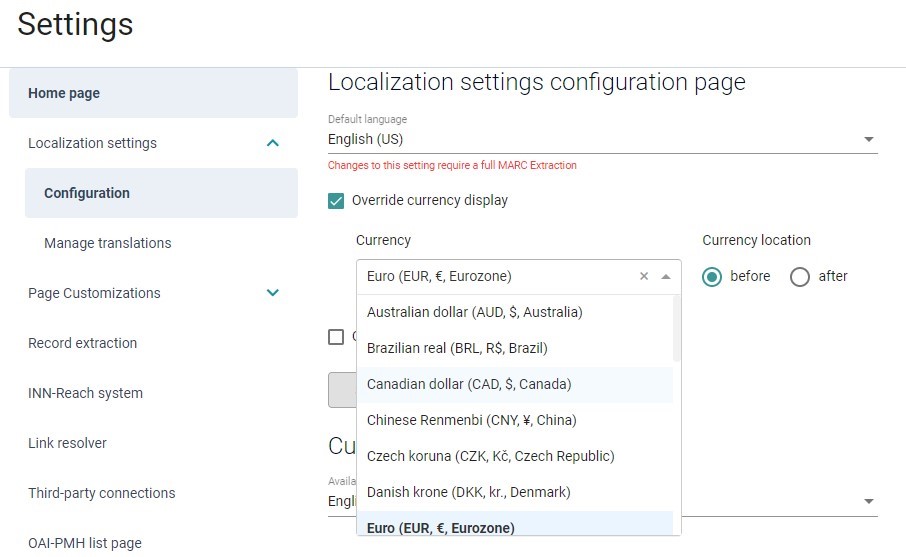
The Localization settings > Configuration page in the Vega Admin has been enhanced so that the Override currency display now contains all PayPal supported currencies. Select the currency of your locale and choose whether the currency symbol should display before or after the fine amount in the Patron Fines and Fees view.
In Vega Discover Fines & Fees tab for patrons, the selected currency will display as configured with the fine amounts they owe.
If you are using a PayPal integration for Fine Payment in Vega Discover the currency you selected will be passed to PayPal when the patron clicks the fine payment button and will appear in the payment form.
Polaris Item Statuses Display Customized Status
This feature will take 24 hours to apply to statuses.
The Item Status displayed for Polaris Libraries now uses the custom Description field from the Item Status configuration instead of the Name field.
Staff Admin Settings Renamed
Changes have been made to the Settings page for clarity.
-
Docking Framework has been renamed Page Customizations
-
Global Header, previously found under Docking Framework, has been renamed Header and Footer.
BUG FIXES
Header and Footer (formerly known as Global Header) Translations
A fix was made to the Header and Footer Configuration so that configured Language pages no longer have display issues. When you configure a display language in Vega Discover, the corresponding Page Language will appear in the Header and Footer Configuration allowing you to customize the Header and Footer for that enabled Language.
Announcement are Not Saving
A fix was made to permission levels so all admins can save an announcement.
Traces of the Announcement Remain After Deletion
A fix was made so the urgent or notice background color doesn't show after an announcement has been deleted.
Home Page Content Disappears
A fix was made so showcases with no content, or that have been deleted, do not prevent all the home page content from appearing.
Facet Padlock is Cut Off
A fix was made so the padlock icon is not cut off when facets are selected.
