
Release Date: May 11, 2023
Documentation Updates
We have updated the Vega Administrative help to improve the documentation searching experience for staff users at Vega libraries. The Vega admin help docs now include all patron documentation. Your library staff can bookmark the admin help docs and use this single interface to search documentation for both library staff and patron help needs.

A feedback button is available for all Vega Administrative help topics and can be used to let us know how we can improve our documentation.
Bug Fixes
Fix for Polaris Patron Login
A problem was fixed where patrons that mistyped their username or password would see a spinner when attempting to login instead of the appropriate error message indicating they had entered the incorrect credentials.
Holds for physical 'electronic' materials
A problem was fixed where Vega was not allowing requests on physical electronic materials like video games, cd roms, dvds and other physical materials with electronic encoding in fixed fields.
Patron Synchronization Jobs
A problem was fixed where the patron synchronization process that runs nightly for Vega and enables you to associate staff patrons with showcase permissions was sometimes failing. Processes that become stale will now be canceled gracefully allowing the next scheduled job to pickup where it left off and provide patron updates.
VPAT fixes for focus issues
Several problems were fixed for focus related issues in Vega Discover
Home Page Configuration Fixes
Several fixes were made to the Home Page configuration (in Beta with some libraries) that allow full browsing of existing showcases.
Release Date: May 24, 2023
Home Page
Thank you to our 20 Home Page early adopter libraries who provided feedback on the training process.
Vega Admins can customize a home page to display your published showcases and selected authors. Create rows of content and arrange them in your preferred order:
-
Cover carousel
-
Showcase group
-
Hero carousel
-
Authors
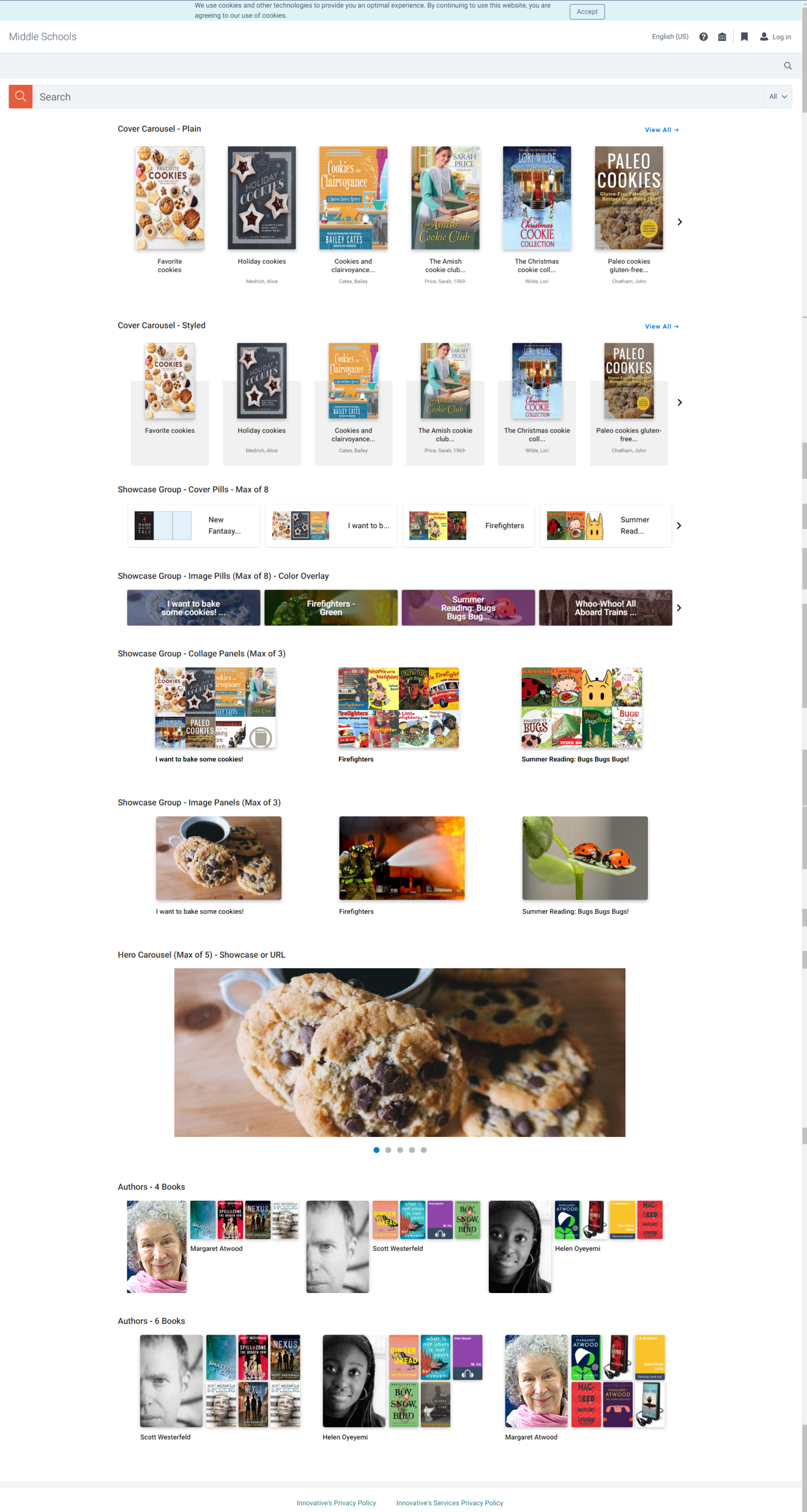
Discover and Discover+ libraries will be able to add up to 5 rows of any content type.
Discover Premium and Consortia libraries will be able to add up to 20 rows of content.
For more details on configuring your home page, look for new Home Page documentation this week in the documentation portal.
During the next two months, if you have questions or you would like some help with the configuration of your home page please don’t hesitate to reach out to the Home Page Onboarding team at Vega_Discover_Home_Page_Onboarding@clarivate.com.
Vega Generated Covers for titles without Identifiers
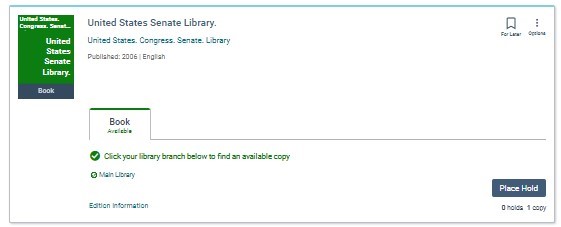
Vega will now display generated cover images for titles that do not have identifiers. These titles would previous display a default grey cover with a line image of a document. Vega generated cover images will look similar to the ones that Syndetics Unbound provides when they do not have a cover for a title in their cover library. Generated covers will appear as a single color cover image with the author name displayed in the top left and the title displayed in the center. A dark grey bar across the bottom of the cover will display a format if one can be determined.
In this first release these covers will display in the search results and resource display pages for works. In a future release we will also apply generated covers to showcases, bookmarks, and other locations where covers display.
Grid View Preview
We need to add a Vega Staff Admin control to turn Grid View on/off before we release it.
https://vegasierra.experience.iiivega.com/
https://vegapolaris.experience.iiivega.com/
Bug Fixes
Hoopla Fix for Inactive Materials
A fix was applied for Libraries that use APIs to ingest Hoopla records directly into the Vega Context Engine to remove inactive materials from the ingested content. Vega will no longer ingest materials that you mark as inactive in the Hoopla content manager system. The recommended workflow for updating your Hoopla content in Vega is as follows:
-
Take note of the materials you have marked as inactive in Hoopla manager.
-
Change these materials to ACTIVE in Hoopla.
-
Wait 24 hours for the Hoopla API job to run an update in Vega and verify that the update job was completed successfully.
-
In Hoopla manager, mark all materials that you do not want to display to patrons in Vega as INACTIVE.
-
Wait 24 hours for the Hoopla API job to run an update in Vega and verify that the inactive titles are no longer able to be found.
If you have ILS copies of materials from Hoopla that you have marked inactive in Hoopla manager these titles will still display in Vega as we prefer ILS records. You will need to delete these from the ILS to remove them from display.
Fix for Use API checkbox display in eContent Configuration
A display issue was fixed in eContent Configurations where the API checkbox position was being shifted to the right displaying in the middle of the descriptive text for some libraries.
