
Release Date: June 7, 2023
Availability Filter Updates
This change to the Availability Filter results will be present by the end of this week as it requires Innovative to complete additional indexing to fully implement.
The Availability Filter has been updated to provide improved filtering results
Choosing the 'At Library' filter will now filter search results to materials that are physical materials that can be retrieved at the library and are currently at an available status. Materials that are checked out or otherwise unavailable will no longer appear when the 'At Library' filter is selected. This filter also includes titles for physical material types that have been set to 'Always Available' status in the Material type settings.
Choosing the 'Online' filter will now filter search results to materials that can only be accessed online such as econtent from our supported vendors and other digital content that displays a 'check availability' button.
'Electronic' materials such as CD ROM and Video Games will no longer be included in the 'Online' filter and will correctly display in the 'At Library' filter if available.
In our next release we will further enhance the 'At Library' filter to also return serial titles that have holdings but no items.
Search and Refine by Publisher
You can enable the publisher facet at any time after June 7th, the facet and publisher data will appear after Innovative completes indexing of this new data. Please allow until end of week for data to fully populate.
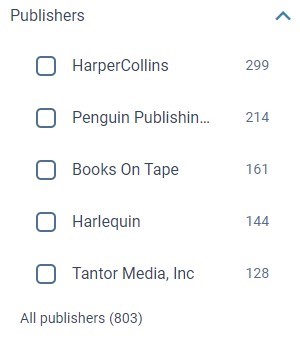
A Publisher facet is now available for libraries to enable in their Vega Catalog. The publisher facets allows users to limit search results to materials that were published by a particular entity.
Publisher names have also been indexed into the Everything search at our lowest relevancy boost. You can search for publisher names to retrieve materials published by a particular entity. The BibFrame fields used for search are filed under provisionActivity = publication and come from MARC 260 $ab or 264 second indicator 1 $ab. Only $b is included in the Publisher Facet. If your library has 880 support on, the 880 publisher data is also indexed and included in the facet. For publishers for an 880 equivalent both values appear in the facet and will retrieve the same results.
Polaris Public Item Notes
This feature requires Polaris 7.4. For libraries on the correct version, public notes display can be enabled if desired in the Staff UI settings and notes will appear by the end of this week as this feature requires Innovative to complete additional indexing to fully implement.
For Polaris libraries a setting has been added to the Vega Staff Admin settings in the cog menu under Library Defaults called Display Configuration. On this page a setting can be toggled to enable the display of Polaris Public Item Notes in the Location Drawer (beneath call number, shelf location and collection information), in the Item Details popup from the editions table and also if the item displaying for availability on a card contains a note that will display in the availability message as well. The default setting for Display Public Item Notes is off.
OPAC Message Updates
For Sierra libraries, the OPAC Message field has been relocated in the Location Drawer to display directly beneath the Call Number and Shelf Location information for each item. When an OPAC message does not include a value and was previously displaying one or more dash marks, the Message field will no longer display for the item in the location drawer.
BUG FIXES
Collection Site Search Improvement
The speed of search retrieval in Collection Sites has been improved.
eContent Management Setting Fix
A bug was fixed where the cog link in the econtent management setting was not correctly linking to the Third Party Connection configured for the consortia main site.
Home Page Builder
-
A bug was fixed where the scrollbar was missing from My Bookshelf when a home page is published.
-
A bug was fixed where the hero and showcase images were cut off on mobile devices.
-
A bug was fixed where changing an author didn't update the biography if there wasn't an author image.
-
Backend handling of images has been improved.
Release Date: June 21, 2023
Additional Identifiers Search & URLs
This index update will be present by the end of next week as it requires Innovative to complete additional indexing to fully implement.
Additional material identifier numbers have been indexed into the "All" search for Vega Discover. You are now able to search for ISSNs (022), Legal Deposit Numbers (015), ISMNs (024), Control Numbers (035) by pasting these identifiers into the search box of Vega. For a full list of all fields and subfields indexed for control numbers please check our documentation (updated Monday).
ISSNs and Control Numbers can also be used to link directly to records in Vega Discover to in the same way that you can create a direct link to materials by ISBNs and RecordIDs.
ISSN URL: https://nypl.na2.iiivega.com/search/card?issn=
Control Number URL: https://nypl.na2.iiivega.com/search/card?controlNumber=
Update to At Library Availability Filter for Holdings
This update will be present by the end of next week as it requires Innovative to complete additional indexing to fully implement.
We have improved the Availability Filter's 'At Library' filter by including Serial titles that have Holdings but no items in the At Library filter results.
Additional Coverage for Default Cover Images when no ISBN
We have expanded our coverage of default Vega generated cover images for titles that do not have an ISBN by extending these covers to display in Showcases that are displayed on Work Detail pages and in the patron bookshelf.
Polaris Donor Facet and Search
This facet and index update will be present by the end of next week as it requires Innovative to complete additional indexing to fully implement.
Polaris Libraries that record Donor Name and Organization information in Item Record details can now enable a Donor Facet in Vega Discover to allow library users to filter search results to materials donated by a particular person or entity. Donor Names and Organizations can also be searched in the All search of Vega Discover to locate materials associated with Donor information. In the Edition Table, if an item has been donated to the library and has associated Donor Name or Organization information, this information will display in the Item Details popup.
Bug Fixes
Some Records Not Appearing in Vega
This fix/update will be present for all libraries by the end of next week as it requires Innovative to complete additional indexing to fully implement.
A problem was fixed where some titles could not be found in Vega. The problem was appearing for some libraries using the eContent APIs for OverDrive. The deletion method for OverDrive materials was causing an issue with Work Level rollups for associated titles in a work. A temporary fix was applied before this release and a long term fix has been applied with this code push. Post deployment processes run by Innovative will resolve any remaining issues by Friday.
Responsiveness Improvements for Generated Showcase Code Widgets
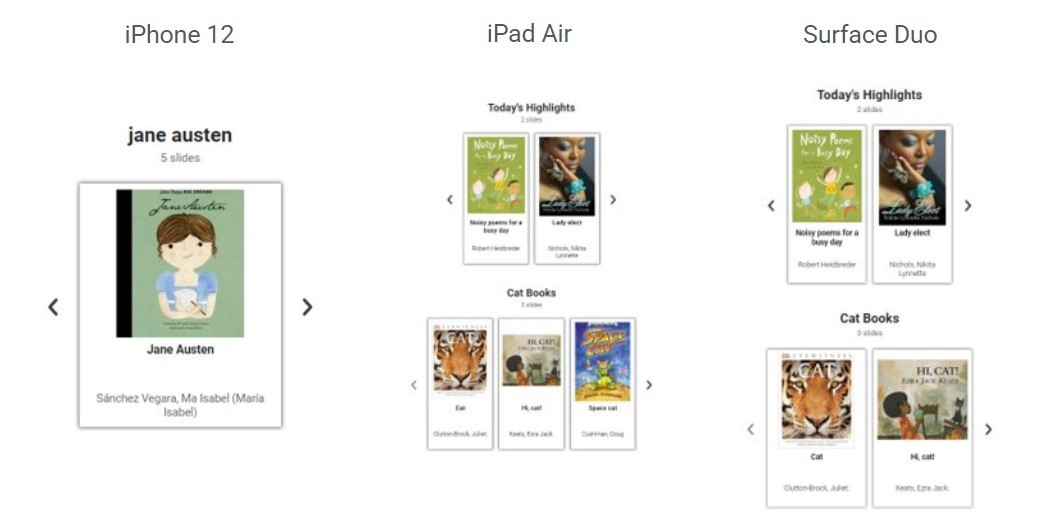
Our Vega Discover generated showcase widget code available for staff created showcases now provides a more responsive display for all devices. There is no need to regenerate code for showcases you are already using in websites, this change will apply automatically to existing showcases. When a showcase display is too wide for a device (too many covers configured for the display area) we gracefully reduce the displayed covers on the showcase row and allow left/right navigation without the need to scroll up and down to view resources in the showcase.
Editing a Home Page Component Moves it to the Bottom of the List
A problem was fixed where editing a previously published component row moved it to the bottom of the list. This has been updated so the component row updates to being Unpublished in the same position on the list.
Switching Between Pills and Panels Lost Showcases 4 - 8
A problem was fixed when comparing Showcase Group display types. You may now add up to 8 showcases as Pills, switch to Panels, then go back to Pills without having to reselect showcases and images.
Vega Resources
Home Page Video
Watch our 8 minute training video for tips on creating your Home Page. This has been added to the other videos available on the Vega Resources page.
