
Release Date: July 6, 2023
Vega One Hour Maintenance Window July 6
Vega is releasing a critical infrastructure update that may cause some users to experience unresponsive pages during the 1 hour maintenance window (starting Midnight PST / 3a EST / 7p NZST and concluding in an hour). Refreshing the page will reload content. This applies to LX Starter, Promote, and Discover (Staff and Patron UIs).
Polaris Item Notes Update
For Polaris libraries that display public item notes, those notes now also display on the search and full resource display pages for works when the item availability message being displayed for a particular call number is an item with a public note. Remember that Polaris Item Notes can be toggled on and off for display in the Vega Staff admin, Cog Menu, Display Configuration settings.
Additional Coverage for Default Cover Images when no ISBN
We have expanded our coverage of default Vega generated cover images for titles that do not have an ISBN by extending these covers to display in Showcases that are displayed on Agent and Concept Detail pages and in the patron fines and fees display.
Additional Identifiers Fully Indexed and Ready to Use
Note that all Vega library's indexed have been updated and users can now search for ISSNs (022), Legal Deposit Numbers (015), ISMNs (024), Control Numbers (035) by pasting these identifiers into the search box of Vega.
ISSNs and Control Numbers can also be used to link directly to records in Vega Discover to in the same way that you can create a direct link to materials by ISBNs and RecordIDs. Full details available in the Staff Documentation.
Bug Fixes
Home Page Component Rows
A problem was fixed where Premium and Consortia libraries could select the 'Add More Content' button, but the 'Create Showcase Block' button was disabled after adding 5 rows of content.
Home Page Image Requirements
Have been updated to provide the more specific image recommendations detailed in the Help documentation.
Home Page Showcase Group
A problem was fixed where the configuration panel on the right was cut off and a scrollbar was needed to pan the panel.
Home Page Preview and Publish
A problem was fixed where having a Collage Panel was preventing the Preview and Published pages from loading.
Release Date: July 19, 2023
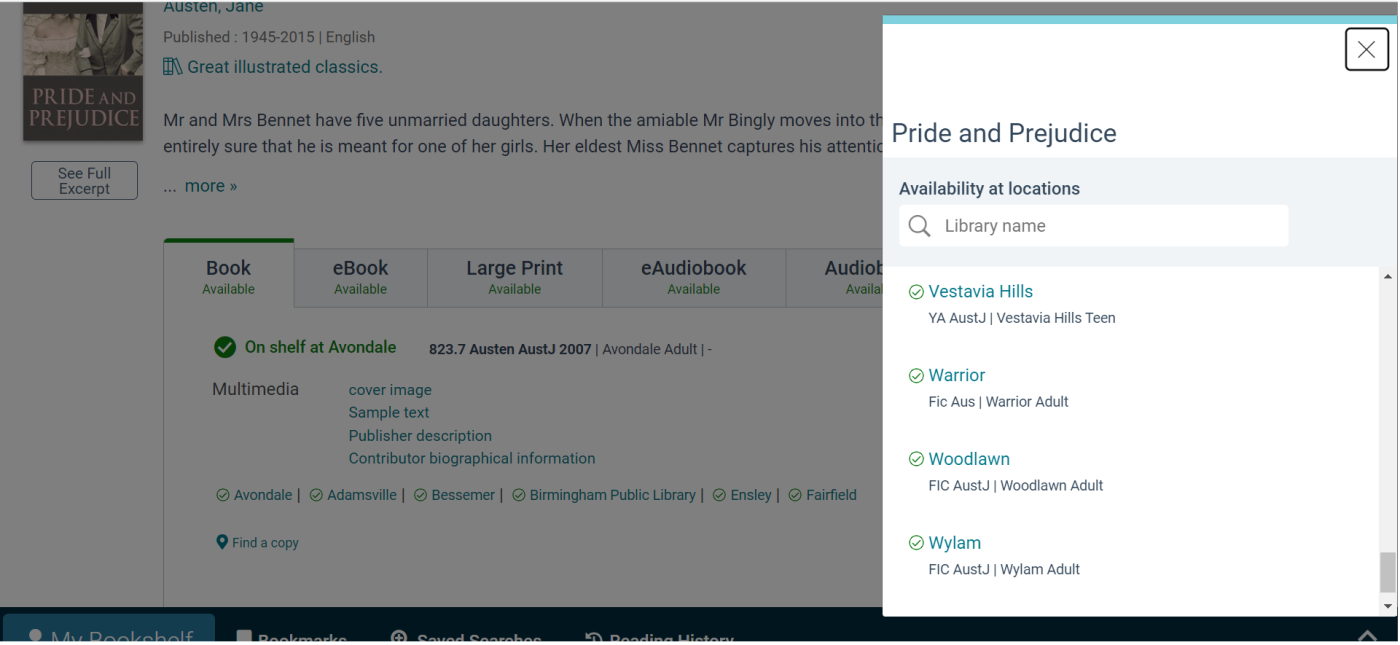
"Find a copy" and Call Numbers Added to All Locations view of Drawer
When your library has more than 6 locations displaying on a work, a link reading, "View More Copies" was available that would open the Location Drawer to a special All Locations view showing the names of all Libraries that have Available Copies with Libraries that have Unavailable Copies filtered to the bottom. The display string for this link has been updated globally to read, "Find a Copy".
Additionally the All Locations view that is displayed when you follow the Find a Copy link or the Locations Link from the Location Drawer view for a particular location has been enhanced to show the first Call Number for an available copy at each location. Call Numbers are also displayed for Unavailable copies to support browsing for similar titles on the shelf in that location.
You may need to clear your browser cache before seeing translation changes
Show First Available Call Number if No Other Preferred Call Number
A setting has been added to the Cog Menu in the Vega Staff Admin settings under Library Defaults > Display Configuration. Enabling "Show first available call number if no other call number is displayed" will result in the following changes to Vega Availability display.
1. The "Find a copy" link will display on works at all times.
2. When Viewing a Vega Catalog in as a Guest User, Vega will display the call number of the first available copy from the first alphabetical location.
3. When Viewing a Vega Kiosk Catalog as a Guest User, Vega will display the call number of the first available copy from the Kiosk Preferred Location. If the kiosk contains items from other locations and there are no copies at the kiosk location, Vega will display the call number and location of an available copy at the next available copy location.
4. When Viewing a Vega Collection Site Catalog as a Guest User, Vega will display the call number of the first available copy from the first alphabetical Preferred Location for the Collection Site. If the Collection Site contains items from other locations and no copies are available at a Collection Site Preferred Location, Vega will display the call number and location of an available copy at the next available copy location.
Summary
In general when this setting is enabled, Vega will prefer the display of call numbers in the following order based on availability:
1. kiosk preferred location
2. patron home location (if patron is logged in)
3. collection site preferred locations in alphabetical order by name
4. all other locations in alphabetical order by name
Additional Coverage for Default Cover Images
Coverage continues to expand for titles that do not have an ISBN.
• Bookmarks
• Showcases
• Saved searches
• Reading History
Coverage for covers displayed in generated showcase code is not available yet.
Home Page Events
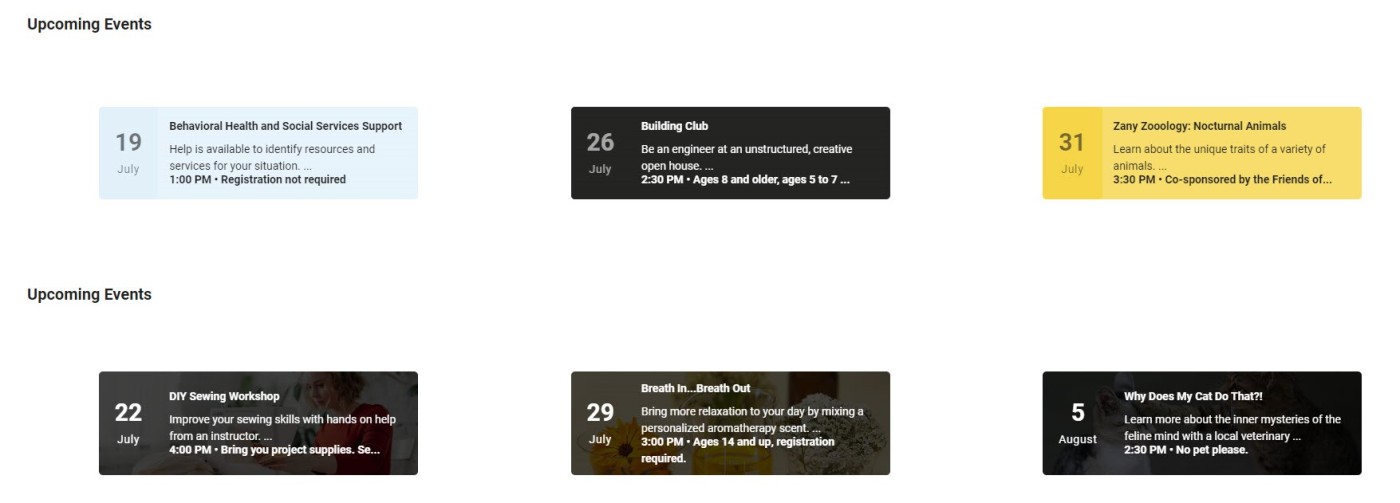
We have expanded the Home Page builder to include the manual creation of events. Staff Admins can create events that link to an external URL. For step by step instructions for creating events, expand the To configure a home page section in the Help Resources.
• Plain gives you 3 color options.
• Image allows you to upload an event image, but there is a darker overlay for text readability.
BUG FIXES
Home Page Responsive Improvements
A problem was fixed where Authors would overlap on mobile devices.
Home Page Hero
A problem was fixed to restore the dots under the hero that indicate the number of images.
Release Date: July 26, 2023
Bug Fixes
Missing home pages
Thank you for opening support tickets for your missing home pages. The fix will be released on Wednesday, July 26. Once this is pushed, you’ll see your published home page from your main site on all configured sites.
Libraries with a Premium or Consortia license are not impacted by this issue and can create individualized home pages for each site configuration.
Tips for Editing Your Home Pages
1. Use preview and another browser to compare changes from the live home page.
2. Close the browser tab with the home page editor before viewing the live site when using one browser.
3. Premium and Consortia library should only edit one collection or kiosk site at a time.
