
In the Account portal settings, you can customize the Overview page in the Account Portal and choose which content appears to minors, provided that you've been assigned either the Admin or the Site Admin role.
To restrict visibility for minors, use the Showcase is visible to minors toggle. When disabled, the showcase is hidden for accounts identified as minors.
Dashboards normally display a Your next read showcase generated from the items the patron has saved or bookmarked. If a patron has no saved items, you can define a backup showcase that is displayed instead.
 To set the backup showcase
-
From the Settings menu, select Interface configurations > Account portal settings.
-
In the Account portal builder section, use the search box next to the Your next read showcase preview to find the showcase to use.
-
Select Save showcase.
You can remove the backup showcase at any time by selecting Remove.
The second showcase block allows you to configure the featured showcase, which appears for all patrons regardless of their activity.
To set the featured showcase
-
From the Settings menu, select Interface configurations > Account portal settings.
-
In the Account portal builder section, use the search box next to the featured showcase preview to find the showcase you want to display.
-
Select Save showcase.
You can remove the backup showcase at any time by selecting Remove.
Account linking
-
When Account Linking is enabled, patrons can link their accounts. Adult patrons can initiate links and connect with other patrons. Minor patrons can connect to adult patron accounts.
If you disable account linking, existing links are preserved and become available again when the feature is re-enabled.
-
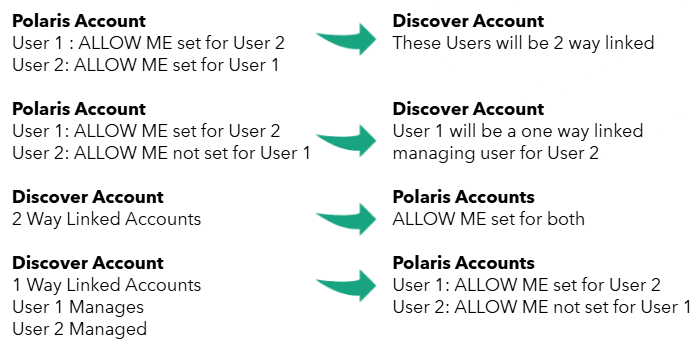
Enable Sync linked accounts with ILS to synchronize account links between Vega Discover and Polaris.
The first time a patron signs in, Vega Discover imports any existing account links from Polaris ILS and creates them in Vega Discover. It also sends any existing account links to Polaris. After the initial synchronization, new links created in Vega Discover are automatically sent to Polaris.
When a patron signs in or refreshes the page, Vega Discover checks Polaris for account links that were added by staff and imports any new links.
In a future release, a Vega API will enable Vega Mobile account links to synchronize through Solus.
Enabling and disabling this feature can result in account link discrepancies. Links created while synchronization is disabled might not be synchronized when the feature is re-enabled.
-
Enable Display Linked Account Location to display the linked account's library branch location in parentheses after the patron's name when the account is managed by another user. This information appears in Account Portal menus and circulation workflows for physical and electronic materials, helping patrons distinguish between linked accounts.
Minor accounts
These settings help you identify accounts and control the access minors have to specific areas of Discover.
-
Use birthday to identify minors
The preferred method of identifying minors is to use the ILS birth date information. When this setting is enabled, you can set the age from which a minor may use Discover independently. -
Minors can unlink from adult accounts
When this setting is enabled, minors can unlink from adult accounts at any time, regardless of who initiated the connection. -
ILS Minor Criteria
If no birth date is available, you can select criteria that identify accounts as belonging to minors. If any of the criteria is a match, the account is flagged as a minor.
