
Flujo de trabajo de la compra
Esta página describe el flujo de trabajo general de la compra que incluye los pasos requeridos para crear los diferentes tipos de órdenes de compra (física/electrónica/digital).
For a list of links to pages with instructions for purchasing in Alma including creating PO lines, renewals, working with vendors, etc., see Purchasing.
For an overview of working with acquisitions in Alma, including links to relevant sections such as Invoicing, Renewals, Configuration, etc., see Introduction to Acquisitions.
Explicación general del flujo de compra
A continuación hay una ilustración del flujo de trabajo de la compra que especifica la manera en que una línea de orden de compra (línea de PO) se gestiona desde su creación hasta que espera para su activación o recibo. This workflow does not cover patron-driven acquisitions and it does not cover the Rialto purchasing workflows. For Rialto purchasing workflows, see Rialto End-to-End Order Lifecycle.
For more information, watch Purchasing Overview. (4:06 min.)
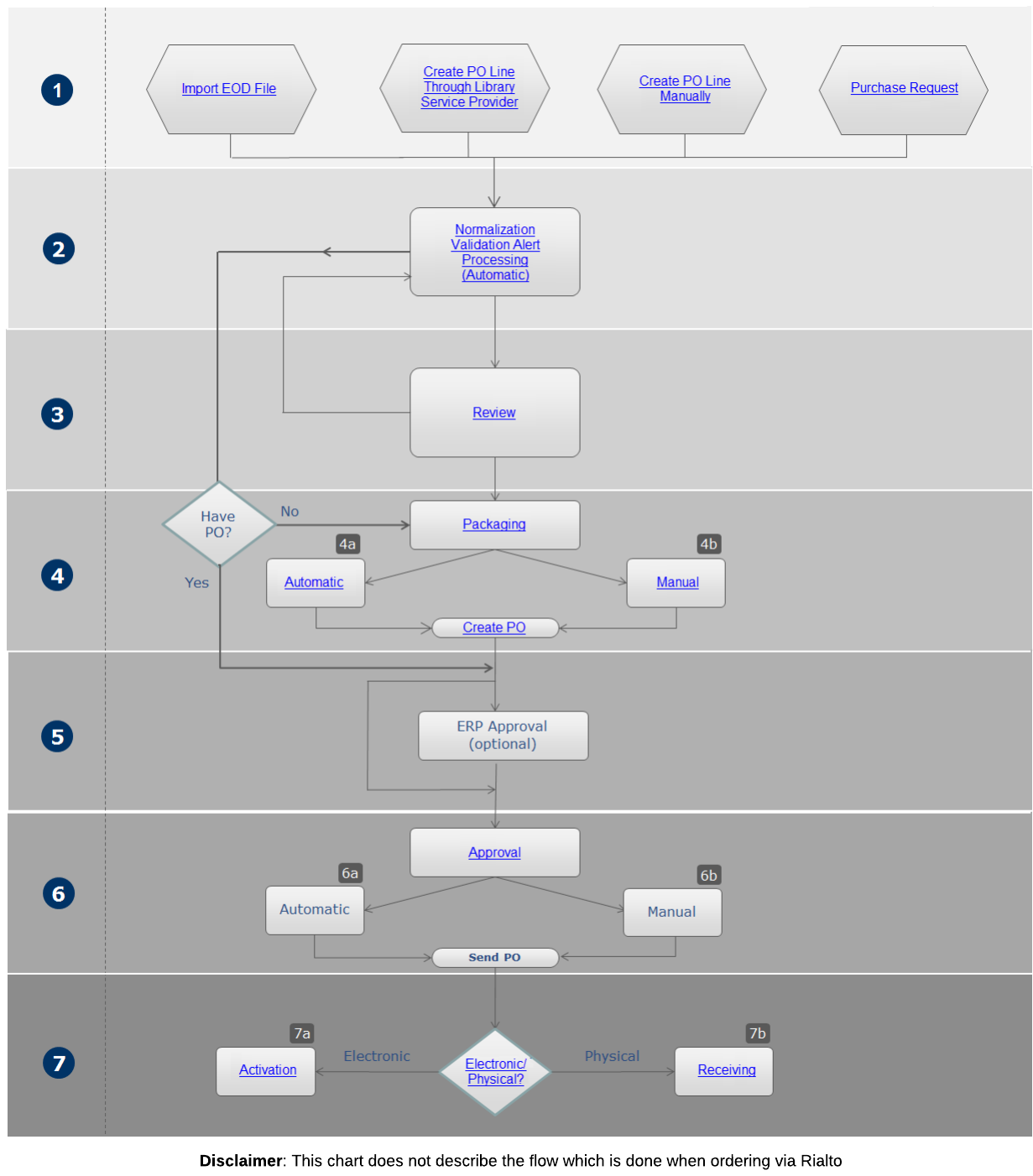
A continuación se detalla una descripción de los pasos a seguir dentro de este flujo de trabajo (con los números que corresponden a los del diagrama):
- Por lo general, una línea de la orden de compra se introduce en Alma mediante uno de los siguientes métodos:
- Automáticamente, por una importación de datos de órdenes insertados (EOD)
- Una API en tiempo real a través de un Proveedor de Servicio Bibliotecarios (LSP)
- Manually as a result of the creation of a PO line, including from purchase requests (see Working with Purchase Requests) For information on the three order types (electronic/physical/digital) and how to create them, see the Required Steps to Create an Order section below. For information on other purchase types such as legal deposits and patron driven acquisitions see Creating PO Lines.
- Alma normaliza, valida y procesa la línea de la orden de compra para determinar si hay elementos que requieren atención especial. This process is based on the review rules pre-configured by an administrator (see Configuring Purchase Review Rules).
- If there are data issues (including invalid or missing information) or alerts that require attention, Alma sends the PO line for review (see Reviewing PO Lines).
Manually created PO lines skip the review process if you select Order Now or Save and Continue. If you do not select these options (for example, if you only select Save), then the manually created PO line remains In Review.
- La línea de la orden de compra se agrupa en una Orden de compra (PO). The purchasing configuration, configured in the PO line's Information section (see Manually Creating a PO Line), determines if the packaging is automatic or manual.If, during the packaging process (manual or automatic), any of the mandatory fields (required in this step) are incomplete, the PO is sent back for review (see Reviewing Purchase Orders). Después de revisar la orden de compra e introducir la información faltante, la orden de compra pasa a ser aprobada y enviada al proveedor.
- Automatic – PO lines are automatically packaged according to the rules in a PO (see Packaging PO Lines into a PO).
- Manual – The PO line is packaged manually (see Packaging PO Lines into a PO). When the person performing the manual packaging selects Create New PO Package in the Actions menu of the PO Lines task list, the PO line is packaged into a PO.
- La PO procede a la aprobación del ERP si se requiere y, a continuación, Alma valida si implementar la aprobación automática o manual según se describe en el siguiente paso.
- Alma decide si la aprobación y el envío es automático o manual dependiendo de la configuración de compras (configurada por Ex Libris).La orden de compra está sujeta a aprobación si fue creada manualmente o con EOD, y si está configurada con agrupación manual o automática. However, if the user selects Order Now for a PO line, the PO is approved automatically, regardless of the purchasing configuration.
- Automatic – The PO is approved automatically and sent to the vendor.
- Manual – The PO must be approved manually before it is sent to the vendor. For information, see Approving and Sending POs. When the person performing the manual approval selects Approve and Send on the Approve Purchase Orders page, the approved PO is sent to the vendor.
- La línea de orden de compra pasa a la etapa final del flujo de trabajo de compra, en donde se verifica para revisar si es material físico, electrónico o digital.
- Electronic – The PO line proceeds to the activation stage (see Activating Electronic Resources and the Activation Task List).
- Physical— The PO line proceeds to the receiving stage, where it is handled according to its type, as described in Receiving Material. Post-receiving processing may also be performed after the material is received (see Post-Receiving Processing).
- Digital— The PO line does not have an activation or receiving process. Sus etapas finales dependen de si se trata de una línea de orden de compra única o continua:
- One-Time – The PO line closes when the representation(s) have been uploaded and Save and Continue is selected.
- Continuous – After a representation is uploaded, and Save and Continue is selected, the PO line is marked either as Recurring Renewal or Waiting for Manual Renewal, depending on whether it is configured for manual or automatic renewal (see Manually Creating a PO Line). It closes when it is either closed manually, closed because its Subscription to date has arrived, or closed by the Change PO Line Status job.
Lista de verificación de pasos requeridos para crear una orden
Existen tres métodos principales para crear una orden:
- Manually - For details see Manually Creating a PO Line. (For creating a service subscription PO line without inventory, see Creating Service Subscription PO Lines Without Inventory.)
- EOD - For details see Importing Records Using an Import Profile.
- Real-Time - For real-time ordering via API (through library service provider) see Real-Time Ordering.
The above three methods can create an order for both physical and electronic resource material types. For digital resource material types, the manual and API methods are supported. A continuación, véase la lista de verificación de los pasos requeridos para crear una orden para cada tipo de material:
For electronic orders originating from OASIS it is recommended to use the API approach for complete descriptive information and access information.
For the full list of the ways to create a PO line including legal deposits, purchase requests and patron driven acquisitions (PDA) see Creating PO Lines.
Métodos de Órdenes de Recursos Tísicos
Física - Orden manual
|
Configuration action |
Description |
|---|---|
|
No se necesita ninguna configuración especial para solicitar órdenes manuales. |
Física - EOD (datos de órdenes insertados)
|
Configuration action |
Description |
|---|---|
|
Configurar Plantilla de Metadatos por Defecto |
Ensure that a default metadata template is configured (see Working with Record Templates). Open Metadata Editor > Template. Elija la plantilla que desee definir por defecto. Select Properties. Seleccionar como por defecto. |
|
Ajustes del Proveedor |
Asegúrese de que el proveedor en Alma no esté configurado para enviar mensajes EDI salientes para las órdenes de compra. Other EDI messages (e.g. for invoices) can be sent if this is your workflow.Read more about vendor EDI |
|
Proporciónele al proveedor información de las órdenes relevantes. |
The following parameters must be provided in order for the vendor to create an order: Owning Library code(s) – The library that the created PO line is assigned to. Se debe facilitar una lista de los posibles códigos de la biblioteca propietaria al proveedor. La implementación por parte del proveedor podría consistir en proporcionar un menú desplegable en el formulario de órdenes, para seleccionar la biblioteca propietaria relevante. Otra implementación podría ser asociar una cuenta a una única biblioteca propietaria. En este caso, el operador debe iniciar sesión en la cuenta correspondiente. The vendor can use the Retrieve libraries API in order to get full list of libraries, or the Get library API in order to check a code of a library. Location code(s) – The location in which the related item(s) will be created. Solo relevante para material físico. The vendor can use theRetrieve locations API in order to get the list of locations. Fund code(s) – The fund from which payment is generated. The vendor can use the Retrieve funds API. |
|
Create a New Order import profile or copy an existing profile |
Go to Acquisitions > Manage import profiles. Ensure that the Vendor reference number information received from the EDI invoice is mapped to Alma. See Managing Import Profiles. |
|
Ensure that you have the correct Submission Format option selected |
|
|
Configure an Update inventory import profile |
Go to Acquisitions > Manage import profiles.
|
Física - API
|
Configuration action |
Description |
|---|---|
|
Configure Plantilla de Metadatos por defecto. |
Ensure that a default metadata template is configured (see Working with Record Templates). Go to Metadata Editor > template. Elija la plantilla que desee definir por defecto. Select Properties. Seleccionar como por defecto. |
|
Send vendor the API key (see REST PO Line). |
La institución debe generar una clave API y proporcionársela al proveedor. A cada proveedor se le debe facilitar una única clave API por separado. De este modo, si la institución desea dejar de trabajar con un proveedor específico, esa clave API específica se puede deshabilitar a través de la red del desarrollador. Otras claves API seguirán funcionando como de costumbre.
Se puede definir la API con su Sandbox o con entornos de producción.
|
|
Proporcione al proveedor información de las órdenes relevantes. |
The following parameters must be provided in order for the vendor to create an order: Vendor code and Vendor account code – These refer to the vendor record in Alma. La línea de la orden de compra creada estará relacionada con el proveedor y la cuenta de este. Se debe garantizar que el proveedor en Alma no esté configurado para enviar mensajes EDI salientes para las órdenes de compra. Se pueden enviar otros mensajes EDI (p. ej. para facturas), si este es su flujo de trabajo. Owning Library code(s) – The library that the created PO line is assigned to. Se debe facilitar una lista de los posibles códigos de la biblioteca propietaria al proveedor. La implementación por parte del proveedor podría incluir proporcionar un menú desplegable en el formulario de órdenes, para seleccionar la biblioteca propietaria relevante. Otra implementación podría ser asociar una cuenta a una única biblioteca propietaria. En este caso, el operador debe iniciar sesión en la cuenta correspondiente. The vendor can use the Retrieve libraries API in order to get full list of libraries, or the Get library API in order to check a code of a specific library. Location code(s) – The location created for the related item(s). Solo relevante para material físico. The vendor can use theRetrieve locations APIto get the list of locations. Fund code(s) – The fund from which the payment is generated. The vendor can use the Retrieve funds API. For more information, see Real Time Acquisitions Setup for Institutions. |
|
Create New order integration profile. |
El Perfil de integración API de Nueva orden determina las reglas de coincidencia que se desean aplicar. For more information, see How the bibliographic record is determined. Validations for fund related issues can also be configured as documented here(docx). |
|
Configure an Update inventory import profile. |
|
Métodos de órdenes de recursos electrónicos
Electrónica - Orden manual
|
Configuration action |
Description |
|---|---|
|
No se necesita ninguna configuración especial para solicitar órdenes manuales |
Electrónica - EOD (datos de órdenes insertados)
|
Configuration action |
Description |
|---|---|
|
Configurar Plantilla de Metadatos por Defecto |
Ensure that a default metadata template is configured (see Working with Record Templates). Go to Metadata Editor > template. Elija la plantilla que desee definir por defecto. Select Properties. Seleccionar como por defecto. |
|
Ajustes del Proveedor |
Verifique que el proveedor en Alma no esté configurado para enviar mensajes EDI salientes para órdenes de compra. Other EDI messages (e.g. for invoices) can be sent if this is your workflow.Read more about vendor EDI |
|
Proporciónele al proveedor información de las órdenes relevantes. |
The following parameters must be provided in order for the vendor to create an order: Owning Library code(s) – The library that the created PO line is assigned to. Se debe facilitar una lista de los posibles códigos de la biblioteca propietaria al proveedor. La implementación por parte del proveedor podría incluir proporcionar un menú desplegable en el formulario de órdenes, para seleccionar la biblioteca propietaria relevante. Otra implementación podría ser asociar una cuenta a una única biblioteca propietaria. En este caso, el operador debe iniciar sesión en la cuenta correspondiente. The vendor can use the Retrieve libraries API in order to get full list of libraries, or the Get library API in order to check a code of a specific library. Location code(s) – The location that is created for the related item(s). Solo relevante para material físico. The vendor can use the Retrieve locations API in order to get the list of locations. Fund code(s) – The fund from which the payment is generated. The vendor can use the Retrieve funds API. For more information, see Real Time Acquisitions Setup for Institutions. |
|
Create a new order import profile or copy an existing profile |
Go to Acquisitions > Manage import profiles. Ensure that the Vendor reference number information received from the EDI invoice is mapped to Alma. See Managing Import Profiles. |
|
Ensure that you have the correct Submission Format option selected |
|
|
Configure an Update inventory import profile |
Go to Acquisitions > Manage import profiles.
|
Electrónica - API
|
Configuration action |
Description |
|---|---|
|
Configurar Plantilla de Metadatos por Defecto |
Ensure that a default metadata template is configured (see Working with Record Templates). Go to Metadata Editor > template. Elija la plantilla que desee definir por defecto. Select Properties. Seleccionar como por defecto. |
|
La institución debe generar una clave API y proporcionársela al proveedor. A cada proveedor se le debe facilitar una única clave API por separado. De este modo, si la institución desea dejar de trabajar con un proveedor específico, esa clave API específica se puede deshabilitar a través de la red del desarrollador. Otras claves API seguirán funcionando como de costumbre.
Se puede definir la API con su Sandbox o con entornos de producción.
|
|
|
Proporciónele al proveedor información de las órdenes relevantes. |
The following parameters must be provided in order for the vendor to create an order: Vendor code and Vendor account code – These refer to the vendor record in Alma. La línea de la orden de compra creada estará relacionada con el proveedor y la cuenta de este. Se debe garantizar que el proveedor en Alma no esté configurado para enviar mensajes EDI salientes para las órdenes de compra. Se pueden enviar otros mensajes EDI (p. ej. para facturas), si este es su flujo de trabajo. Owning Library code(s) – The library that the created PO line is assigned to. Se debe facilitar una lista de los posibles códigos de la biblioteca propietaria al proveedor. La implementación por parte del proveedor podría incluir proporcionar un menú desplegable en el formulario de órdenes, para seleccionar la biblioteca propietaria relevante. Otra implementación podría ser asociar una cuenta a una única biblioteca propietaria. En este caso, el operador debe iniciar sesión en la cuenta correspondiente. The vendor can use the Retrieve libraries API in order to get full list of libraries, or the Get library API in order to check a code of specific library. Location code(s) – The location that is created for the related item(s). Solo relevante para material físico. The vendor can use the Retrieve locations API in order to get the list of locations. Fund code(s) – The fund from which the payment is generated. The vendor can use the Retrieve funds API. For more information, see Real Time Acquisitions Setup for Institutions. |
| El Perfil de Integración API de Nueva Orden determina las reglas de coincidencia que desea aplicar. For more information, see How the bibliographic record is determined. Validations for fund related issues can also be configured as documented here (docx). | |
|
Configure an Update inventory import profile |
|
Métodos de órdenes de recursos electrónicos para órdenes procedentes de OASIS/GOBI
See Real-Time Ordering for a full list of providers.
Electrónica - API
|
Configuration action |
Description |
|---|---|
|
Configurar Plantilla de Metadatos por Defecto |
Ensure that a default metadata template is configured (see Working with Record Templates). Go to Metadata Editor > template. Elija la plantilla que desee definir por defecto. Select Properties. Seleccionar como por defecto. |
|
Send vendor the API key (see REST PO Line). |
La institución debe generar una clave API y proporcionársela al proveedor. Use OASIS-Onboarding@proquest.com to contact OASIS. For GOBI, contact your GOBI representative. A cada proveedor se le debe facilitar una única clave API por separado. De este modo, si la institución desea dejar de trabajar con un proveedor específico, esa clave API específica se puede deshabilitar a través de la red del desarrollador. Otras claves API seguirán funcionando como de costumbre.
Se puede definir la API con su Sandbox o con entornos de producción.
|
|
Proporciónele al proveedor información de las órdenes relevantes. |
The following parameters must be provided in order for the vendor to create an order: Vendor code and Vendor account code – These refer to the vendor record in Alma. La línea de la orden de compra creada estará relacionada con el proveedor y la cuenta de este. Se debe garantizar que el proveedor en Alma no esté configurado para enviar mensajes EDI salientes para las órdenes de compra. Se pueden enviar otros mensajes EDI (p. ej. para facturas), si este es su flujo de trabajo. Owning Library code(s) – The library that the created PO line is assigned to. Se debe facilitar una lista de los posibles códigos de la biblioteca propietaria al proveedor. La implementación por parte del proveedor podría incluir proporcionar un menú desplegable en el formulario de órdenes, para seleccionar la biblioteca propietaria relevante. Otra implementación podría ser asociar una cuenta a una única biblioteca propietaria. En este caso, el operador debe iniciar sesión en la cuenta correspondiente. The vendor can use the Retrieve libraries API in order to get full list of libraries, or the Get library API in order to check a code of a specific library. Location code(s) – The location created for the related item(s). solo Relevante para material físico. The vendor can use the Retrieve locations API in order to get the list of locations. Fund code(s) – The fund from which the payment is generated. The vendor can use the Retrieve funds API. For more information, see Real Time Acquisitions Setup for Institutions. |
|
El Perfil de integración API de Nueva orden determina las reglas de coincidencia que se desean aplicar. For more information, see How the bibliographic record is determined. Validations for fund related issues can also be configured as documented here(docx). Dado que el flujo de trabajo activa los registros de la Zona de la Comunidad, las secciones Validación y Coincidencia del perfil de integración no se tienen en cuenta. |
|
|
Activar la colección relevante de la Zona de la Comunidad |
To successfully create an electronic resource (portfolio) within a collection in Alma, the institution must have the relevant collection in their Institution Zone activated from the Community Zone. Currently, the functionality of creating the resource within a collection during the order process is available only for orders originating from OASIS and GOBI from their supported eBook platforms. |
Métodos de órdenes de recursos digitales
Digital - Orden manual
|
Configuration action |
Description |
|---|---|
|
Habilite el tipo de línea de orden de compra difital relevante. |
Navigate to Configuration > Acquisitions > PO Line Types and select Customize from the row actions menu for one or both of the following:
Make sure to select Save when done. |
|
Cree o busque el título digital relevante y ordénelo. |
Para crear una línea de orden de compra digital, los tipos de línea de orden de compra se deben habilitar según se describe arriba. Creating a digital PO line is very similar to creating a physical or electronic PO (see Manually Creating a PO Line). One main difference is that digital PO line types are created with no inventory(both One Time and Continuous), and you need to associate a representation with the PO line. Hay dos formas para asociar una representación con una línea de orden de compra:
After a Digital PO Line is created, configured, and saved, the workflows differ for One Time and Continuous:
The UPDATE_REPRESENTATION_FROM_ACQ privilege provides purchasing roles the ability to edit representations from the PO Line. Una línea de orden de compra no se puede "Guardar y continuar" sin una representación. If you select Save and Continue when no representations have been added to it, it is not saved, and a warning message appears. |
Explanation of Purchase Types Workflow and Inventory
Una vez creada la línea de orden de compra con un cierto tipo de compra, el flujo de trabajo y las implicaciones de datos se fijan y no pueden modificarse. Por consiguiente, es importante entender el impacto de los diversos tipos tanto en el flujo de trabajo de compras como en el inventario resultante.
The material type is the type of material, such as a book, electronic journal, or CD-ROM, etc., from which an item takes its form. For information on all electronic material types, see Managing Electronic Resources. For information on all physical material types, see Configuring Physical Item Material Type Descriptions. El tipo de material es parte del registro del ejemplar que es creado, pero no controla el flujo de trabajo de la línea de la orden de compra. El tipo de material se puede modificar cuando se crea/edita una línea de orden de compra. El tipo de material se puede modificar cuando se crea/edita una línea de orden de compra.
Para las líneas de orden de compra digitales, no se usa el campo de tipo de material.
Los tipos de compra pueden ser físicos, electrónicos o digitales y de uno de los siguientes tipos de continuidad:
-
One-time – One-time or infrequent orders, such as a printed book, an e-book, or a musical score that is not published repetitively. Physical material is received on the One Time tab on the Receive New Material page. Las existencias y los ejemplares se crean automáticamente y se crea una existencia para cada ubicación de una sola vez y un ejemplar por cada copia. El material electrónico pasa por el proceso estándar de activación y permanece activado indefinidamente. Las líneas de orden de compra digitales se crean sin inventario. Una vez se factura y se recibe/activa la línea de orden de compra, se cierra.
Digital representations (Digital Non-Archiving and Digital One Time) are considered as if the "Item" is received and will push the PO Line forward in the workflow. -
Continuous – Orders that are repeated on a regular basis, for example, monthly subscriptions to physical or electronic material such as journals. Physical material is received on the Continuous tab on the Receive New Material page. Holdings are created upon physical PO line creation (for each run of the series in a location) and items are created: Electronic material goes through the standard activation process and may be deactivated during the evaluation process. La línea de orden de compra permanece abierta una vez facturada y recibida/activada (aunque se puede cerrar manualmente). Las representaciones digitales (Suscripción digital) se consideran como si el "Ejemplar" se hubiera recibido y harán avanzar la línea de orden de compra en el flujo de trabajo de renovación. Las líneas de orden de compra digitales se crean sin inventario.
Additional examples and workflow information:
-
When using a prediction pattern: After selecting Open predicted item in the MD Editor. See Prediction Patterns.
-
De lo contrario: al recibir el fascículo o el volumen encuadernado.
-
Una publicación seriada por la cual se recibirán ejemplares de forma trimestral - los fascículos se describen por el registro bibliográfico del periódico adjunto a la orden. Se debe crear un ejemplar por cada fascículo; son ejemplares independientes hasta que se unen. Los fascículos pueden circular o no, pero se puede querer registrar información sobre cada fascículo, como por ejemplo si está perdido o las reglas especiales para uso interno de ciertos fascículos. You should either create a prediction pattern for the delivery of the issues or receive new issues in the Continuous tab on the Receive New Material page.
-
Una monografía de múltiples volúmenes por la cual se recibirán volúmenes en intervalos no predecibles, tales como los volúmenes de una enciclopedia. Los volúmenes se describen por el registro bibliográfico de la enciclopedia adjunta a la orden. Se deben crear ejemplares para cada volumen, debido a que los volúmenes pueden circular de forma independiente. You should receive new volumes in the Continuous tab on the Receive New Material page.
-
Standing order – Orders that are not repeated on a frequent or regular basis. Se usa, por ejemplo, para comprar todos los libros impresos de un autor particular cuando son publicados o cuando se publica una serie de libros pero no necesariamente de forma regular. El material de monografía física no se recibe en la pestaña de Continua de la página de Recibir material nuevo. En su lugar, se crea manualmente al crear o seleccionar un registro bibliográfico, crear un registro de existencias y luego crear un registro de ejemplar, el cual se asocia con una línea de orden de compra permanente. Se establece una fecha de recibo para el ejemplar en el Editor de ejemplares físicos.
For more information on managing standing orders in Alma, see Acquisitions - Standing Orders in Alma[PPT].
-
Puede registrar compras que reflejen el modelo de compra de las actualizaciones de la licencia. Additionally, a PO line can be created without a fund and price for the scenario where a License upgrade has no charge and needs to be recorded in the system. The option to set a PO line as no charge is compatible with the following acquisition methods: Purchase, Approval Plan, and Purchase at Vendor System. When selecting any of these values in the Acquisition Method of the PO line, the No Charge check box appears. Cuando seleccione esta casilla de verificación, se ocultan las secciones de Fondo y Precios.
-
El material que no es monografía se procesa de la misma forma que el material continuo, aunque sin una secuencia o frecuencia fija. El material electrónico pasa por el proceso estándar de activación y se puede desactivar durante el proceso de evaluación. La línea de orden de compra permanece abierta una vez facturada y recibida/activada (aunque se puede cerrar manualmente).
Ejemplos adicionales e información:
-
Una serie de monografías para la cual se reciben títulos nuevos a intervalos inesperados. Cada título puede ser publicado por un autor diferente, pero todos están bajo la misma serie y se está suscrito a la serie. La orden se enlaza a un registro bibliográfico suprimido para la serie; los ejemplares no están descritos por este registro bibliográfico. Cada ejemplar se publica bajo un título diferente y debe catalogarse por separado con su propio registro bibliográfico que está enlazado a la orden de la serie. Cada ejemplar circula de forma independiente.
-
Una suscripción a un recurso integrador, como materiales legales de hojas sueltas que son entregados y luego agregados a un ejemplar físico. Los materiales se describen por el registro bibliográfico del ejemplar físico adjunto a la orden; cada uno es una actualización del ejemplar. No es necesario crear ejemplares nuevos para cada material que es entregado, debido a que no circulan de forma independiente. Si los materiales se reciben en un intervalo predecible, actualizar la fecha de recepción prevista en la orden cada vez que se reciba el material.
-
The table below presents the recommended purchase types that are available for each type of repository search (see Manually Creating a PO Line for an explanation of the search and PO line creation process).
| Encontrar | Seleccionar tipo | Tipo de compra recomendado | Continuidad de la orden | Flujo de trabajo de la línea de orden de compra | Inventario creado |
|---|---|---|---|---|---|
| Todos los Títulos | Periódico (ISSN) | Periódico electrónico | Una sola vez | An Activate task is created when the PO line is sent | Portafolio sencillo |
| Continua | An Activate task is created when the PO line is sent | Portafolio sencillo | |||
| Imprimir periódico | Una sola vez | Recibido en la página de Recibir material nuevo | Tipo de ejemplar - Periódico | ||
| Continua | Recibido en la pestaña de Continua en la página Recibir material nuevo. El ejemplar se crea al momento de recibirlo. | Existencias | |||
| Libro (ISBN) | Libro electrónico (Título) | Una sola vez | An Activate task is created when the PO line is sent | Portafolio sencillo (libro electrónico) | |
| Continua | An Activate task is created when the PO line is sent | Portafolio sencillo (libro electrónico) | |||
| Actualizar licencia | Una sola vez | Ninguno | Ninguno | ||
|
Imprimir libro
Si solo los ejemplares físicos que se piden son libros, entonces cualquier tipo de orden de Imprimir libro (tal como Imprimir Libro - Una sola vez) es esencialmente la misma que el tipo físico equivalente (como Físico - Una sola vez).
|
Una sola vez | Recibido en la página de Recibir material nuevo | Tipo de ejemplar - Libro | ||
| Pedido permanente
(monografía; no monografía actúa como continua) |
El material no se recibe en la página Recibir material nuevo, sino a través de un flujo de trabajo único. For details, see Receiving Standing Order Monograph Material. | Existencias | |||
| Colección electrónica | Paquete de periódicos | Colección electrónica | Una sola vez, Continua | An Activate task is created when the PO line is sent | Colección electrónica (Basada en conocimiento central) |
| Paquete de libros | Colección electrónica | Una sola vez, Continua | |||
| Mixto | Colección electrónica | Una sola vez, Continua | |||
| Base de datos | Colección electrónica | Una sola vez, Continua | |||
| Actualización de licencia: solo disponible como "Orden adicional" | Una sola vez | Ninguno | Ninguno | ||
| Orden de servicio (sin inventario) | Servicio de acceso | No se creó el inventario. El flujo de trabajo de la línea de orden de compra depende de la continuidad (se necesita una renovación para órdenes de tipo suscripción). See also Creating Service Subscription Lines Without Inventory.
Estos tipos de línea de orden de compra no pueden ser la línea de orden de compra principal del inventario, pero se pueden añadir al inventario como líneas de orden de compra adicionales. A one time PO line moves to the "Waiting for Invoice" workflow step once its PO is approved. A subscription PO line moves to the "Recurring Renewal" workflow step once its PO is approved. See Manually Creating a PO Line for more information. |
|||
| Servicios de base de datos | |||||
| Otro servicio | |||||
| Cargos de procesamiento de artículos (APC) - Única vez | |||||
| Cargos de procesamiento de artículos (APC) - Suscripción | |||||
- Purchasing Physical Items
- Import Records in Batch for New Orders
For information about the PO line types that can be created for each material type and context in Alma, see Enabling/Disabling PO Line Types.
Page tags: article:topicpurchasingproduct:almacontent:Documentationlang:englishPurchase order linePO Linepurchase typestanding ordercontinuous PO lineone-time PO linestanding order PO line
