
Viewing Running Jobs
Esta página describe cómo ver las tareas en ejecución en Alma. For a page with links to information about managing jobs in Alma including scheduled and manual, see Managing Jobs in Alma.
You can view all jobs that are currently running on the Running tab of the Monitor Jobs page (Admin > Manage Jobs and Sets > Monitor Jobs). Además, Alma incluye páginas dedicadas que enumeran tareas de tipos específicos en ejecución y completadas. For the list of job types with their own Alma pages, see Job Types with Their Own Management Pages.
The Running tab of the Monitor Jobs page lists all running jobs. You can filter the list by job category and search using the quick-search Find field.
In the Network Zone in a collaborative network, you can also filter by Institution Name to view jobs run on a specific institution. Un administrador en la Zona de red no puede abortar la ejecución de una tarea por una institución miembro.
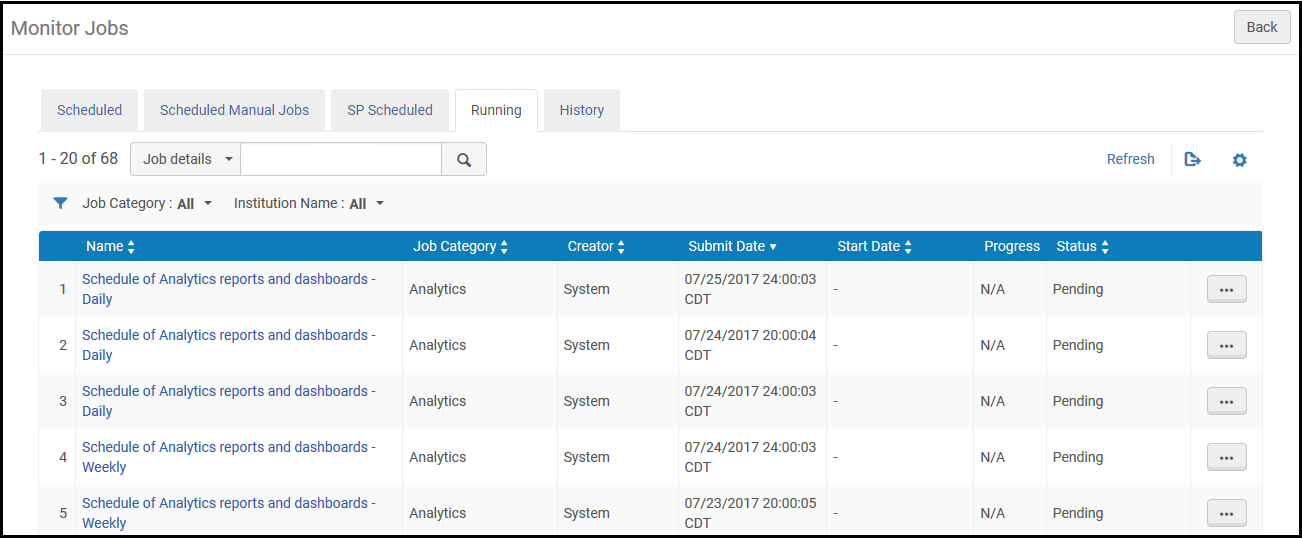
Las tareas de Alma se ejecutan en uno o varios hilos. La diferencia entre éstos es:
- De un solo hilo - Estas tareas se procesan en una ejecución, con un periodo relativamente corto (hasta 30 minutos). The progress of the job is not shown in the Running tab. An example of a single-threaded job is the fiscal period rollover job.
- Hilos múltiples - Estas tareas se procesan en lotes pequeños con hilos paralelos. The Running tab shows the job's progress as it is run. Algunos ejemplos de tareas de hilos múltiples son el indizado, publicación e importación/sincronización de SIS.
Each job in the Running tab includes the following information:
| Nombre de columna | Descripción |
|---|---|
| Nombre | Nombre de la tarea. |
| Categoría de tarea | Una categoría definida por el componente de la biblioteca y el rol del usuario asociado con la tarea. |
| Creador | El usuario que ejecutó la tarea. For user-submitted jobs, the name is the user's user name. For system jobs, the name is System. |
| Fecha de envío | La fecha y hora en que se envió la tarea. |
| Fecha de inicio | La fecha y hora en que se inició la tarea. |
| Progreso | El porcentaje del progreso en la ejecución de la tarea. |
| Estado | El progreso actual de la tarea. Están disponibles los siguientes estados:
|
To refresh the page view as the job progresses, select Refresh.
Job Types with their Own Management Pages
Alma incluye páginas que enumeran tareas de tipos específicos en ejecución y completadas. Los tipos de tareas con sus propias páginas de Alma incluyen:
- Adquisiciones:
- Delete POs – See Deleting POs
- Roll over ledgers – see Rolling Over Ledgers
- Roll over encumbered PO lines – see Rolling Over PO Lines
- Roll over resource sharing requests – See Rolling Over Resource Sharing Requests
- Import an embedded order data or inventory using an import profile – Monitor and View Import Jobs
- EDI communication – see Monitoring EDI Jobs
- Administración:
- Purge users – see Purging Users
- Waive fines – see Waiving Fines in Bulk
- Manage circulation desk operators – see Managing Circulation Desk Operators
- Health check –HealthCheck Tool
- Perfil de integración – Muchas de estas tareas tienen sus propias páginas de historial/ejecución. For more information, see Configuring Integration Profiles.
- Servicios al usuario:
- Change due dates – see Changing Loan Due Dates in Bulk
- Restore temporarily shelved items –Viewing Restore Request Jobs
- Upload loans and transactions created off-line – see Offline Circulation
- Mark items requiring action – see Items Requiring Action
- Run transfer requests – see Transferring All Requests to a Different Circulation Desk
- Create a fines and fees report – see Creating Fines and Fees Reports
- Match citations to inventory in bulk – see Matching Citations to Inventory in Bulk
- Lost Loans – see Viewing Overdue and Lost Loan Jobs
- Suggest alternate editions for citations – see Finding Alternate Resource Suggestions for Citations
- RENEW_PPU_LICENSE – see Renewing PPU Licenses After a Course Rollover
- Integración y perfiles de publicación:
- Export/import invoice information from financial systems – see Financial Systems
- Send/receive EDI communication with vendors – see Monitoring EDI Jobs
- Publish inventories – see Publishing and Inventory Enrichment
- Import resource sharing borrowing requests – see Importing Resource Sharing Borrowing Requests From an External System
- Send requests to remote storage – see Requests to Remote Storage Facilities
- Import/export users from/to Student Information System (SIS) – see Student Information Systems
- Publish fines to a bursar system – see Bursar Systems
- Aleph Central Catalog – see Integrating an Aleph Central Catalog
- SBN – see SBN Job Report for Bibliographic and Authority Alignment
- Gestión de recursos:
- Import a file using an import profile – see Monitor and View Import Jobs
- Overlap and Collection Analysis – see Overlap and Collection Analysis
- Export records using a publishing profile – see Publishing Profiles
