
External Systems
Configuring Integration Profiles
- Administrador general del sistema
Alma se integra con sistemas externos tales como sistemas de proveedores, sistemas de Planificación de Recursos Empresariales, sistemas de catálogos, sistemas de almacenamiento remoto y otros, usando protocolos estándar (tales como S/FTP). For more information, see Integrations with External Systems.
Algunos perfiles de integración crean tareas que pueden ser usadas para exportar información a, o importar información de, un sistema externo. Otros perfiles de integración proveen tokens y códigos para ser usados para configurar sistemas externos.
For a video on integrating external systems, watch Integration with External Systems (6 min.)
You begin configuring integration profiles on the Integration Profile List page (Configuration Menu > General > External Systems > Integration Profiles).
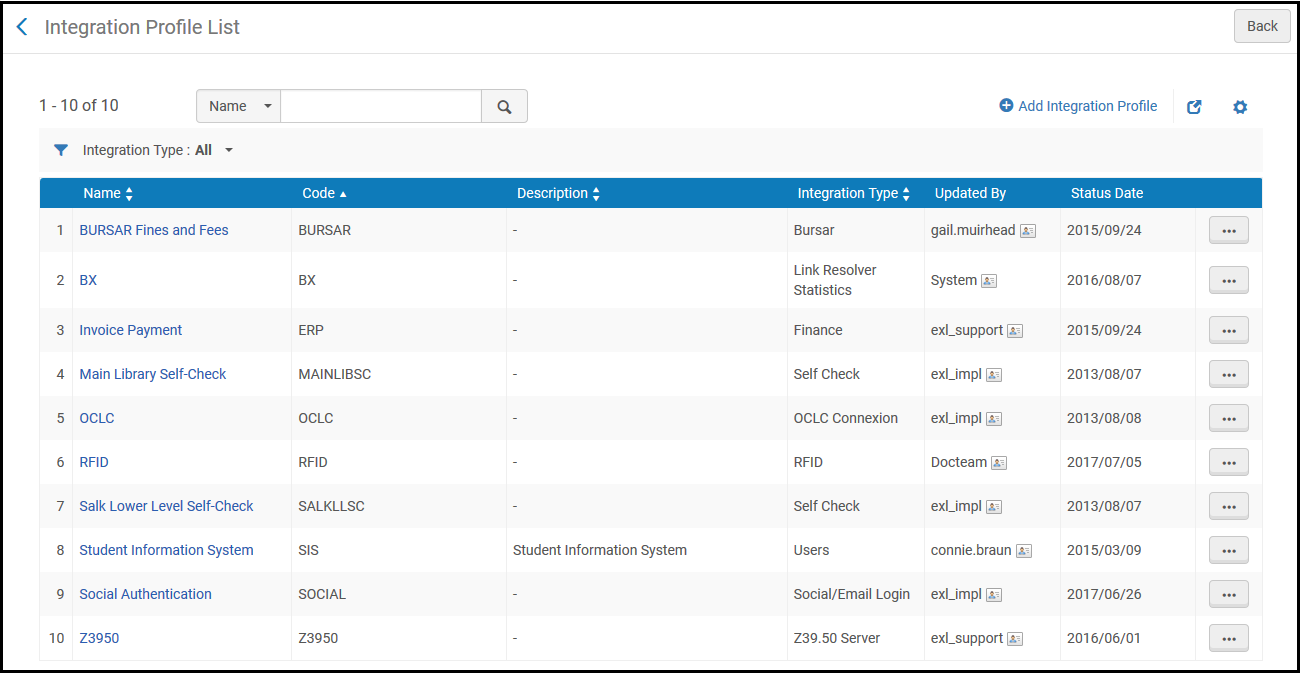
La página de Lista de perfiles de integración incluye una lista de los perfiles de integración.
Se pueden realizar las siguientes acciones en esta página:
- Añadir un perfil de integración (véase las secciones enlazadas en la tabla de abajo).
- Edit an integration profile (Edit in the row actions list). Al editar un perfil, no se puede cambiar el tipo de perfil. In addition, you can add contact information relevant to the profile on the Contact Information tab. For more information about the fields on this tab, see Configuring Institution/Library Contact Information.
- Delete an integration profile (Delete in the row actions list).
- View job history (Job History in the row actions list; see Viewing Completed Jobs.)
Para más información sobre añadir/editar un perfil de integración, véase las siguientes secciones:
| Tipo de perfil | Descripción | Más información |
|---|---|---|
| Integración Aleph Bridge | Integrar desde un sistema central un inventario de un no miembro de Alma en una institución puente que es gestionada por la Zona de red de Alma. | Integrating a Non-Alma Member's Inventory from a Central System into a Bridge Institution Managed by a Network Zone |
| Restricciones de la API | For more information about this profile, see the developer's network documentation at https://developers.exlibrisgroup.com/blog/working-with-api-restriction-profiles/. | |
| Ampliación | Configurar el enriquecimiento de OpenURL. | Alma Resolver Augmentation |
|
Contribución de registros de autoridad |
Para uso futuro (Solo Zona de la Comunidad) |
|
| Gestión financiera | Export fines and fees to the institution's bursar system. | Exporting Fines and Fees to a Bursar Systems |
| CAS | Intercambiar información de autenticación y autorización para un inicio de sesión único con un sistema externo. | CAS-Based Single Sign-On/Sign-Off |
| Integración del catálogo central | Integrar un catálogo central externo con Alma. | |
| IdP en la nube | Para uso futuro | |
| Inscripción a Cursos | Importar la información de inscripción a cursos a Alma para su empleo con Leganto. | Configuring Importing Course Enrollment Jobs |
| Cargador de cursos | Importar cursos desde un sistema de gestión de cursos. | Configuring Course Loading |
| Almacén de contenido digital | Integrar con el almacén de contenido digital de CLA del Reino Unido | Integrating with the UK's Digital Content Store (DCS) |
| Interfaz de descubrimiento | Configurar el enlace del mapa de ubicaciones en la pestaña de Obtenerlo. | Configuring the Template for the Location Map Link |
| Finanzas | Import and export orders and invoices by vendors from and to an institution's financial system. | Financial Systems |
| For customers who are exposing their library's unique materials to Google and want to monitor their site's exposure to Google, can use this integration to allow Google Console to verify the connection for Primo VE customers. | ||
| Handle | Se integra directamente con el servidor de identificadores alojado y crea identificadores con la funcionalidad de número de control existente. | Configuring Persistent Handle Identifiers for Digital Resources |
| LDAP | Importar información desde un sistema de Protocolo Ligero de Acceso a Directorios (LDAP). | Supporting LDAP |
| Plugin para resolver enlaces | El Plugin para resolver enlaces de EBSCO efectúa verificaciones externas usando una API que determina la URL disponible más certera para el texto completo. Solo se admite TLS 1.2. | |
| Estadísticas del resolvedor de enlaces | El perfil de integración bX integra la conexión entre Alma y bX para compartir las estadísticas de datos del resolvedor de enlaces de Alma.
Además, permite a los clientes de Primo VE registrarse y habilitar el servicio de Recomendador bX. |
|
| Datos enlazados | Publicar datos enlazados estructurados. | Linked Data |
| Herramienta LTI | Autenticación entre Leganto y su sistema de gestión de cursos. | Configuring Learning Tools Interoperability (LTI) |
| Gestión del correo | Gestión de los correos electrónicos salientes | Configuring Outgoing Email |
|
Mejora de los metadatos externos |
Seleccionar esta opción de integración para enriquecer texto en japonés usando la herramienta de transliteración Happiness. |
|
| NACSIS | Configurations for the communication with the NACSIS-CAT/ILL system. | Configuration with NACSIS |
| API de nueva orden |
Synchronize records from a vendor's database to PO lines. This profile works with any vendor that uses the new order API, and is also used if the order is created using the API by a REST client. For more information, see the following in the Developer Network:
For Collaborative Networks, the Use network zone checkbox appears. For more information, see Managing Import Profiles. |
|
| Definición de repositorio OAI | Publicar registros como tipos de OAI | Setting Up OAI Integration |
| Conexión OCLC | Importar registros desde una conexión OCLC | Importing Records from OCLC Connexion |
| Pago en línea | Enviar al usuario correos electrónicos de recibo de pago usando el sistema de pago électrónico de WPM Education | Configuring the WPM Education E-Payment System |
| Actualización en línea del usuario | Para uso futuro | |
| OpenID Connect | User authentication layer. | OpenID Connect |
| ORCID | Enables the use of ORCID credentials to add ORCID URIs into Bib records using the Alma Refine cloud app. | For more information, see ORCID URI Enrichment for Bib Records Using Alma Refine.
For more information on the cloud app, see Alma Refine |
| Cargador de listas de lecturas | Importa una lista de lecturas recomendadas desde un fichero .txt o .csv | Reading List Loader |
| RFID | Usar un lector de RFID, comunicación con etiquetas RFID en los ejemplares. | RFID Support |
| Almacenamiento remoto | Solicitar un recurso de una ubicación de almacenamiento remoto o un sistema automatizado de almacenamiento y recuperación. | Requests to Remote Storage Facilities or Configuring the Dematic ASRS |
| Proxy del resolvedor | Configurar una definición del proxy del resolvedor | Resolver Proxies or OpenAthens Redirector |
| Integración de recursos compartidos | Importar solicitudes de préstamo de un sistema externo. |
Importing Resource Sharing Borrowing Requests From an External System |
| SAML | Intercambiar información de autenticación y autorización para un inicio de sesión único con un sistema externo. | SAML-Based Single Sign-On/Sign-Off |
| Comunicación por SMS | Configurar la comunicación por SMS con los usuarios. | SMS Communications |
| Servidor SRU | Activar la capacidad de búsqueda SRU/SRW. | SRU/SRW Search |
| Servidor SWORD | Enviar contenido a Alma para que sea añadido al repositorio. | Configuring the SWORD Server Integration Profile |
| Autopréstamo | Configurar la comunicación entre Alma y una máquina de autopréstamo. | Self-Check Machines |
| Inicio de sesión con red social/correo electrónico | Configurar la conexión con redes sociales o correo electrónico para el inicio de sesión del usuario. | Social and Email Login |
| Integración de la API de Springshare | Configurar la comunicación entre Alma y la API de Springshare. | Springshare Integration |
|
Cargar existencias electrónicas |
Upload and update electronic holdings. |
For more information and the list of providers see Automatic Upload of Electronic Holdings |
| Usuarios | Exportar/importar Usuarios a/de un sistema de información de estudiantes | Student Information Systems |
| Webhooks | Generar una solicitud HTTP a un URI configurado cuando una tarea termina. | Webhooks |
| Servidor Z39.50 | Activa la capacidad de búsqueda Z39.50 | Z39.50 Search |
Configuring S/FTP Connections
- Administrador general del sistema
Many connections to external systems require an S/FTP connection to transfer files between Alma and the external system. Once this connection is defined, you can assign it to the applicable integration profiles (see Configuring Integration Profiles). For configuring allowed S/FTP connections during testing, see below.
- Si se está trabajando en un sandbox (entorno aislado) o en la fase previa de implementación (Go Live) de un entorno de producción de Alma, se deben definir las conexiones S/FTP permitidas. For details, see Configuring Allowed S/FTP Connections During Testing.
- Alma soporta FTP seguro (SFTP) sobre SSH, pero no FTPS sobre SSL. For detailed port information, see Technical Requirements for Alma and Discovery Implementation.
- The Allowed Emails and Allowed S/FTP Configuration lists are kept during the Premium Sandbox (PSB) refresh (see Alma Sandbox Environments).
You configure S/FTP connections (for institutions only) from the List of S/FTP Connections page (Configuration Menu > General > External Systems > S/FTP Definitions).

- diffie-hellman-group-exchange-sha1
- diffie-hellman-group1-sha1
- diffie-hellman-group14-sha1
- diffie-hellman-group-exchange-sha256
- ecdh-sha2-nistp256
- ecdh-sha2-nistp384
- ecdh-sha2-nistp521
Ex Libris soporta versiones obsoletas para una retrocompatibilidad con diversos sitios, pero recomienda los algoritmos más fuertes mencionados arriba.
Se pueden realizar las siguientes acciones en esta página:
- Add an S/FTP connection (see Adding S/FTP Connections)
- View an S/FTP connection (View in the row actions list).
- Edit an S/FTP connection (Edit in the row actions list)
- Duplicate an S/FTP connection (Duplicate in the row actions list)
- Delete an S/FTP connection (Delete in the row actions list)
Adding S/FTP Connections
Se puede definir una nueva conexión S/FTP para ser usada por sus perfiles de integración.
To add a new S/FTP connection:
- On the List of S/FTP Connections page (Configuration Menu > General > External Systems > S/FTP Definitions), select Add S/FTP Connection. The Update S/FTP Connection page appears.
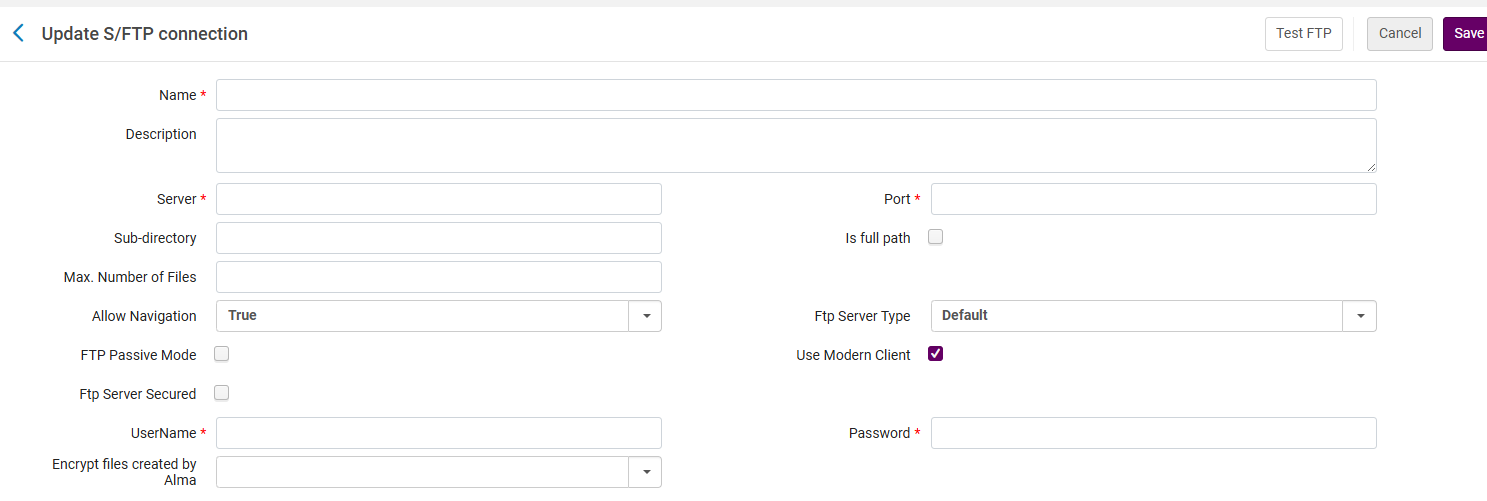
- Introducir un nombre (obligatorio) y una descripción (opcional) para la nueva conexión S/FTP.
- Introducir la información en los campos restantes, tal como se describe en la siguiente tabla.
Campo de la conexión S/FTP
Campo Descripción Servidor (obligatorio) La dirección IP del servidor que envía o recibe los ficheros. No puede empezar con un punto y no puede empezar ni terminar con comillas. Puerto (obligatorio) El puerto del servidor. Subdirectorio / Es la ruta completa El subdirectorio en el cual se guardan los ficheros. Si esta es una ruta absoluta, seleccione la casilla de verificación "Es la ruta completa" e introduzca su ruta con el signo '/'. Si se trata de una ruta relativa, deje en blanco "Es la ruta completa" e inicie la ruta en su directorio actual.
Si también se especifica un subdirectorio en el perfil de integración, este directorio se concatenado con el otro. For example, if you define the system1 S/FTP connection as: Sub-directory – ftp
Y se define un perfil de Exportar registros bibliográficos con:
- FTP configuration – system1
- FTP sub-directory – alma
Then files transferred by this integration profile are saved in the external system's ftp/alma directory.
Los directorios de la definición S/FTP y los perfiles de integración funcionan de la siguiente manera:
- There is a subdirectory in the definition of the S/FTP connection defined in Configuration Menu > General > External Systems > S/FTP Definitions.
- The integration profiles defined in Configuration Menu > General > External Systems > Integration Profiles also have a field called subdirectory which defines where the file will be taken from or placed.
- The subdirectory of the integration profile is relative to the subdirectory of the S/FTP definition. Así, por ejemplo, si:
- The S/FTP profile used by the integration profile has the subdirectory Alma
- The input file path of the integration profile of the type Users is yilis_patrons
- Then the file will be taken from [root directory]/Alma/yilis_patrons
The sub directory is mandatory for the the Send Requests to Remote Storage job.
Número máximo de ficheros No está en uso. Aceptar el valor por defecto. Número mínimo de ficheros No está en uso. Aceptar el valor por defecto. Tamaño máximo del fichero No está en uso. Aceptar el valor por defecto. Unidad de medida Las unidades usadas para el tamaño de los ficheros. Los valores válidos son: GB, MB y TB. El valor por defecto es GB. Permitir navegación True if you want to enable access to other areas of the FTP site, or False if you do not. The default is to allow navigation (True). Tipo de servidor FTP Default or MVS. Select MVS to work with IBM's Multiple Virtual Storage operating system. FTP en modo pasivo Determinar si la IP del cliente funciona en modo pasivo. El perfil de integración de publicación de OCLC requiere modo pasivo.
Use un cliente moderno Si esta casilla está marcada (opción por defecto), todas las solicitudes FTP desde Alma utilizarán los últimos estándares del protocolo FTP. Servidor FTP seguro Seleccionar si el servidor FTP es seguro. The Authentication Method option appears when this option is selected. Si se selecciona MVS como el tipo de servidor FTP, no seleccionar esto. Los servidores MVS seguros no están soportados.
Método de autenticación Appears if FTP Server Secured is enabled. Seleccionar una de:
- Username/password authentication- Use a user name and password.
- Key authentication(public key encryption) - When you select this, a public key appears. La clave pública se usa para autenticar ficheros recibidos de Alma. Cuando se seleccione está opción, se eliminará el campo de contraseña. One of the following 3 Key types can be used: RSA, ECDSA or Ed25519.
Nombre de usuario (obligatorio) El nombre de usuario de S/FTP. El campo aparece y es requerido sin importar si se está usando FTP seguro o no. Password (mandatory, except when Key authentication is selected) La contraseña de S/FTP. Requerido, a menos que se esté usando autenticación mediante clave. Alma no soporta contraseñas que incluyan caracteres especiales.
Clave pública
The public key appears on the page if Key Authentication is selected for Authentication method.
Clave pública de Alma. You must add this key to the .ssh/authorized_keys file on your FTP server. Cada institución de Alma tiene su propia clave pública. When implementing a Network Zone, customers must add the public key of each institution into their authorized_keys file.
-
Select Test FTP(recommended) to test the S/FTP connection. Se debería recibir mensajes indicando que las siguientes acciones de comando de FTP se han realizado con éxito:
- List and check files in the specified directory using ls,pwd, and cd commands
- Upload and download files using the put and get commands
- Delete using the delete command
Si no se reciben mensajes de éxito para estas acciones, resolver los problemas de conexión S/FTP antes de continuar.
For OCLC FTP connections, disregard the Test FTP button! OCLC immediately moves files into a queue for subsequent processing after files are uploaded to the OCLC file exchange system. As a result, the Test FTP process will fail.
- Select Save when you are done.
Regenerate Key in S/FTP Profile
Las claves públicas asociadas con una institución permanecieron estáticas y no se pudieron actualizar ni refrescar. Alma enables users to refresh the Public Key by following these steps: Go to Alma configuration > General > S/FTP definitions and click on the Regenerate X Keys.
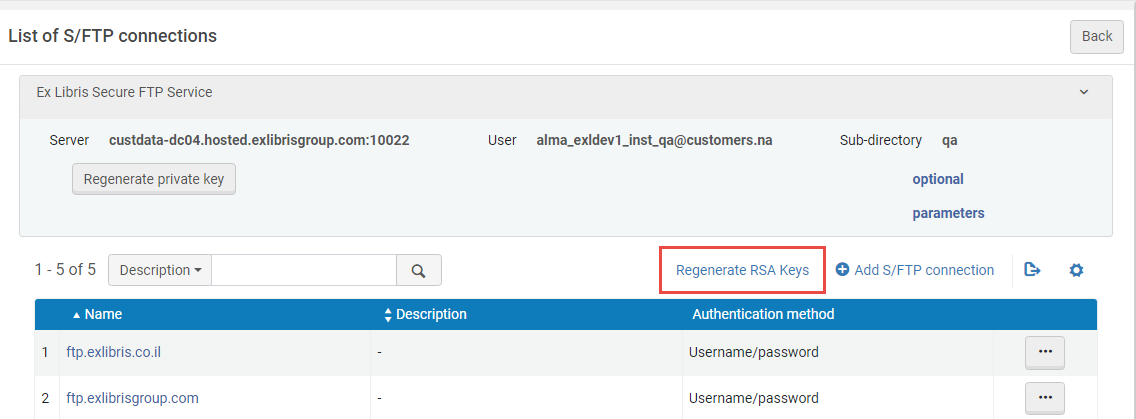
Selecting the Regenerate private key button immediately regenerates the private key for the Ex Libris Secure FTP Service. Esto invalida la clave privada generada previamente y afecta tanto a Alma Production como a Alma Sandbox.
Configuring Allowed Emails
- Administrador general del sistema
Esta característica solo está disponible en a) un entorno aislado o b) en el entorno de producción de Alma para clientes que aún están en la fase de implementación/prueba y no poseen todavía una configuración certificada.
Se pueden definir direcciones/dominios de correo electrónico específicos para usar durante las pruebas de comunicación de su institución. This avoids any stray communications: Alma does not send emails to any other email addresses.
- La comunicación por correo electrónico queda restringida a las direcciones de correo electrónico de esta tabla solo si al menos una dirección de correo electrónico está definida en la tabla. No borrar completamente todas las entradas de esta tabla. Si la tabla está vacía, se habilita una comunicación por correo electrónico sin restricciones para cualquier dirección de correo electrónico introducida en cualquier lugar de Alma.
- In Sandbox environments, an email cannot be sent unless the receiving address is on the allowed emails list (Configuration Menu > General > External Systems > Allowed Emails). If the list is empty, no email is sent.
- If MFA is activated (see Ex Libris Identity Service), the Allowed Emails list should be configured with the email addresses of all staff members who need to be able to login.
- The Allowed Emails and Allowed S/FTP Configuration lists are kept during the Premium Sandbox (PSB) refresh (see Alma Sandbox Environments).
You configure emails or domains on the Email Include List mapping table (Configuration Menu > General > External Systems > Allowed Emails). For more information about mapping tables, see Mapping Tables.
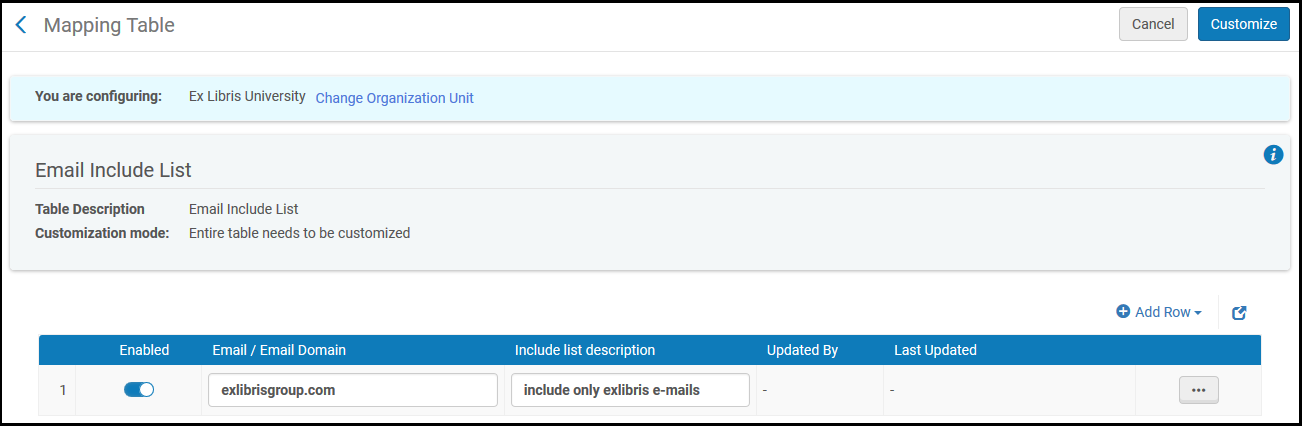
Se puede añadir, borrar o activar/desactivar dominios y direcciones. Alma solo envía correos electrónicos a las direcciones y/o dominios activos.
If you are at the Network Zone level, access to that configuration table is done directly from the Central Configuration Dashboard (Configuration Menu > Network Zone > General > External Systems > Allowed Emails). For more information about the Central Configuration Dashboard, see Consortia Central Configuration Dashboard.
Domains only work in an implementation Production environment, and not in Sandbox environments.
Configuring Allowed S/FTP Connections During Testing
- Administrador general del sistema
Esta característica solo está disponible en a) un entorno aislado o b) en el entorno de producción de Alma para clientes que aún están en la fase de implementación/prueba y no poseen todavía una configuración certificada.
Alma permite definir conexiones S/FTP permitidas para ser usadas durante las pruebas de comunicación de su institución. This avoids any stray file transfers: Alma does not try to use any other S/FTP connections. For further information on configuring S/FTP connections see above.
S/FTP está restringido a las direcciones de esta tabla solo si al menos una dirección está definida en la tabla. No borrar completamente todas las entradas de esta tabla. Si esta tabla está vacía, se habilita una comunicación S/FTP sin restricciones para cualquier dirección introducida en cualquier lugar de Alma.
You configure test S/FTP connections on the FTP Include List mapping table (Configuration Menu > General > External Systems > Allowed S/FTP Connections). For more information about mapping tables, see Mapping Tables.
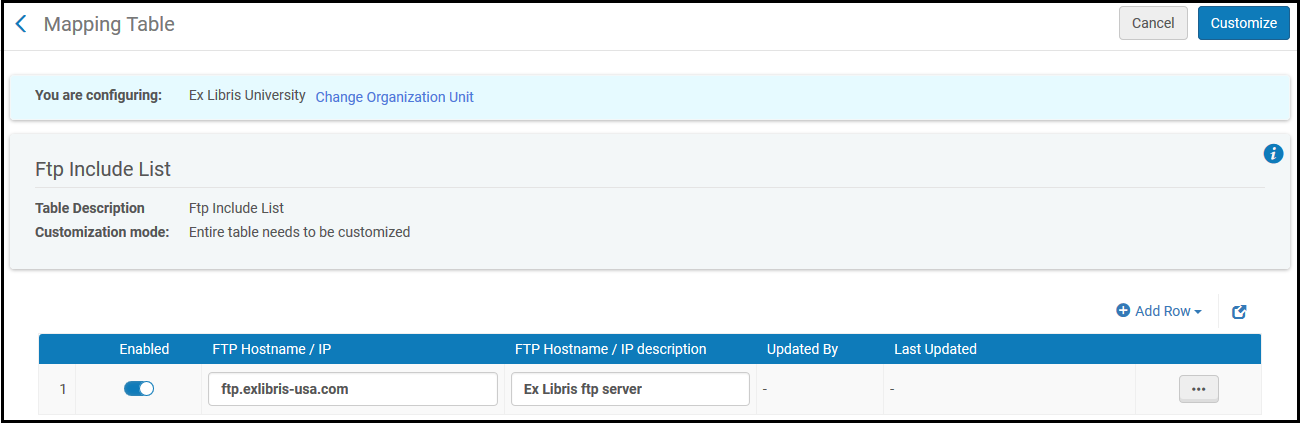
Se pueden añadir, borrar y activar/desactivar direcciones.
If you are at the Network Zone level, access to that configuration table is done directly from the Central Configuration Dashboard (Configuration Menu > Network Zone > General > External Systems > Allowed S/FTP connections). For more information about the Central Configuration Dashboard, see Consortia Central Configuration Dashboard.
