
Configurar carga de cursos
- Administrador general del sistema
For general information about courses, see Managing Courses. For information about course rollover, see Rolling Over Courses(Alma) and Leganto Course Rollover(Leganto).
Se puede importar información del curso desde su sistema de gestión del curso. Alma admite esto utilizando el perfil de integración de Cargador de cursos que se ejecuta en el horario que se configure. También se puede ejecutar manualmente el perfil después de que se haya configurado, y se puede editar o borrar el perfil.
The course information must be in a tab-separated value file(not comma-separated) in a dedicated directory on an FTP server accessible by Alma, saved either as a .txt,.csv,.xls, or a .xlsx file.
- El directorio FTP no puede utilizarse para otro propósito.
- Cada fichero debe tener una marca con una fecha válida. El perfil solo carga un fichero con una marca con la fecha posterior a la última vez que se ejecutó el perfil.
- El fichero debe ser de formato UTF-8 o ASCII con terminación de línea CRLF.
El fichero debe contener una lista de cursos, uno en cada línea, con las siguientes columnas, en orden. Each line indicates a course that is new, changed, deleted, or rolled over (see the Operation column).
- Los valores en las siguientes columnas pueden contener valores separados por comas porque las comas solo se usan para separa valores dentro de una columna. Each is described in more detail in the Course Loader Fields table below:
- SEARCH_ID3
- MULTI_INST
- CAMPUS_AND_PARTICIPANTS
- Todas las columnas deben estar presentes, incluso si no se incluyen los valores para una columna en una fila/todas las filas.
- Key fields are Code and Section ID. Estos campos identifican el curso. Valid values in the Course Title and Processing Department fields are also mandatory.Operation is mandatory (but see below). Todos los otros campos son opcionales.
- Solo la primera línea con un código específico e identificación de sección se procesa. Cualquier línea subsecuente con el mismo código y sección darán un error y se ignoran.
- Start Date and End Date and Submit By Date must be strings in the format specified in the integration profile.Number of Participants,Weekly Hours, and Year are integer fields. Todos los otros campos son cadenas.
- Old Course Code and Old Course Section are only required if the Operation field has the value ROLLOVER; see below.
- You can edit a course in a subsequent file by including a line with the same Code and Section ID.
- Cambiar el número de participantes es solo para información; no se cambia el estado de ninguna cita adjunta a las listas de lectura asociadas con el curso.
- Modificar los cambios de los instructores que puede asociar una lista de lectura con el curso. No cambia ninguna lista de lectura que ya está asociada con el curso.
- When editing a course and a field is marked for overwrite (see overwrite options below), or when rolling over a course, then entering a plus sign (+) as a value in the field instructs the job to keep the old value in this field (as if overwrite was not selected). If the field contains multiple values, all old values are maintained. Any other value (including an empty value) is used instead of the old value.
Nuevo valor de campo cuando se edite un curso El campo en el fichero de entrada es... se dejó en blanco un signo más (+) cualquiera otro valor Sobrescritura seleccionada Vacío (eliminar valor antiguo) Valor antiguo Valor nuevo Sobrescritura no se ha seleccionado Valor antiguo Valor antiguo Valor antiguo For any of the Searchable ID fields, if:
se deja vacío, se elimina el valor antiguo.
a + is entered as a value in addition to other values, the current values are retained, and all other entered values are added as additional values.
se añade un nuevo valor, éste sustituye al anterior.
| Campo | Código (en el fichero de ejemplo, a continuación) | Descripción | Valores |
|---|---|---|---|
| Código de Curso (obligatorio) | COURSE_CODE | Obligatorio. Hasta 250 caracteres. Si se utiliza el perfil de integración LTI, este campo debe coincidir con el identificador del curso importado utilizando el perfil de integración LTI. | |
| Título de Curso (obligatorio) | COURSE_TITLE | El nombre del curso | Hasta 255 caracteres |
| Identificación de la sección | SECTION_ID | Identificación de la sección de curso. Los cursos están divididos en secciones para organizar de mejor manera los recursos y las actividades para los estudiantes. Cada sección la puede enseñar un miembro diferente del personal académico, tener una descripción separada y contener tantos recursos como lo requiera el miembro del personal académico. | No es obligatorio, pero consulte la nota anterior. Hasta 50 caracteres |
| Departamento académico | ACAD | El código del departamento académico. Utilizar un código (no una etiqueta o nombre) de la tabla del Departamento académico; cualquier otro valor se ignorará. See Configuring Academic Departments. | |
| Departamento de Procesamiento (obligatorio) | PROC_DEPT | El código del departamento de procesamiento. Utilizar un código (no una etiqueta o nombre) de la tabla del Departamento de Procesamiento; cualquier otra tabla se ignora. See Configuring Processing Departments. | |
| Condición1 | TERM1 | Un código de condiciones de la tabla de Términos. See Configuring Course Terms. | |
| Condición2 | TERM2 | ||
| Condición3 | TERM3 | ||
| Condición4 | TERM4 | ||
| Fecha de inicio | START_DATE | Fecha de inicio del curso. If not entered, the value is taken from default_course_start_date, or the current date if it is not defined. | Cadena en el formato especificado en el perfil de integración. |
| Fecha de fin | END_DATE | Fecha de finalización del curso. If not entered, the value is taken from default_course_end_date, or the current date if it is not defined. | Cadena en el formato especificado en el perfil de integración. |
| Número de participantes | NUM_OF_PARTICIPANTS | Integrar hasta 10 caracteres | |
| Horas semanales | WEEKLY_HOURS | Integrar hasta 10 caracteres | |
| Sem. | AÑO | Año del curso | Integrar hasta 4 caracteres |
| Identificación de la que puede hacerse una búsqueda 1 | SEARCH_ID1 | Los ID(s) del curso, si está utilizando identificaciones del curso adicionales en el LMS que son diferentes del código del curso que se introdujo anteriormente. | Hasta 50 caracteres When editing or rolling over a course, if a + is entered here, any IDs added in the Searchable ID columns are appended to the existing course IDs. |
| Identificación de la que puede hacerse una búsqueda 2 | SEARCH_ID2 | ||
| Todos los ID localizables | SEARCH_ID3 | La lista de todas las identificaciones de las que se pueda hacer una búsqueda. Se puede utilizar este campo en lugar de los dos campos anteriores. | A list of searchable IDs, separated by commas (,). No existe un límite de caracteres para este campo. Utilizar este campo para introducir múltiples búsquedas de identificaciones en una columna. When editing or rolling over a course, if a + is entered in any of these fields, any IDs added in the Searchable ID columns are appended to the existing course IDs. |
| Instructor 1 | INSTR1 | El nombre de uno de los instructores | Un identificador primario de usuario de Alma. Cualquier valor que no coincida con un usuario que exista en Alma se ignora. Si el usuario no tiene ya una función como Instructor, se puede configurar que Alma añada la función. También se puede configurar si un instructor añadido nuevo se añada automáticamente como un propietario para cualquier lista de lectura para el curso. See Configuring Reading List Ownership. When editing a course, if a + is entered here, then any instructors added in any instructor columns are merged with any existing instructors in the course (note that this feature does not work for rollovers). |
| Instructor 2 | INSTR2 | ||
| Instructor 3 | INSTR3 | ||
| Instructor 4 | INSTR4 | ||
| Instructor 5 | INSTR5 | ||
| Instructor 6 | INSTR6 | ||
| Instructor 7 | INSTR7 | ||
| Instructor 8 | INSTR8 | ||
| Instructor 9 | INSTR9 | ||
| Instructor 10 | INSTR10 | ||
| Todos los instructores | ALL_INSTRUCTORS | La lista de todos los instructores. Se puede utilizar este campo en lugar de los 10 campos anteriores. | A list of instructors separated by commas (,). No existe un límite de caracteres para este campo. When editing or rolling over a course, if a + is entered anywhere in here, then any instructors added in any instructor columns are merged with any existing instructors in the course. |
| Operación (obligatorio) | OPERACIÓN | Este campo técnicamente solo es obligatorio en cualquiera de los siguientes casos:
|
Empty — If left blank, perform the default operation. NEW— Create a new course UPDATE— Update the existing course DELETE— Delete the course ROLLOVER— Duplicate the course If left empty, the course is added (NEW) if no such course with the same code and section already exists in Alma; otherwise, the course is UPDATED. See the note above. If set to DELETE, the associated course (identified by the first and third columns (Code and Section ID)) is deleted from Alma. If set to ROLLOVER, see the next two fields. Para que esto se aplique, también debe marcar la casilla Sobrescribir correspondiente en el perfil de integración. |
| Código antiguo del curso (solo traspasar) | OLD_COURSE_CODE | La información del curso antiguo se copia al curso nuevo. | When Operation is set to ROLLOVER, enter the old course code here and the old course section in the next field. These fields are not required if Operation is not ROLLOVER. |
| Identificación de la Sección de Curso antiguo (solo traspasar) | OLD_COURSE_SECTION | La información del curso antiguo se copia al curso nuevo. | When Operation is set to ROLLOVER, enter the old course section in this field and the old course code in the previous field. The old course section must be identical to the section ID to perform ROLLOVER to the record. These fields are not required if Operation is not ROLLOVER. |
| Enviar en la Fecha | SUBMIT_LISTS_BY | Cadena en el formato especificado en el perfil de integración. | |
| Participantes de Campus | CAMPUS_AND_PARTICIPANTS | If a campus code is not defined in Alma, the campus is created with the name <code> not found. El número de participantes es opcional. | La lista de códigos de campus, separados por comas. Each code can include the number of participants after a vertical bar, as follows: <code>|<number of participants>. For example, RIVERCAMPUS|10, UPCAMPUS. |
| Nombre de la lista de lecturas | READING_LIST_NAME | When Operation is set to ROLLOVER, enter the Reading List Name. This field is not required if Operation is not ROLLOVER. |
Se mantiene la fecha original en la que se creó la cita.
See an example file here.
- Crear una conexión S/FTP para el perfil de integración. For more information, see Configuring S/FTP Connections.Este perfil requiere de un directorio único, dedicado en el servidor FTP.
- Asegúrese de que la tarea Activar/Desactivar cursos esté habilitada. See Configuring Fulfillment Jobs.
- On the Integration Profile List page (Configuration Menu > General > External Systems > Integration Profiles), select Add Integration Profile. Aparecerá la página de del Perfil de Integración.

- In the Integration type field, select Course Loader. La página se actualiza con diferentes campos.
- Enter a Code and Name for the profile.
- Select the S/FTP connection for the profile. You can also enter an optional Description. Note: the Default field is reserved for future use.
- The System field is mandatory and for Ex Libris' information purposes only.
- Select Next. Aparecerá la segunda página del asistente.
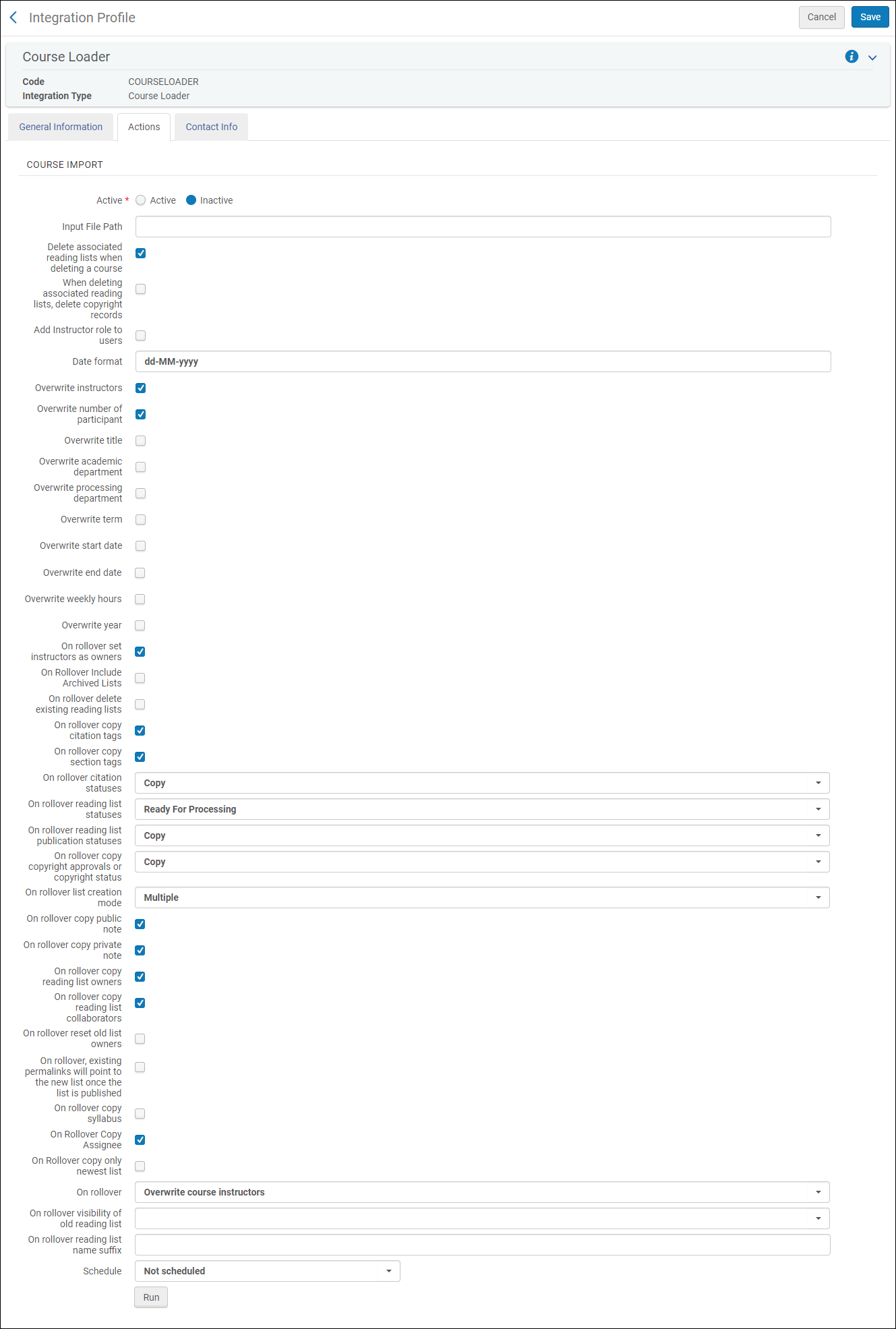 Perfil de integración del cargador de cursos - Pestaña aciones
- Configurar los siguientes campos:
- Active— Whether this profile is active or inactive. Un perfil inactivo no puede programarse ni ejecutarse.
- Input File Path— If the course file information is located in a subdirectory at the FTP connection, enter the subdirectory. Otherwise, enter ./. Both .txt (tab-delimited) and .xlsx are supported.
- Delete associated reading lists when deleting a course— Whether reading lists (and associated sections and citations) are deleted from Alma when their associated course is deleted. Cuando no se seleccione, la lista de lectura permanece en Alma sin una asociación del curso.If any courses are deleted, the profile's job report indicates the number of deleted courses.
- When deleting associated reading lists, delete copyright records— Whether to also delete the copyright information about a deleted reading list if you enabled the previous setting (Delete Associated Reading List when Deleting a Course); this information is normally preserved for record keeping.
- Add instructor role to users— Whether to automatically add the Instructor role to all users listed in columns as instructors.
- Date format— The expected date format for date fields (for example, MM/dd/yyyy). For permitted values, see https://docs.oracle.com/javase/7/docs/api/java/text/SimpleDateFormat.html.
- Overwrite options— Whether new values overwrite existing values for instructors, number of participants, course title, academic department, processing department, term, start date, end date, weekly hours, and year. Tenga en cuenta que, para que esto se aplique, también debe actualizar el valor correspondiente de Operación en el fichero cargado.
- Rollover options— Note that you also need to update the relevant Operation value in the uploaded file for this to be implemented. Al realizar un traspaso, seleccione si:
- On rollover include archived lists— Whether to include archived lists.
- On rollover delete existing reading lists— Whether the old lists are removed.
- On rollover copy citation tags— Whether citation tags are copied.
- On rollover copy section tags— Whether section tags are copied.
- Todas las etiquetas — Incluir todas las etiquetas configuradas.
- Select tags — Include selected tags.
- On rollover citation statuses— Whether to copy the citation statuses, recalculate them (When recalculated, some may automatically be set to Complete; see Configuring Default Statuses for Citations/Reading Lists. All others are set to Ready for Processing.) or set all citations to Being Prepared.
- On rollover reading list statuses— The status of the new reading lists:Being Prepared,Ready for Processing,Complete, or Rolled Over.
- On rollover reading list publication statuses— Whether to copy the reading lists' publication statuses or set the new ones to Draft.
- On rollover copy copyright approvals or copyright status— Whether to copy any existing copyright records or manual statuses (Copy), not copy existing records or statuses (None), or submit all new citations for copyright approval (Recalculate). Note that a DCS license type and status is copied, regardless of what this is set to; see Integrating with the UK's Digital Content Store (DCS). Si se copia el registro de derechos de autor, el rango de fechas de autorización de los derechos de autor se actualiza al rango de fechas del curso.
- On rollover list creation mode—Multiple(create a new reading list for each course) or Single(if the reading list already exists, attach it to the new course). Esta opción es relevante cuando varios cursos pueden estar asociados con una lista de lecturas única. As an example, if, in your file, you would like to roll over course C1 to C2 and also roll over course C1 to C3, the following occurs:
- This option is set to Multiple— Two lists are created, one associated with C2, and one associated with C3.
- This option is set to Single— One list is created, associated with both courses C2 and C3.
- On rollover copy public note— Whether to copy citations' public notes.
- On rollover copy private note— Whether to copy the citation's fulfillment notes.
- On rollover copy student discussion(Leganto only) — Whether to copy student discussions. Los nombres de los usuarios se eliminan de cada comentario.
- On rollover copy reading list owners— Whether to copy the reading list's owners.
- On rollover send owner subscription letter— Whether to send an owner subscription letter after the completion of a rollover. For more details on letters, see Configuring Alma Letters.
- On rollover copy reading list collaborators— Whether to copy the reading list's collaborators.
- On rollover reset old list owners— Whether to reset the old list owners.
- On rollover, existing permalinks will point to the new list once the list is published— Whether existing permalinks should point to the new list (once it is published) or remain pointed at the old list.
- On rollover, copy syllabus(Leganto only) — Whether to copy the reading list's syllabus.
- On rollover Copy Assignee— Whether to copy the reading list's assignee.
- On Rollover copy only newest list— Whether to copy only the newest list during rollover. Esto evita listas duplicadas durante el traspaso si, por alguna razón, hay múltiples listas asociadas con su curso.
- On rollover copy internal library note— Whether to copy or reset internal library notes during rollover.
- On rollover copy instructor note— Whether to copy instructor notes during rollover.
- On rollover create new course when old course code doesn't exist— Whether to create a new course during rollover even if OLD_COURSE_CODE does not exist..Si se deja vacío el campo del código del curso antiguo, se omitirá esa línea y no se creará ningún curso nuevo.
- On rollover copy list created before— Relevant only for institutions who run the rollover job more than once per term, to ensure that reading lists that were previously rolled over in preparation for the upcoming term are not rolled over again. The rollover job checks if a reading list is already associated with the new course (COURSE_CODE) and if so, if it was created before the date defined in this field. If the reading list was created prior to the defined date, the reading list associated with the old course (OLD_COURSE_CODE) is rolled over to the new course (as defined in COURSE_CODE). De lo contrario, la lista de lecturas no se traspasa.Después del traspaso inicial, introduzca la fecha del primer traspaso para el trimestre actual. Guarde el perfil de integración, incluida la fecha, que se utilizará para los traspasos posteriores. Puede ejecutar la tarea de traspaso tantas veces como sea necesario y esta solo traspasará las listas que aún no se hayan traspasado. Quite la fecha antes de realizar el primer traspaso para el trimestre siguiente y luego actualice la fecha de nuevo como se indicó anterioremente.
- On rollover:
- Keep course instructors— Keep the existing course instructors and ignore the instructors in the uploaded file.
- Overwrite course instructors— Remove the old instructors and add the instructors from the file.
- On rollover visibility of old reading list(Leganto only) — Select the publication status of the old list after a rollover (the new list will be in Draft). Deje en blanco para conservar el estado de la publicación existente, sea el que sea.
- A list's copyright clearance is reset on rollover. De todos modos, si una licencia común creativa se declara para la cita, esta declaración se traspasará.
- Seleccionar cuando desea que se ejecute el perfil. The scheduling options vary depending on your time zones but include not scheduled, every 6 hours, every day, every week, and every month.
- Select Save to save the profile.When Operation is set to ROLLOVER, you can set the name of the newly created list using the Field Normalization table (Leganto configuration menu > General > Field Normalization). See Configuring Normalization Rules. Si el nombre no está configurado, este pasará a ser por defecto al antiguo nombre con el sufijo 1.
Se podrá ver la tarea en la lista de tareas programadas. See Viewing Scheduled Jobs.
- On the Integration Profile List page (Configuration Menu > General > External Systems > Integration Profiles), select Edit in the row actions list for the course loader integration profile. The profile appears with the General Information tab pre-selected.The Contact Info tab is reserved for future use.
- Select the Actions tab. The Actions tab appears.
- Select Run to run the profile. The job number appears on the page OR Select Run in Report Mode to run the job in report mode. Report Mode creates a report as if the Course Loader had run, detailing the course records that would have been created, updated, and deleted, and a list of anticipated issues, warnings, or errors. El Modo de informe es relevante solo para cargas de cursos, incluidas la actualización y eliminación de registros de cursos. Cuando se ejecuta un fichero de traspaso en Modo de informe, el informe valida el fichero, pero no muestra los resultados completos de la tarea.
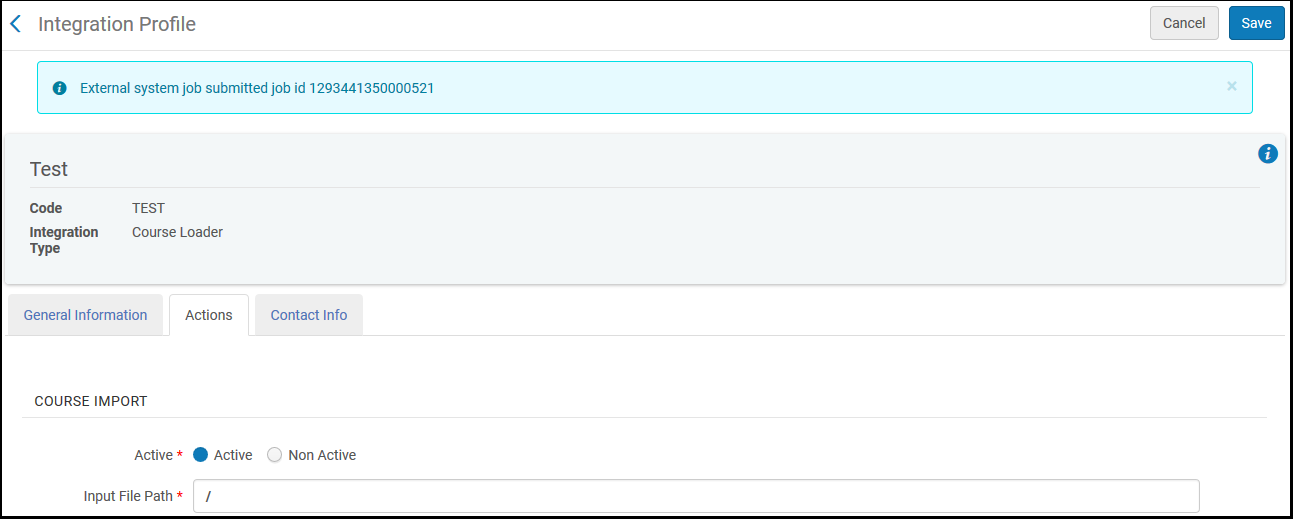
Se puede controlar la tarea en la página de Gestionar tareas. See Viewing Running Jobs and Viewing Completed Jobs.
- On the Integration Profile List page (Configuration Menu > General > External Systems > Integration Profiles), select Edit in the row actions list for the course loader integration profile.
- Enter any changes (see To manually run a course loading profile, above) and select Save. El perfil se ha modificado.
On the Integration Profile List page (Configuration Menu > General > External Systems > Integration Profiles), select Delete in the row actions list for the course loader integration profile, and then select Confirm in the confirmation dialog box. El perfil se ha borrado.
Page tags: article:topicproduct:almacontent:Documentationlang:english
