Configuring Patron Registration Forms
Nelle seguenti aree, è possibile configurare quali campi appaiono nel modulo di registrazione utente:
- User Registration (Admin > Manage Users)
- Patron Registration (Fulfillment > Manage Patron Services > Register New User button)
- Edit User ( Manage Patron Services )
- Edit User( Manage Users )
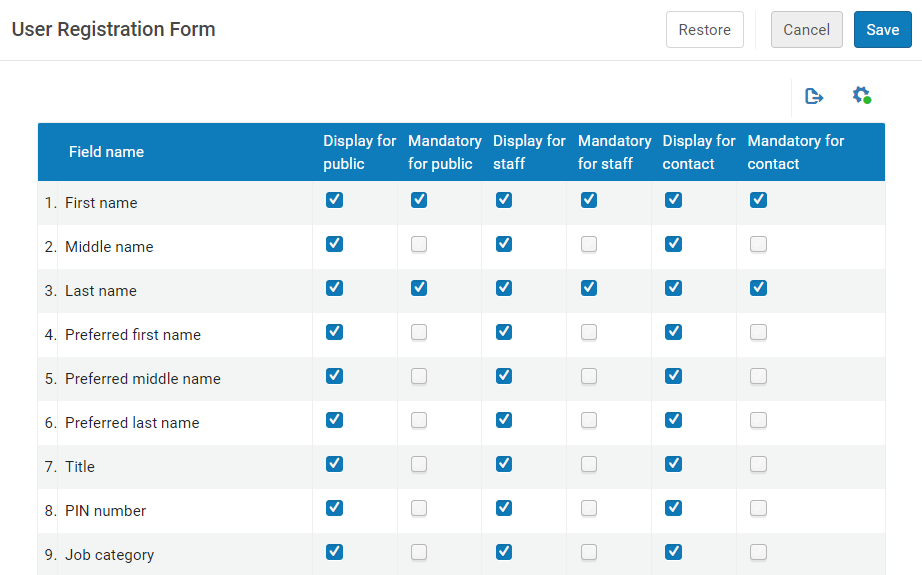
Ciò consente all'Utente di configurare moduli che sono ottimizzati per le esigenze della biblioteca e di gestire solo le informazioni necessarie della biblioteca. Accessing this option enables users to select the fields in the user registration form that they want to be visible in the form, with the exception of the mandatory fields.
To configure the User Registration Form:
- Access the User Registration Form (Configuration menu > User Management > User Details > User Registration Form).
- In the table, select the fields to be displayed to the various audiences (such as public or staff).
- Fare clic su Salva.
È anche possibile determinare quali tipi di Indirizzo/email/telefono appaiono nel modulo. This option can be activated by Ex Libris. Please contact support for assistance.