
Real-Time Notifications
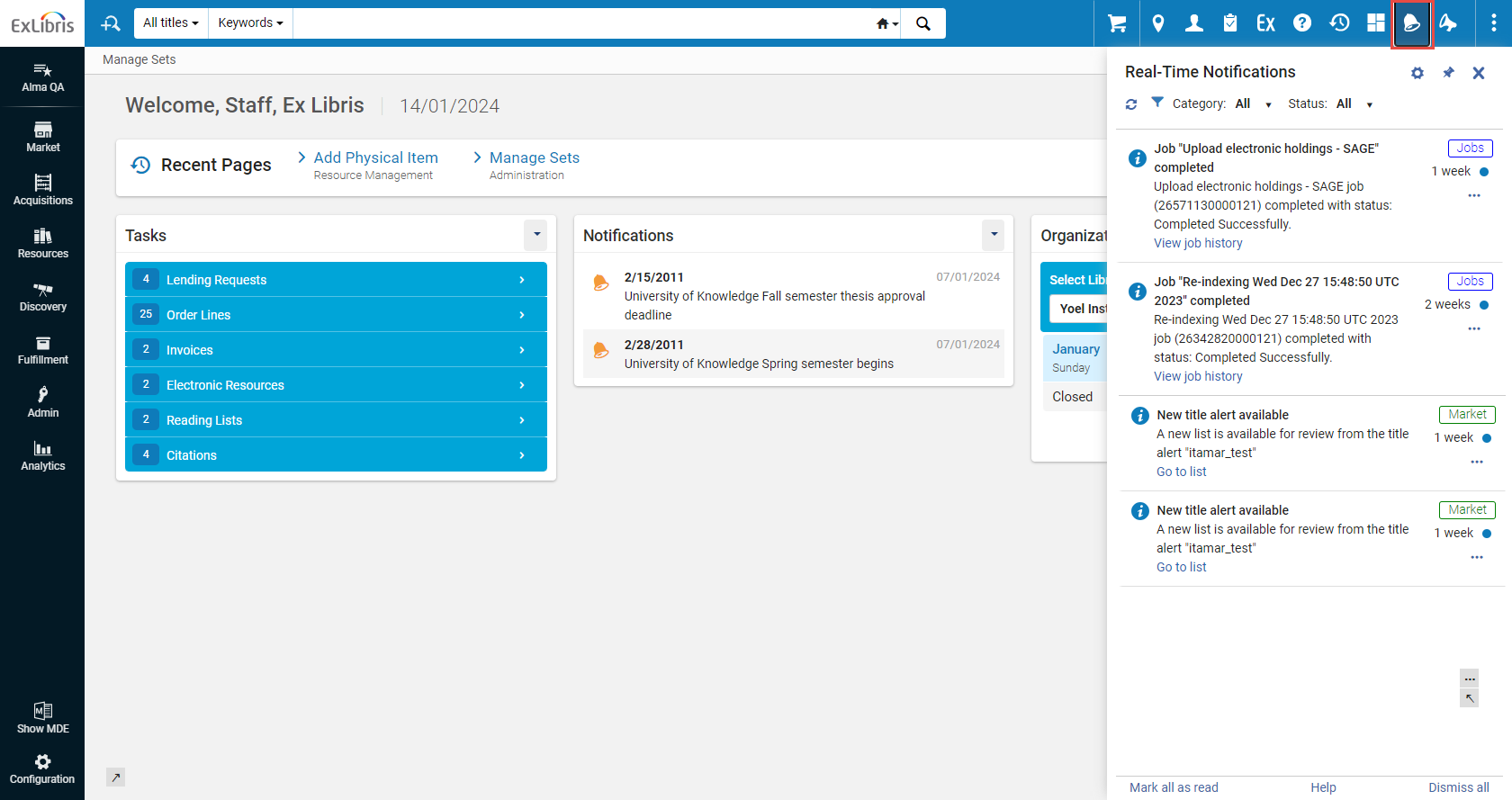
Real-Time Notifications is an opt-in, system-level interface that displays items requiring your attention such as manual jobs. Users who opt-in can receive a pop-up and/or email when exporting files, manual jobs, etc., are completed. All such notifications are accessible through the notification icon ( ) on the top menu bar.
For Rialto, notifications appear when orders are cancelled, rejected, require intervention, etc. Users will also see the message (with actionable links) in the Real-Time Notifications panel. For a walk through on viewing and managing user notifications, watch User Notifications (2:00 min).
The Notifications Panel
The Real-Time Notifications list is a helpful way to view notifications requiring your attention for the last month. After one month, all notifications are deleted. L'ordine delle notifiche è dal più recente al meno recente, in base all'ora e alla data.
To open the Real-Time Notifications panel:
- To open the Real-Time Notifications panel, select the
 icon on the persistent menu bar in the interface. The system checks for changes to your tasks every few minutes, and if new changes exist, a counter is displayed on the icon -
 .
- To have the panel constantly displayed, pin it to the screen by selecting the
 icon.
Alma and Esploro real-time notifications for jobs are indicated with the Jobs tag (
 ). Rialto real-time notifications are indicated with the Market tag (
 ). Analytics real-time notifications are indicated with the Analytics tag (
 ).
Configuring the Notifications
Lei può controllare quali notifiche riceve e quali no. These selections can be made and configured at any moment. Può scegliere di ricevere le notifiche nella Sua casella email, oppure di visualizzarle come messaggio pop-up. Tutte le notifiche sono presenti all'interno del pannello.
To configure notifications:
- Click the icon on the persistent menu bar.
- Click the
 icon to open the configuration section of the Real-Time Notifications panel.
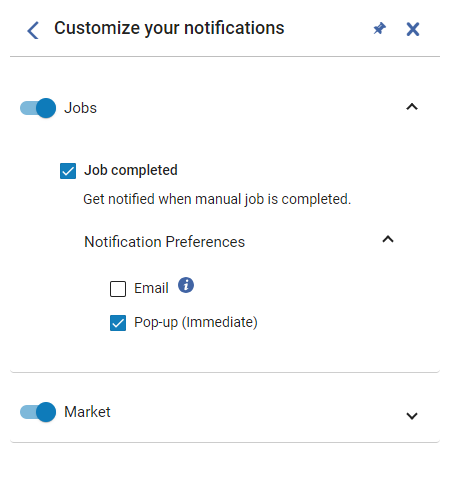
- To enable notifications of a certain category (for example Jobs or Market), toggle on the control. All'interno di ogni categoria è possibile configurare anche l'invio di notifiche via email. The notification categories are listed below:
- Analytics– Configure notifications for when an administrator shares a report, dashboard, or DV workbook with you.
- Cataloging – Configure notifications for cataloging, such as for the AI Metadata Assistant (for example when the AI Metadata Assistant draft is ready to work on in the MD Editor).
- Export – Configure notifications for exported files.
- Jobs – Notify when manual jobs are completed. Il default è notificare con un messaggio pop-up.
- Market – Configure notifications for the Rialto system.
- To enable specific notification types within the category (for example, notifications on the creation of new PO lines), select the relevant checkbox.
- To opt in to receive notifications to your email box, click Notification Preferences, and then select the Email checkbox. Emails are sent to the address defined as your Primary email address. L'amministratore deve assicurarsi che l'indirizzo email sia nella lista email consentita nel sistema. The letter that is sent is 'User Notifications (New Gen)', see Configuring Alma Letters. Si prega di notare che quando si configura questa comunicazione, le modifiche verranno applicate a tutte le notifiche inviate.
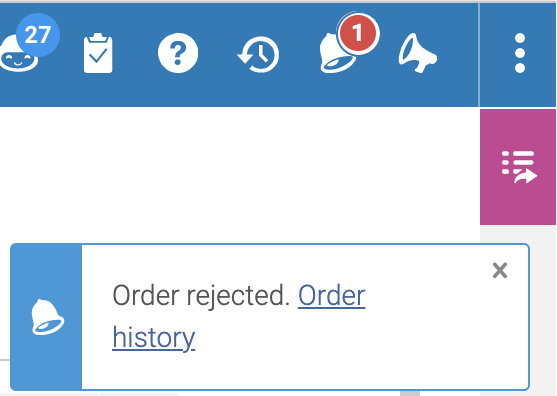
- To opt in to receive notifications as pop-up messages, click Notification Preferences, and then select the Pop-up (immediate) checkbox. Example of a popup notification:
Working with Notifications
| A: | Esegua: |
|---|---|
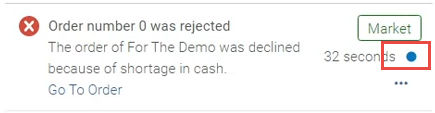
| Change the state from Unread to Read |
|
| Annulla le notifiche |
Una notifica eliminata viene cancellata immediatamente e non può essere ripristinata.
|
| Filtra le notifiche |
Può filtrare le notifiche per:
|
| Salta alla copia | Selezionare il collegamento Vai a . Questo apre la copia pertinente in Alma/ Rialto. |
| Bloccare le notifiche di un certo tipo |
Se non è interessato a ricevere notifiche di un certo tipo (ad esempio, notifiche sulla creazione di nuove linee di ordine di acquisto), può bloccarle.
|
Currently Available Notifications
Sono disponibili le seguenti notifiche:
| Real-Time Notification | Available for | Description |
| Processo "[Nome]" completato | Tutti gli Utenti | Riceva una notifica quando un lavoro manuale di Alma (non un lavoro programmato) è completato. |
| L’amministratore ha condiviso un nuovo report con l’utente | Tutti gli Utenti | Notifica che un amministratore ha condiviso con Lei un report, dashboard o una cartella di lavoro di visualizzazione dati. |
| Aggiunta dell’elenco al carrello completata | Tutti gli utenti di Rialto | Ricevi una notifica al termine dell’aggiunta al carrello dall’elenco. |
| Impossibile chiudere la richiesta di prestito in uscita collegata | Acquirenti Rialto | Ricevi una notifica quando si richiede di chiudere una richiesta di prestito in uscita collegata al momento del checkout ma ciò non è possibile a causa del suo stato. |
| Saldo del fondo limitato per le regole del piano di selezione | Amministratori di Rialto | Ricevi una notifica quando una regola di un piano di selezione ha un fondo insufficiente |
| Un’istituzione ha effettuato l’opt-out dalle holding partner | Amministratori di Rialto | Ricevi una notifica quando un partner effettua l’opt-out dalle holding partner. |
| Caricamento file completato correttamente | Rialto Utente | Ricevi una notifica al termine del caricamento del file nell’elenco. |
| Caricamento file non riuscito | Rialto Utente | Riceva una notifica quando il caricamento del file su Lista non è riuscito. |
| Caricamento del file annullato | Rialto Utente | Riceva una notifica quando il caricamento del file su Lista è stato annullato. |
| Titoli creati | Rialto Utente | Riceva una notifica quando un avviso Titolo genera una nuova lista per revisione. |
| L'ordine richiede revisione | Acquirenti/Approvatori di Rialto | Notifica riguardante l'Ordine che richiede revisione. |
| Ordine cancellato | Acquirenti/Approvatori di Rialto | Notifica per quando un Ordine è stato annullato. |
| Ordine annullato, e-book non disponibile | Acquirenti/Approvatori di Rialto | Ricevi una notifica quando si annulla un ordine perché l’e-book non è disponibile. |
| Ordine rifiutato | Selettori Rialto | Get notified when an order has been rejected by approval staff. |
| Annullamento ordine richiesto rifiutato | Acquirenti/Approvatori di Rialto | Get notified when an order cancellation request is rejected. |
| Selezione intelligente EBA completata | Amministratori di Rialto | Ricevi una notifica quando si completa correttamente una selezione intelligente. |
| Il piano EBA termina a breve | Amministratori di Rialto | Get notified when an EBA plan is approaching it's end date. |
| Piano EBA terminato in attesa di selezione titolo | Amministratori di Rialto | Ricevi una notifica quando un piano EBA viene chiuso ed è in attesa della selezione di un titolo. |
| Il processo EBA non è riuscito | Amministratori di Rialto | Ricevi una notifica se il processo EBA non riesce. |
| Acquisto EBA completo | Amministratori di Rialto | Ricevi una notifica quando un processo di acquisto EBA viene completato correttamente. |
| Titolo adesso disponibile | Rialto Utente | Riceva una notifica quando un Titolo in una Lista di Sua proprietà (o che è stata condivisa con Lei) ha cambiato lo stato di disponibilità da Non ancora pubblicato a Disponibile. |
| Nuovi titoli in attesa di approvazione | Acquirenti/Approvatori di Rialto | Receive a notification when titles are submitted by selection staff for approval. |
| tagghi l'Utente in un commento | Rialto Utente | Questo Le consente di ricevere una notifica se un altro Utente La ha taggata in un commento in una Lista. |
