
Broker-Based Resource Sharing
Questa pagina descrive il flusso per la condivisione delle risorse basate sui broker, dalla creazione della Richiesta di prestito in uscita fino alla restituzione della copia al prestatore. For more information on the various workflows for resource sharing, including broker and peer to peer based, managing resource sharing partners, borrowing/lending requests and contributing to the resource sharing directory, see Resource Sharing.
Broker-Based Resource Sharing - Borrowing
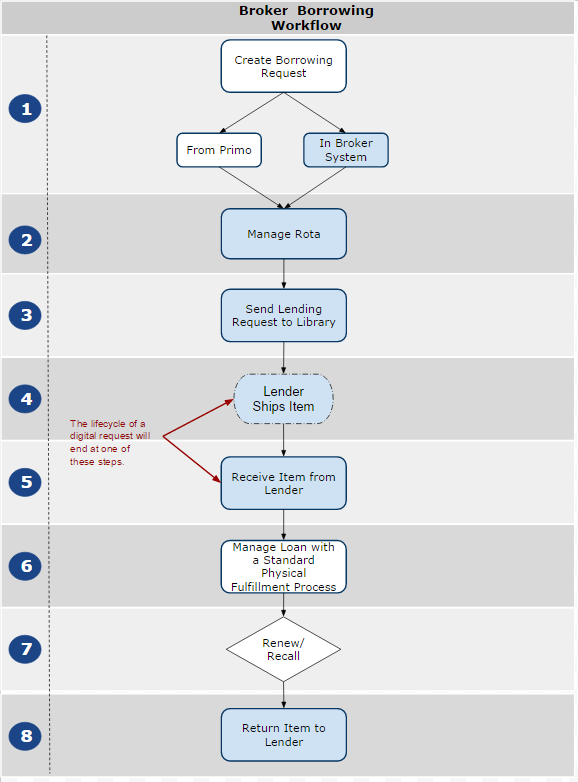
Il diagramma del flusso di prestito del broker descrive l'intero flusso di prestito, inclusi i passaggi che avvengono interamente nel sistema del broker. I passaggi che si svolgono nel sistema del broker sono evidenziati in blu.
For additional details on the broker-based protocols of NCIP, Libris, and SLNP, as well as their integration with resource-sharing requests, see B
For details on the configuration settings that must be implemented in Alma in order to enable integration with the broker, see Configuring Alma/Broker Integration.
Borrowing-Request Creation
This section refers to steps 1-4 of the broker borrowing workflow diagram.
This section describes a sample workflow for submitting resource-sharing requests using a broker.
Il richiedente invia una richiesta di condivisione delle risorse a un broker in uno dei seguenti modi:
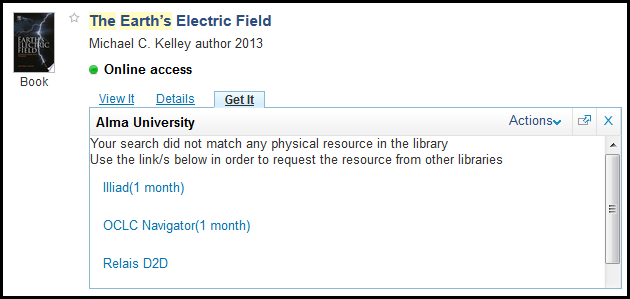
Using Primo, PC, or any OpenURL-enabled system, such as Google Scholar (with complete metadata), or using the citation linker (with incomplete metadata): The request is then sent to and accepted by the broker. Selecting a broker link transfers the patron out of Primo and directly to the broker system.
- Using the broker's system directly: You log in in order to perform a search and submit a request.
On initial request submission, the broker updates the request status to Document Received. La maggior parte dei sistemi di broker non notifica ad Alma la richiesta in questo momento, ma piuttosto al momento della ricezione della copia. A seguito della presentazione della richiesta, il sistema del broker gestisce la rotazione e invia la richiesta all'istituzione di credito.
Receiving Items
This section refers to step 5 of the broker borrowing workflow diagram.
Il processo di ricezione effettivo viene eseguito nel sistema del broker. The broker system then sends an AcceptItem message to Alma.
- Per una Richiesta di risorsa fisica, il broker conferma che un breve record bibliografico e di copia viene creato in Alma, e per l'utente vengono create una Richiesta di prestito in uscita per la condivisione delle risorse e una richiesta di prenotazione interna.
Per una richiesta in formato digitale, la richiesta viene creata in formato digitale. In base alla configurazione del broker per il parametro automatic-receive, potrebbe essere contrassegnato come completato quando la richiesta viene creata.
For more information about digital document delivery of resource sharing requests, see the More Information About Digital Fulfillment of Resource Sharing Requests video (18:43 min.).
Si intraprendono azioni sul messaggio ricevuto. Per una descrizione dettagliata di come Alma identifica questi messaggi come correlati alla richiesta di fornitura digitale, fare riferimento alla Developer Network :
Manage Loan
This section refers to step 6 of the broker borrowing workflow diagram.
Una volta ricevuta la copia richiesta, viene gestita come qualsiasi altro Servizio copia. Viene aggiunto alla copia standard della lista di attesa e appare sullo scaffale attivo di attesa o sulla lista delle attività scadute. Il prestito del patrono sarà eseguito tramite il workbench dei servizi al patrono. Per una Richiesta in formato digitale, se il parametro di ricezione automatica nella configurazione del broker è impostato su no, il personale contrassegna manualmente un'azione di ricezione per questa richiesta.
The item return may also be done through the patron services workbench or the Return Items interface
Recall/Renew Items
This section refers to step 7 of the broker borrowing workflow diagram.
Per il rinnovo del prestito, viene inviato un messaggio RenewItem al broker, il quale notifica al prestatore che è stata richiesta una proroga. Quando l'istituzione finanziaria risponde al mediatore per approvare o respingere la richiesta, il mediatore restituisce il messaggio ad Alma con la risposta del prestatore.
Per il richiamo del prestito, se un'istituzione di prestito fascicola un richiamo, il broker invierà un messaggio RecallItem ad Alma.
For more information about renewals in a broker system, see the More Information About Resource Sharing Broker Renewals video (17:02 min.).
For more information about recalls in a broker system, see the More Information About Resource Sharing Broker Recalls video (13:15 min.).
Si noti che l'autorizzazione dei rinnovi per la condivisione delle risorse dipende dal profilo di flusso impostato per il record del partner broker. Le seguenti azioni influiscono su come una richiesta di rinnovo può essere gestita per una richiesta di prestito interbibliotecario:
- Rinnovo dell'utente
- Rinnovo Personale
- Rinnovo manuale
- Risposta di rinnovo
For more information on Workflow Profiles, see Resource Sharing Configurations.
Restituzione della copia al Prestatore
This section refers to step 8 of the broker borrowing workflow diagram.
Il processo di restituzione è gestito dal sistema del broker. The broker sends a CheckinItem message to Alma. This message triggers Alma to close out the request and delete the temporary items that were previously created. Le copie temporanee sono:
- Un BIB (record bibliografico) temporaneo, che viene automaticamente soppresso
- Una custodia temporanea
- Una copia temporanea
- Una richiesta di prenotazione collegata alla copia temporanea
For a broker borrowing demo, see the More information About Broker Resource Sharing (Borrower Demo) video (25:35 min.).
Broker-Based Resource Sharing - Lending
Il processo di checkout inizia quando la richiesta viene inoltrata al broker e un prestatore viene assegnato alla richiesta. La Biblioteca prestante riceve la nuova richiesta e l'operatore della Biblioteca prestante avvia la procedura di prestito descritta di seguito. In questo processo sono supportati i flussi digitali e fisici.
Si intraprendono azioni sul messaggio ricevuto. Per una descrizione dettagliata di come Alma identifica questi messaggi come correlati alla richiesta di fornitura digitale, fare riferimento alla Developer Network :
- NCIP: https://developers.exlibrisgroup.com/alma/integrations/resource_sharing/broker/ncip/application_profile/v2
- SLNP:https://developers.exlibrisgroup.com/alma/integrations/resource_sharing/broker/SLNP/Messages
Il processo di evasione di una richiesta di prestito avviene presso la biblioteca prestante dopo che è stata creata una richiesta di condivisione delle risorse. The following is a detailed description of the steps of the resource-checkout workflow when a resource-sharing request is submitted by a broker, including steps that take place in the broker system:
- Il broker aggiorna lo stato della richiesta a Documento ricevuto.
- The broker may send a RequestItem message to Alma.
- Una bolla di prelievo può essere generata sia dal sistema del broker che da Alma. Se la bolla di prelievo viene generata in Alma, viene creata anche una richiesta di spostamento. The item then follows a standard fulfillment lifecycle for pickup at shelf, scanning items, and shipping items.
-
Il broker invia un messaggio CheckOutItem ad Alma. Per una Richiesta di risorsa fisica, il broker conferma che la copia è stata verificata come prelevata in Alma. For a digital request, the request will be marked completed as long as Receive Digitally is not marked in the Workflow Profile. This action is equivalent to a shipping action (see Shipping Items).
For more information about digital document delivery of resource-sharing requests, see the More Information About Digital Fulfillment of Resource Sharing Requests video (18:43 min.).
-
Per il rinnovo:
- When the borrower requests a renewal, a RenewItem message is sent from Alma to the borrowing broker. Il messaggio include le informazioni sulla copia e la data di scadenza desiderata ed è inviato per tutti i tipi di sistema NCIP. You must configure the Broker System NCIP URL in the partner record to successfully send this message (see NCIP Parameters).
- Il mediatore creditizio invia un messaggio ad Alma, in cui la richiesta di prestito viene approvata o respinta.
-
When the broker on the borrower side receives an approval of the renewal request, Alma is notified with the RenewItem NCIP message.
For more information about renewals in a broker system, see the More Information About Resource Sharing Broker Renewals video (17:02 min.).
Per richiamo:
- If a shipped item is requested by a local patron, the recall is issued from the lending institution's Alma to its broker system. The RecallItem message is sent to the lending broker.
-
L'intermediario creditizio notifica all'istituzione richiedente che una copia è stata richiamata.
For more information about recalls in a broker system, see the More Information About Resource Sharing Broker Recalls video (13:15 min.).
- Un operatore della biblioteca di prestito riceve la copia presa in prestito dall'utente per il check-in e la invia nuovamente alla biblioteca prestante. The broker's loan tracking updates the request status to Returned.
- The broker sends a CheckInItem message to Alma. Il broker conferma che la copia è stata registrata in Alma. In Alma, the lending request is marked as Completed, and the loan's status is marked as Released.
For a broker lending demo, see the More information About Broker Resource Sharing (Lender Demo) video (17:38 min.).
