
Resource Sharing Partners
Questa pagina descrive come lavorare con il partner Biblioteca, inclusi il download dalla directory, la configurazione dei partner e il contributo di informazioni all'Archivio. See also British Library Document Supply Service (BLDSS), Configuring Alma/Broker Integration and Configuring Rota Templates.
For more information on resource sharing including locating items for resource sharing, managing borrowing and lending requests and contributing to the resource sharing directory, see Resource Sharing.
Per configurare la comunicazione tra Alma e i sistemi di condivisione delle risorse, è necessario disporre del seguente ruolo:
- Gestore Partner ILL (Condivisione Risorse)
È possibile creare un partner biblioteca per definire i tipi di comunicazione richiesta/ricezione che possono avvenire tra Alma e un sistema di condivisione delle risorse.
- NCIP – Comunicazione tra Alma e sistemi di condivisione delle risorse, come OCLC Navigator, OCLC iLLiad, VDX e Relais, tramite messaggio NCIP 2.0. Note that Alma supports the OCLC CIRC ILL and Relais application profiles for both borrowing and lending, as well as the responder role for the following NCIP messages:RequestItem,CheckOutItem,CheckInItem,AcceptItem,LookupUser.
- Alma notifies the partner when an item renewal is requested by sending a RenewItem message to the partner with item information and a desired due date. Il partner risponde con uno stato di attesa ed eventualmente con un DateOfExpectedReply. Il sistema del partner può anche notificare ad Alma lo stato della richiesta di rinnovo. Alma receives an NCIP CirculationStatusUpdated message with a circulation status of
- Renew Still Pending- Marks the request as Renew Requested.
- Item Not Renewed- Manages the request as it does when a renew request is rejected.
- Il check-in di una singola richiesta con più copie creerà una richiesta CheckInItem per ciascuna delle copie.
- When using an NCIP Partner, all actions such as recallitem need to be preformed in the external system and not from Alma.
- Alma notifies the partner when an item renewal is requested by sending a RenewItem message to the partner with item information and a desired due date. Il partner risponde con uno stato di attesa ed eventualmente con un DateOfExpectedReply. Il sistema del partner può anche notificare ad Alma lo stato della richiesta di rinnovo. Alma receives an NCIP CirculationStatusUpdated message with a circulation status of
- ARTEmail – Comunicazione tra Alma e il sistema di condivisione delle risorse della biblioteca britannica.
- ISO – Comunicazione tra Alma e un altro sistema di Servizi interbibliotecari (Alma o non-Alma).
- email – L'invio delle Richiesta di prestito in uscita da parte del Partner Alma tramite email. Email requests are sent in XSL format. The XSL used for formatting the email is FulOutGoingEmailLetter.xsl and is configurable on the Configuration Files page (see Customizing Letter XSL Style Sheets).
- SLNP – Comunicazione tra Alma e il server ZFL per il flusso di lavoro di condivisione delle risorse in Germania. Full integration details with this partner are available in the Alma Developer Network at https://developers.exlibrisgroup.com/alma/integrations/resource_sharing/broker/SLNP.
- BLDSS – Comunicazione tra Alma e il sistema di Servizi interbibliotecari della biblioteca ILL. For more information, see British Library Document Supply Service.
L'elemento Servizio/Speed del messaggio CreateOrder è mappato alla tabella dei Livello di priorità. I livelli di mappatura BLDSS sono:
- EXPRESS_LOCAL - Download immediato
- RUSH_LOCAL - 2 ore
- PRIORITÀ_LOCALE - 24 ore
- Normale_locale - Entro 4 giorni
I livelli di priorità BLDSS si mappano ai livelli di priorità di Alma come segue:
Messaggio di mappatura BLDSS
Messaggio BLDSS Messaggio(i) di Alma Download immediato Espresso (Locale) 2 ore Urgente (Locale) Urgente (Estesa)
24 ore Priorità (Locale) Priorità (Estesa)
Entro 4 giorni Normale (Completa) Normale (Locale)
Quando conviene
For more information on levels of service, see Configuring Levels of Service
- External Systems- Used to receive a resource through the CCC GetItNow service.
- RapidILL- Used to create borrowing requests in RapidILL using the InsertRequest RapidILL API.
- Fulfillment Network- For institutions configured as a fulfillment network, a partner record is entered in order to use the resource sharing framework for the fulfillment network request. For more information, see Automated Fulfillment Network Requests (AFN).
- NACSIS- Used to create borrowing and lending requests in NACSIS-ILL system. For details, see Private - Integration with NACSIS-CAT/ILL.
Per informazioni dettagliate sulla condivisione delle risorse basata su broker tra Alma e vari sistemi, vedere https://developers.exlibrisgroup.com/alma/integrations/resource_sharing/broker.
Per creare un partner che collabori con SBN ILL, è necessario creare un partner ISO in Alma.
After a partner is created, the partner can only be deleted if it has no requests associated with it. All requests that are associated with the partner even if the requests are cancelled or rejected are still applicable since they can be reactivated. All requests associated with the partner in the rota, even if they are not the active partner, are still applicable since the request may reach the partner.
Downloading a Resource Sharing Partner from the Directory
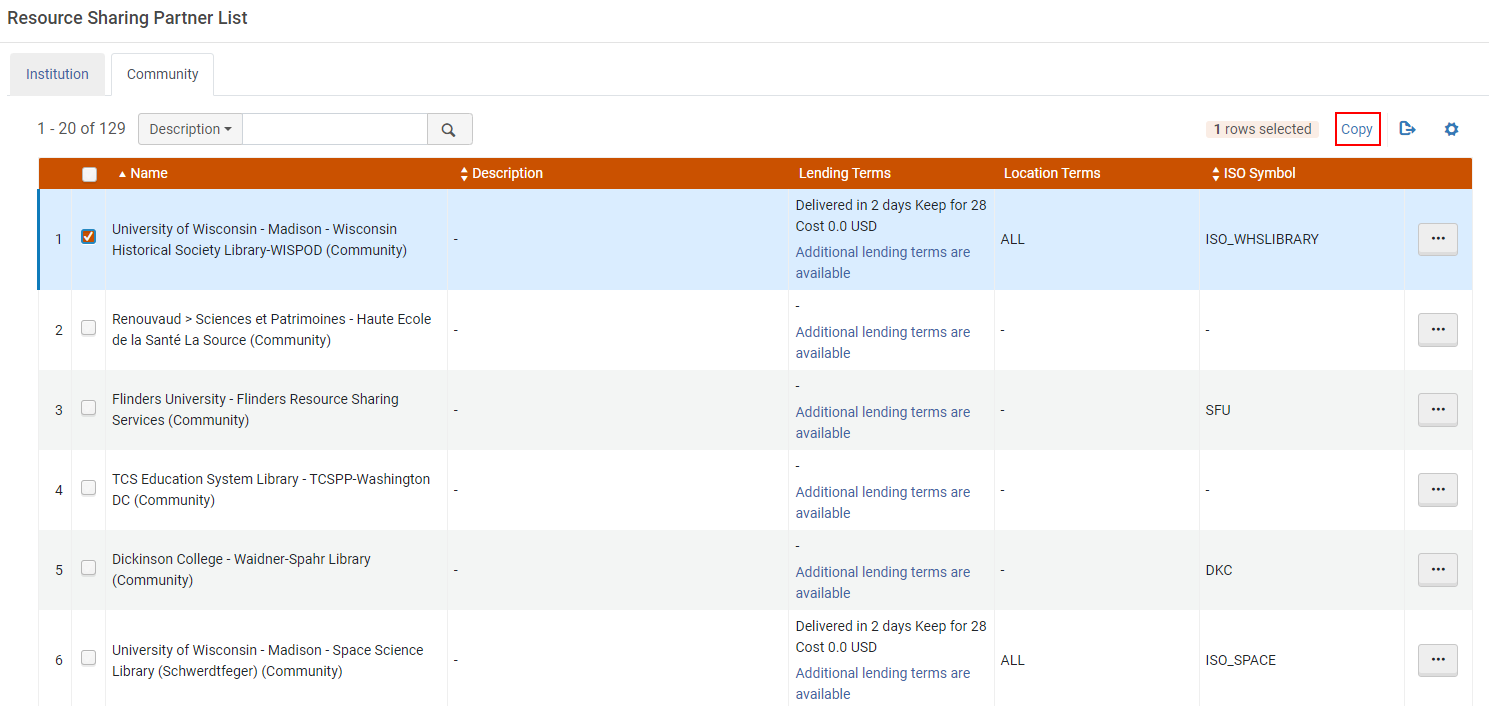
If the partner exists in the resource sharing directory (Fulfillment > Resource Sharing > Partners > Community tab), you can add a member to your institution by selecting the member and selecting Copy. Il membro e i suoi dettagli vengono quindi aggiunti alla Sua Lista partner.
The column Pods I'm Part Of is only displayed if you select it in the Manage column display list  .
Configuring a Resource Sharing Partner
-
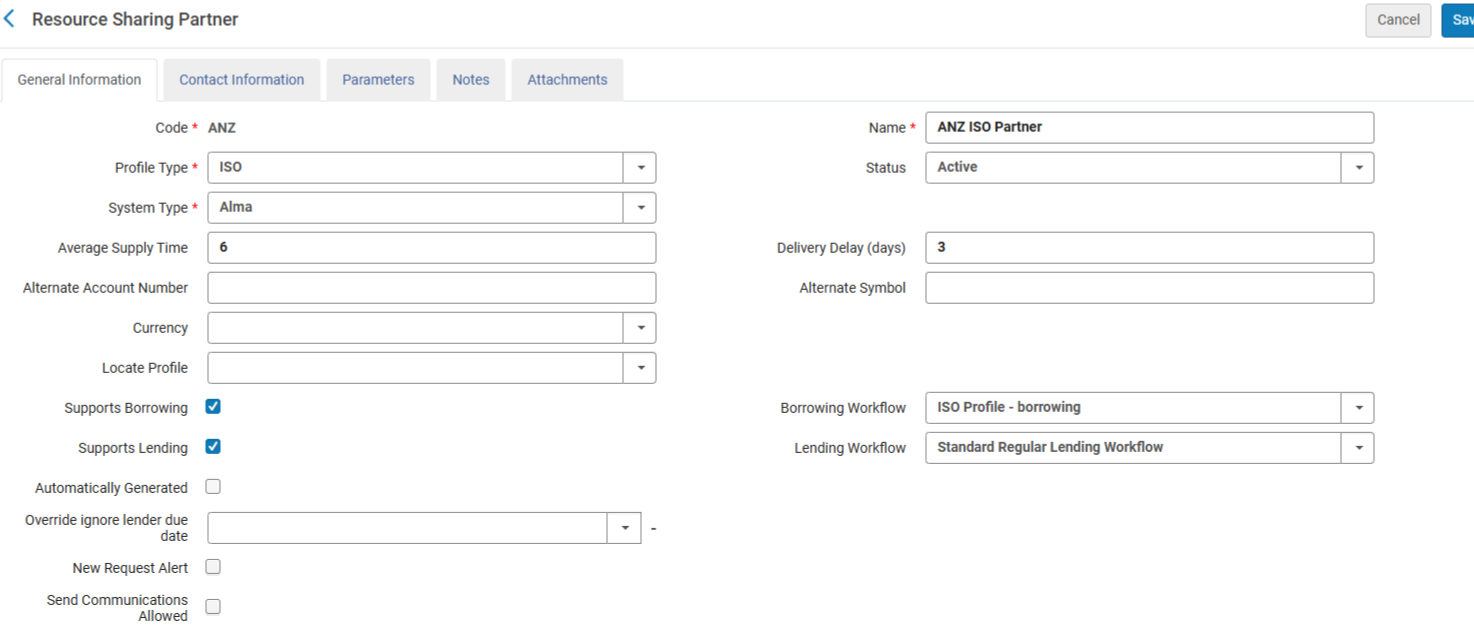
On the Resource Sharing Partner List page (Fulfillment > Resource Sharing > Partners), select Add Partner. La pagina Biblioteca partner si apre alla tab Informazioni generale.
To be able to add partners of type 'Fulfillment Network', you have to add a dummy entry to the Fulfillment Members table (Configuration > General > Network Groups > Fulfillment Member). Only then can you add the partners to the Fulfillment Networks Groups page (Configuration Menu > General > Network Groups > Fulfillment Network Groups). Once you have set up all the Partners in the Network Zone, you can either leave that dummy entry in the Fulfillment Members table in the Network Zone or delete it. If you decide to delete it, the partners show as Profile Type 'Fulfillment Network (Not Listed)' in the Fulfillment Partners table, but they are still functional as Fulfillment Network partners.
Gli Utenti possono aggiungere un record Partner utilizzando la Directory Servizi interbibliotecari. Use the Community tab to look for the partner record you want to create and select Copy.The copied record is displayed in your Institution tab as one of your local partner records and can be freely updated and used in one of your rota templates. 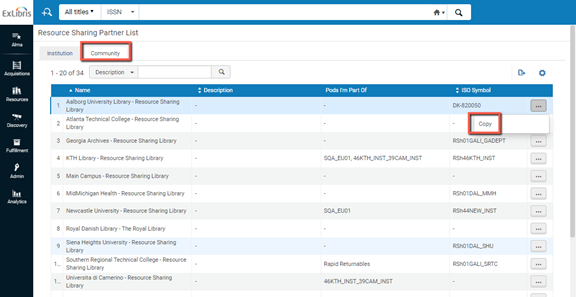
-
Inserisca un codice e un nome per il partner Biblioteca. Si noti che il codice può contenere solo caratteri alfanumerici.
-
In the Profile type field, select the type of protocol you want to create. Le opzioni sono:
- ARTEmail
- BLDSS
- Sistema esterno
- Fulfillment Network
- Inn-Reach API
- ISO
- ISO 18626
- KERIS
- NACSIS
- NCIP
- NCIP-P2P
- RapidILL
- SLNP
I parametri ISO sono gli stessi per ISO ILL 10160/10161 e ISO 18626.
-
Facoltativamente, seleziona Inattivo dalla Lista a discesa Stato se non desideri che il Partner sia attivo.
The status affects only peer-to-peer requests, such as ISO, but does not affect broker managed requests, such as NCIP. NCIP requests are still received, even if an NCIP type profile is marked inactive.
-
Select the resource sharing system with which you are integrating from the System type dropdown list (for Ex Libris' informational purposes). Questo è obbligatorio.
Per un profilo con tipo di profilo Sistema esterno, selezioni CCC GetItNow come Tipo di sistema (questo è il default).
When an NCIP profile is configured, the indicated broker types must be configured with the following NCIP parameters in the Parameters tab of the partner:
Configurazioni aggiuntive Descrizione Relais Metodo invio richiesta = OpenURL The URL is defined as follows, where the XXX and YYY values are provided to each institution by Relais:https://h7.relais-host.com/<XXX>/loginRFT.jsp?LS=<YYY>
Aggiungi Utente al Login = Sì
Abilita servizio per utente ospite = No
Loan Period= <Free text, which is displayed in the Get It tab>
OCLC Navigator Metodo invio richiesta = Link Il sistema Navigator non può ricevere un OpenURL come input; il link configurabile può essere solo un link statico. To configure a dynamic link to the Navigator system, use General Electronic Services (see Adding a General Electronic Service).
Abilita servizio per utente ospite = SìNavigator richiede un nuovo login quando viene effettuato l'accesso.
Loan Period = <Free text, which is displayed in the Get It tab>INN Reach Metodo invio richiesta = Link A link is created by a General Electronic Service with an OpenURL template, as described in Adding a General Electronic Service.
Abilita servizio per utente ospite = NoINN Reach non avvia un processo di autenticazione, poiché si presume che l'autenticazione sia già avvenuta prima di accedere al modulo di richiesta INN Reach.
Loan Period = <Free text, which is displayed in the Get It tab>ILLiad Metodo invio richiesta = Link A link is created by a General Electronic Service with an OpenURL template, as described in Adding a General Electronic Service.
Aggiungere il login utente all'URL = NoILLiad richiede di effettuare nuovamente l'accesso
Enable service for guest user = YesLoan Period = <Free text, which is displayed in the Get It tab>
I broker configurati vengono visualizzati come collegamenti nella tab Primo Get It. For more information about brokers in the Get It tab, see More Information About Resource Sharing Broker in Get It.
General Electronic Services - Displays a Primo link to an external service (such as Amazon), as an additional way to retrieve resources. È possibile anche creare regole per assegnare link differenti da utilizzare per risorse diverse (come per un libro o un DOI). For details, see Adding a General Electronic Service.
Display Logic Rules - Indicates when a certain broker link will display or be hidden in Primo (see Configuring Display Logic Rules).
- Enter values in the Average supply time (in days),Delivery delay, and Currency fields.
- Selezionare le caselle di controllo Supporta il prestito e/o Supporta il prestito. Il flusso selezionato qui controlla le azioni che possono essere eseguite sulla lista delle attività di richiesta di prestito e prestito per il partner definito. Choose one of the workflows from the dropdown list predefined by an administrator (in Configuration Menu > Fulfillment > Resource Sharing > Workflow Profiles). For details on configuring workflow profiles, see Configuring Workflow Profiles.
- (New for February 2026) Additional fields can be configured that allow libraries to customize and expand the partner information:
Alternate Account Number – Free text field that, in addition to an alternate symbol, enables additional information to be stored on the partner record.
Account Allowances – Populated by customizable drop down options. È possibile effettuare selezioni multiple per designare informazioni aggiuntive sul partner.
Sector – Populated by customizable drop down options to enable additional information to be stored on the partner record.
Send Communications Allowed – The value is checked/unchecked. Alcune biblioteche potrebbero voler verificare se i materiali di marketing possono essere consegnati ai partner oppure no.
Organization Type – Populated by customizable drop down options to enable additional information to be stored on the partner record
- Nel campo Ritardo di accesso, inserisci il numero di giorni necessari per l'accesso dell'copia. La data di scadenza calcolata quando la copia ricevuta viene prestata all'utente richiedente viene automaticamente posticipata del numero di giorni indicato in questo campo.
Ad esempio, se la data di scadenza al momento della ricezione della copia è il 5 giugno 2013 e accesso Delay = 4, il valore Data di Scadenza viene visualizzato nella pagina Servizi Utente come 1 giugno 2013, per consentire 4 giorni per l'accesso alla copia e garantire che la copia arrivi entro la sua data di scadenza 'effettiva' del 5 giugno.
For more information about managing the due date for an interlibrary loan, see the Interlibrary Loan With Due Date video (7:01 min.).
- The symbol added to the Alternate Symbol field can be outputted on the Ful Incoming Slip Letter, Resource Sharing Shipping Slip Letter, and Resource Sharing Return Slip Letter.
- Il campo Stato locale appare per le istituzioni che gestiscono centralmente i record dei partner nella Network Zone. Consente a un'istituzione individuale di disattivare localmente un record di un Partner anche se il Partner è attivo per la Collaborative Network.
- In the Locate profile field, select a locate profile to determine how the partner's catalog is to be searched. The Holding code and Institution Code fields appear.Institution Code is a display field that shows the Alma institution code that is configured for the selected locate profile. This field must be populated in order to use links (rather than attachments) for the digital shipment of a resource sharing request if the institutions are not part of the same network zone. For details on locate profiles, see Configuring Locate Profiles and Configuring Copyright Management.
- Se un messaggio NCIP in arrivo non riesce a identificare il partner, viene utilizzato il partner NCIP per cui è selezionata la casella di controllo Partner predefinito.
- Nel campo Codice di holding, immettere un codice biblioteca o Campus. Il processo di localizzazione per il Partner cerca nella biblioteca/Campus indicato dal valore in questo campo. Specificando un codice holdings è possibile effettuare le seguenti operazioni:
- Verificare se una Risorse (bibliografiche) richiesta è disponibile in un Campus specifico di un potenziale fornitore.
- Richieda la risorsa da quel prestatore solo se la risorsa è posseduta dal Campus richiesto.
- Per i partner peer-to-peer, selezionando il campo Richiesta automatica si abilita il campo Tempo di Richiesta (giorni). This triggers an automatic claim letter (RSBorrowerClaimEmailLetter) when a configured period of time is reached. For example, when the Automatic Claim check box is selected and the Time to Claim (days) field is set to 7, if a request was sent 7 days ago and the request's status is still Sent, a claim letter is automatically triggered and the request status is set to Claimed.
È anche possibile configurare un'opzione per inviare un messaggio di annullamento e continuare attraverso la lista. Nel caso di un partner email/SLNP, la comunicazione viene inviata tramite email. For ISO requests, the notice is sent in a General Message. Il testo nel messaggio può essere configurato.
-
For peer-to-peer partners, selecting the Automatic Cancel field enables the Time to Cancel (days) and Cancellation Reason fields. The cancelation uses the same workflow as the manual cancel partner option and sends an automatic cancelation notification to the partner and continues through the rota.
Affinché l'azione di annullamento e sollecito abbia luogo, è necessario Attiva il processo di Sollecito e Annullamento Servizi interbibliotecari utilizzando la pagina Configurazione servizi. See Configuring Fulfillment Jobs.
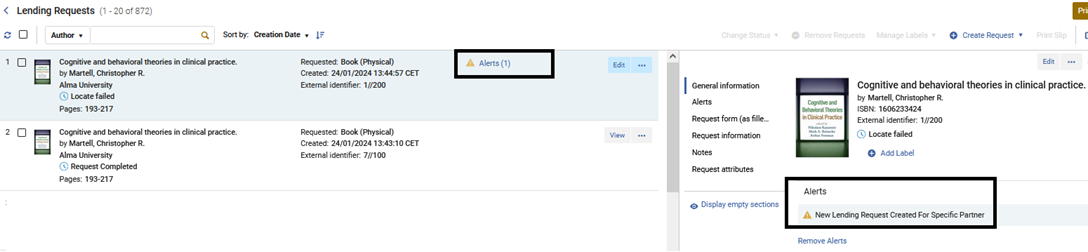
- Setting the New Request Alert checkbox will cause every lending request that is created for this partner to have a facetable alert.
- In the Contact Information tab, add address, phone number, and email information for the resource sharing partner (for informational purposes only; information for sending the resource sharing request is entered in the Parameters tab – see the following step). For instructions, see Adding User Contact Information.
-
Nella tab Parametri, configura i parametri dei Servizi interbibliotecari. For more information, see Partner Parameters below.
-
Seleziona Salva. Il partner di condivisione delle risorse viene creato e visualizzato nella pagina Elenco partner di condivisione delle risorse.
The partner can then be selected from the Partner dropdown list (accessible when selecting the Edit,Duplicate, or Send options on the Resource Sharing Borrowing Requests page) or Supplied to drop-down list (accessible when selecting the Edit or Duplicate options on the Resource Sharing Lending Requests Task List page).
A Notes tab is available when editing the resource sharing partner (Actions > Edit).
Parametro partner
Parametro ARTEmail
Inserisca l'indirizzo email ARTEmail. Inoltre, per ogni ID cliente che aggiungi, devi inserire un codice e una password. Optionally, if you want to enable the ability to send requests to an alternate physical location or email address (which you can select to do in the Request Attribute section of the Creating a Borrowing Request page), you may select the Supports ADD request check box. You may also select keyword codes –that is, request values –to include. (Refer to the British Library's Guide to ARTEmail for an explanation of these values.) These define the communication that is possible vis-a-vis the resource sharing partner.
See also Alma Resource Sharing ARTEmail and Email.
Parametri NCIP
Configurare il parametro come descritto nella tabella seguente:
| Sezione | Campo | Descrizione |
|---|---|---|
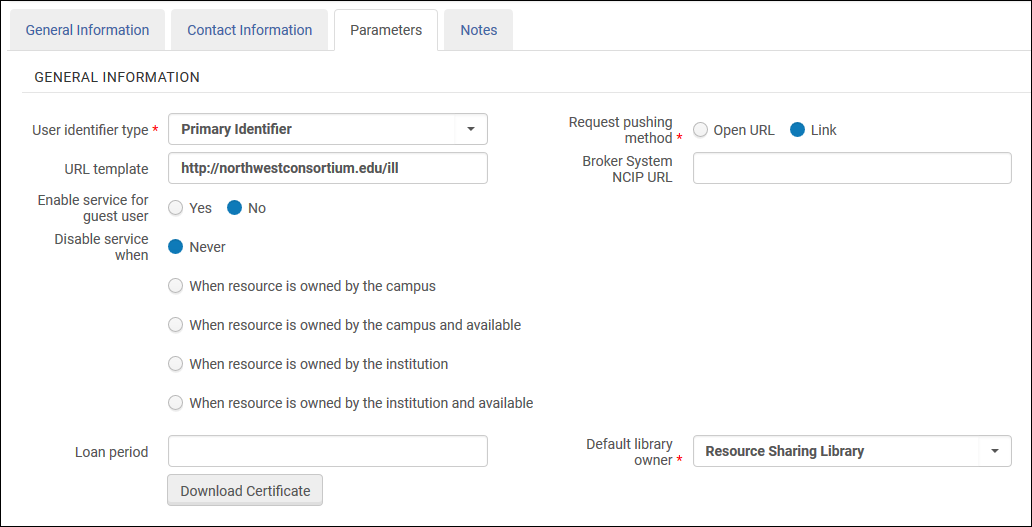
| Informazioni generali | Tipo di identificativo utente (obbligatorio) | Il tipo di identificazione che verrà utilizzato per abbinare l'Utente quando un messaggio contiene un ID Utente. Seleziona una delle opzioni predefinite da un amministratore. See Viewing Additional User Identifier Types. |
| Metodo di invio richiesta (obbligatorio) |
Il partner NCIP apparirà come servizio in Primo. Configurare questo campo per determinare il collegamento che verrà attivato dal servizio in Primo.
|
|
| Template URL | The URL that is used to send patrons from Primo to the resource sharing library's Web site. | |
| URL NCIP sistema broker | L'URL per comunicare con il broker NCIP. | |
| Aggiungi l'accesso automatico dell'utente all'URL. | Select Yes to add a user's login credentials to the URL, thereby logging the user in automatically upon accessing the URL. This field displays only when Request pushing method = OpenURL.
Select Yes when configuring integration with a Relais system (see Configuring Alma/Broker Integration). |
|
| Abilita servizio per utente ospite | Indica se il collegamento al partner viene visualizzato in Primo quando l'utente non ha effettuato l'accesso. | |
| Disattivare il servizio quando | Selezionare i parametri in base ai quali il servizio deve essere disattivato. I valori possibili sono:
Quando un Utente ospite o un Utente senza un Campus configurato esegue una qualsiasi delle attività di Disattiva a livello di Campus, Alma Disattiva/nasconde il Servizio in base a un controllo di autoproprietà eseguito a livello di istituzione. |
|
| Periodo di prestito | Il tempo a disposizione dell'Utente prima di dover restituire la copia alla biblioteca di condivisione risorse. (Questo può essere visto dai clienti in Primo.) | |
| Biblioteca proprietaria di default | La biblioteca di resource sharing che gestisce la richiesta di prestito creata da questo profilo. | |
| Pulsante Scarica certificato |
Questo pulsante serve per autenticare la comunicazione TCP dei messaggi crittografati inviati ad Alma tramite il protocollo SLNP. Il pulsante appare per i Partner NCIP dopo che il Partner è stato salvato per la prima volta. Ogni clic su questo pulsante crea un "nuovo" certificato e quindi può compromettere la crittografia, se il nuovo certificato non viene immediatamente installato dalla parte del partner. For more information on the certificate, see the Developer Network. |
|
| richiesta di una copia
Un messaggio NCIP viene inviato quando una richiesta di prestito viene registrata sul lato del prestatore. |
Biblioteca per la condivisione delle risorse | La singola Biblioteca dei Servizi Interbibliotecari supportata per tutte le azioni. Selezionare da una Lista predefinita dall'amministratore. |
| Tipo ID Record Bibliografico |
Selezioni un parametro in base al quale cercare le richieste di condivisione risorse. I valori possibili sono:
|
|
| Supporto al prestito | Use if the broker system notifies Alma about new borrowing requests at the time they are created using the Request Item NCIP messages. Most broker systems do not use this message to notify a borrower about a new borrowing request. Rather, the AcceptItem message is used at the point when the item is received. Leave the checkbox unselected, unless you are sure that your broker system also uses the Request Item message for notifying about new borrower requests. | |
|
Oggetto check out Un messaggio NCIP viene inviato quando una copia viene inviata dal lato del prestito al lato del prestito in entrata. |
biblioteca predefinita (obbligatorio) | La biblioteca di condivisione delle risorse da utilizzare come default, se sono presenti più biblioteche di condivisione delle risorse. |
|
Localizzazione di default (Obbligatorio) |
La Localizzazione di biblioteca temporanea nella Biblioteca dei Servizi Interbibliotecari che verrà assegnata a una copia che è Inviata a un utente dei Servizi interbibliotecari. Selezionare da una Lista predefinita dall'amministratore. | |
|
Default Policy Copia (Obbligatorio) |
La policy che verrà collegata a una copia che verrà inviata a un utente dei Servizi interbibliotecari. Selezionare da una Lista predefinita dall'amministratore. | |
|
Accetti copia Un messaggio NCIP viene inviato quando l'arrivo di una copia viene registrato sul lato del prestito. |
Localizzazione di default (obbligatorio) | La localizzazione di biblioteca temporanea presso la biblioteca ricevente. Selezionare da una Lista predefinita dall'amministratore.
Questa localizzazione di biblioteca è assegnata a una copia che viene inviata a un mutuatario di condivisione risorse, a meno che una diversa localizzazione di biblioteca non sia stata assegnata da una regola di creazione copia temporanea. |
| Biblioteca per la condivisione delle risorse | La biblioteca di condivisione risorse, se sono presenti più biblioteche di condivisione risorse. | |
| Biblioteca ritiro di default | "Il Luogo di ritiro default al quale vengono spostamento le copie temporanee quando una copia arriva per una Richiesta di prestito in uscita." Selezionare da una Lista di biblioteche predefinite da un amministratore. | |
| Ricezione Automatica |
Selezionare per abilitare la ricezione automatica della copia di condivisione delle risorse. La ricezione automatica consente al personale di registrare un'azione di ricezione nel sistema del broker, senza dover ripetere l'azione di ricezione in Alma. Abilitando questa opzione, è possibile elaborare più richieste AcceptItem per una singola Richiesta di prestito in uscita multi-copia. Questo è applicabile se le richieste contengono lo stesso ID richiesta ma codici a barre diversi e l'ID richiesta è attivo. Se l'opzione non è Abilita, verranno create più richieste con lo stesso ID di richiesta. |
|
| Banco ricevimento | Seleziona una scrivania presso cui ricevere la copia. The available options are the desks of the library that is specified in the Default library owner field. Il valore che selezioni indica la Localizzazione di biblioteca in cui la copia arriva quando viene Ricevere il messaggio.
This field displays only when Automatic receive is selected. |
|
|
Cerca utente Un messaggio NCIP viene inviato quando un utente tenta di creare una richiesta nel sistema di Servizi interbibliotecari. |
Richiedi autenticazione | Select whether authentication should or should not be required for the resource sharing library's Web site. When working with a Relais broker, select No. |
| Esporta a terzi | Esportato a terzi | Utilizzato per ILLiad, Tipasa, Worldshare ILL e Relais. See ILLiad parameters; Tipasa, Worldshare ILL, and Relais Parameters below. |
|
Crea transazione fiscale utente A received NCIP message can create a request fee. |
Creare una tariffa utilizzando |
|
È necessario configurare anche i seguenti parametri sul partner NCIP:
- The NCIP URL, in the following format:https://<Alma domain>/view/NCIPServlet
- L'AgencyID, che è il codice della Sua istituzione Alma
- The ApplicationProfileType, which is the code defined on the Resource Sharing Partner page (see step 3 above)
Parametro Peer-to-Peer NCIP
- Supports ADD request – Select this box if you want to enable the ability to send requests to an alternate physical location or email address (which you can select to do in the Request Attribute section of the Creating a Borrowing Request page).
- Tipo di identificativo utente – Il tipo di identificazione che verrà utilizzato per trovare la corrispondenza con gli utenti quando un messaggio contiene un ID utente. Seleziona una delle opzioni predefinite da un amministratore. See Managing User Identifiers.
- Server – Enter the partner's server name (or IP address).
- Username – Enter the username. Entrambi i partner devono inserire lo stesso nome utente.
- Password – Enter the password. Entrambi i partner devono inserire la stessa password.
- Codice Istituzione – Inserisca il codice Istituzione Alma del partner.
- Simbolo partner – il simbolo con cui viene indicato il partner ILL. Il simbolo deve essere unico rispetto a tutti gli altri simboli partner e ISO. Questo include i partner NCIP-P2P, SLNP e ISO.
- Request Expiry – Configure when the partner's lending settings expire. Scegli tra i seguenti:
- Nessuna scadenza – La richiesta non scade mai
- Scadenza per data di interesse – La richiesta scade alla data specificata nel campo Necessario entro nella pagina Richiesta di prestito in uscita (Servizi interbibliotecari) (visualizzata durante la creazione di una richiesta di prestito in uscita).
- Ora di scadenza – viene visualizzato il campo Ora di scadenza, in cui è possibile immettere un numero. Questo valore indica il numero di giorni dopo l'invio della richiesta al prestatore in cui la richiesta scade.
- Invia informazioni sul richiedente – Seleziona questa opzione per consentire alla richiesta inviata tramite il partner specificato di contenere informazioni sul richiedente, come il loro nome e email. It is recommended to select this option only if the third-party system requires this information in order to properly handle the request.
- Codici a barre condivisi – selezionare per Abilita la condivisione dei codici a barre delle copie tra istituzioni di prestito e di prestito.
- Indirizzo email – Utilizzato per l'invio di notifiche di ritardo.
- Intervallo di reinvio dei giorni di ritardo – un numero intero che indica il numero di giorni per le notifiche ricorrenti di ritardo.
An additional option available for NCIP peer-to-peer configuration is the Lookup Agency button. Selezionando questo pulsante, si contatta il Partner e si ottiene il protocollo supportato o altre informazioni che il Partner desidera trasmettere per facilitare il processo di configurazione del Partner. You may also set your institution's information that will be transmitted to other partners by customizing the resource_sharing_protocol parameter of the Fulfillment mapping table. For information on modifying this value, see Configuring Other Settings.
Il sistema peer-to-peer di NCIP supporta l'invio di un messaggio generale all'istituzione partner.
parametro ISO
- Alma supports the following ISO Resource Sharing messages:ILL Request,Shipped,Received,Returned,Checked-In, Answer – Unfilled, Cancel/Cancel Reply, and General Messages.
- I partner ISO possono soddisfare la richiesta di condivisione di Risorsa digitale utilizzando l'opzione di accesso al documento tramite collegamento.
- I parametri ISO sono per lo più gli stessi per ISO ILL 10160/10161 e ISO 18626.
- Supports ADD Address – Select to include the requester's email in the ILL request, enabling the lending partner to send the shipped resource directly to the requester.
- Server – the partner's server or IP address. If the partner also uses Alma, use the Alma domain (see Logging Into and Out of the User Interface) as the server.
- Port – the partner's ILL port number. Se anche il partner utilizza Alma, questa è la porta 9001.
- Simbolo ISO – il simbolo con cui si fa riferimento al partner ILL. Il simbolo deve essere unico rispetto a tutti gli altri simboli partner e ISO. Questo include i partner NCIP-P2P, SLNP e ISO.
- Request Expiry – configure when the partner's lending settings expire. Scegli tra i seguenti:
- Nessuna scadenza – La richiesta non scade mai
- Scadenza per data di interesse – La richiesta scade alla data specificata nel campo Necessario entro nella pagina Richiesta di prestito in uscita (Servizi interbibliotecari) (visualizzata durante la creazione di una richiesta di prestito in uscita).
- Ora di scadenza – viene visualizzato il campo Ora di scadenza, in cui è possibile immettere un numero. Questo valore indica il numero di giorni dopo l'invio della richiesta al prestatore in cui la richiesta scade.
- Invia informazioni sul richiedente – Seleziona questa opzione per consentire alla richiesta inviata tramite il partner specificato di contenere informazioni sul richiedente, come il loro nome e email. It is recommended to select this option only if the third-party system requires this information in order to properly handle the request.
- Codici a barre condivisi – selezionare per Abilita la condivisione dei codici a barre delle copie tra istituzioni di prestito e di prestito. Se sia il Partner prestatore che quello richiedente hanno selezionato questa opzione, la Biblioteca prestante Invia un codice a barre con il messaggio Spedito e la Biblioteca richiedente utilizza il messaggio Spedito per determinare il codice a barre della copia della Biblioteca fornitrice. The barcode displays as the Temporary Barcode value on the Receiving Items page (displayed when selecting Receive for a borrowing request), and can be used for identifying the received item when accessing the Received Items page (see Receiving Items).
- Send ReturnInfo (relevant for ISO18626) – Select this to include the information for the originating lending library instead of the resource sharing library. Il codice ISIL della Biblioteca prestante viene quindi incluso nella richiesta di Servizi interbibliotecari, se è disponibile. The ISIL code is presented on the Resource Sharing Borrowing Task List as Return Information. It is also available in the XML for the Resource Sharing Return Slip Letter (see Configuring Letters). Il campo appare nella comunicazione quando è popolato. Se la comunicazione è personalizzata, devi aggiungere manualmente il campo all'XML affinché venga popolato. Si nota che quando si esegue la scansione di una copia tramite l'interfaccia di scansione, le informazioni sulla destinazione vengono aggiunte a ciascuna riga. Quando si torna tramite Restituzioni, viene aggiunto alla visualizzazione pop-up.
- Ignora i Costi di fornitura della Biblioteca fornitrice – seleziona questa casella di controllo per utilizzare il costo impostato dall''utente. Quando la casella di controllo non è selezionata, i costi della Biblioteca fornitrice ignorano i costi dell'utente. Si noti che quando la casella di controllo non è selezionata, il costo dell'istituzione che prende in prestito viene ignorato anche se il prestatore non ha comunicato un valore di costo; ovvero, sarà considerato come se al mutuatario fosse stato comunicato un valore pari a 0.
- Intervallo di reinvio dei giorni di ritardo – un numero intero che indica il numero di giorni per le notifiche ricorrenti di ritardo.
parametro e-mail
- Email address- The email address to which resource sharing borrowing requests are to be sent. Note that if you are working in a sandbox environment or in a pre-”Go Live” production environment, the entered address must be added to the Email Include List Mapping Table in General Configuration > Configuration menu > External Systems > Allowed Emails. For details, see Configuring Allowed Emails).
- Intervallo di reinvio dei giorni di ritardo – un numero intero che indica il numero di giorni per le notifiche ricorrenti di ritardo.
Parametri ILLiad
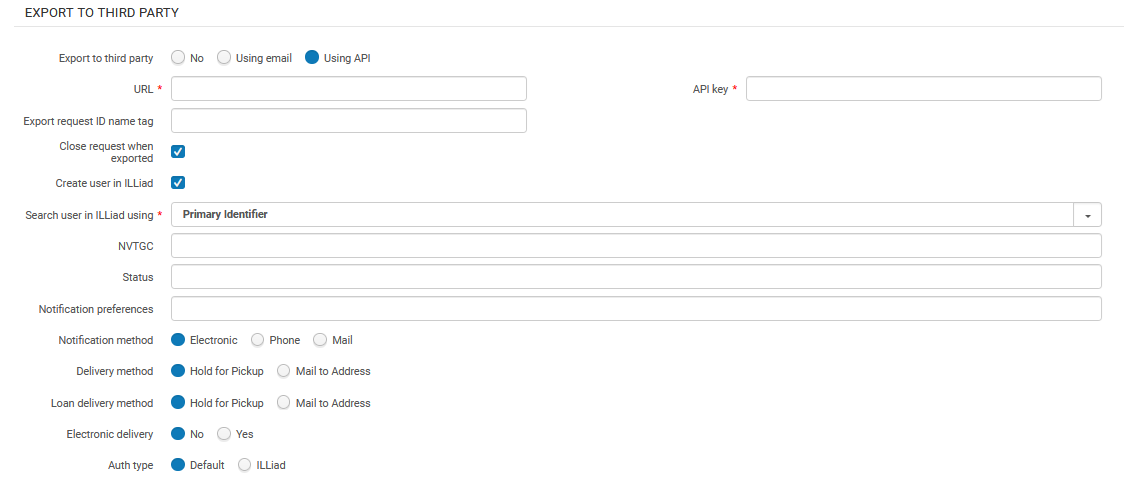
ILLiad can be set up in Alma in a peer-to-peer rota as a supplier of last resort (see Peer-to-Peer Resource Sharing in the Resource Sharing Guide), Configure this in the Export to Third Party section, at the bottom of the Parameters tab.
For the Export to Third Party radio button, select either Using API or Using email.
If you select Using email, enter the email address for ILLiad request notifications in Export email address.
ILLiad deve essere configurato per caricare le email inviate all'Indirizzo configurato e utilizzarle per creare una richiesta di prestito in uscita interna.
If you are using the API to export borrowing requests to ILLiad, enter the URL and API key as supplied by ILLiad. Additionally, enter the name of the XML tag to populate with the external request ID in Export request ID name tag.
Inserisci il nome del tag da popolare con l'ID della richiesta esterna. ILLiad can use this request ID for further NCIP communications with Alma. L'uso di questa opzione ti Abilita a continuare a Ricevere aggiornamenti tramite NCIP. The value of this tag must be coordinated with ILLiad.
Select Create user in ILLiad if you want to use the API to push user records to ILLiad. The push only occurs if the user does not already exist in ILLiad: Before pushing a request to ILLiad, Alma checks if an account exists and creates a new user account if not.
If selected, the following API values appear (to be filled according to ILLiad's requirements):
- Search user in ILLiad using – the value that Alma uses to locate/create a user in ILLiad (user identifier or preferred email)
- NVTGC – free string
- Status – free string
- Notification preferences – repeatable free text field with two comma-separated values. Il primo è inviato come ActivityType e il secondo come NotificationType. For example,{RequestPickup,Email},{RequestOverdue,Email}
- Notification method –Electronic,Phone, or Mail
- Delivery Method –Hold for Pickup or Mail to Address
- Loan Delivery Method –Hold for Pickup or Mail to Address
- Electronic Delivery –No,Yes
- Authtype –Default,ILLiad
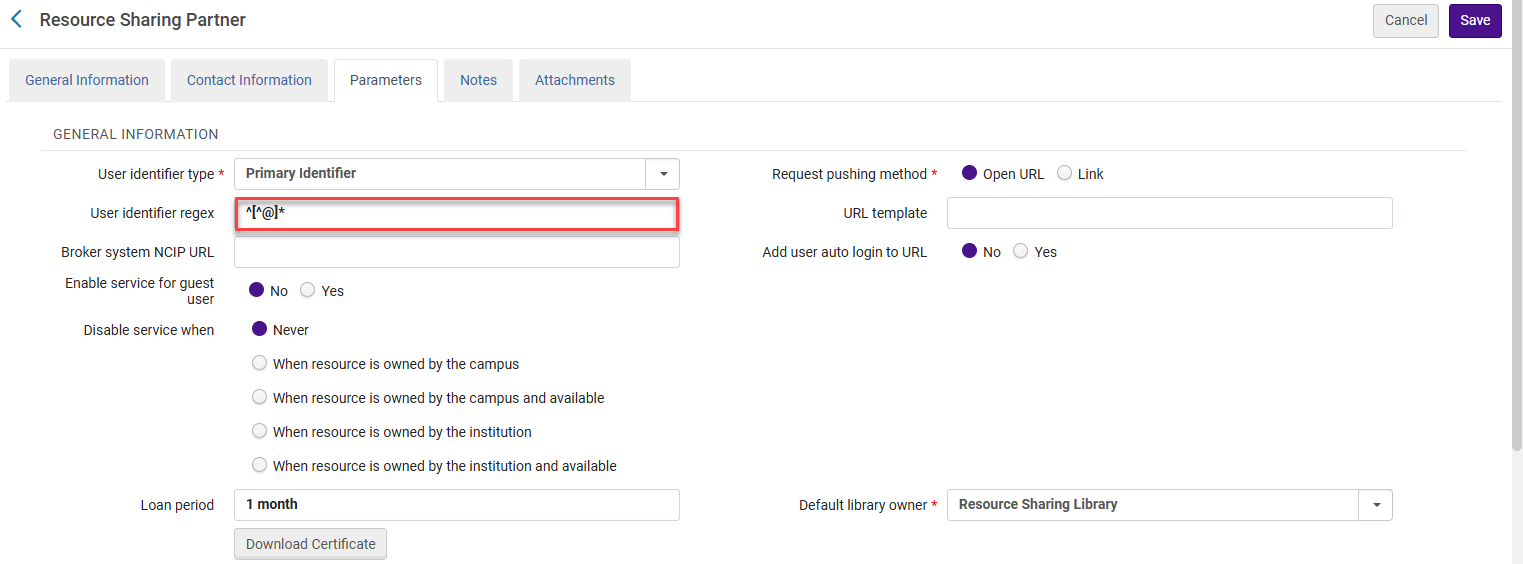
If you want to manipulate the user ID exported in the request, configure the User identifier regex field. For example, if the library wants to use the email as the identifier, but only wants to send the part before the @ sign, the library must define the following as the regular expression:^[^@]* This means that all characters until the first occurrence of @ are used as user ID. For example, if the email address is joe@clarivate.com and the User identifier regex field contains ^[^@]*, then the identifier isjoe.
Vedi anche l'articolo del blog di Developer Network.
Parametri SLNP
- Supports ADD Address – Select to include the requester's email in the ILL request, enabling the lending partner to send the shipped resource directly to the requester.
- Server – The partner's server name (or IP address)
- Port – The partner's ILL port number
- Simbolo del partner – rappresenta la biblioteca Sigel. Il simbolo deve essere unico rispetto a tutti gli altri simboli partner e ISO. Questo include i partner NCIP-P2P, SLNP e ISO.
- Request Expiry – configure when the partner's lending settings expire. Scegli tra i seguenti:
- Nessuna scadenza – La richiesta non scade mai
- Scadenza per data di interesse – La richiesta scade alla data specificata nel campo Necessario entro nella pagina Richiesta di prestito in uscita (Servizi interbibliotecari) (visualizzata durante la creazione di una richiesta di prestito in uscita).
- Ora di scadenza – viene visualizzato il campo Ora di scadenza, in cui è possibile immettere un numero. Questo valore indica il numero di giorni dopo l'invio della richiesta al prestatore in cui la richiesta scade.
- Invia informazioni sul richiedente – Seleziona questa opzione per consentire alla richiesta inviata tramite il partner specificato di contenere informazioni sul richiedente, come il loro nome e email. It is recommended to select this option only if the third-party system requires this information in order to properly handle the request.
- Codici a barre condivisi – selezionare per Abilita la condivisione dei codici a barre delle copie tra istituzioni di prestito e di prestito. Se sia il Partner prestatore che quello richiedente hanno selezionato questa opzione, la Biblioteca prestante Invia un codice a barre con il messaggio Spedito e la Biblioteca richiedente utilizza il messaggio Spedito per determinare il codice a barre della copia della Biblioteca fornitrice. The barcode displays as the Temporary Barcode value on the Receiving Items page (displayed when selecting Receive for a borrowing request), and can be used for identifying the received item when accessing the Received Items page (see Receiving Items).
- Indirizzo email – l''indirizzo email per l''invio di notifiche in ritardo e di richiamo
- Intervallo di reinvio dei giorni di ritardo – un numero intero che indica il numero di giorni per le notifiche ricorrenti di ritardo.
Parametri Network Servizi
- Customer Code- The Alma customer code of the fulfillment network partner.
- URL- The Alma URL of the fulfillment network partner.
- Request Expiry- configure when the partner's lending settings expire. Scegli tra i seguenti:
- Nessuna scadenza – La richiesta non scade mai
- Scadenza per data di interesse – La richiesta scade alla data specificata nel campo Necessario entro nella pagina Richiesta di prestito in uscita (Servizi interbibliotecari) (visualizzata durante la creazione di una richiesta di prestito in uscita).
- Ora di scadenza – viene visualizzato il campo Ora di scadenza, in cui è possibile immettere un numero. Questo valore indica il numero di giorni dopo l'invio della richiesta al prestatore in cui la richiesta scade.
To be able to add partners (Fulfillment > Partners) of type 'Fulfillment Network', you have to add a dummy entry to the Fulfillment Members table (Configuration > General > Network Groups > Fulfillment Member). Only then can you add the partners to the Fulfillment Networks Groups page (Configuration Menu > General > Network Groups > Fulfillment Network Groups). Once you have set up all the Partners in the Network Zone, you can either leave that dummy entry in the Fulfillment Members table in the Network Zone or delete it. If you decide to delete it, the partners will show as Profile Type 'Fulfillment Network (Not Listed)' in the Fulfillment Partners table, but they will still be functional as Fulfillment Network partners.
BLDSS Parameters
- Base URL – Enter the partner's URL.
- Account – The account number supplied by the British Library.
- Password – immettere la password dell'account.
- Digital Format – Select the type of file transfer.
- Invia informazioni sul richiedente – Seleziona questa opzione per consentire alla richiesta inviata tramite il partner specificato di contenere informazioni sul richiedente, come il loro nome e email. It is recommended to select this option only if the third-party system requires this information in order to properly handle the request.
- Consenti richiesta asincrona – Abilita la condivisione dei codici a barre delle copie tra le istituzioni prestatrici e riceventi.
RapidILL Parameters
È possibile configurare un partner RapidILL dedicato. If configured, Alma will automatically export borrowing requests that have been assigned to the RapidILL partner and create an equivalent borrowing request in RapidILL. The export action takes place when the Send action is triggered (manually or automatically) for the request with the active RapidILL partner.
If the request cannot be fulfilled by RapidILL, for example in the case where the requested resource is not lendable in RapidILL, then the Send action will be rejected and the request will automatically move on to the next partner on the rota, or get canceled when there are no other partners that can fulfill the request.
Questo abilita la biblioteca a impostare RapidILL come Partner nella Rota, in modo che tutte le richieste vengano automaticamente esportate per i servizi tramite RapidILL, a meno che la richiesta non possa essere soddisfatta da RapidILL. In questo caso, la richiesta si propagherà attraverso la rota di Alma.
- URL – Mandatory – The URL defaults to https://rapid.exlibrisgroup.com/rapid5api/apiservice.asmx, which is the RapidILL production server.
- Username – Mandatory
- Password – Mandatory
- Requesting Rapid Code – Mandatory -- also known in RapidILL as Rapid Site Code. Potrebbe essere lo stesso del Suo nome utente. Se è così, inserisca lo stesso valore in entrambi i campi.
- Requesting Branch Name – Mandatory – If your institution has multiple RapidILL branches, each branch needs a different partner.
I valori per configurare questi campi sono forniti da RapidILL
- Close Request when Exported- When selected, the request is closed when exported and the request status is updated to Exported to 3rd party. Questa è l'impostazione predefinita. Quando la casella di controllo non è selezionata, la richiesta rimane attiva dopo essere stata esportata in Rapid, e lo stato della richiesta viene aggiornato a Inviato al Partner. This allows the request to remain viewable in Primo even though it has been exported. Requests that are left open must be manually closed.
NACSIS Parameters
Inserisca il seguente parametro:
- Code- NACSIS
- Name- NACSIS
- Profile Type- NACSIS
- Status- Active
- System Type- NACSIS
- Supports borrowing- Select the suitable workflow profile.
- Supports lending- Select the suitable workflow profile.
For additional details about NACSIS, see Integration with NACSIS-CAT/ILL.
Tipasa, WorldShare ILL, and Relais Parameters
Supplier of Last Resort Broker
Tipasa, WorldShare ILL, and Relais may be set up in Alma in a peer-to-peer rota as a supplier of last resort. In this case, Alma will push a borrower request to these systems, where the request lifecycle will proceed as a broker managed request (see Broker-Based Resource Sharing).
To do so, when the partner record's Profile Type is NCIP, and the System Type is Tipasa,WorldShare ILL,Relais D2D, or Relais ILL, find the section Export to Third Party at the bottom of the Parameters tab.
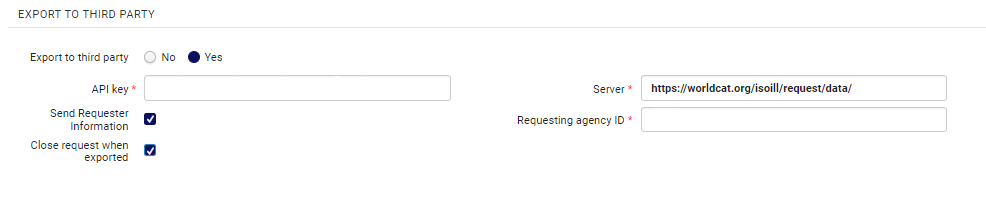
For the Export to Third Party radio button, select Yes. Inserisci la chiave API e l’URL del server forniti da OCLC, nonché l’ ID dell’agenzia di richiesta fornito per identificare la tua biblioteca (ad esempio, il Codice identificativo Istituzione OCLC dell’istituzione in OCLC-XXX Formato).
Invia informazioni sul richiedente – Seleziona questa opzione per consentire alla richiesta inviata tramite il partner specificato di contenere informazioni sul richiedente, come il loro nome e email. It is recommended to select this option only if the third-party system requires this information in order to properly handle the request.
The Close request when exported option defines whether the borrowing request is closed after export or is managed under the same borrowing request. Since these systems are not able to use the exported request's ID to further send NCIP messages that hook up to the existing request, it is recommended to enable this option, resulting in the request being closed in Alma when it is exported. Verrà creata una nuova richiesta con un ID diverso quando la copia sarà ricevuta dal partner, come avviene con altri sistemi broker NCIP.
Peer to Peer Partner
Once enabled by OCLC, Tipasa and WorldShare ILL can be set up as peer to peer partners using the ISO 18626 protocol. In this case, the request lifecycle will be managed as a peer to peer request (see Peer-to-Peer Resource Sharing).
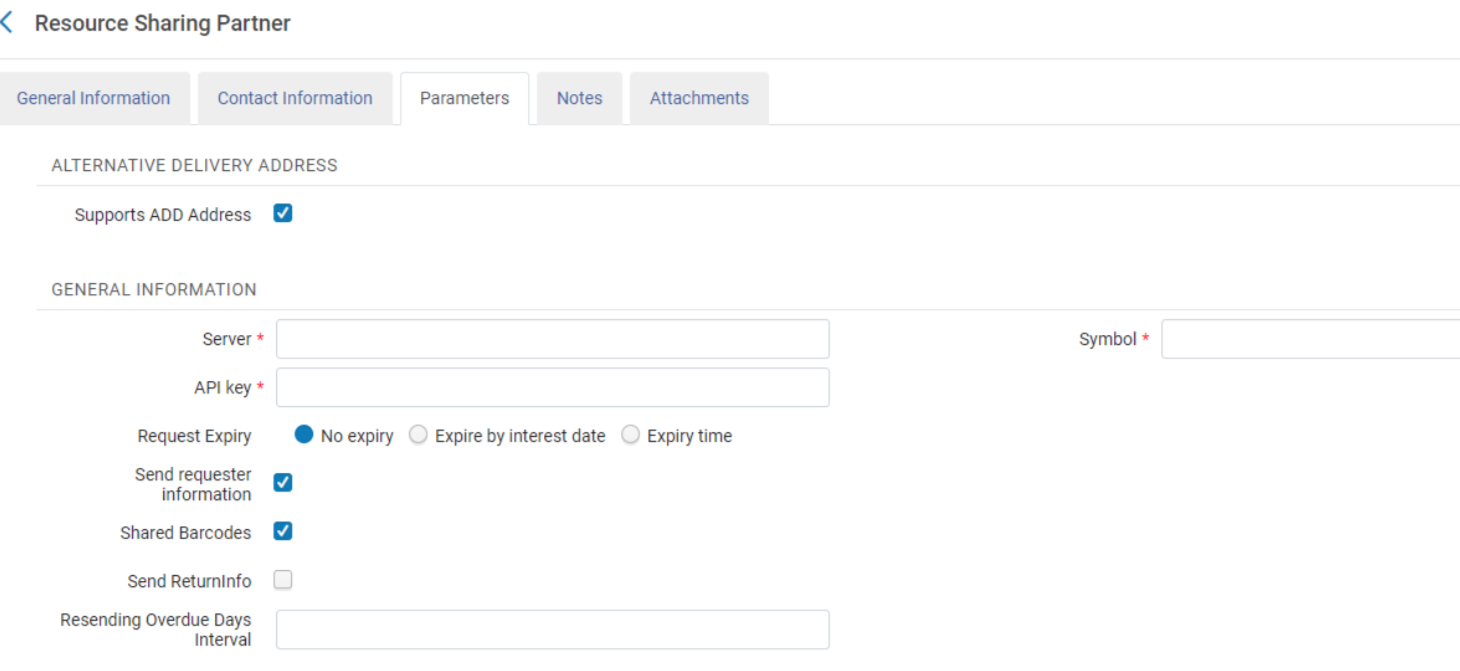
To set this up, create a partner record with the Profile TypeISO 18626 and System TypeTipasa or WorldShare ILL. In the Parameters tab of the partner record, configure the following parameters:
- The partner's symbol in the Symbol field
- L'URL del server nel campo Server
- An API key in the API key field
This feature is not currently supported by OCLC.
Inn-Reach API
See more information of the configuration and workflow of the API based InnReach requests, in the InnReach API Implementation Guide.
Libraries currently integrated with InnReach using NCIP and the InnReach DCB should contact Innovative in order to set up an implementation project with Innovative.
ReShare Parameters
Alma enables you to push user borrowing requests to ReShare (Fulfillment > Resource Sharing > Partners). Alma può verificare se le Risorse (bibliografiche) si trovano nella rete ReShare.
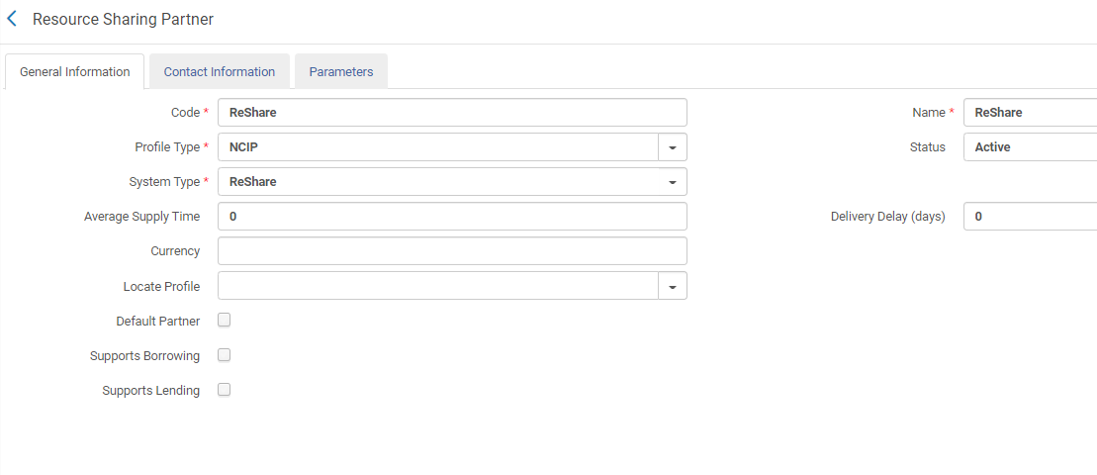
Enter the ReShare credentials on the Parameters tab.
The ReShare SHARED INVENTORY CONFIGURATION section is used for searching on the ReShare network. La sezione CONFIGURATION di ReShare OpenURL viene utilizzata per inviare la Richiesta di prestito in uscita.
Contributing Information to the Repository
Una biblioteca può contribuire le proprie informazioni all'Archivio.
You can contribute your own resource sharing library information to the repository , see Contributing to the Resource Sharing Directory for details.
