
Configurazione dell'ID aggiuntivo della richiesta
- Amministratore di sistema generale - Abilita, Disabilita, Modifica
- Amministratore Servizi - Abilita, Disabilita, Modifica
Overview
La biblioteca può impostare il prefisso e il massimo per l'ID aggiuntivo assegnato alla richiesta di prenotazione. To access this page, navigate to Configuration > Fulfillment > Request Additional ID Configuration.
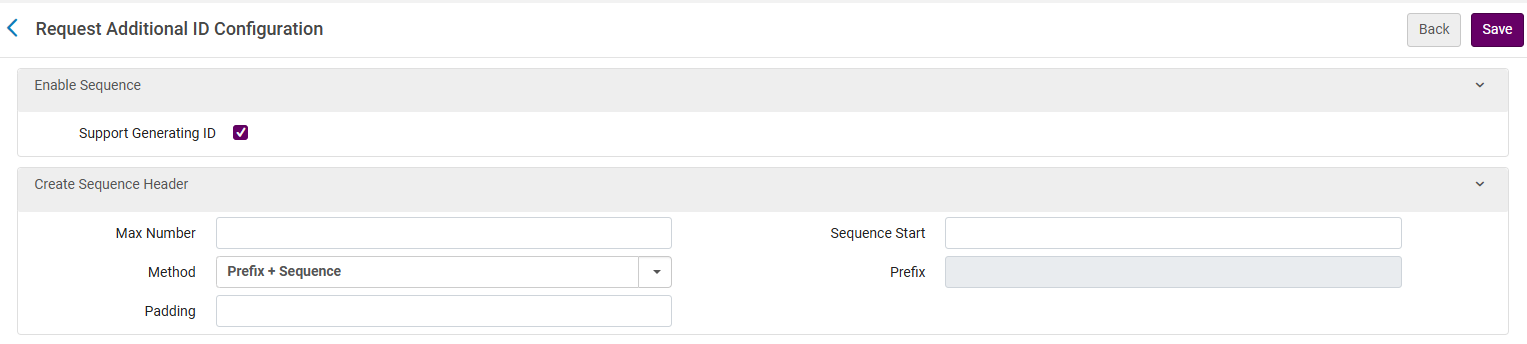
Configurazione dell'ID aggiuntivo della richiesta
You can set the sequence, i.e., a running number that continues until the Max Number. Once the Max Number is reached, the sequence returns to the start (see Sequence Start below).
-
Supporta la generazione dell'ID - Consente la generazione dell'ID. Per default questa funzione è disabilitata.
-
Numero max - Set il numero max della sequenza numerica. Once the sequence reaches the max number, it will automatically reset to the Sequence Start value (unless there is a manual reset). Un esempio di valore massimo è - 9999.
-
Metodo - Impostare il metodo da utilizzare per la sequenza.
-
Prefisso + Sequenza: quando questa opzione è selezionata, è possibile aggiungere un prefisso (vedere Prefisso di seguito) da includere prima della sequenza.
-
Nessuno - Quando questa opzione è selezionata, il campo Prefisso è disabilitato.
-
-
Padding - The maximum number of digits (numbers only) allowed in the numerical part of the sequence. If Padding = 5, then the number will contain five digits.
-
Example 1: If Max Number is set to 999 and the padding is 3, then after 999 comes 001.
-
Example 2: If Max Number is set to 9999 and the padding is 5, then after 09999 comes 00001.
-
Example 3: If Max Number is set to 9999 and the padding is 3, then after 999 comes 001.
-
-
Inizio sequenza - Il valore iniziale della sequenza.
-
Prefisso - Questo è disponibile solo se è selezionato il metodo prefisso. It can either be a number, letter or symbol (-, /, #, etc.).
Si consiglia che il padding sia uguale o maggiore del numero di cifre nel numero massimo.
Esempio
Sequenza
-
Metodo: Prefisso + Sequenza
-
Prefisso: REQ-
-
Max number: 9999
-
Sequence Start: 1000
-
Padding: 5
Output ID aggiuntivi
-
REQ-01000
-
REQ-01001
-
REQ-01002
-
....003
Page tags: article:topicproduct:almacontent:Documentationlang:english
