
Supporto BIBFRAME
Introduzione
Alma is a multi-format system that supports BIBFRAME Works and Instances. I record in questo Formato possono essere utilizzati nei flusso di lavoro di Alma, come la Gestione risorse, le Acquisizioni, i servizi e il supporto per il Discovery. Questa pagina offre una panoramica delle funzionalità disponibili in Alma per gestire i record BIBFRAME nelle diverse sezioni e funzionalità di Alma.
Queste funzionalità continueranno ad espandersi ed evolversi man mano che verranno sviluppate nuove capacità per BIBFRAME.
Enabling BIBFRAME in Your Institution
Per attivare il supporto BIBFRAME nel tuo ambiente Alma, devi disporre di uno dei seguenti ruoli:
- Modulo di catalogazione Configuration
- Amministratore del catalogo
Una volta abilitato, il nuovo LOD Editor è ora disponibile per tutte le istituzioni che desiderano catalogare e modificare i record BIBFRAME direttamente all'interno di Alma.
- Select Configuration > Resources > Cataloging > Activate Linked Open Data Formats.
- Selezionare la casella di controllo Attiva BIBFRAME.
- Seleziona Salva. BIBFRAME è ora abilitato per la tua istituzione.
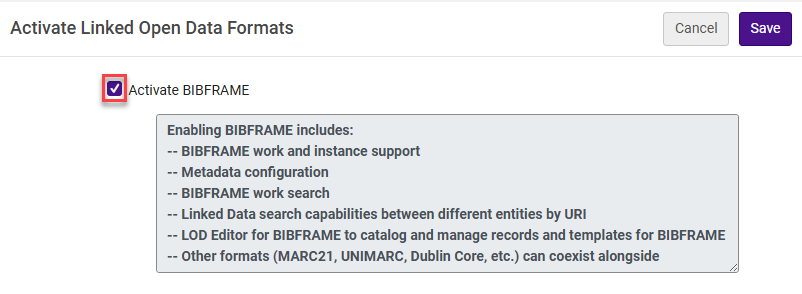
Questa configurazione abilita la ricerca delle opere, il collegamento all'editor BIBFRAME e i collegamenti ai modelli nel menu Risorse, nonché la configurazione dei metadati per questi formati.
API Services
API interne per i Clienti con Chiavi
BIBFRAME work and instance records can be sent to Alma using the Ex Libris Developers Network API Console Bibliographic records API (/bibs). For more information and examples, see How to use an API to create a BIBFRAME record.
Il collegamento tra l’opera e l’istanza viene effettuato a livello di istanza, utilizzando la proprietà bf:instanceOf con l’URI dell’opera contenuto in un rdf:resource. For example: <bf:instanceOf rdf:resource="http://id.loc.gov/resources/works/18016450"/>. Other structures are currently not supported by the API, and if used so the instance cannot link to the relevant work.
In addition, APIs can be used for updating, viewing, and deleting BIBFRAME works and instances the same way as bibliographic records in other metadata formats. The update API for instances includes the additional ability to update the work that the instance is related to.
Quando si aggiorna un record BIBFRAME, le API di Alma creano una corrispondenza con un record BIBFRAME esistente tramite almeno uno dei seguenti elementi nel record (in modo che almeno uno di questi URI o ID debba corrispondere al record da aggiornare, evitando così di creare un nuovo record):
- bf:about — the main URI of the work or instance.
- owl:sameAs — Alma adds an Alma URI to each record sent to Alma, which is then added to the work or instance as a same as URI.
- bf:identifiedBy — that contains a local ID (MMSID).
These APIs support the Sinopia BIBFRAME editor, enabling seamless updates of BIBFRAME records in Alma directly from Sinopia. To activate the Sinopia integration, open an issue on Sinopia's GitHub to request the integration's activation.
- Devi fornire a Sinopia la tua chiave API.
- Un prerequisito è avere un account attivato negli ambienti di fase e/o sviluppo di Sinopia.
If interested in manually testing the integration, see Python files for transforming Sinopia to Alma structure.
API aperte
These enable any individual with an Alma URI to reach the BIBFRAME RDF/XML record.
L'URI funge da endpoint per le opere e le istanze.
For more information, see the BIBFRAME documentation on the Developer Network.
SRU(Search/Retrieve via URL) is available for Alma bibliographic records and can be returned in BIBFRAME format, among others. Ensure the requested record schema is lc_bf_instance. For more information, see here.
All Titles Search
Le istanze BIBFRAME possono essere cercate tramite la funzione Ricerca per titolo di Alma. In Addition to existing indexes, such as title, author, subjects, etc., users can search by linked data fields such as the Instance URI (Title URI) and the Work URI (Parent URI). The URIs are also searchable as keywords to create a partial text search. For instance, if you wish to search exclusively by the prefix of the URI, it's achievable (example: development.sinopia.io).
BIBFRAME records can also be added to a set, whether an all-BIBFRAME set or a set that combines other record formats.
Il lavoro può essere visualizzato nella vista del record dell'istanza.
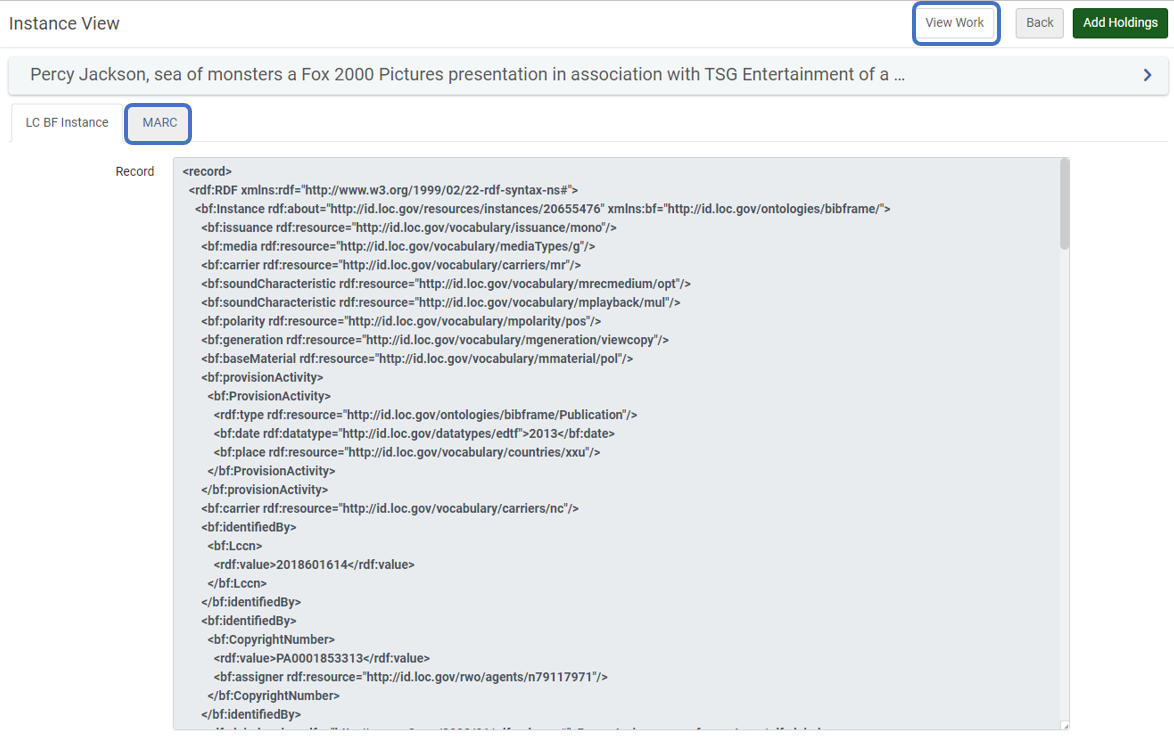
Il record BIBFRAME può essere visualizzato al volo come Record in formato MARC nella visualizzazione record.
For more information, see Searching in Alma - Ex Libris Knowledge Center (exlibrisgroup.com) and Search Indexes - Ex Libris Knowledge Center (exlibrisgroup.com)
Gestione risorse
BIBFRAME è supportato nei vari flussi di lavoro di Gestione risorse e nelle attività di amministrazione e Ricerca della biblioteca. The link below directs you to further information on developments done for BIBFRAME.
For more information on Resource Management, see Introduction to Resource Management - Ex Libris Knowledge Center (exlibrisgroup.com)
Supporto delle relazioni in BIBFRAME
BIBFRAME works and instances that contain relations are supported as part of the existing relations capabilities, based on the relations vocabulary maintained by the Library of Congress and the BIBFRAME ontology. Le relazioni BIBFRAME sono raggruppate e visualizzate come parte della funzionalità di visualizzazione dei record correlati disponibile all'interno di Alma. Poiché le relazioni BIBFRAME sono definite con gli URI del record correlato, Alma sa come utilizzare l'URI dell'Entità correlata per visualizzare la relazione all'interno di Alma.
La struttura RDF/XML delle relazioni BIBFRAME che Alma supporta:
We are aware of the change to the BIBFRAME ontology regarding relations and plan to support this structure in the future as well.
For more information on related record in Alma, see Configuring Related Records for Physical Inventory.
Gestione metadati
BIBFRAME instance records can be managed in the Metadata Editor. The records are displayed as view only, since they were created outside of Alma. The additional functionalities of the Metadata Editor are also functional for the BIBFRAME instance. Users can add a BIBFRAME instance to a portfolio, suppress/unsuppressed the instance, add management tags, add inventory, extract call numbers, add records to portfolios, and more.
For more information, see Metadata Management.
Collegamento alle Autorità
BIBFRAME records are linked to authority records, allowing the instances to be searchable by non-preferred terms. The linkage is based on the authorities and URIs cataloged in the BIBFRAME work and instance. Alma supports linking BIBFRAME records to the following authorities: Library of Congress Name Authority, Library of Congress Subject Headings, Library of Congress Children's Subject Headings, BNE, FAST and MESH. Support for linking to additional authorities will be incorporated at a later stage.
For more information, see Working with Authority Records.
Inventory
L'inventario di Alma è supportato per BIBFRAME. Il modello di dati esistente per le holdings e le copie è funzionale anche per il record BIBFRAME.
For more information, see Introduction to Alma Inventory - Ex Libris Knowledge Center (exlibrisgroup.com)
Pubblicazione
I record BIBFRAME possono essere pubblicati in Alma verso Risorse esterne tramite la General Publishing. Alma's general publishing supports publishing BIBFRAME as BIBFRAME and as MARC. Quando viene pubblicato come BIBFRAME, l'opera e l'istanza sono pubblicate in un unico file XML. For more information, see Publishing and Inventory Enrichment (General Publishing) - Ex Libris Knowledge Center (exlibrisgroup.com)
Alma supports publishing BIBFRAME records as part of the publishing to OCLC job by converting the BIBFRAME records on-the-fly to MARC records that are sent along with all MARC records to OCLC, both on the bibliographic level and on the holding level. Il Processo di pubblicazione di BIBFRAME come BIBFRAME su OCLC è supportato tramite General Publishing, come spiegato sopra.
For more information on the OCLC publishing profile, see Publishing to OCLC - Ex Libris Knowledge Center (exlibrisgroup.com)
Acquisizione
As a multi-format system, Alma PO lines and acquisition workflows are supported for the BIBFRAME instance.
For more information on Acquisition, see Acquisitions Infrastructure and Advanced Tools - Ex Libris Knowledge Center (exlibrisgroup.com)
Servizi
As a multi-format system, Alma supports BIBFRAME instances in the fulfillment processes of requests, loaning, and returning items.
For more information on Fulfillment, see Fulfillment - Ex Libris Knowledge Center (exlibrisgroup.com)
Analitica
Alma Analytics supporta i record bibliografici BIBFRAME nello stesso modo in cui supporta i record bibliografici in altri formati di catalogazione. In addition, Linked Open Data specific fields are available in analytics, such as Instance URI,Work URI, and others. For more information, see Linked Open Data.
Primo VE
BIBFRAME instances are indexed and displayed in Primo VE out of the box. In addition, you can configure the deduping of BIBFRAME instances by the work URI and configure FRBR for BIBFRAME by work URI and Expression of URI, combined with existing deduping and FRBR keys. In addition, existing normalization rules apply for BIBFRAME via an on-the-fly conversion to MARC.
For more information on mapping to Primo VE sections, see Mapping to the Display, Facets, and Search Sections in the Primo VE Record - Ex Libris Knowledge Center (exlibrisgroup.com)
For more information on deduping, see Understanding the Dedup and FRBR Processes (Primo VE) - Ex Libris Knowledge Center (exlibrisgroup.com).
For more information on normalization rules, see Configuring Normalization Rules for Display and Local Fields - Ex Libris Knowledge Center (exlibrisgroup.com).
Man mano che l'uso di BIBFRAME si espande nelle biblioteche, Ex Libris continuerà a migliorare le funzionalità di BIBFRAME in Primo VE.
Page tags: article:topicproduct:almacontent:Documentationlang:english
