
クレームの処理
このページには、Almaで請求を処理するための情報へのリンクが含まれています。For a high level overview of the receiving stage for physical items with links to details for closing PO lines, post receiving and processing claims see Receiving Material.For information on the overall purchasing workflow see Purchasing Workflow.For an overview of working with acquisitions in Alma, including links to relevant sections such as Infrastructure, Renewals, Invoicing, etc., see Introduction to Acquisitions.
- 購入オペレーター
- 購入マネージャー
注文が到着しない、または予定日までに有効化されない場合、注文明細に対してクレームが作成されます。Claim notifications to vendors can be sent for electronic or physical PO lines, as explained below.多くの場合、単一ベンダーからの複数のクレームを 1 つの通知にまとめることができます。
The following diagram provides an overview of the processing of claims:

- An order appears as In Claim only after the PO Line - Claiming job has run.(The process must be marked as Active on the Monitor Job page – see Viewing Running Jobs).
- 継続性が「スタンディングオーダー」で、在庫形式が「デジタル」である発注明細タイプのクレームは、現在 Alma ではご利用頂けません。このクレームには、継続タイプが「継続」であり、クレーム メカニズムで処理される発注明細タイプ「冊子 -スタンディングオーダーの非モノグラフ」は含まれません。
注文明細タスクリスト内のクレーム中アイテム
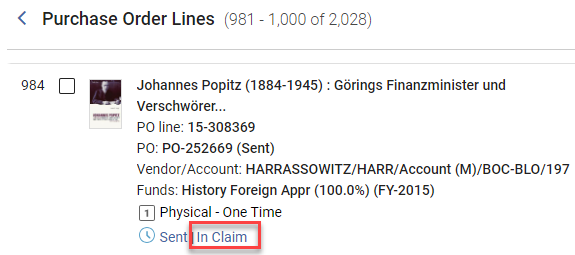
When one or more items in a PO line are in claim, the In Claim link appears beside the current workflow step (status) of the PO line in task list.For the criteria used to mark an item as in claim see Criteria for Marking PO Lines as In Claim.
In addition, for physical items, the Items in Claim section appears in the Details pane, below the Ordered Items section, and lists each of the items in the PO line that is in claim, along with its expected receiving date.
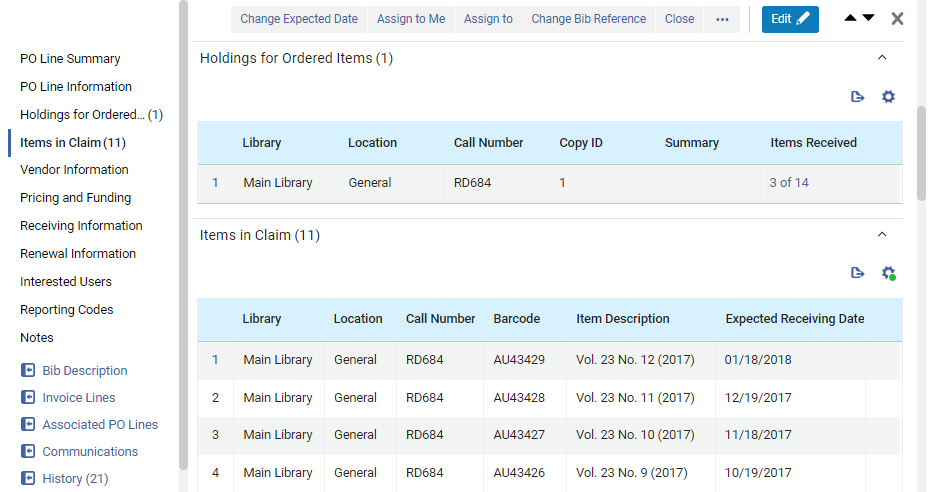
冊子の 1 回限りの注文の場合、リストには、この注文明細にリンクされている延滞で未受領のアイテムがすべて表示されます。Select the barcode of an item in the Ordered Items section to open the item in the Physical Item Editor.(New for February 2026) Select this link to view the holdings record in a sliding panel.
It is also possible to receive a specific item in the Items in Claims section of the PO line by selecting Receive from the row actions menu.When performing the receive operation in a PO line, a dialog box displays enabling you to update the receiving information.See also Modifying Physical Item Information.
For physical continuous PO lines, the claim is based on the prediction patterns, if they are enabled.For physical continuous orders, the list displays all overdue unreceived items that are under the holdings linked to this PO line, based on the prediction pattern.If there are items in claim, the link in the Holdings for Ordered Items section, under Items Received, opens the List of Items page in a sliding panel.In the row actions of an item, select View to open it in the Physical Item Editor.When a continuous PO line is in claim but no actual items are in claim, as when the PO line is waiting for renewal, the Items In Claim section is empty.For additional information about the criteria for determining which items are in claim, see Criteria for Marking PO Lines as In Claim, below.
クレーム中の注文明細のリスト表示
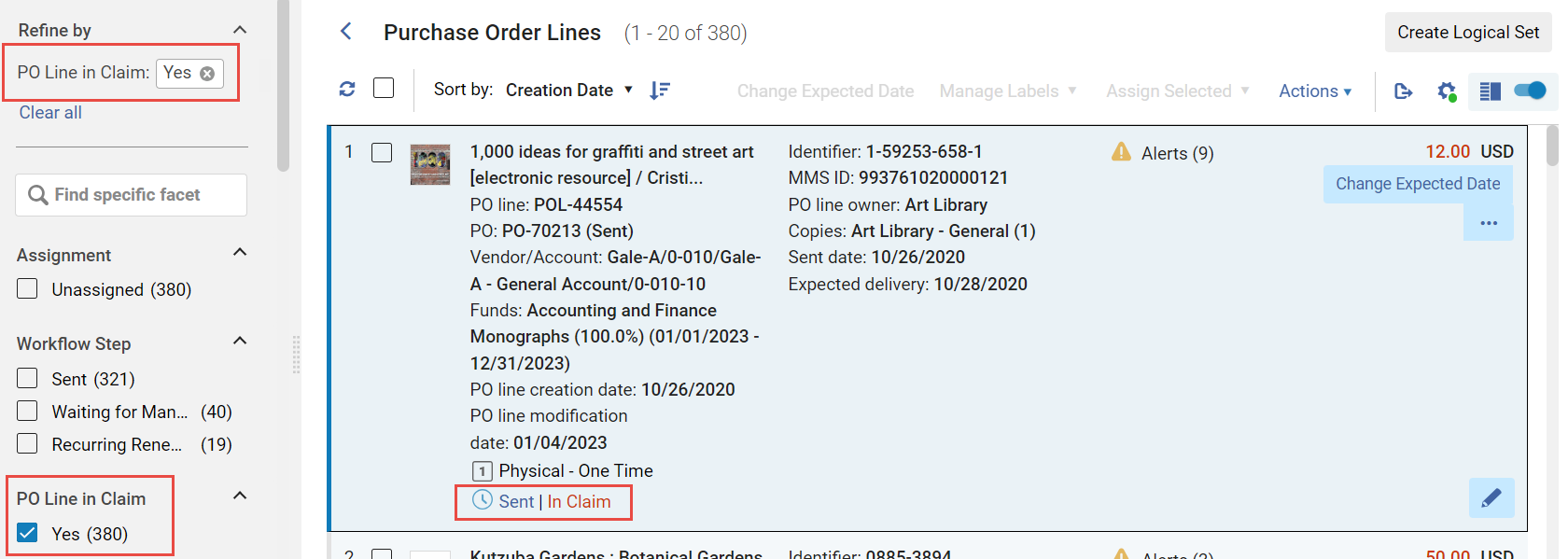
延滞の注文明細のリストを開くには、タスク リスト内の注文明細のリストをフィルター処理して、クレーム中の注文明細のみを表示します。タスク リストを開いているときであればどの時点でも、このフィルターをオンにしてタスク リストを開くことや、ファセットからフィルターをオンにすることが可能です。
- Navigate to Acquisitions > Purchase Order Lines > Claim.
- In the persistent menu, in the Tasks list, select Order Lines > Claim(see Tasks in the Task List).
- ファセットの [クレーム中の注文明細] で [はい] を選択します。(For additional information about working with the facets, see New Layout 2022.)
- In the row or Details pane of a PO line that is In Claim, select the In Claim link.
Criteria for Marking PO Lines as In Claim
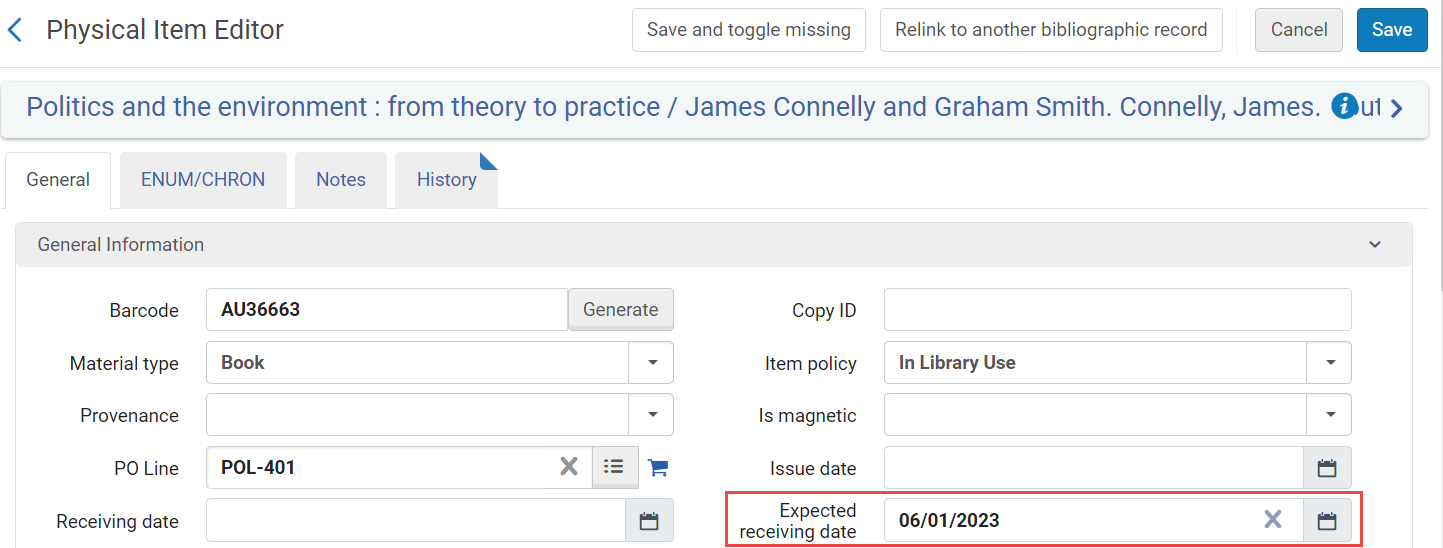
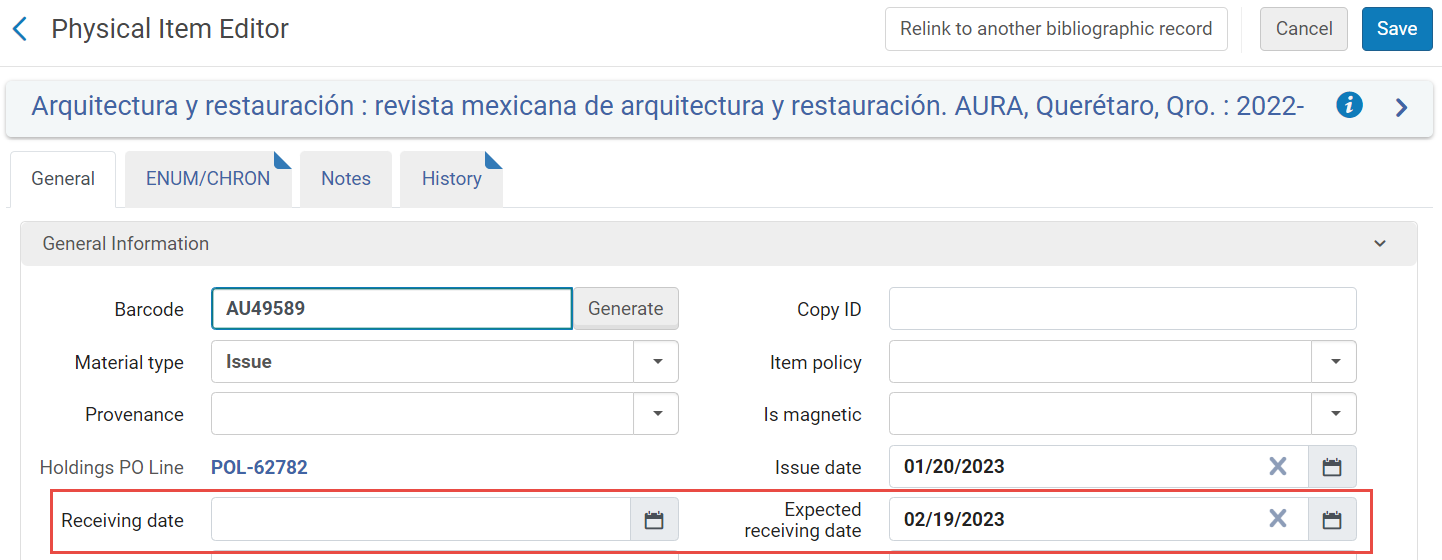
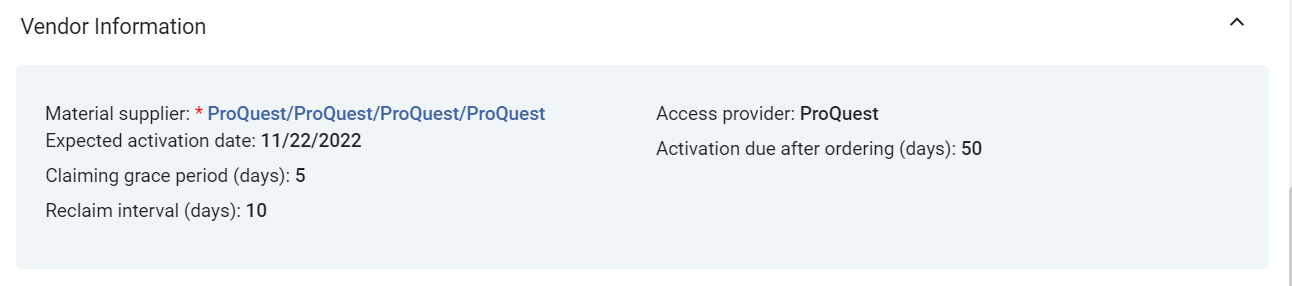
Several fields from the PO line are used by Alma to determine when a PO line is marked as In Claim.These fields appear in the Vendor Information section of the Details pane (see Manually Creating a PO Line).The expected receiving date that is calculated appears in the Expected receiving date field of the item information.
| 発注明細タイプ | クレーム |
|---|---|
| 1回限りの物的注文明細の場合 |
Alternative Ways of Specifying the Expected Receiving Date of an Item in the PO LIne's Vendor Information Section
|
| 継続物的注文明細の場合 |
When a continuous PO line does not have any expected items and the Expected receiving date is in the past, Alma marks the PO line as In Claim based on the Expected Receiving date+ grace period on the PO line. リクレーム間隔が設定されている場合、注文明細上のクレーム日+リクレーム間隔によって注文明細がクレーム中とマークされるたびに、クレーム日が再計算されます。 CO注文明細が請求情報付きで請求中の場合、アイテムエディターで受領予定日を変更しても、請求から注文明細は削除されず、請求日も再計算されません。
The fields associated with the item are (see Prediction Patterns and Updating Item-Level Information):
|
| For electronic PO lines (both one-time and continuous) |
Alma calculates claim dates as described above for physical PO lines, except that the Expected activation settings are used instead of the Expected receipt settings.When the Expected activation date+Claiming grace period arrives, and the PO line (either one-time or continuous) is still not activated, the PO line is marked as In Claim .
Example: If the vendor is configured with Expected activation > Days after ordering=5 and Claiming grace period=2, then if the electronic resource is ordered on April 20, it is expected to be activated by the end of April 27 (April 20 + 5 days + 2 days grace = April 27), and the PO line is marked as In Claim on April 28.
|



電子メール/EDI で送信されるクレーム通知
この注文明細が初めて[クレーム中]とマークされたときのみ、クレーム通知がベンダーに自動的に送信されます。後になってオペレーターが注文明細の受領予定日を更新し、新しい日付の後に注文明細が再び[クレーム中]とマークされた場合は、新たな通知は送信されません。
A notification is automatically sent to the vendor using email when all of the below take place:
- The vendor has a defined email addresses (see Managing Vendors)
- If the email Claims Letter is enabled (see Enabling/Disabling Letters)
- If the relevant claim parameters is set to Y (see Configuring Other Settings):
- auto_claim parameter for physical one-time PO line
- auto_claim_co for physical continuous PO line
- 電子注文明細のauto_claim_electronic
For all PO line types, if EDI Claim Letters are enabled, then for vendors that use EDI and have enabled EDI claims, a notification is sent using EDI instead of email (Claims must be checked on the EDI Information tab of the vendor; see Electronic Data Interchange (EDI)).
それ以外の場合、通知は電子メールでもEDIでも自動的に送信されません。You can send a notification manually using email (see Communicating with Vendors).
When a claim letter is sent for a given month, and the item is never received, if the following month's item also goes into claim, a claim letter can be sent with details for both months.To enable this option, set the claim_continuous_item_level parameter to true(see Combined Email Claim Notifications below).
Alerts Generated
注文明細が延滞になると、次のアラートのいずれかが生成されます:
- 延滞の注文明細 – 注文後の予想日数以内、または受領/有効化予定日までに、注文明細が受領/有効化されませんでした。
- この注文明細には未処理のクレームが存在します – 注文明細はクレーム中としてマークされています。物的単発注文明細(またはEDIクレームをサポートするベンダーの注文明細)の場合、注文の配達遅延について問い合わせるEメールがベンダーに自動的に送信されます。This automatic email is sent only once per claimed item to the vendor.Note that even if the In Claim indication is removed from a PO line, this alert remains until the claim is closed.Subsequent communication with the vendor takes place using the Communications section of the PO line's Details pane (see Communicating with Vendors).
- <x> items were received out of <y> ordered – For one-time physical PO lines: How many items have been received out of the total number ordered.To see a list of all the items in the PO line: In the PO Line Summary section, select the Alerts link to open a list of the alerts attached to the PO line.For this alert, select Go To Manage Items in receiving.The Received Items List page opens in the sliding panel and displays the list.(これを行うには、正しい部署内にいる必要があることに注意してください。)
- This POL has subscription interval of <Subscription interval> - at least 1 item did not arrive in this time frame – For continuous physical PO lines: The number of days that have passed since an item was received for this PO line is greater than the subscription interval.For example, if the PO line's subscription interval is 30 days, then every 30 days an item should be received.If for more than 30 days no item was received, the PO line is set to In Claim with this alert.
- Electronic resource was not activated – For electronic PO lines: The PO line's electronic resource has not yet been activated.To open the PO line in the Electronic Resource Activation Task List page, where you can activate the resource: In the PO Line Summary section, select the Sent link.(Note that you must be within the correct department to do this.) The Electronic Resource Activation Task List page opens in a sliding panel.For additional information, see Activating Electronic Resources and the Activation Task List.
Updating Claim Dates
延滞の注文明細の日付を編集または更新できます。場合により、期限切れの注文明細を再リンク、クローズ、キャンセルしたり、延滞の電子注文明細を有効にしたりすることもできます。Most of these actions remove the In Claim indication, either immediately or after the PO Line - Claiming job runs.
詳細については、次のセクションを参照してください:
- Editing PO Line Information
- Updating Dates(below)
- Relinking PO Lines
- Canceling PO Lines
- Activating Electronic Resources
- Closing PO Lines
日付を更新
ベンダーからの新しい受領予定日または有効化予定日を入力できます。同じ予定日が複数の注文明細に適用される場合、該当するすべての注文明細に対して新しい日付をグローバルに入力できます。将来の日付が入力されたとき:
- 注文明細に適用されたクレームアラートは削除されます。
- 注文明細はタスクリストにクレーム中として表示されなくなります。
- The PO lines no longer appear in the task list when the Order lines with claims link is selected in the task list (see Tasks in the Task List).
- 日付をグローバルに更新するか、個別に更新するかを選択します:
- クレーム中であり、現在の表示タスク リストに表示されている複数の注文明細の予定日を更新するには: 日付を更新したいすべての注文明細のチェック ボックスをオンにします (リストの別のページから注文明細を選択できます)。選択した注文明細の合計数がタスク リストの上に表示されます。Then, in the Actions menu, select Change Expected Date.After running this bulk action, information displays at the top of the page showing the results, including the number of successes and failures.
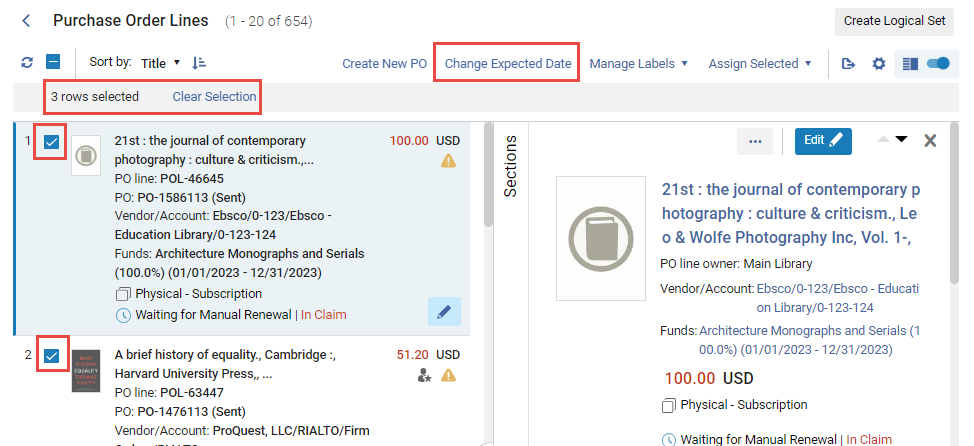
- To update the expected date for an individual PO line in the task list, select Change expected date in the row actions list (or update the date by editing the PO line – see Editing a PO Line in Review).
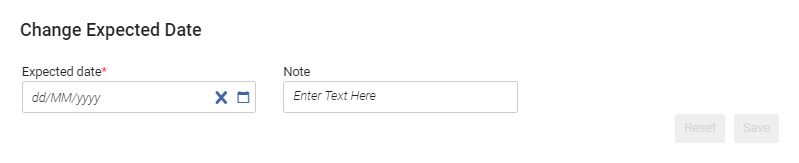 [予定日の変更] ダイアログ・ボックス
- クレーム中であり、現在の表示タスク リストに表示されている複数の注文明細の予定日を更新するには: 日付を更新したいすべての注文明細のチェック ボックスをオンにします (リストの別のページから注文明細を選択できます)。選択した注文明細の合計数がタスク リストの上に表示されます。Then, in the Actions menu, select Change Expected Date.After running this bulk action, information displays at the top of the page showing the results, including the number of successes and failures.
- [予定日] で、将来の新しい日付を選択します。
- 必要に応じて、注記エリアにノ注記を入力します。
- 保存を選択します。予定日が更新され、クレームアラートと クレーム中表示が注文明細から削除されます。
結合された電子メールクレーム通知
When the PO Line - Claiming job runs, it checks if there are multiple claims from a single vendor.If there are, and the claim notification is going to be sent by email, Alma combines the notifications for all of the claims from that vendor into a single claim letter, the PO Line Aggregated Claim Letter.このタイプの単一の通知には、物理的なアイテムと電子的なアイテムの両方を含めることができます。
EDI によって送信される請求通知は結合できず、常に注文明細ごとに個別に送信されます。
次の顧客パラメーターは、請求通知の組み合わせに影響を与える可能性があります。The values of these parameters can be modified in the Mapping Table page (Configuration > Acquisitions > General > Other Settings); see Configuring Other Settings (Acquisitions).
| 顧客パラメータ | 請求通知の結合への影響 |
|---|---|
| claim_aggregated_letter |
1 つの通知に複数のクレームを含めるかどうかを制御します。
If the claim_aggregated_letter Customer Parameter is set to TRUE, but the PO Line Aggregated Claim Letter letter is disabled, no claim letter is sent to the vendor. |
| acq_use_vendor_account_email |
ベンダー レコードまたはベンダー アカウントごとに通知を組み合わせるかどうかを制御します。
|
| claim_continuous_item_level |
For continuous orders, controls whether missing items for which a claim letter was already sent are included in new claim notifications.たとえば、定期刊行物の 5 月号が請求日までに受領されておらず、3 月号と 4 月号も受領されていない場合、このパラメーターは、5 月号の請求通知に 3 月と 4 月を含めるかどうかを制御します。
|
Page tags: article:topicproduct:almacontent:Documentationlang:englishClaiming grace periodExpected receipt after orderingExpected receipt dateSubscription intervalclaimsclaim PO linemissing orderclaim missing itemReceiving dateExpected receiving dateOverdue PO lineOpen claims exist for this PO lineNo item was receivedElectronic resource was not activated
