
リクエストキャンセルの理由を設定
注文明細をキャンセルする場合、注文明細キャンセル理由を選択できます。
このページでは、Almaでリクエストを手動でキャンセルするためのリクエストキャンセル理由を設定する方法について説明します。For links to all the main fulfillment documentation pages see Fulfillment.
- フルフィルメント管理者
- 一般システム管理者
When a fulfillment request, such as a hold or a resource-sharing borrowing request, is cancelled, a reason for the cancellation must be specified.Request cancellation can be performed automatically by the system, manually in Alma by a staff member, or manually by a patron in the discovery system.
When a request is cancelled manually in Alma, the user performing the cancellation must specify a reason for the cancellation by selecting one from a list of possible reasons (see, for example,Cancelling a Hold Request).The options that appear in this list are defined in a code table.最初に、コード テーブルにはデフォルトの理由のリストが含まれており、各理由はコードと説明によって識別されます。コードはシステム内の理由を識別し、説明はキャンセル理由のリストでユーザーに表示されるものです。
リクエストのキャンセル理由はハードコーディングされています。それらは削除できず、それらのコードは変更できません。However, you can modify their descriptions, and you can disable any reason if you do not want it to appear in the list.
ワークオーダーリクエストをキャンセルする場合は、専用の構成テーブルを使用します。この表のカスタマイズは現在、Ex Librisサポートでのみ利用可能です。
リクエストのキャンセル理由のデフォルト リスト
次の要求キャンセル理由コードはシステムで事前定義されており、デフォルトの説明は [説明] の下に表示されます。Codes identified in the last column as Manual only appear in the list of reasons available to users when they manually cancel a request, but are not applied by the system.
| コード | 説明 | これらのシナリオでシステムによって適用されます |
|---|---|---|
| CancelledAtPatronRequest | 利用者の希望によりキャンセルされました | ユーザーリクエストはREST APIによって削除されます。 |
| PurchaseRequest | 図書館はリソースを購入しようとします | リソース共有リクエストは、購入リクエストに変更されます。 |
| ItemNeededForCourseReserves | リクエストした資料はコースリザーブに指定されています | マニュアルのみ |
| RequestSwitched | 別のリクエストに切り替えられました | マニュアルのみ |
| DuplicateRequest | リクエストが重複しています | マニュアルのみ |
| RequestedMaterialCannotBeLocated | リクエストされた資料が特定できません | A request is cancelled because the item is not available. |
| InventoryMoved | アイテムの配架場所が変わりました | アイテムがリクエストの条件を満たさない場所に移動されたため、リクエストはキャンセルされます。 |
| ItemsWithdrawn | アイテムは除籍(完全削除)されました | アイテムがシステムから削除されたため、デジタル化リクエストはキャンセルされました。 |
| CouldBeFulfilled | 要望にあう資料がありません | A request is cancelled because it was not approved, either because the item was not yet incorporated into the inventory, or because the item's terms of use do not permit the fulfillment of the request. |
| PatronNotInterested | 利用者は、すでに必要としていません | マニュアルのみ |
| RequestUpdated | リクエストは変更されました | A request is cancelled because it was updated and cannot be fulfilled in its new form. |
| BookingReleaseTimePassed | ブッキングリクエストの取り置き期間を超過しました | ブッキングリクエストの取り置き期間を超過しました。 |
| ExpiredOnHoldShelf | 予約の取り置き期間を超過しました | A hold request is cancelled when the item is on the hold shelf but the time for pick up has expired. |
| DateNeededByPassed | 必要な日付が過ぎました。 | リクエストは、有効期限が切れたときにジョブによってキャンセルされます。つまり、その期限が過ぎたことを意味します。 |
| FailedToLocateSuppliers | 提供できる図書館がありません | 勤務表のパートナーがアイテムを提供できないため、リソース共有リクエストはキャンセルされます。 |
| RejectedBySupplier | 申し込んだ図書館から謝絶されました | リソース共有の借用リクエストが、貸出パートナーによって拒否されました。 |
| AsrsCannotFulfill | 自動書庫はリクエストを受け付けられませんでした | ASRS からエラーを受信したため、要求がキャンセルされました。 |
| RemoteStorageCannotFulfill | リモートストレージはリクエストを満たすことができません。 | swisslog で通信エラーが発生したため、リクエストがキャンセルされました。 |
| ConvertedToResourceSharingRequest | 他機関へのリクエストに切り替えました | A request is cancelled because it was converted to a resource-sharing request. |
| NoAvailableItemsForBookingAtActivation | 指定した開始時間にリクエスト可能なアイテムはありません | マニュアルのみ |
| FailedDuringBookingTriggerCreation | ブッキングリクエストの作成中にエラーが起きました | 開始時刻に達したが、アクティベーションに失敗したため、予約リクエストがキャンセルされました。 |
| CancelledOutOfInstitution | リクエストは他の機関のオペレーターによってキャンセルされました | リクエストが別の機関によってキャンセルされました。 |
| RequestExpired | リクエストの有効期限が切れました | 有効期限が切れたため、リクエストはキャンセルされました。This can occur with various types of requests, such as remote-storage requests and resource-sharing borrowing requests. |
| ItemAlreadyAvailable | アイテムはすでに利用可能です | マニュアルのみ |
| ResourceFoundInInstitution | あなたの機関内に資料が見つかったため他の機関へのリクエストがキャンセルされました。代わりに機関内のリクエストを作成しました。代わりにローカルリクエストが作成されました。 | アイテムが機関で見つかったため、リソースシェアリクエストはキャンセルされました。 |
| ItemMissing | アイテムは欠本です | マニュアルのみ |
| AdditionalReason01...AdditionalReason10 | 追加の理由 01...追加の理由 10 | 手動キャンセルのために、必要に応じて機関が有効にして構成できる 10 個の追加コード。 |
リクエストキャンセル理由リストの設定
You can configure the request-cancellation reasons that appear in the list available to users performing in the Request Cancellation Reasons Code Table page (Configuration Menu > Fulfillment > Physical Fulfillment > Request Cancellation Reasons).項目を追加または削除することはできませんが、さまざまな方法でリストをカスタマイズできます。
- リストに表示する場合はコードを有効にし、リストに表示したくない場合はコードを無効にします
- コードの説明を変更します - ユーザーに表示されるリストに表示される説明です
For information about working with code tables, see Code Tables.
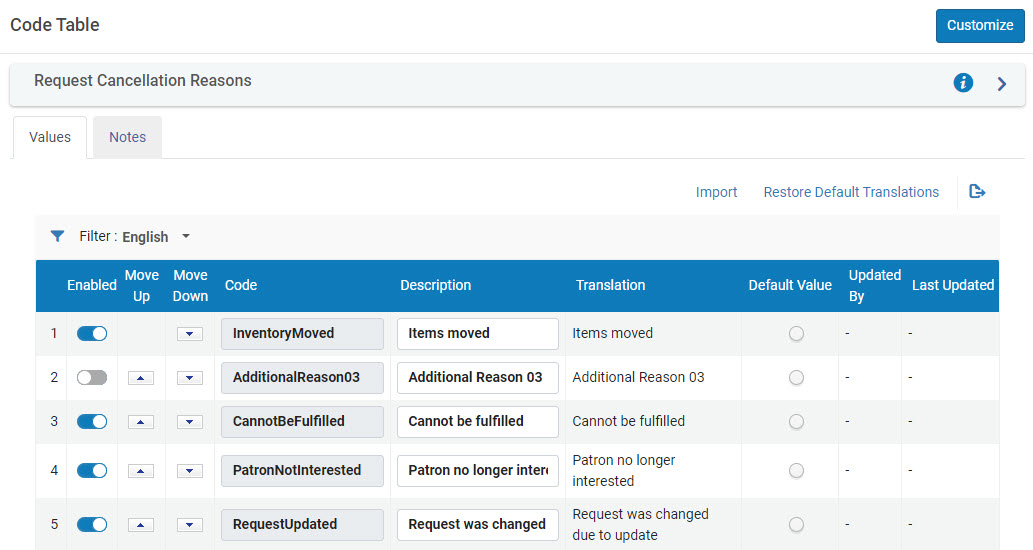
You can also create up to ten custom reasons by enabling and configuring any of the ten Additional Reason codes.For example, in the code table in the illustration above, you could enable AdditionalReason03 and modify its description as required, as shown below:

Page tags: article:topicproduct:almacontent:Documentationlang:englishPO line cancellation reasonadd PO line cancellation reasonedit PO line cancellation reason
