
Configuring SIP2 Bin Configuration
このページでは、Alma 用に SIP2 Bin を設定する方法について説明します。For links to all the main fulfillment documentation pages see Fulfillment.
SIP2ビン設定
- 一般システム管理者
- フルフィルメント アドミン
You can configure rules that determine the sort bin field for SIP2 machines (self-check).SIP2 is the Standard Interchange Protocol v2, which provides a standard interface between a library's automated circulation system and a self-check machine.ソートビンは、返却アイテムを配置するビン(SIP2マシン内の冊子バケット)を決定するプロトコルのフィールドです。宛先図書館や請求番号など、さまざまな値に基づいたルールに従ってフィールドをセットできます。
For more information on self-check machines, see https://developers.exlibrisgroup.com/alma/integrations/selfcheck.
[SIP2ビン設定ルール]ページ([設定メニュー]> [フルフィルメント]> [図書館管理]> [SIP2ビン設定])から、マシンビンのセルフチェックの使用ルールを設定します。
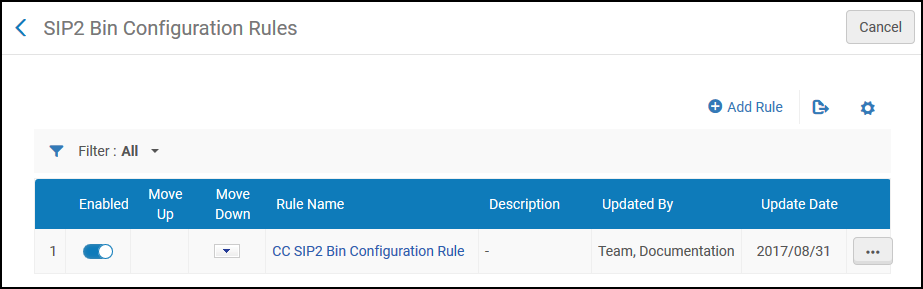
このページでは、次のアクションを実行できます。
- Adding a SIP2 bin configuration rule (see Adding a SIP2 Bin Configuration Rule)
- Editing a SIP2 bin configuration rule (select Edit from the row actions list)
- SIP2ビン設定ルールの削除(行アクションリストから削除を選択)
- SIP2ビン設定ルールの有効化または無効化
SIP2ビン設定ルールの追加
SIP2ビン設定ルールを追加できます。
- [SIP2ビン設定ルール]ページ([設定メニュー]> [フルフィルメント]> [図書館管理]> [SIP2ビン設定])で、ルールを追加を選択します。[SIP2ビン設定]ページが表示されます。SIP2ビン設定ルールのコピーを作成する場合は、行アクションリストから重複を選択します。ルールをコピーしたら、必要に応じて変更できます。
- 上部の入力パラメータセクションで、SIP2ビン設定ルールの名前と説明を入力します。
- In the lower Input Parameters section, specify the components of the input parameter (Name,Operator, and Value).A set of input parameters may look like this:Destination Library=ArtLibrary.使用可能な名前フィールドの値(つまり、SIP2ビン設定ルールをいつ有効にするかを決定する基準)およびそれぞれの値について、次の表で説明します。
SIP2ビン設定ルール-入力パラメータ値 名前 値 宛先の図書館 機関内の図書館。For details on adding a library, see Configuring Libraries. 宛先の貸出・返却受付 貸出・返却受付For details on configuring circulation desks, see Configuring Circulation Desks. 宛先のサービスユニット ワークオーダー部署やデジタル化部署など、機関内の部署。For details on configuring work order departments, see Configuring Work Order Departments. 請求番号から The call number from which you specify the rule to take effect when the item's call number is numerically greater than the indicated value. リクエストされている リソースがリクエストされたかを示します(はいまたはいいえ)。 Lexicographical From call number The call number from which you specify the rule to take effect when the item's call number is lexicographically (in other words, alphabetically) greater than the indicated value.たとえば、辞書式オーダーでは2> 10> 1です。 辞書式の請求番号 The call number from which you specify the rule to take effect when the item's call number is lexicographically (in other words, alphabetically) less than the indicated value.For example, 1 < 10 < 2 in lexicographic order. 棚に戻すアイテムのロケーション アイテムを棚へ戻す機関内の図書館。For details on adding a library, see Configuring Libraries. セルフチェック貸出・返却受付 セルフチェックを実行する貸出・返却受付。For details on associating a self-check machine with a circulation desk, see Self-Check Machines. 請求番号 The call number from which you specify the rule to take effect when the item's call number is numerically less than the indicated value. - パラメータを追加を選択します。入力パラメータのセットが、SIP2ビン設定ルールのパラメータのリストに追加されます。
- 前の2つのステップを繰り返して、ルールに必要なパラメータをすべて追加します。ルールを適用するには、すべての入力パラメータが満たされている必要があります。
- 出力パラメータセクションで、ビン番号(セルフチェックマシンがアイテムを配置するビンの番号)を入力します。ここの番号が、SIP2マシンで設定されたビンの番号と一致することを確認してください。
- 新しいルールを保存するために保存を選択します。ルールが[SIP2ビン設定ルールページ]ページに表示されます。
- 複数のルールを定義した場合は、上へ移動する/下へ移動する矢印を使用してルールのオーダーを設定します。ルールのオーダーは重要です。システムが最初の(最初の)適切な有効なルールを適用するためです。
Page tags: article:topicFulfillmentConfiguring Fulfillmentproduct:almacontent:Documentationlang:englishcreating a reading roomItemless resource sharing libraryConfigure resource sharing library
