SFX Environment
This section describes the SFX environment and the layout of the SFX installation, databases, and the directory tree. This section also explains how to navigate the SFX server and how the database is set up.
SFX Installations
In SFX, the following levels of granularity exist:
- Installation – One or more SFX installations can exist on one server.
- Customer – The institution or consortium that has SFX. A customer can have access to one or multiple instances.
- Instance – An SFX environment to be localized by an institution.
- Institute – A sub-division within an instance, with its own configuration settings different from the instance default (regarding activation, coverage, proxy or linking parameter information). An institute can be assigned to one or more groups.
These levels are used in the OWNER and AVAILABLE_FOR fields in the SFX database to indicate which customer, instance, or institute owns and is entitled to see each database item. For more information about these database fields, see Database Tables.
The customer name is a unique customer code assigned by Ex Libris and is included in the SFX license of each instance. This code can be either an individual customer code or a consortium customer code. When an instance is created, the customer name is retrieved from the license and stored in the following configuration file of the global instance:
config/instances.config_
From SFX 4.1.1 and later, the customer name for newly created instances is stored in the local instance CONTROL table. When retrieving the customer name, SFX first checks the CONTROL table and then the sfxglb41 configuration file instances.config_.
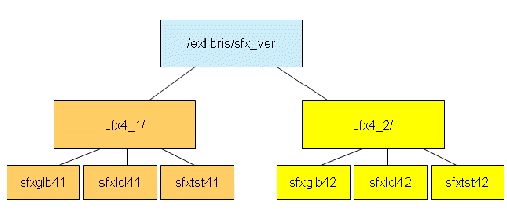
Multiple SFX installations can exist on the same server, but instance names and Apache ports should be unique within the server. Each installation is located at /exlibris/sfx_ver/sfx4_x (where 'x' is the installation number).
By default, the first installation created is called sfx4_1 and is located at /exlibris/sfx_ver/sfx4_1. The global instance of this installation is called sfxglb41.
Additional installations are called sfx4_2, sfx4_3, and so forth.
In the example below, two installations were created:
In the description of the SFX directory tree structure (see SFX Directory Tree Structure), an installation in the sfx4_1 directory is used as an example.
SFX Database Structure
The SFX database contains two types of information: global and local.
- Global information – Data about resources that exist in the information world and are “globally” relevant
Examples are: target, target service, and portfolio information, including names, descriptions, global coverage, and linking information.
- Local information – customer, “context”-specific data, such as activation information, local coverage, and customer-specific linking information. Local information includes overrides of global data.
Global information is stored in the global schema (sfxglb4x). Only one copy of the global information exists per SFX installation. This global information is largely maintained by Ex Libris as part of the global KnowledgeBase. Additionally, any locally created database items that describe global information (for example, targets, target services, portfolios, or objects) are stored in the global schema.
Local information is stored only in the local schema(s) of each instance. The activation information for any global database item is stored in the INVENTORY tables, whereas other localization information and overrides of global data are stored in the LINKING_INFO tables.
A list of database tables and fields, as well as a section of the ERD diagram that shows the connections between the most important database tables, can be found in Database Tables.
For more information on the SFX databases and MySQL, refer to the SFX Environment section of the the SFX System Administration Guide.
SFX Directory Tree Structure
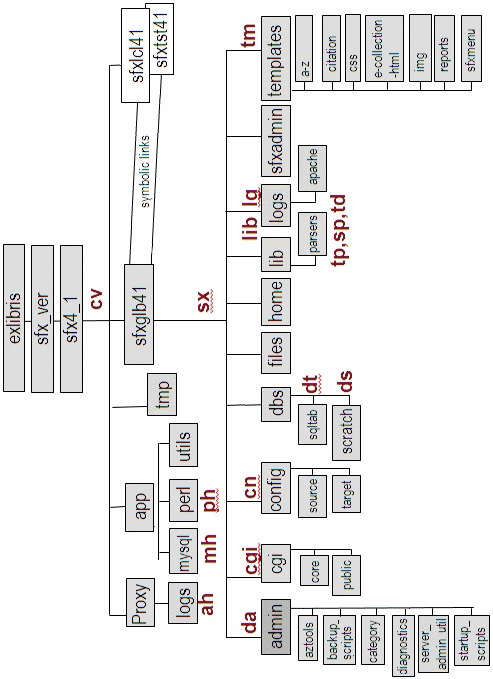
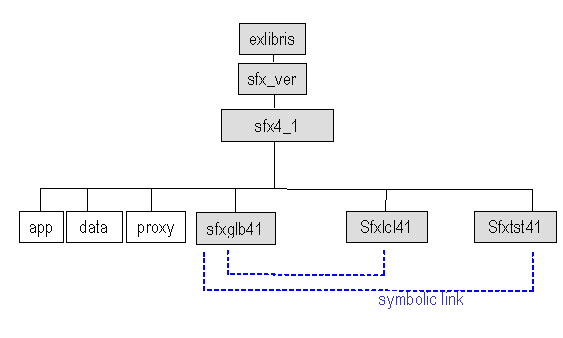
A default SFX installation package includes some application directories (app, data, and proxy) and the following three instances:
- sfxglb41 – This is the global instance.
- Two local instances:
- sfxtst41 – This instance is used as a testing environment. This is a clean copy of the SFX instance.
- sfxlcl41 – This instance is used for production.
Additional local instances may be created within the installation.
Do not make an localizations in the sfxglb41 instance. Instead, perform file localizations in the local instances, after the symbolic link to the global instance has been broken.
The resulting tree structure is as follows:
For more information on the SFX databases and MySQL, refer to the SFX Environment section of the SFX System Administration Guide.
Application Directories
The following are the application directories in SFX.
/exlibris/sfx_ver/sfx4_x/app – Supporting Software
This directory contains all supporting software required for running SFX (MySQL, Perl programming environment, Java, and an Apache Web server).
The app directory contains the following subdirectories:
| Subdirectory | Description |
|---|---|
| /exlibris/sfx_ver/sfx4_x/app/apache | Contains all software required to run and administer an Apache HTTP dæmon |
| /exlibris/sfx_ver/sfx4_x/app/mysql | Contains all software required to run and administer a MySQL database |
| /exlibris/sfx_ver/sfx4_x/app/openssl | Contains software for HTTPS |
| /exlibris/sfx_ver/sfx4_x/app/oracle | Contains an Oracle table client used for Verde-SFX synchronization |
| /exlibris/sfx_ver/sfx4_x/app/perl | Contains all Perl software and modules required for SFX |
| /exlibris/sfx_ver/sfx4_x/app/python | Contains Python, a programming language used by Sphinx |
| /exlibris/sfx_ver/sfx4_x/app/sphinx | Contains Sphinx, an SQL full-text search engine used for Author searching |
| /exlibris/sfx_ver/sfx4_x/app/utils | Contains utilities such as UNZIP |
| /exlibris/sfx_ver/sfx4_x/app/yaz | Contains a YAZ z39.50 client |
- /exlibris/sfx_ver/sfx4_x/data – This directory contains MySQL databases.
- /exlibris/sfx_ver/sfx4_x/proxy – This directory contains reverse proxy Apache files.
Default Instances
The following are the default instances in SFX.
- sfxglb4x (Global)
The purpose of the global instance is to provide the customer with the most up-to-date KnowledgeBase, programs, and configuration files.
- sfxlcl4x (Local) and sfxtst41 (Test)
The files in the local and test instance use UNIX symbolic links to point to files in the global instance. Ex Libris regularly updates files on the sfxglb41 instance and because of the relationship between the sfxlcl41 instance and the sfxglb41 instance, the sfxlcl41 instance is immediately updated as well (same for sfxtst41).
Tree Structure of Each SFX Instance
Each SFX instance has the following directories and subdirectories:
| Directory | Description |
|---|---|
| /exlibris/sfx_ver/sfx4_x/<instance>/admin | Contains command line tools |
| /exlibris/sfx_ver/sfx4_x/<instance>/archive | Contains statistics archive files |
| /exlibris/sfx_ver/sfx4_x/<instance>/cgi/core | Contains SFX core CGI programs (encrypted), such as sfxmenu.cgi, sfxresolver.cgi, and sfxctrl.cgi |
| /exlibris/sfx_ver/sfx4_x/<instance>/cgi/public | Contains CGI programs required for certain targets (not encrypted, intended to be editable) |
| /exlibris/sfx_ver/sfx4_x/<instance>/config | Contains all configuration files |
| /exlibris/sfx_ver/sfx4_x/<instance>/dbs | Contains SQL table definitions and the scratch directory |
| /exlibris/sfx_ver/sfx4_x/<instance>/export | Contains export files from KBTools |
| /exlibris/sfx_ver/sfx4_x/<instance>/home | Home directory of the instance |
| /exlibris/sfx_ver/sfx4_x/<instance>/lib | Contains Perl modules, target parsers, source parsers, and target displayer programs |
| /exlibris/sfx_ver/sfx4_x/<instance>/logs | Contains SFX request logs when redirection is used |
| /exlibris/sfx_ver/sfx4_x/<instance>/sfxadmin | Contains programs for the SFX Admin Center |
| /exlibris/sfx_ver/sfx4_x/<instance>/templates | Contains HTML pages for the SFX menu screen, the HTML update reports, the HTML electronic journal lists, and SFX Admin |
| /exlibris/sfx_ver/sfx4_x/<instance>/convert_DB | Contains data related to the SFX V3 to SFX V4 database upgrade |
| /exlibris/sfx_ver/sfx4_x/<instance>/upgrade | Contains data related to the SFX V3 to SFX V4 upgrade process |
Sfxmenu Aliases
When logging on to the server, several aliases listed in the following table can be used to navigate through the sfxmenu directory structure.
| Alias | Description |
|---|---|
| Slib |
Sets the current sfxmenu instance to |
| cv | Changes the directory to the sfx4_x directory: /exlibris/sfx_ver/sfx4_x/ |
| sx | Changes the directory to the sfxmenu root directory for the current instance: /exlibris/sfx_ver/sfx4_x/<sfx_instance>/ |
| lib | Changes the directory to the lib directory for the current instance: /exlibris/sfx_ver/sfx4_x/<sfx_instance>/lib |
| cn | Changes the directory to the configuration directory containing all configuration files: /exlibris/sfx_ver/sfx4_x/<sfx_instance>/config |
| cgi | Changes the directory to: /exlibris/sfx_ver/sfx4_x/<instance>/cgi |
| da | Changes the directory to the admin directory containing administrative tools and programs: /exlibris/sfx_ver/sfx4_x/<sfx_instance>/admin |
| ds | Changes directory to the scratch directory containing the input and output of the programs in the prog directory: /exlibris/sfx_ver/sfx4_x/<sfx_instance>/dbs/scratch |
| dt | Changes the directory to the directory containing all SQL scripts to create database tables and indexes: /exlibris/sfx_ver/sfx4_x/<sfx_instance>/dbs/sqltab |
| sp | Changes the directory to the SourceParser directory containing all SourceParser modules: /exlibris/sfx_ver/sfx4_x/<sfx_instance>/lib/Parsers/SourceParser |
| tp | Changes the directory to the target/TargetParser directory containing all TargetParser modules: /exlibris/sfx_ver/sfx4_x/<sfx_instance>/lib/Parsers/TargetParser |
| td | Changes the directory to the TargetDisplayer directory containing all TargetDisplayer modules: /exlibris/sfx_ver/sfx4_x/<sfx_instance>/lib/Parsers/TargetDisplayer |
| tm | Changes the directory to the templates directory: /exlibris/sfx_ver/sfx4_x/<sfx_instance>/templates |
| lg | /exlibris/sfx_ver/sfx4_x/<sfx_instance>/logs |
| ph | /exlibris/sfx_ver/sfx4_x/app/perl/bin |
| mh | /exlibris/sfx_ver/sfx4_x/app/mysql |
| ah | /exlibris/sfx_ver/sfx4_x/app/apache/bin |
Mod_Perl and Multiple Apache Daemons
SFX uses Mod_perl to compile code in order to optimize performance. To be able to use Mod_perl, SFX employs a reverse proxy setup. In this setup, different SFX instances on the same server share the same binaries of Apache, but each instance has its own Apache daemon, as follows:
- In the sfxglb41 instance, the following configuration file lists the Apache configuration of the different instances:
/exlibris/sfx_ver/sfx4_1/proxy/config/reverse_proxy_httpd.config
- In the local SFX instances, the following configuration files contain Apache daemon information:
- /exlibris/sfx_ver/sfx4_x/<instance>/config/httpd.conf
- /exlibris/sfx_ver/sfx4_x/<instance>/config/local_httpd.config
To the outside world, all SFX instances have the same port.
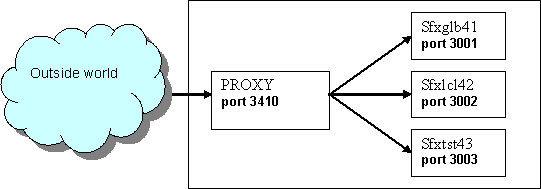
For the /exlibris/sfx_ver/sfx4_1 installation, the default reverse proxy port is 3410. This port can be changed during or after SFX installation.
For the /exlibris/sfx_ver/sfx4_2 installation, the default reverse proxy port is 3420.
UNIX File Map and User Shortcuts