
SFX APIs
This section includes basic information on the following API options. For details on each of these APIs, see the EL Commons Web site (www.exlibrisgroup.org):
- OpenURL
- Rapid Service Indicator
- Journal Subscription (Deprecated)
OpenURL
This API enables the sending of an OpenURL 1.0 request to SFX in XML format in order to receive context-sensitive linking information.
The response sent by SFX to the application that initiated the request is a response in XML format that includes the following:
- The metadata received by the SFX server and stored in the ContextObject
- SFX services, if they exist
XML requests should be sent to the following address/program:
<SFX server>:<port>/<sfx_instance>
Configuring the Multi-Object Detailed XML Response Type
The Multi Object Detailed XML response type provides advanced options for the inclusion of additional details in the XML response. It is the most comprehensive response in XML format.
Details that can be added include:
- Availability (coverage statement) in the API response, both in structured XML and in a user-readable text string
- SFX KnowledgeBase target, target service, and portfolio identifiers.
- Journal relationship information in the API response and an indication when a target is for a close or remote related object
To configure the Multi-Object Detailed XML, click Menu Configuration from the Configuration section of the Setup & Administration area. Click the SFX API tab. The following is displayed:
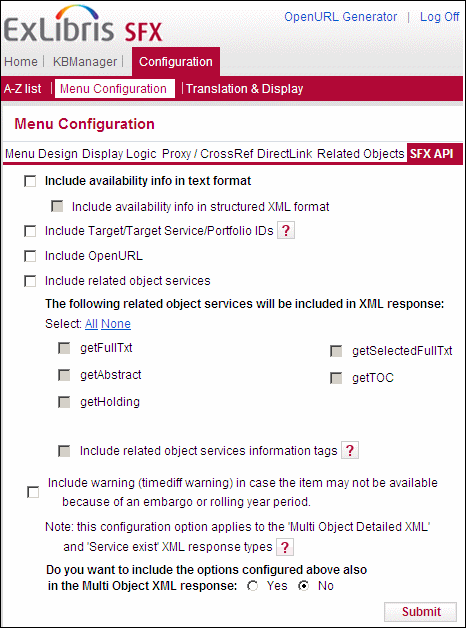
This section allows the Multi-Object Detailed XML to include a number of additional XML tags in its response. Additionally, it is possible to configure the existing Multi-Object XML response to behave identically to the new Multi Object Detailed XML.
The following is a list of all advanced options that can be configured for the Multi-Object Detailed XML API response.
- Include availability info in text format – select this option to include availability (coverage statement) in the SFX Multi-Object API response in text format. For each target, all active parsedDate and timeDiff thresholds are included in the coverage statement. This is the same text string that appears in the A-Z list, SFX menu, and in XML advanced exports. In the following example, the text “Available from 1976 volume: 1 issue: 1 “is included as follows:
|
<coverage> <coverage_text> <threshold_text> <coverage_statement> Available from 1976/01/01 volume: 1 issue: 1</coverage_statement> </threshold_text> </coverage_text> </coverage> |
- Include availability info in structured XML format – select this option to have the availability statement be in an XML structure containing informational threshold elements. For example:
|
<coverage> <from> <year>1976</year> <month>01</month> <day>01</day> <volume>1</volume> <issue>1994</issue> </from> <embargo /> </coverage> |
- Include Target/Target Service/Portfolio IDs – select this option add the identification numbers of the target, target service and object portfolio for each target in the response. If this option is cleared, only the target_service.internal_id is included in the SFX API response. The following is an example of an XML response with this option selected:
|
<target> <target_name>FACTIVA</target_name> <target_public_name>Factiva</target_public_name> <object_portfolio_id>111037302894000</object_portfolio_id> <target_id>111037301464000</target_id> <target_service_id>111037301464002</target_service_id> </target> |
- Include openURL – Clear this option to exclude the element <item key="sfx.openurl"> in the section <ctx_obj_attributes> of the XML response. This can reduce the size of the XML response greatly. We recommend excluding the OpenURL element except when needed in the API response, since its existence can significantly increase the size of the <ctx_obj_attributes> section.
- Include related object services – Select this option to include relation information in the Multi-Object Detailed XML API. If this option is cleared, no related object information is included in the XML. If this option is selected, target services for the orginal object sent in the OpenURL, as well as services for close and remotely related objects are included, with the following new tags:
- For objects sent in the OpenURL: <is_related>no</is_related>
- For closely related objects: <is_related>close</is_related>
- For remotely related objects: <is_related>remote</is_related>
Additionally, when this option is selected, the following options exist:
- The following list of services can be defined for which the related object behavior should apply:
- getFullTxt
- getSelectedFullTxt
- getAbstract
- getTOC
- getHolding
- Include related object services information tags – select this option to include additional tags for remote relation types, such as the type of relation and the related object information.
The following is an example of a target that is not for a related object:
|
<target> <target_name>LOCAL_CATALOGUE_EX_LIBRIS_ALEPH</target_name> <target_public_name>Ex Libris ALEPH catalog</target_public_name> <target_service_id>110974980650101</target_service_id> <is_related>no</is_related> </target> |
The following is an example of a target for a close type of related object:
|
<target> <target_name>WILEY_INTERSCIENCE_ANALYT_SCIENCE_BACKFI</target_name> <target_public_name>Wiley InterScience Analytical Sciences Backfiles</target_public_name> <object_portfolio_id>1000000000709579</object_portfolio_id> <target_id>1000000000000511</target_id> <target_service_id>1000000000001038</target_service_id> <is_related>close</is_related> </target> |
The following is an example of a target for a remote type of related object:
|
<target> <target_name>PUBMED_CENTRAL_JOURNALS</target_name> <target_public_name>PubMed Central</target_public_name> <object_portfolio_id>1000000000548543</object_portfolio_id> <target_id>111058563444000</target_id> <target_service_id>111058563444001</target_service_id> <is_related>remote</is_related> <related_service_info> <relation_type>CONTINUES</relation_type> <related_object_issn>0267-0623</related_object_issn> <related_object_title>British medical journal</related_object_title> <related_object_id>954927635438</related_object_id> </related_service_info> </target> |
- Include warning (timediff warning) in case the item may not be available because of an embargo or rolling year period – a warning is displayed if only year (no month/day) is sent in the request and that year is equal to the year the embargo/rolling year threshold for a specific porfolio starts.
This option corresponds to the warning for the SFX menu descibed in the Other Menu Configurations section of the SFX General User’s Guide.
- Do you want to include the options configured above also in the Multi Object XML response – Select this option to include the options configured above also in the Multi-Object XML response. If this option is selected, the Multi-Object XML response type is identical to the behavior of the Multi-Object Detailed XML response type. This eliminates the need to change the API request when you want to utilize the Multi-Object Detailed XML response type.
Rapid Service Indicator
The following section describes the Rapid Service Indicator.
Overview
The Rapid Service Indicator API (RSI) offers an interface for querying the SFX KnowledgeBase for the availability of specific journals and books identified by identifiers such as ISSN/ISBN/LCCN/OBJECT_ID/CODEN.
It replaces the Journal Subscription API (JSI), which will be phased out.
The improvements in the RSI over the JSI include:
- RSI includes not only journals, but also books.
- RSI allows searching not just by ISSN, but also by OBJECT_ID, ISBN, LCCN, and CODEN.
- RSI has full support for consortia APIs. It also takes into account institute-specific activation and allows the sending of IP information so that SFX can determine the appropriate institute.
- RSI can respond with YES/NO and also a third value, MAYBE, when multiple objects are found.
XML requests should be sent to the following address/program:
<SFX server>:<port>/<sfx_instance>/cgi/core/rsi/rsi.cgi
The request can be sent using the GET or POST method and the request_xml parameter. The POST method is recommended due to the length of the XML query.
For more information on building the RSI index, refer to the Rapid Service Indicator section of the SFX System Administration Guide.
Configuring the Rapid Service Indicator
In SFX 4, an additional configuration file can be used to configure which types of services are included in the RSI index. By default, all services defined to be included in the A-Z list profile services are included in the RSI index.
This is necessary because the A-Z index, which builds on the data in the RSI index, may contain, in addition getFullTxt services, also the following additional services: getSelectedFullTxt, getAbstract, getTOC, and getHolding.
The following is the location of the configuration file:
/exlibris/sfx_ver/sfx4_1/<local instance>/config/rsi.config
This file contains the list of service types that are included in the RSI index. Since the RSI index is used for both the RSI API and the A-Z list, it is recommended to set all service types to Y that you want to use in either the RSI API or A-Z list.
The following is an example of the configuration file:
|
Section "retrievalType" # Set next parameter to 1 for automatically detect serviceType settings defined in A-Z configuration (all profiles taken into account) # If you set this parameter to 0 or no A-Z profiles defined in current instance serviceTypes will be taken from next section ("serviceTypes") Automatically 1 EndSection
Section "serviceTypes" getFullTxt Y getSelectedFullTxt N getAbstract N getTOC N getHolding N EndSection |
For more information on the RSI, see the Developer’s Network.
Separate Indexes for Serials and Monographs
Following the release of SFX 4.3, there is an option to create separate RSI indexes for serials and monographs. It is recommended to create separate indexes, as this is required for the eBook Search to work. There are two benefits to the new functionality:
- It is possible to perform an incremental build for the monograph index where the existing RSI index is updated with all of the changes that were made in the SFX KnowledgeBase since the last time the index was built, but the whole index is not rebuilt. This build takes much less time than a complete build.
- The mechanism for including activation data from the shared instance in consortia model 2 has been improved. Instead of retrieving and including the shared data in the local instance RSI during the build (old mechanism), the eBook RSI integrates the RSI data from the local and shared instance on-the-fly during the RSI query (which reduces RSI build time).
Previous Functionality
The following characterize the previous functionality where serials and monographs could only be in the same RSI index:
- Data is stored in local instance RAPID_SERVICE_INDICATOR table.
- When an RSI API is received, SFX checks the RSI index, which includes both journals and books.
- Only a complete build is available – no incremental build.
- For consortia API, data from a shared instance is included in the RSI index from the local instance during the build.
New Functionality
The following characterize the new functionality where serials and monographs can be in separate RSI indexes:
- RSI ejournals and RSI ebooks are stored in separate DB tables.
- When an RSI API request is received, both the journal and book RSI indexes are checked.
If RSI ejournals are stored in local instance RAPID_SERVICE_INDICATOR table:
- Only a complete build is possible – no incremental build.
- For consortia API, data from a shared instance is included in the RSI index from the local instance during the build.
If RSI ebooks are stored in the IRSI_INSTITUTIONS and IRSI_<instance> global instance tables:
- Both complete build and incremental build are available
- For an incremental build, the TRACKING_TABLE table and triggers are used.
- For consortia API, data from a shared instance is not included in the RSI index from the local instance during a build. Instead, on-the-fly querying of the local and shared RSI tables is performed. For a remote shared set-up, replication is used.
Configuring Separate Indexes for Serials and Monographs
To configure SFX to create separate indexes for serials and monographs, set the Separate_RSI_for_Books parameter in the config/rsi.config file to Y. For example:
|
Section "monograph_parameters" Separate_RSI_for_Books "Y" EndSection |
The Separate_RSI_for_Books parameter affects the behavior of the RSI API and RSI build in the following manner:
- If the parameter set to Y:
RSI API queries both the serial and the monographs RSIs. When building the serial RSI index, book object holdings information is no longer included in the index.
- If the parameter is set to N:
RSI API queries only the serial RSI index (and disregards the monograph RSI index, if it exists). When building the serial RSI index, SFX includes both journal and book holdings data in the index.
The Separate_RSI_for_Books parameter does not affect the build of the monograph RSI index. This index can be built in any case.
Complete Monograph Index Build
The complete build is needed in the following cases:
- No RSI index data exists yet for the instance (a first build)
- This means that the tracking_id value in the CONTROL table is not defined.
- More than 10,000 changes or more than 20% of the total amount of objects have changed for the instance in TRACKING_TABLE. In this case, it is faster to do a complete build.
- Activation changes are made to targets or target services.
- After a KnowledgeBase update has been applied in the SFX installation.
The following scenarios track changes by storing the current value in the CONTROL table.
- If one of following changes in institute set-up in the local instance:
- An institute or group is added or deleted.
- A group affiliation for an institute is added or deleted.
- If one of following occurs in the consortia API set-up of the local instance:
- The active parameter in the Consortium section of the ctx_object.config file is changed from Y to N or from N to Y.
- The value of the rsi_consortium_members parameter in the config/consortium.config file has changed.
With a complete build, the TRACKING table, which contains a list of changes, is ignored. The complete build may be quite heavy on system resources (depending on the number of eBook activations). It is recommended to not run this process during peak time.
Incremental Monograph Index Build
During an incremental build, the TRACKING_TABLE table lists all of the changes to the instance. This table is updated by the triggers of the local and global database tables.
During an incremental build, SFX makes a list of objects for which activation needs to be recalculated. For this list, the default institute and group activations are all recalculated and the existing RSI index is updated.
The incremental build is fast, depending on the number of changes. Build time can be 10 minutes or less.
The maximum amount of changes before a complete build is needed is defined in the config/rsi.config configuration file, in the following section:
|
Section "complete_build_params" # The parameters below determine the maximum amount of changes allowed for incremental build of the monograph RSI and A-Z index. # If the number of changes in the SFX KB exceeds the parameters below, a complete build is required. max_op_changes "10000" max_changes_percent "20" EndSection |
Journal Subscription (Deprecated)
The Journal Subscription API offers an interface for querying the SFX KnowledgeBase for the availability of specific journals identified by their ISSN.
It allows sending an ISSN along with year, institute, issue, or volume details to SFX, which replies whether there are full-text or other services active for this journal, within these restrictions. This API supports requests for one or more ISSNs.
XML requests should be sent to the following address/program:
<SFX server>:<port>/<sfx_instance>/cgi/core/journal_subscription.cgi
The request can be sent using the GET or POST method and the request_xml parameter. The POST method is recommended due to the length of the XML query.
