
SFX Targets and Target Parsers
A target parser is a program that creates a URL to go to a specific place on the Internet, such as a publisher’s Web site or the abstract of a particular journal article. In the SFX environment, each target service and object portfolio uses a target parser to create a URL which the target service and object portfolio resolve.
- For general information on SFX targets and target parsers, refer to the SFX General User’s Guide.
- The SFX administrator can choose to use either local or global parser/parse_param combinations. No mixture of the two is possible, whether in the Target Service table or in the Object Portfolio table.
PARSE_PARAM Fields
PARSE_PARAM fields contain information used by target parsers to create URLs to which the SFX target service resolves. They have the syntax:
The following PARSE_PARAM fields exist in the database:
- In the Target Service table:
- Parameters that apply to the whole target service
- Syntax – url=base_URL
- In the Object Portfolio table:
- Parameters that apply to one particular object portfolio
- Syntax – jkey=fill_in_your_jkey_here
To identify the information/components required for the URL structure of a particular TARGET_SERVICE or OBJECT_PORTFOLIO, review the examples below.
Examples of PARSE_PARAM Fields
This section includes several PARSE_PARAM field examples for your review.
American Chemical Society Example
The following information is needed for the American Chemical Society example:
- The PARSE_PARAM field in the getFullTxt target service needs to contain:
url= http://pubs3.acs.org/acs/journals/toc.page
- The PARSE_PARAM field in the object portfolio for the Accounts of Chemical Research journal must contain the following information:
jkey=achre4
Sometimes the URL structure of a target service is more complicated and additional information must be provided in the PARSE_PARAM fields.
In the PARSE_PARAM field of the target service, more than one URL can be entered. This is necessary, for example, when one URL is used to link to a journal’s home page and another URL to link to the abstract level of the journal.
American Physical Society Example
The PARSE_PARAM field of the full-text service of the American Physical Society (PROLA archive) contains the following:
|
url1=http://ojps.aip.org/journal_cgi/dbt & url2=http://publish.aps.org/abstract & url3=http://prola.aps.org |
In the PARSE_PARAM field of the OBJECT_PORTFOLIO, more than one journal key can be entered. This is necessary when a different jkey is used for different levels of linking. The different jkeys in the PARSE_PARAM field are separated by commas. For example, the Physical Review Letters is part of the American Physical Society getFullTxt service and has the following information in the PARSE_PARAM field:
|
jkey=prl,PRL,PRLTAO |
American Journal of Psychiatry Example
In the PARSE_PARAM field of the OBJECT_PORTFOLIO, it is sometimes necessary to indicate that a journal (or group of journals) uses a slightly different URL structure than other journals belonging to the same TARGET_SERVICE. These journals have a code=1,2,3,… in the PARSE_PARAM field. For example, the American Journal of Psychiatry is part of the HighWire Press getFullTxt service and has the following PARSE_PARAM field:
|
jkey=ajp.psychiatryonline & code=3 |
- Example 1:
The following is a Jkey element that includes a URL with two ampersands:
jkey=http://www.evaluationcanada.ca/site.cgi?section=4&ssection=3&_lang=an
The following is the same URL with encoded ampersands:
jkey=http://www.evaluationcanada.ca/site.cgi?section=4%26ssection=3%26_lang=an
- Example 2:
The following is a URL element after URL encoding that includes URLs with spaces and ampersands:
url1=http://www.university.corg?a=xx%26b=yy & url2=http://www.library.net/book%20title/
Note that the ampersand used to combine URL1 and URL2 is not URL-encoded. This is not required.
Linking Parameter Table
The Linking Parameter table is used to store local server, customer authentication information, and any other variables necessary to link to specific targets.
In each target service for which linking parameter information is required, a  button is displayed in:
- Edit Target Service
- List of Target Services

Click the button to fill in the required authentication information for the ID_VALUE field. The help file next to each target service PARSE_PARAM field provides more information about the linking parameter information that needs to be provided.
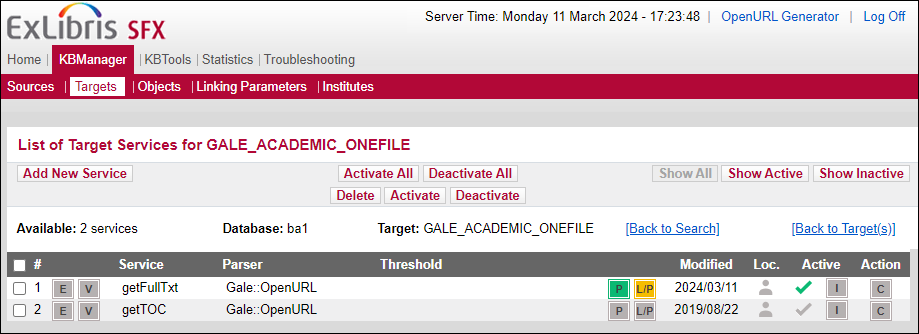
The Linking Parameters button is displayed in yellow if at least one L/P has been filled in for either DEFAULT or institute/Group.
See the example below for the EBSCO_ACADEMIC_SEARCH_ELITE full-text target service.
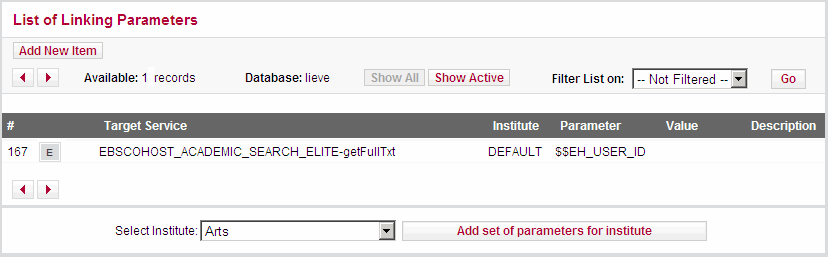
If the PARSE_PARAM field includes a $$PARAMETER value, the +L/P button appears when adding a local target service, indicating that a linking parameter should be added.
Storing Institute-Specific Linking Parameters for a Particular Target
It is possible to specify institute-specific linking parameters for a particular target service.
The following fields should be specified:
- Target service name
- Name – The content of this field (in the given example: $$EH_USER_ID) matches the $$ parameter in the field. When SFX creates a specific target URL, the $$ parameter in the parse_param field is replaced with the content of the corresponding Value field.
- Value – The actual user name, password, or other local parameters for the specific institute.
- From the KBManager section in the SFX Admin Center, click Targets. The list of targets is displayed.
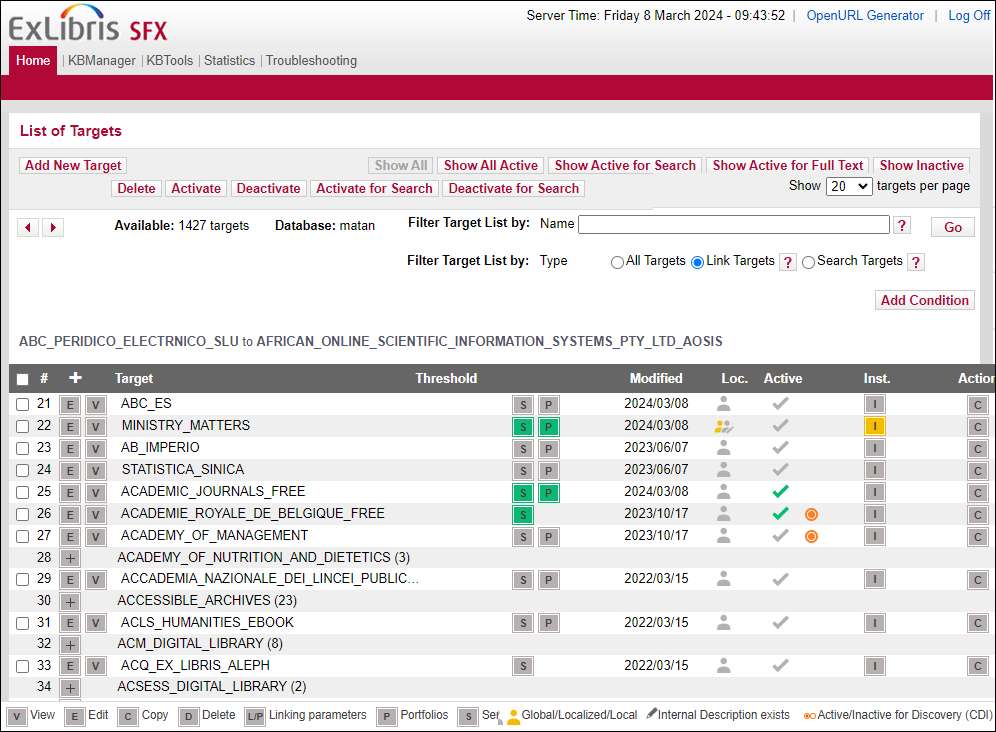
- Click the Service button
 next to the target service to which you want to add different linking parameters for each of the different institutes.
 - Click the L/P button . The List of Linking Parameters dialog box is displayed.
- Select the institute from the drop-down list and click the Add Set of Parameters for Institute button. The Add Linking Parameters dialog box opens:
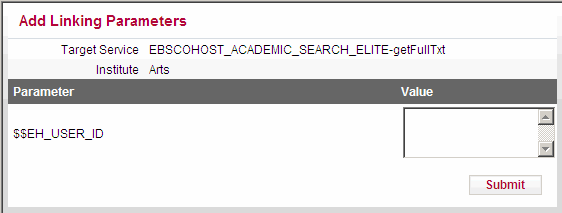
- Enter the authentication information in the Value field.
- Click Submit to save the information.
Repeat this procedure for each of the institutes for which specific user name and password information or other local information needs to be specified.
Using the Generic Target Parser
Using the generic target parser, you can create a target parser “on the fly” (without writing a Perl script). The generic parser can be used to test URLs, store syntax, and add new journals to the SFX database.
The generic target parser can be used both on the OBJECT_PORTFOLIO and TARGET_SERVICE level.
- Enter Generic in the Parser field.
- Enter the URL information using the generic target parser syntax in the PARSE_PARAM field.
The following example uses the generic target parser on the OBJECT_PORTFOLIO level:
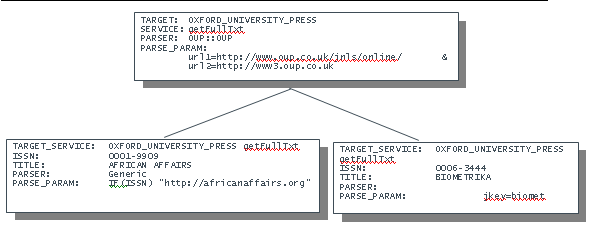
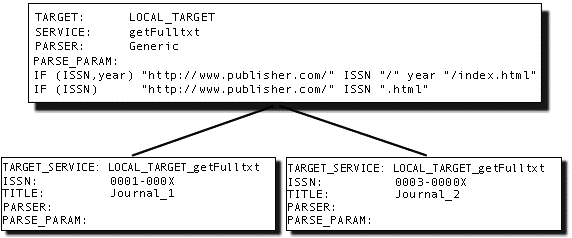
The following example uses the generic target parser on the TARGET_SERVICE level:
Generic Target Parser Syntax
This section describes the generic target parser syntax.
- Generic Target Parser Syntax Example
- Generic Target Parser Syntax Example for Static Web Pages
Generic Target Parser Syntax Example
In the following example, the generic target parser syntax describes how to link to:
- A specific journal article
- A particular year of a journal
- The home page of a journal
The link that is created depends on the amount of information available in the context object (CTXO) (see ContextObject).
For example:
|
IF(ISSN,year,startPage) "http://www.publisher.com/" ISSN "/" year "/" startPage IF(ISSN,year) "http://www.publisher.com/" ISSN "/" year "/index.html" IF(ISSN) "http://www.publisher.com/" ISSN "/" |
Generic Target Parser Syntax Example for Static Web Pages
Another popular use of the generic target parser is to create targets that are static Web pages, such as a library’s FAQ page or a page describing the library’s digital reference service. For example:
|
IF () "http://www.your.library.edu/FAQ.html” IF () "http://www.your.library.edu/askalibrarian.html” |
Variables in the PARSE_PARAM field are replaced with the relevant content of the context object (CTXO). The generic target parser returns the first condition that matches. This means that if only an ISSN is available, the last row is matched. When users click this service on the SFX menu, they are sent to the home page of the journal.
Functions
The following functions can be used in the generic target parser syntax:
- REPLACE(string,search,replace)]
For example:
|
IF (ISBN) "http://www.amazon.com/search.cgi?isbn=" REPLACE(ISBN,"-","") |
- [SUBSTR(string,from,length)]
For example:
|
IF (year) "http://www.thisyear.com/" SUBSTR(year,2,2) |
- [URLENCODE(string)]
Example:
|
IF (articleTitle) "http://www.google.com/search?q=" URLENCODE(articleTitle) IF (@abbrevTitle) "http://www.google.com/search?q=" @abbrevTitle[0] |
Target Parser Information
This section contains information about target parsers and recommendations on how to write them.
The SFX installation includes a template target parser that is used as an example.
The template is located in: /exlibris/sfx_ver/sfx4_1/
|
# Version: $Id: TEMPLATE.pm,v 1.6 1 package Parsers::TargetParser::TEMPLATE::TEMPLATE; 2 use base qw(Parsers::TargetParser); 3 use URI; 4 use strict; 5 sub 6 my ($this) = @_; 7 my $ctx_obj = $this->{ctx_obj}; # retrieve context object 8 my $value = $ctx_obj->get(' 9 my $svc = $this->{svc}; # retrieve service object 10 my $value = $svc->parse_param(''); 11 my $base_url = ""; 12 my $uri = ""; 13 my %query = (); 14 if (length $value) { 15 $query{'name'} = $value; # name and value as it should appears in the url result } 16 $uri = URI->new($base_url); 17 $uri->query_form(%query); 18 return $uri; } 1; |
Target Parser Location
All target parsers can be found in the following location:
/exlibris/sfx_ver/sfx4_1/
For example:
/exlibris/sfx_ver/sfx4_1/
Target Parser Name Convention
The following describes the target parser naming convention:
- Directory – Directory with the name of the target, in uppercase letters
- File name –
.pm (recommended to use uppercase letters)
For example:
TEMPLATE/TEMPLATE.pm
The package name should be constructed from the target parser name and listed in the first line of the target parser. See line 1 of the template:
|
Parsers::TargetParser::TEMPLATE::TEMPLATE; |
Subroutine Name
The target parser should contain a subroutine for every target service associated with the target. The subroutine name is identical to the serviceType. For example:
|
getFullTxt, getTOC, getAbstract, getHolding etc' |
Constructing the Target URL
The target URL is divided into two parts:
- The base URL – the part up to the question mark (?). For example:
http://......?
- The query string – the part after the question mark (?) in name=value pairs separated by the ampersand (&). For example:
a=b&c=d&e=f…
(see line 3 in the target parser template)
In order to construct a URL, the target parser should use the URI module. Objects of this class represent Uniform Resource Identifier references.
The base URL is the input to the constructor method. For example:
|
my $uri = URI->new($base_url); |
See line 16 in the target parser template.
The query string is implemented through a hash. The query string key is the name, and its value is the name’s value. For example:
|
$query{'volume_id'} = $volume; $query{'issue_id'} = $issue; |
The constructed hash should be given as input to the query_form. For example:
|
$uri->query_form(%query); |
The target parser should return the URI object.
See line 18 in the target parser template.
For more information, refer to: http://search.cpan.org/~gaas/URI-1.35/URI.pm#SYNOPSIS.
Integrating Metadata and Parameters into URL
In order to integrate the ContextObject into the query string, use the ContextObject object. For example:
|
my $ctx_obj = $this->{ctx_obj}; |
See line 7 in the target parser template.
See ContextObject for more information about the ContextObject and ContextObject attributes.
To retrieve attributes from the ContextObject, use the get method of the context object in the following way:
|
my $attribute_value = $ctx_obj->get(\ |
A list of all ContextObject attributes that can be used with the get method, can be found in /exlibris/sfx_ver/sfx4_1/
See line 8 in the target parser template.
For example:
|
my $issue = $ctx_obj->get('rft.issue'); |
To set the ctx_obj attributes, use the set method of the context object in the following way:
|
$ctx_obj->set(\ |
In order to integrate the parameters stored in the SFX database PARSE_PARAM field into the URI, use the PARSE_PARAM method of the service object. The service object is the metadata container that includes all the information for the TARGET_SERVICE that was chosen (including the TARGET and TARGET_SERVICE public names, PARSE_PARAM information, and so forth).
You first need to retrieve the service object.
See line 10 in the target parser template.
For example:
|
my $svc = $this->{svc}; # services my $jkey = $svc->parse_param('jkey'); my $host = $svc->parse_param('url') |
Syntax Checking
After writing the target parser, check its syntax by running the following command:
|
Perl –cw |
Debugging
In order to debug the target parser, turn on target debugging.
- Choose Debugging in the Troubleshooting section of the SFX Admin Center.
- Turn on the Debugging in TARGET SCREEN option.
- Send an OpenURL that brings up the target service in the SFX menu.
- Click Go to activate the target parser.
Debugging information is printed in the target window. The bottom part of the debugging information displays the target URL constructed by the target parser.
See Debugging Tool for more information.
The target parser is also traced in the Apache error log, and the warn command can be used in the code for debugging purposes.
Target Parser Example
See the example in /exlibris/sfx_ver/sfx4_1/
|
# Version: $Id: E2MED.pm,v 1.3 2006/05/24 06:39:35 nk_3 Exp $ package Parsers::TargetParser::MASSON::E2MED;
use base qw(Parsers::TargetParser); use URI; use strict;
sub getFullTxt { # the service name
my ($this) = @_;
my $svc = $this->{svc}; # retrieve service object my $jkey = $svc->parse_param('jkey'); # retrive parse_param values of target service my $host = $svc->parse_param('url');
my $uri = ""; my %query = ();
if (length $jkey) { $uri = URI->new("$host/masson/portal/bookmark"); # cunstruct the URI object with the base url as input. $query{'Global'} = 2; # Populate the hash for the query_form URI method. $query{'Page2'} = 1; $query{'MenuIdSelected'} = 102; $query{'MenuItemSelected'} = 0; $query{'MenuSupportSelected'} = 0; $query{'Product2'} = $jkey; $query{'ProductCode2'} = $jkey;
$uri->query_form(%query); # set the query string using query_form method return $uri; } $uri = URI->new($host); ); # construct the URI object with the base url. return $uri; } 1; |
- The query string part of the target URL is URL-encoded by the URI object. As a result, it is not necessary to handle URL encoding in the target parser.
- In order to apply the new target parser, the Apache instance must be restarted. Restarting Apache involves a short period of downtime. For more information on restarting apache, refer to the Start/Stop Services section of the SFXSystem Administration Guide.
GET and POST Notes
Nearly all of the standard Ex Libris-supported SFX target parsers are written to create a final URL in the form GET.
When a local developer wants to create a URL using the POST form in a local target parser, it is recommended that you:
- Have the target parser return the URL of a Web page that posts the URL to the target
- Have the target parser generate a URL that calls a CGI that generates the appropriate POST request.
Refer to the following global targets that use this approach:
- LOCAL_FEEDBACK
- DOCDEL_LOCAL
These targets have corresponding CGI scripts in the /cgi/public directory.
