
Troubleshooting and Debugging
OpenURL Generator
- Test the data in the SFX database
- Check TARGET_PARSERS
- Access the SFX database directly and simulate SFX requests without using an A&I database or full-text repository as a source
- Allow end users or librarians to request services for citations they have in hand
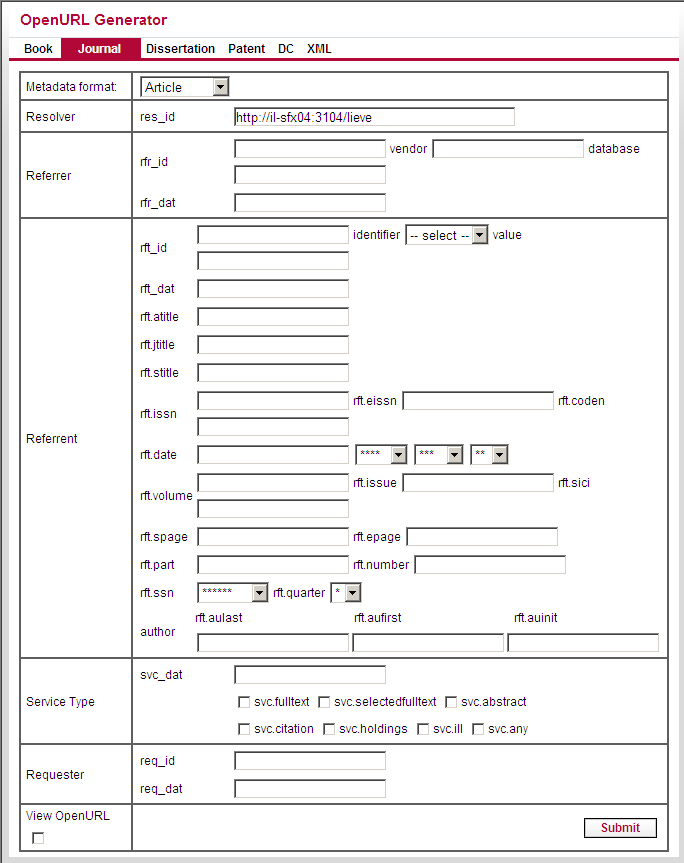
Using the OpenURL Generator to Test Your SFX Database
- Check to see which services display on the SFX menu for a particular journal
- Review the order of the services
- Check to see whether the thresholds you defined are working properly
OpenURL Example: Activating a New Journal
- On the OpenURL generator Web page, enter the ISSN of the journal you just activated.
You can fill in this information in the Referrent section of the OpenURL Generator.
- Enter the year information.
You can use a randomly chosen year. You can also use the date threshold information in the KBManager.
- Select the View OpenURL check box.
- Click Submit.
- Review the OpenURL that is to be created.
- Click to access this OpenURL.
The SFX menu for the journal displays, taking into account the year, volume, and issue information you provided. The full-text link to the Wiley journal should display in the SFX menu.
- Click the button for the Wiley full-text service to check if the link to the Wiley journal actually works.
OpenURL Example: Checking All Services for a Particular Journal
- In KBManager, go to the list of object portfolios for one particular journal.
- Click the SFX button.
- When the SFX menu displays for the journal, compare the list of services in the SFX menu with the list of services you find in the KBManager list of object portfolios.
XML Tab of the OpenURL Generator
XML Input
|
http://10.1.1.67:9003/sfx_local?ctx_tim=2004-10-20T13%3A22%3A7CDT&rft.volume=29&rft.issn=0146-9592&rft.genre=article&ctx_ver=Z39.88-2004&svc_val_fmt=info%3Aofi%2Ffmt%3Akev%3Amtx%3Asch_svc&rft.issue=1&url_ctx_fmt=10_1&rft.aufirst=Qinrong&rft.atitle=Temperature+dependence+of+Brillouin+frequency%2C+power%2C+and+bandwidth+in+panda%2C+bow-tie%2C+and+tiger+polarization-maintaining+fibers.&rft_val_fmt=info%3Aofi%2Ffmt%3Akev%3Amtx%3Ajournal&rft.date=2004&ctx_id=10_1&url_ver=Z39.88-2004&ctx_enc=info%3Aofi%2Fenc%3AUTF-8&rft.aulast=Yu&res_id=http%3A%2F%2F10.1.1.67%3A9003%2Fsfx_local&rft.epage=18&rft.spage=17 |
|
<?xml version="1.0" encoding="UTF-8" ?> <ctx:context-objects xmlns:ctx="info:ofi/fmt:xml:xsd:ctx" xmlns:xsi="http://www.w3.org/2001/XMLSchema-instance" xsi:schemaLocation="info:ofi/fmt:xml:xsd:ctx http://www.openurl.info/registry/docs/info:ofi/fmt:xml:xsd:ctx"> <ctx:context-object timestamp="2004-01-16T12:13:00Z" version="Z39.88-2004" identifier="123"> <ctx:referent> <ctx:metadata-by-val> <ctx:format>info:ofi/fmt:xml:xsd:journal</ctx:format> <ctx:metadata> <rft:journal xmlns:rft="info:ofi/fmt:xml:xsd:journal" xsi:schemaLocation="info:ofi/fmt:xml:xsd:journal http://www.openurl.info/registry/docs/info:ofi/fmt:xml:xsd:journal"> <rft:author rank="1"> <rft:aulast>Yu</rft:aulast> <rft:aufirst>Qinrong</rft:aufirst> </rft:author> <rft:atitle>Temperature dependence of Brillouin frequency, power, and bandwidth in panda, bow-tie, and tiger polarization-maintaining fibers.</rft:atitle> <rft:title>Opt Lett</rft:title> <rft:date>2004-12-31</rft:date> <rft:volume>29</rft:volume> <rft:issue>1</rft:issue> <rft:pages>17/18</rft:pages> <rft:spage>17</rft:spage> <rft:epage>9</rft:epage> </rft:journal> </ctx:metadata> </ctx:metadata-by-val> <ctx:metadata-by-ref> </ctx:metadata-by-ref> </ctx:referent> <ctx:referrer> </ctx:referrer> </ctx:context-object> </ctx:context-objects> |
XML Output
- Metadata received by the SFX server
- SFX services, if they exist
| <?xml version="1.0" encoding="UTF-8" ?> <sfx_menu> <ctx_obj_set> <ctx_object_1> <perldata> <hash> <item key="rft.issn">0146-9592</item> <item key="ctx_ver">Z39.88-2004</item> <item key="rft.year">2004</item> <item key="rft.pages">17/18</item> <item key="rft.eissn">1539-4794</item> <item key="@rfr_id"> <item key="@rft_id"> <array></array> </item> </item> <item key="rft.atitle">Temperature dependence of Brillouin frequency, power, and bandwidth in panda, bow-tie, and tiger polarization-maintaining fibers.</item> <item key="sfx.response_type">simplexml</item> <item key="rft.object_type">JOURNAL</item> <item key="rft.issue_start">1</item> <item key="@rft.abbrev"> <array> <item key="0">OPT LETT</item> <item key="1">OPTICS LETT</item> </array> </item> <item key="rft.object_id">954925474435</item> <item key="rft.volume_start">29</item> <item key="rft.volume">29</item> <item key="sfx.request_id">1001000000000668</item> <item key="rft.month">12</item> <item key="rft.genre">journal</item> <item key="req.user_group"></item> <item key="rft.issue">1</item> <item key="req.faculty"></item> <item key="sfx.openurl">http://<OpenURLValuefrom example above>;sfx.response_type=simplexml;__submit=Submit</item> <item key="req.language">English</item> <item key="rft.title">Optics letters</item> <item key="@rfe_id"> <array></array> </item> <item key="@rft.aufirst"> <array> <item key="0">Qinrong</item> </array> </item> <item key="@rft.aulast"> <array> <item key="0">Yu</item> </array> </item> <item key="rft.day">31</item> <item key="sfx.sourcename">DEFAULT</item> <item key="rft.coden">OPLEDP</item> <item key="rft.jtitle">Optics letters</item> <item key="rft_val_fmt">journal</item> <item key="rft.date">2004-12-31</item> <item key="rft.epage">18</item> <item key="rft.spage">17</item> </hash> </perldata> </ctx_object_1> </ctx_obj_set> <targets> <target> <target_name>LOCAL_CATALOGUE_ENDEAVOR_VOYAGER</target_name> <target_public_name>Library Catalog (UNISTAR)</target_public_name> <target_service_id>110986400596330</target_service_id> <service_type>getHolding</service_type> <parser>ENDEAVOR::VOYAGER</parser> <parse_param>url=</parse_param> <proxy>no</proxy> <crossref>no</crossref> <note /> <authentication /> <char_set /> <displayer /> <target_url /> </target> <authentication /> <char_set>UTF8</char_set> <displayer /> <target_url /> </targets> </sfx_menu> |
Debugging Tool
The debugging tool allows the SFX administrator to determine the source of errors that occur in the SFX flow. Debugging can be used in the:
-
SFX menu
-
Target window
The debugging information can be restricted to one IP address or a range of IP addresses. This prevents end users from seeing the debugging information in a live/production SFX environment.
See the following examples:
|
No IP restriction: *.*.*.* One IP address: 123.12.151.23 IP range: 123.12.151.* IP range: 123.12.151.23-25 |

Debugging Tool
Checking the SFX Menu
|
'ctx_enc' => 'UTF-8', 'ctx_id' => '10_1', 'rft.year' => '2003', 'sfx.openurl' => 'http://10.1.2.225:3210/cs_3?ctx_tim=2004-10-20T10%3A57%3A8EDT;rft.issn=0000-0019;rft.genre=journal;rft_val_fmt=info%3Aofi%2Ffmt%3Akev%3Amtx%3Ajournal;rft.date=2003;ctx_id=10_1;ctx_enc=info%3Aofi%2Fenc%3AUTF-8;ctx_ver=Z39.88-2004;url_ver=Z39.88-2004;svc_val_fmt=info%3Aofi%2Ffmt%3Akev%3Amtx%3Asch_svc;res_id=http%3A%2F%2F10.1.2.225%3A3210%2Fcs_3;url_ctx_fmt=10_1', -------------- SFX Metadata Augmentation-------------------
ContextObject::Engine::OpenURL::augment_object_attributes: Setting 'rft.title' in ctx obj to: The publishers weekly ContextObject::Engine::OpenURL::augment_object_attributes: From the db: $VAR1 = { 'TITLE_ABBREV' => 'PUBLISHERS WEEKLY' };
ContextObject::Engine::OpenURL::augment_object_attributes: Setting '@rft.abbrev' in ctx obj to: PUBLISHERS WEEKLY ContextObject::Engine::OpenURL::augment_object_attributes: From the db: $VAR1 = { 'OBJECT_TYPE' => 'JOURNAL' }; -------------------Threshold Checking------------------
'target_internal_name' => 'GALEGROUP_INFOTRAC_EXP_ACAD_ASAP', 'ss_threshold_local' => undef, 'target_service_id' => '110997392153001', 'op_threshold_global' => '$obj->parsedDate(">=",1987,undef,undef)', 'ts_threshold_global' => '', |
Checking Target Parsers
|
------------------Context Object section--------------------
SFXResolver::Engine::restore_request: Final version of ctx obj: $VAR1 = bless( { 'rft.issn' => '0000-0019', 'ctx_tim' => '2004-10-20T11:3:34CDT', 'rft.genre' => 'journal', 'svc_val_fmt' => 'info:ofi/fmt:kev:mtx:sch_svc', 'ctx_ver' => 'Z39.88-2004', 'rft.year' => '2003', 'sfx.openurl' => 'http://10.1.1.67:9003/sfx_local?ctx_tim=2004-10-20T11%3A3%3A34CDT;rft.issn=0000-0019;rft.genre=journal;rft_val_fmt=info%3Aofi%2Ffmt%3Akev%3Amtx%3Ajournal;rft.date=2003;ctx_id=10_1;ctx_enc=info%3Aofi%2Fenc%3AUTF-8;ctx_ver=Z39.88-2004;url_ver=Z39.88-2004;svc_val_fmt=info%3Aofi%2Ffmt%3Akev%3Amtx%3Asch_svc;res_id=http%3A%2F%2F10.1.1.67%3A9003%2Fsfx_local;url_ctx_fmt=10_1', 'rft.title' => 'The publishers weekly', 'url_ctx_fmt' => '10_1', '@rfe_id' => [], '@rft_id' => [], 'rft.coden' => 'PWEEAD', 'sfx.sourcename' => 'DEFAULT', 'rft.jtitle' => 'The publishers weekly', 'rft_val_fmt' => 'journal', 'rft.date' => '2003', 'sfx.sid' => 'DEFAULT', 'ctx_id' => '10_1', 'ctx_enc' => 'UTF-8', 'url_ver' => 'Z39.88-2004', '@req.institutes' => [ 'Medical' ], 'rft.object_type' => 'JOURNAL', '@rft.abbrev' => [ 'PUBLISHERS WEEKLY' ], '@res_id' => [ 'http://10.1.1.67:9003/sfx_local' ], 'rft.object_id' => '954921332001' }, 'ContextObject::Generic' );
-------------- Target Parser Retrival Section----------------
SFXResolver::Engine::revive_target_service: Context service found:$VAR1 = bless( { 'tmp_ctx_obj_id' => 1, 'ss_threshold_global' => undef, 'parser' => 'Bulk::BULK', 'authentication' => '', 'TS_AVAILABILITY' => 'ACTIVE', 'op_status' => undef, 'target_public_name' => 'Free E- Journals',
-----------------Target URL Retrieval-----------------------
SFXResolver::Engine::redirect_to_target_url: Target URL: 'http://www.publishersweekly.com/'. |
- Check the parser field in the target service using the KBManager. If this field is empty, this is the cause of the problem.

- If the field is not empty, check the target parser .pm file on your SFX server. The name of the target parser and the name of the directory that stores this parser should correspond to the data in the parser field of the target service.
In the above example, the directory name should be ISI and the parser name should be WOS.pm.
- Check the first line of the target parser. This line should contain the exact directory name and file name of the target parser in the following format:
|
package TargetParser::ISI::WOS; |
Error Messages in the Debugging Tool
- Telnet to the SFX server and log on to the SFX instance for which you want to activate debugging.
- Enter cn to go to the configuration directory.
- Enter the following:
|
chmod 775 ctx_object.config chmod 775 sfxresolver.config |
Configuring Contact Support
- The Contact Support link located in the SFX Admin Center main menu under Data Management > Troubleshooting
- The SFX Contribution feature in KBManager
- Log on to the SFX server as an instance user (for example: sfxlcl41).
- Start the Server Admin Utility program:
|
da ./server_admin_util |
- Select 3 Change Passwords from the main menu.
- Select 5 Generate encrypted password for use in configuration files.
- Enter your current USERNAME (not password) for the Ex Libris Customer Center / SalesForce.
For example:
|
Generate encrypted password for use in configuration files Please select [1-5,q,m]: 5 Please enter password to encrypt:****** <password, no output visible> [Enter] Confirm password:****** <password, no output visible> [Enter] Your encrypted password is: "378686c673535303236303"* |
- Edit the CRM configuration file:
|
cn vi sfx_crm.config |
- Copy and paste the encrypted password into the Contacts section of sfx_crm.config as the crm_encrypted_pass value:
For example:
|
#contact_name "email" "crm_user_name" "crm_encrypted_pass" Customer_Lastname "name@institution.edu" "name@sf.com" "378686c673535303236303" |
- Enter value for crm_user_name in the Contacts section of sfx_crm.config. Use the contact's entire SalesForce email address (as shown on the My Profile page in SalesForce).
- Enter the SaleForce URL in the server_url section of the sfx_crm.config file:
|
server_url "http://exlibris.force.com/antwoord/services/apexrest/xmlservice/" |
- Save and exit the sfx_crm.config file:
|
:wq |
