
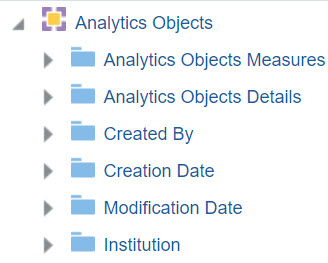
Analytics Objects
Using the Analytics Objects subject area, the Design Analytics user can create reports/dashboards concerning analytic objects and is able to answer the following types of business questions:
- How many of each object type does the institution have
- How many users added a widget to his / her dashboard
- How many users subscribed to a scheduled report or scheduled dashboard
- Names and locations of each object type
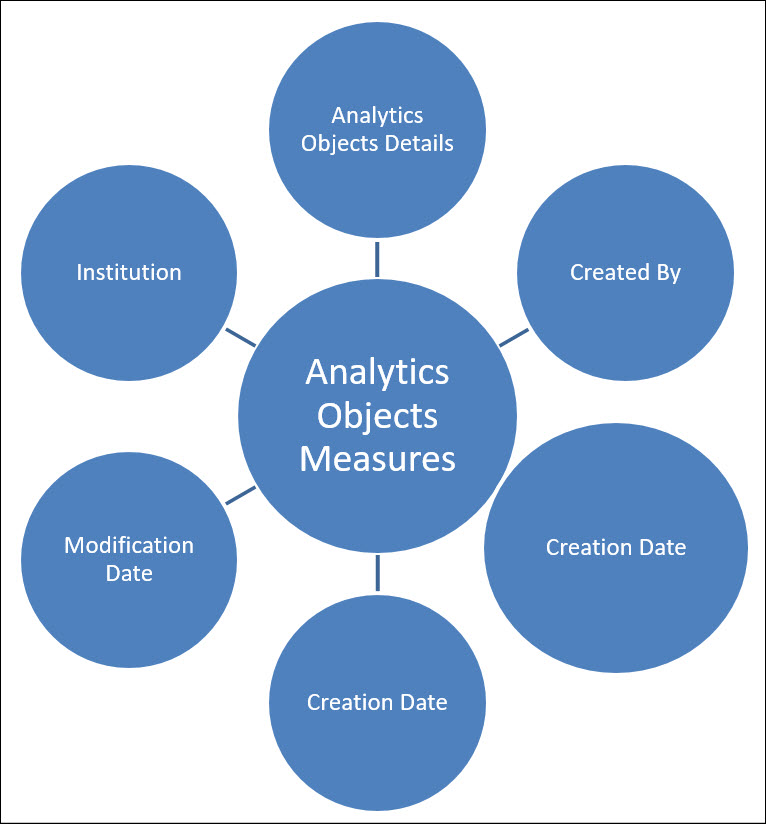
Field Descriptions
The following lists the fields available in Analytics Objects.
Analytics Objects Measures
The Analytics Objects Measures table is a fact table that stores all measures relating to analytics objects.
| Field | Description | Additional Information | Data Type | Data Size |
|---|---|---|---|---|
| Num of Objects | The number of analytics objects created by the institution. | NUMERIC | ||
| Num of Objects of Type Dashboard | The number of analytics objects of type dashboard | NUMERIC | ||
| Num of Objects of Type DV | The number of analytics objects of type data visualization | NUMERIC | ||
| Num of Objects of Type Report | The number of analytics objects of type report | NUMERIC | ||
| Num of DV Objects Marked for Homepage | The number of analytics objects of type Data Visualization that are marked as being available to be used as an Alma homepage. | NUMERIC | ||
| Num of Objects Added as Widget | The number of analytics objects that were added as a widget | NUMERIC | ||
| Num of Objects Delivered by Attachment | The number of analytics objects marked to be sent as an attachment | NUMERIC | ||
| Num of Objects Delivered by FTP | The number of analytics objects marked to be delivered by FTP | NUMERIC | ||
| Num of Objects Delivered by Link | The number of analytics objects marked to be sent as a link | NUMERIC | ||
| Num of Objects for Source Alma | The number of objects Alma created by the institution from Alma analytics. | NUMERIC | ||
| Num of Objects for Source Primo | The number of objects created by the institution from Primo analytics. | NUMERIC | ||
| Num of Objects of Type Dashboard - Active (to be deprecated) | The number of active objects of type dashboard | This field will be deprecated in a future release and should not be used. | NUMERIC | |
| Num of Objects of Type Dashboard - Not Active (to be deprecated) | The number of non-active objects of type dashboard | This field will be deprecated in a future release and should not be used. | NUMERIC | |
| Num of Scheduled Objects | The number of scheduled analytics objects | NUMERIC | ||
| Num of Objects of Type Scheduled Report - Active (to be deprecated) | The number of active objects of type scheduled report | This field will be deprecated in a future release and should not be used. | NUMERIC | |
| Num of Objects of Type Scheduled Report - Not Active (to be deprecated) | The number of non-active objects of type scheduled report | This field will be deprecated in a future release and should not be used. | NUMERIC | |
| Num of Scheduled Objects | The number of scheduled analytics objects | NUMERIC | ||
| Num of Shared Internal Users | The number of internal users with whom the analytics object is shared | NUMERIC | ||
| Num of Shared Users by Role | The number of roles with which the analytics object is shared | NUMERIC | ||
| Num of Subscribed Users | The number of users who subscribed to a scheduled report. | NUMERIC | ||
| Num of Users Who Pinned Object | The number of users that pinned an object | NUMERIC | ||
| Number of Widget Instances Displayed | The number widgets displayed by all users | The same widget is counted separately for each user that uses the widget | NUMERIC |
Analytics Object Details
The Analytics Object Details table is a dimension table that stores all measures relating to analytics object details.
| Field | Description | Additional Information | Data Type | Data Size |
|---|---|---|---|---|
| Is DV Homepage | Indicates of the analytics object of type data visualization is marked as being available to be used as the Alma homepage. | VARCHAR | 3 | |
| Is Out of Box | Indicates if the report or dashboard of the analytics object is "out-of-the-box" - created by Ex Libris. | VARCHAR | 3 | |
| Object Type | The object type. | VARCHAR | 3 | |
| Is Scheduled | Indicates if the analytics object is scheduled. | VARCHAR | 3 | |
| Is Widget | Indicates if the analytics object is added as a widget that can be added to the Alma homepage. | VARCHAR | 3 | |
| Object Description | The object description. | VARCHAR | 4000 | |
| Object Display Name | The display name of the object. | VARCHAR | 255 | |
| Object ID | The object ID. | VARCHAR | 50 | |
| Object Report URL | The report URL of the analytics object. | This field only supports Alma Analytics Objects. | VARCHAR | 1557 |
| Object Type | The object type. | VARCHAR | 50 | |
| Report Location | The report location. | VARCHAR | 255 | |
| Report Name | The report name. | VARCHAR | 255 | |
| Scheduled by Link/ Attachment | Indicates if the scheduled analytics object is marked to be sent as a link or as an attachment. | VARCHAR | 20 | |
| Scheduled Format | The scheduled report format. | VARCHAR | 20 | |
| Scheduled Frequency | The scheduled frequency. | VARCHAR | 50 | |
| Scheduled FTP | The scheduled FTP. | VARCHAR | 3 | |
| Scheduled Status | The scheduled status. | VARCHAR | 25 | |
| Shared Internal Users | The names of the internal users with whom the analytics object is shared. | VARCHAR | 4000 | |
| Shared Roles | The roles with which the analytics object is shared. | VARCHAR | 4000 | |
| Source System | The source system. | VARCHAR | 25 | |
| Subject Area | The subject area of the report of the analytics object. | VARCHAR | 100 |
Created By
The Created By table is a dimension table that stores all measures relating to the analytics objects creator.
The field descriptions can be found in the User Details shared dimension.
- Many institutions store information about individuals, including personal details and information about their activities. Due to privacy concerns, some institutions are required to anonymize the data on a regular basis.
- Alma offers the option to delete such user information for fulfillment and resource sharing activities. The information is deleted for activities that have been completed, such as completed loans, closed fines and fees, or resource sharing borrowing requests.
- You can configure Alma to delete the more specific information (for example, User ID) and retain the more general user information (for example, User Group and Job Title).
- The information that is not anonymized can be included in Analytics reports.
- For more information concerning anonymization, see Security and Data Privacy.
| Field | Description | Additional Information | Data Type | Data Size |
|---|---|---|---|---|
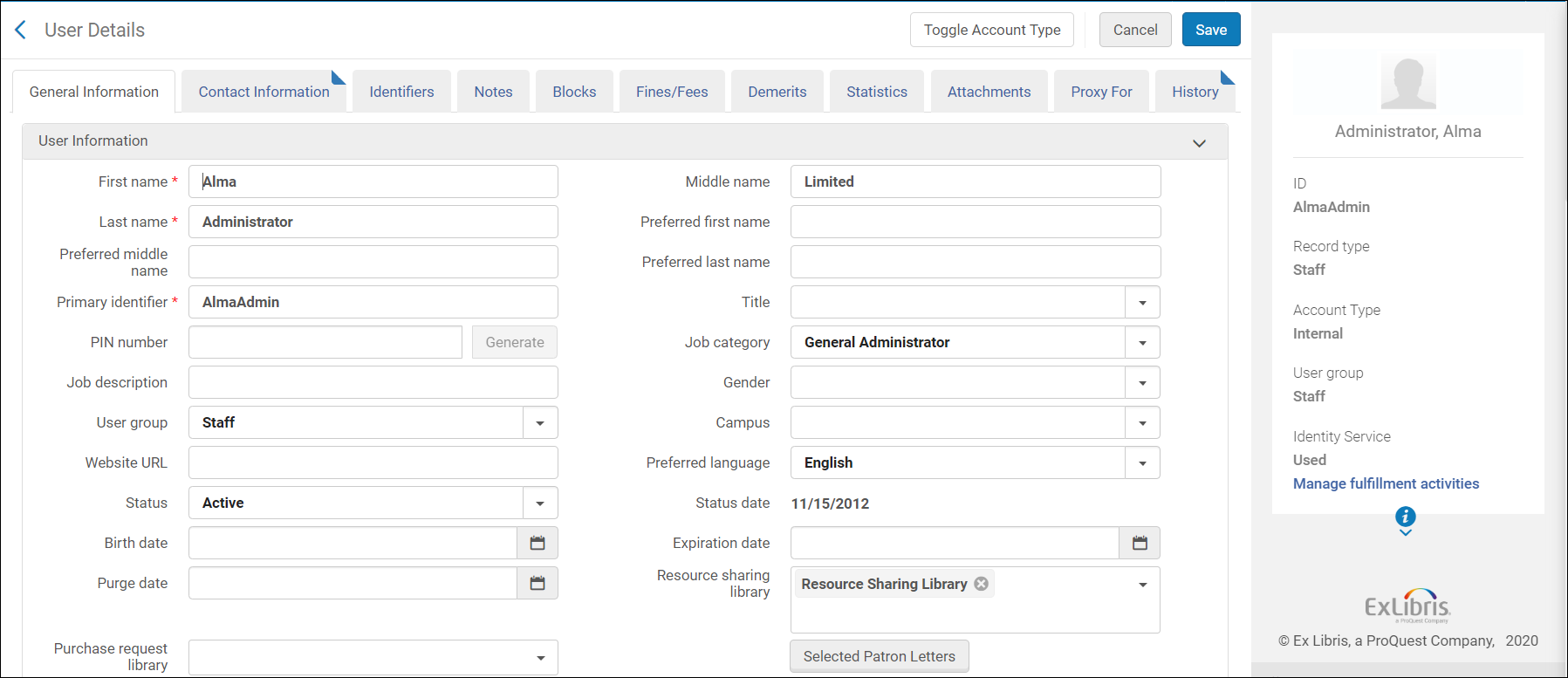
| Creation Date | Stores the date that the user was created in the system | See the field location in Alma in the image below. | DATE | |
| Creator | Stores the user name of the user that created the user in the system | See the field location in Alma in the image below. | VARCHAR | 255 |
| Modification Date | Stores the date of the modification of the user record | See the field location in Alma in the image below. | DATE | |
| Modified By | Stores the name of the user that modified the user record | See the field location in Alma in the image below. | VARCHAR | 255 |
| Campus Code | Stores the campus code of the user | See the field location in Alma in the image below. | VARCHAR | 50 |
| Job Title | Stores the job category definition to which the user belongs based on the Job Categories code table | See the field location in Alma in the image below. | VARCHAR | 255 |
| Statistical Categories 01-10 | These fields allow you to map ten statistical categories. This allows you to filter reports based on advanced user information typically stored in the statistical category fields. For more information, see Configuring Statistical Categories. | VARCHAR | 4000 | |
| User Group | Stores the group with which the user is associated such as Faculty, Graduate, or Student | See the field location in Alma in the image below. | VARCHAR | 4000 |
| User Group Code | VARCHAR | 255 | ||
| User Type | Stores the values Internal and External. |
See the field location in Alma in the image below. |
CHAR | 20 |
| Birth Date | Stores the birth date of the user | See the field location in Alma in the image below. | DATE | |
| Cataloger Level | The cataloger level of the user. | VARCHAR | 255 | |
| Default Language | Stores the default language of the user | See the field location in Alma in the image below. | VARCHAR | 4000 |
| Disable All Login Restrictions | VARCHAR | 3 | ||
| Expiry Date | Stores the date on which the user is to expire and no longer be able to get service from the system |
See the field location in Alma in the image below. Changing the user expiry date is one way to control item due dates that extend beyond the end of a semester and must be shortened to the end of the semester. |
DATE | |
| External ID | Stores the ID of the user in the originating system | VARCHAR | 255 | |
| First Name | Stores the user’s first name | See the field location in Alma in the image below. | VARCHAR | 255 |
| Full Name | The user's first and last name | There is no option to include the middle name. | VARCHAR | 511 |
| Gender (Not in Use) | Possible values are taken from the Genders code table (Configuration > User Management > User Details > Genders) | See the field location in Alma in the image below. | VARCHAR | 4000 |
| Has Role Other Than Patron | Indicates if the patron has a role other than Patron | VARCHAR | 3 | |
| Has Role Other Than Patron and Instructor | Indicates if the patron has a role other than Patron and Instructor | VARCHAR | 3 | |
| Identifier 1 | Stores identifier 1 |
The identifier field allows you to enrich the user details exported to Analytics with additional identifiers. Selecting a specific identifier to be included in the user details is done in Alma (in a table that is currently restricted to Ex Libris staff). For assistance in defining this field, contact Ex Libris Support. Only one value per identifier is supported.
|
VARCHAR | 4000 |
| Identifier 2 | Stores identifier 2. See details for the Identifier 1 field above. | VARCHAR | 4000 | |
| Is Blocked | Indicates if the patron is blocked | VARCHAR | 3 | |
| Job Description | Stores free-form text that describes the function of the user in the library | See the field location in Alma in the image below. | VARCHAR | 255 |
| Last Activity Date | The last date that a patron made a request or borrowed or returned an item | DATE | ||
| Last Name | Stores the user’s last name | VARCHAR | 255 | |
| User – Linked From Institution Code | The code of the institution from which the user is linked | VARCHAR | 255 | |
| User – Linked From Institution Name | The name of the institution from which the user is linked | VARCHAR | 255 | |
| User – Linked From Other Institution | Indicates if the user is linked from another institution | Possible values: yes/no | VARCHAR | 4000 |
| Linked To Other Institution | Indicates if the user accessed Primo/Alma for services in another institution. Note that this does not necessarily indicate that the services were actually supplied or that a linked account was created. | Possible values: yes/no | VARCHAR | 10 |
| Middle Name | Stores the middle name of the user | See the field location in Alma in the image below. | VARCHAR | 255 |
| Patron Letters Opt In | The letters for which the patron has opted in | VARCHAR | 2000 | |
| Patron Letters Opt Out | The letters for which the patron has opted out | VARCHAR | 2000 | |
| Preferred First Name | Stores the user’s preferred first name | See the field location in Alma in the image below. | VARCHAR | 255 |
| Preferred Last Name | Stores the user’s preferred last name | See the field location in Alma in the image below. | VARCHAR | 255 |
| Preferred Middle Name | Stores the user's preferred middle name | See the field location in Alma in the image below. | VARCHAR | 255 |
| User Primary Identifier | Stores the primary identifier that the user uses in order to log on to Alma | See the field location in Alma in the image below. | VARCHAR | 255 |
| Purge Date | Stores the date on which the user record is to be deleted from Alma | See the field location in Alma in the image below. | DATE | |
| Resource Sharing Library | The resource sharing library assigned to the user. | VARCHAR | 4000 | |
| Resource Sharing Library Code | The code of the resource sharing library assigned to the user. | VARCHAR | 4000 | |
| User Status | Indicates if the user is active | See the field location in Alma in the image below. | VARCHAR | 8 |
| Status Date | Stores the date on which the patron was registered in the institution | See the field location in Alma in the image below. | DATE | |
| User ID | Stores the unique ID of the user | VARCHAR | 50 | |
| User Record Type | Indicates if the user is a Public User or a Staff User | See the field location in Alma in the image below. | VARCHAR | 4000 |
| User Title | The title of the user. | VARCHAR | 4000 |

Creation Date
The Creation Date dimension is a dimension table that stores details about the creation date of the analytics object.
| Field | Description | Additional Information | Data Type | Data Size |
|---|---|---|---|---|
| Creation Date | The creation date of the analytics object | The date in the format DD/MM/YYYY | DATE | |
| Creation Start of Week | The date of the first business day of the week | The date in the format DD/MM/YYYY | DATE | |
| Creation Week Number | The number of the week of the year | There are 52 weeks in a year. | VARCHAR | 2 |
| Creation Month Key | The month of the date in number format | For example - February will show the number 2 in this column. This field is useful when you want to sort by month. | INT | |
| Creation Month | The month of the date in text format | The month, for example,"February" | VARCHAR | 20 |
| Creation Full Month | The year and month that the purchase request was modified | The month in text format and the year. For example - Feb 25 (for February 2025) | VARCHAR | 20 |
| Creation Quarter | The quarter in the year in which the purchase request was modified | The quarter of the date in a display format such as Q1 | VARCHAR | 20 |
| Creation Year | The year in which the purchase request was modified | The year of the date in YYYY format. For example - 2025 | VARCHAR | 20 |
| Creation Fiscal Month Key | The fiscal month of the date in number format | For example - If the fiscal year starts in June, this column will show the number 1 for June, the number 2 for July, and so on. | INT | |
| Creation Fiscal Year | The fiscal year of the date in string format | The year is presented according to the description in the mapping table "Fund and Ledger Fiscal Period". See - Configuring Fund and Ledger Fiscal Periods | VARCHAR | 50 |
| Creation Date Filter | Used to filter report results by date | Possible values: Current Academic Year, Current Fiscal Year, Current Month, Current Year, Last 3 Months, Last 30 Days, Last 365 Days, Last 7 Days, Older than 30 Days, Older than 60 Days, Older than 7 Days, Older than 90 Days, Previous Complete 12 Months, Previous Complete 24 Months, Previous Complete Two Years, Previous Fiscal Year, Previous Month, Previous Year, Two Fiscal Years Ago, and Two Years Ago. | VARCHAR | 100 |
| Creation Year-Month | The year and the month in which the purchase request was modified | The year and the month in the format YYYY-MM | VARCHAR | 250 |
| Creation Date | The date in a hierarchy format | Enables the user to drill down from the year to the month to the specific date. Using this column provides the user with the option to view the accumulative measures in each level of the hierarchy. |
Modification Date
The Modification Date dimension is a dimension table that stores details about the modification date of the analytics object.
| Field | Description | Additional Information | Data Type | Data Size |
|---|---|---|---|---|
| Modification Date | The modification date of the analytics object. | The date in the format DD/MM/YYYY | DATE | |
| Modification Start of Week | The date of the first business day of the week. | The date in the format DD/MM/YYYY | DATE | |
| Modification Week Number | The number of the week of the year. | There are 52 weeks in a year. | VARCHAR | 2 |
| Modification Month Key | The month of the date in number format. | For example - February will show the number 2 in this column. This field is useful when you want to sort by month. | INT | |
| Modification Month | The month of the date in text format. | The month, for example, "February". | VARCHAR | 20 |
| Modification Full Month | The year and month that the purchase request was modified. | The month in text format and the year. For example - Feb 25 (for February 2025) | VARCHAR | 20 |
| Modification Quarter | The quarter in the year in which the purchase request was modified. | The quarter of the date in a display format such as Q1. | VARCHAR | 20 |
| Modification Year | The year in which the purchase request was modified. | The year of the date in the format YYYY . For example - 2025. | VARCHAR | 20 |
| Modification Fiscal Month Key | The fiscal month of the date in number format. | For example - If the fiscal year starts in June, this column will show the number 1 for June, the number 2 for July, and so on. | INT | |
| Modification Date Filter | Used to filter report results by date. | Possible values:
|
VARCHAR | 100 |
| Modification Fiscal Year | Stores the year of the date in string format such as 2012. | VARCHAR | 50 | |
| Modification Year-Month | The year and the month in a format such as 2023-1. | VARCHAR | 250 | |
| Modification Date | Stores the Hierarchy column that allows the user to drill down from the year to the month to the specific loan date. Using this column provides the user with the option to view the accumulative measures in each level of the hierarchy. |
Institution
The shared Institution dimension allows the Network Zone to view reports according to institution. If an analytics report is run from the Network Zone in a collaborative network implementing a Network Zone, all member institutions are included in the report for Institution Code and Institution Name. If an analytics report is run from an institution that is not part of a collaborative network implementing a Network Zone, only the single institution from which the report is run is included in the report for Institution Code and Institution Name.
This dimension is available in every subject area. It contains the following fields:
| Field | Description | Additional Information | Data Type | Data Size |
|---|---|---|---|---|
| Institution Code | The code of the institution. |
Configured from: Configuration > General > Add a Library or Edit Library Information > Summary tab. The label in Alma is Code located on the right pane. |
VARCHAR | 50 |
| Institution Name | The name of the institution. |
Configured from: Configuration > General > Add a Library or Edit Library Information > Summary tab. The label in Alma is Organization unit name. |
VARCHAR | 255 |
| Institution Address Line 1 | The first line of the address of the institution. It usually includes the building number and the street name. |
Configured from: Configuration > General > Add a Library or Edit Library Information > Contact Information tab. This is taken from the address configured as the Preferred address. The label in Alma is Address Line 1. |
VARCHAR | 1000 |
| Institution City | The city of the institution. |
Configured from: Configuration > General > Add a Library or Edit Library Information > Contact Information tab. This is taken from the address configured as the Preferred address. The label in Alma is City. |
VARCHAR | 255 |
| Institution State Province | The state or province of the institution. |
Configured from: Configuration > General > Add a Library or Edit Library Information > Contact Information tab. This is taken from the address configured as the Preferred address. The label in Alma is State/Province. |
VARCHAR | 320 |
| Institution Country | The country of the institution. |
Configured from: Configuration > General > Add a Library or Edit Library Information > Contact Information tab. This is taken from the address configured as the Preferred address. The label in Alma is Country. |
VARCHAR | 320 |
| Institution Postal Code | The postal code of the institution. |
Configured from: Configuration > General > Add a Library or Edit Library Information > Contact Information tab. This is taken from the address configured as the Preferred address. The label in Alma is Postal code. |
VARCHAR | 200 |
| Institution Timezone | The timezone of the institution. | The timezone is set during implementation. | VARCHAR | 255 |
| Data Available As Of | When the institution data became available in analytics. | Displayed at the bottom of the main Analytics menu. | VARCHAR | 255 |
| Data Updated As Of | When the institution data was taken from the Alma database. | Displayed at the bottom of the main Analytics menu. | VARCHAR | 255 |
Page tags: article:topicproduct:almacontent:Documentationlang:english
