
Patron Account Configurations
Esta página describe cómo configurar las cuentas de los usuarios, incluso grupos de usuarios, límites del usuario, autenticación del usuario y límites de préstamo.
For information on configuring demerits see Configuring User Blocks.
For links to all the main fulfillment documentation pages see Fulfillment.
Configuring Patron (User) Groups
Para configurar grupos de usuarios se debe tener uno de los siguientes roles:
- Administrador general del sistema
- Administrador de servicios al usuario
Esta página explica cómo configurar los límites del usuario y los requisitos de autenticación para grupos de usuarios.
- Watch the Configure User Blocks video (3 min.).
- Watch the Configure Patron and Loan Limits video (4 min.).
The patron user-groups themselves are created and configured on the User Groups Code Table page (Configuration Menu > Fulfillment > Patron Configurations > Patron Groups). For details, see Configuring User Groups.
También pueden crearse sanciones para usuarios individuales, basadas en puntos de demérito o préstamos vencidos. For details, see Configuring User Blocks.
If your institution is using user groups as fulfillment parameters (e.g., in Fulfillment Unit Rules, Display Logic Rules, etc.), you will need to update the rules with the new user group in order for them to take effect for users in the group.
Configuring Patron Limits
Para configurar límites del usuario se debe tener uno de los siguientes rolles:
- Administrador general del sistema
- Administrador de servicios al usuario
For the how-to that guides you through the process of setting up librarian- and system-assigned blocks to patrons, see How To Set Up Blocks to Prevent Loaning, Renewing and Hold Requests for Patrons.
Alma permite definir varios límites que se aplican a los usuarios que utilizan los servicios de la institución y las bibliotecas dentro de la institución. Los límites del usuario se verifican y aplican cuando un usuario intenta pedir prestado o renovar un recurso de la biblioteca. When a patron reaches one of the defined limits, the patron's account is blocked. The patron limits are calculated in real-time during fulfillment activities (similar to loan limits) and do not appear in the user's "Blocks" tab. For example, you can specify that the patron's account is blocked when the patron reaches 10 overdue items. El usuario no podrá pedir prestados recursos adicionales de la biblioteca hasta que el número de préstamos vencidos en su cuenta esté por debajo del límite configurado.
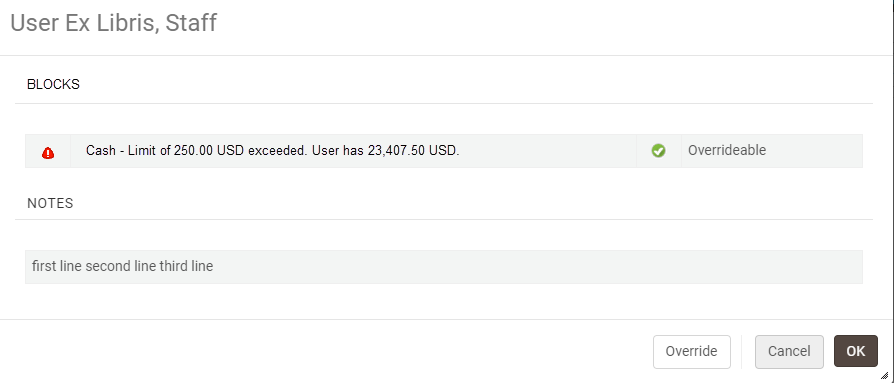
Selecting OK continues the flow and the user will be prompted with the block message where relevant when loaning or renewing an item. Selecting Override causes the blocks to be overridden i.e., the user will not be prompted with this message for loans.
Los límites del usuario se definen para grupos de usuarios, en función de los grupos de usuarios a los que están asignados. For example, you could define a set of limits for all patrons that are part of the Graduate Student user group. For each user group, you can define limits that may block a patron's account, such as:
Número máximo de ejemplares vencidos
- Cantidad máxima de efectivo que puede ser adeudada por el usuario.
- Número máximo de reservas (sin incluir las solicitudes de recursos compartidos)
- Número máximo de ejemplares vencidos
Estos límites se configuran a nivel institucional utilizando la tabla de asignación de definiciones de límites del usuario. Cada conjunto de límites puede ser habilitado o deshabilitado. De forma predeterminada, cada nuevo conjunto de límites del usuario está habilitado. Los límites que se definen se aplican a todas las bibliotecas de la institución.
Patron limits are configured on the Patron Limits Mapping Table page (Configuration Menu > Fulfillment > Patron Configurations > Patron Limits).
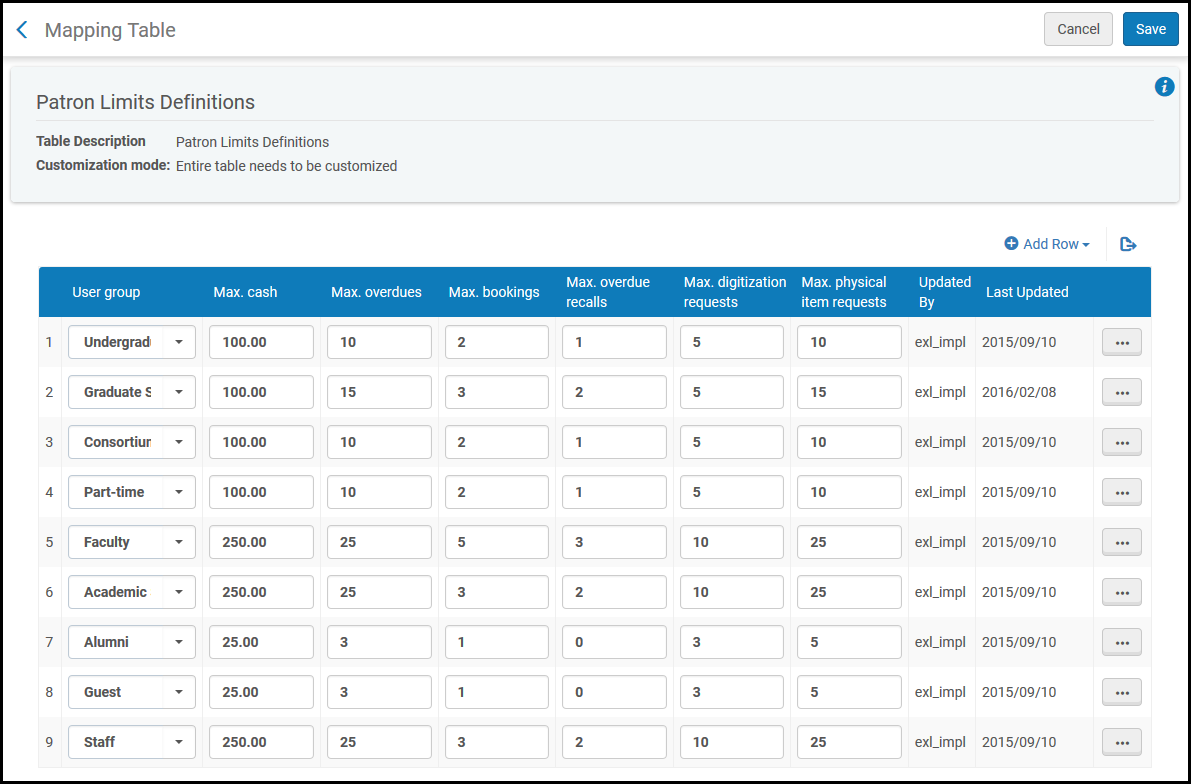
Patron limits can be configured at the institution level only. Select the required institution from the Configuring filter on the Fulfillment Configuration page.
Se pueden efectuar las siguientes acciones en esta página:
- Add a set of patron limits (see Adding a Set of Patron Limits)
- Edit a set of patron limits (select Edit)
- Delete a set of patron limits (select Delete)
Adding a Set of Patron Limits
Se puede agregar un nuevo conjunto de límites del usuario a la institución. When you add a set of patron limits for a specific user group (for example,Alumni), ensure that there is only one enabled set of limits for this user group.
Se definen los límites del usuario a nivel institucional. Los límites que se definen se aplican a todas las bibliotecas de la institución.
-
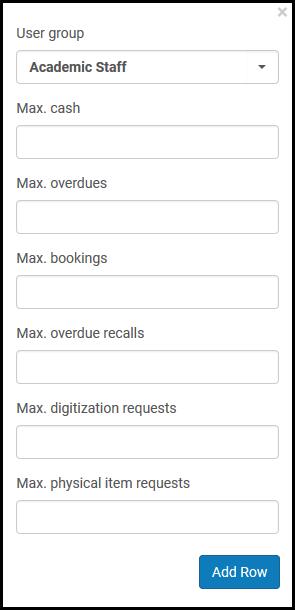
On the Patron Limits Mapping Table page (Configuration Menu > Fulfillment > Patron Configurations > Patron Limits), select Add Row and select the patron user group for which you want to create a new set of limits.
-
Introducir la siguiente información:
-
Max. cash – Maximum amount of cash that can be owed by the patron before the patron's account is blocked.
Max. cash is a required field.
- Max. overdues – Maximum allowed overdue loans before the patron's account is blocked. Si define Vencimientos máx. = 1, la cuenta del usuario se bloquea si hay más de un préstamo vencido. Configurar Vencimientos máx. a 0 bloqueará a un usuario con un préstamo vencido.
- Max. bookings – Maximum number of bookings allowed before the patron's account is blocked. Este valor no incluye las solicitudes de recursos compartidos.
- Max. overdue recalls – Maximum number of overdue recalled items allowed before the patron's account is blocked. Tenga en cuenta que si se fija en 0 el número máximo de recuperaciones vencidas, se sancionará a los usuarios con un préstamo vencido.
- Max. digitization requests – Maximum number of digital item hold requests allowed before the patron's account is blocked
- Max. physical item requests – Maximum number of concurrent active physical item hold requests allowed before the patron's account is blocked
Si deja en blanco uno de los cuadros anteriores, no se aplicará ningún límite en esta área.
-
- Select Add Row. El nuevo conjunto de límites se muestra en la parte inferior de la lista de límites del usuario definidos.
- Select Save to store the new set of patron limits.
Configuring Patron User Authentication
Para entornos de Primo VE, también se necesitará configurar la autenticación de usuario para las sesiones. For more information, see Configuring User Authentication for Primo VE.
Para configurar autenticaciones de usuarios se debe tener uno de los siguientes roles:
- Administrador general del sistema
- Administrador de servicios al usuario
You can configure the login options that appear in the Alma digital viewers from the User Authentication page (Configuration > Fulfillment > Patron Configuration).
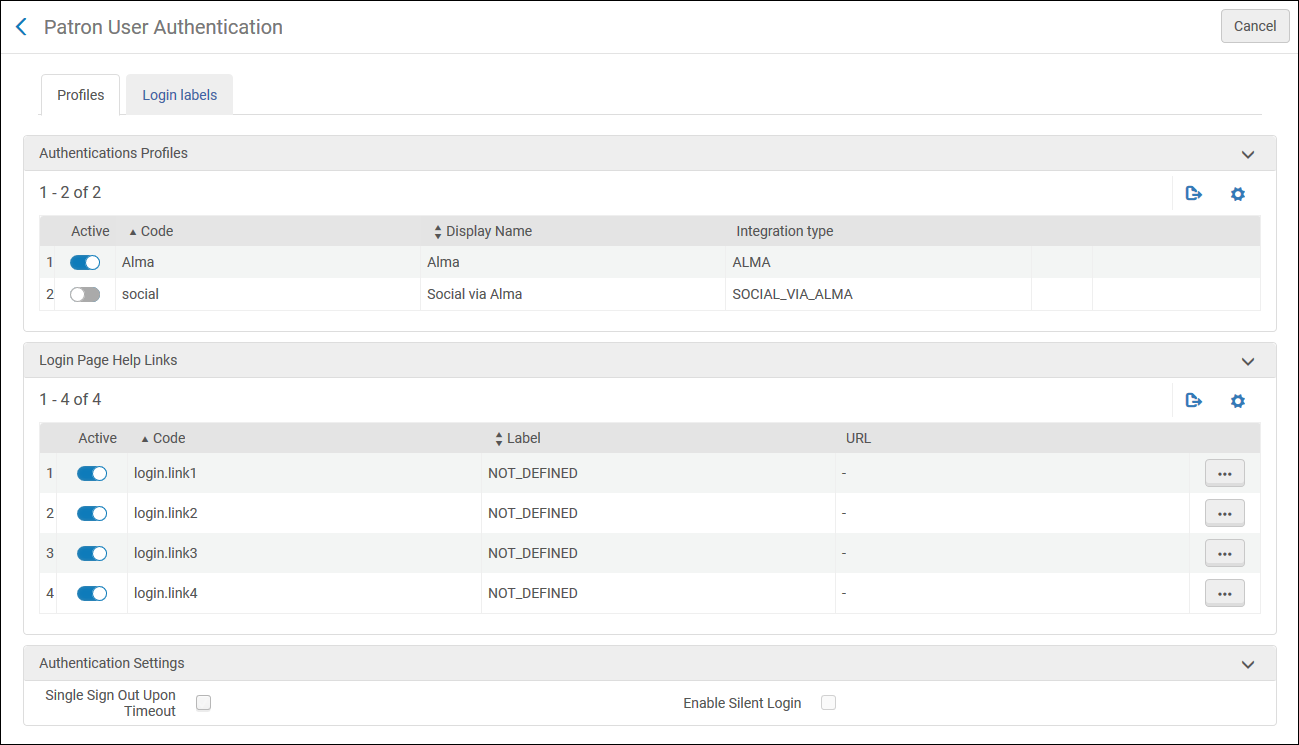
- Open the User Authentication page (Configuration > Fulfillment > Patron Configurations > Patron User Authentication).
-
From the Profiles tab, in the Authentication Profiles section, activate the profiles that you want to appear in the Alma digital viewers.
Los perfiles que aparecen aquí son los perfiles de integración configurados con un tipo de integración de SAML, LDAP, CAS y Social/Email Login. For more information, see Configuring Integration Profiles.
- In the Login Page Help Links section, activate and edit the links that appear when the patron clicks the Need help for this page link (configurable) in the viewer login page.
- To have the viewer sign out when Alma times out, select Single Sign Out Upon Timeout.
-
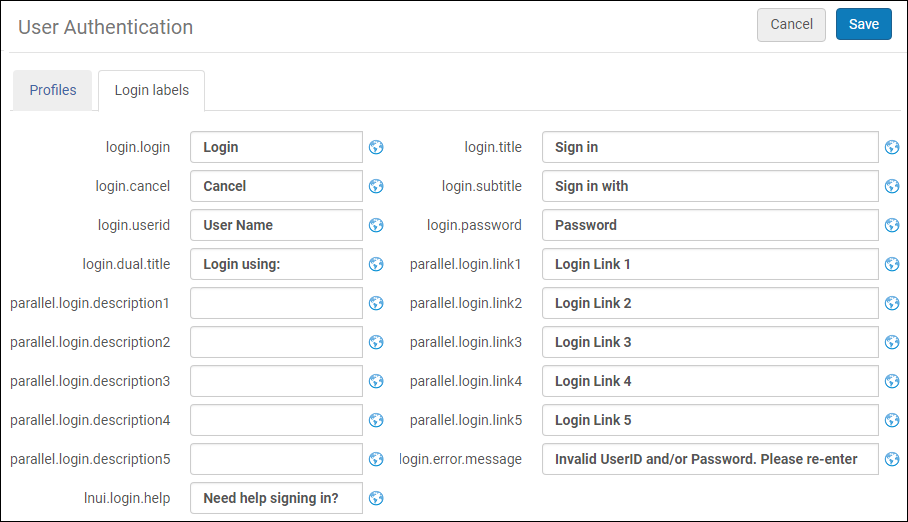
Select the Login Labels tab. Aparecerá lo siguiente:
- Click Save.
Configuring Loan Limit Rules
Para configurar las reglas de límites de préstamo se debe tener uno de los siguientes roles:
- Administrador general del sistema
- Administrador de servicios al usuario
Para limitar el número de ejemplares que un usuario puede retirar simultáneamente, agregue una regla de límite de préstamos. The rule can be applied according to library, location, item policy, material type, and user group.
You configure loan limit rules from the Loan Limit Rule page (Configuration Menu > Fulfillment > Patron Configurations > Loan Limits).
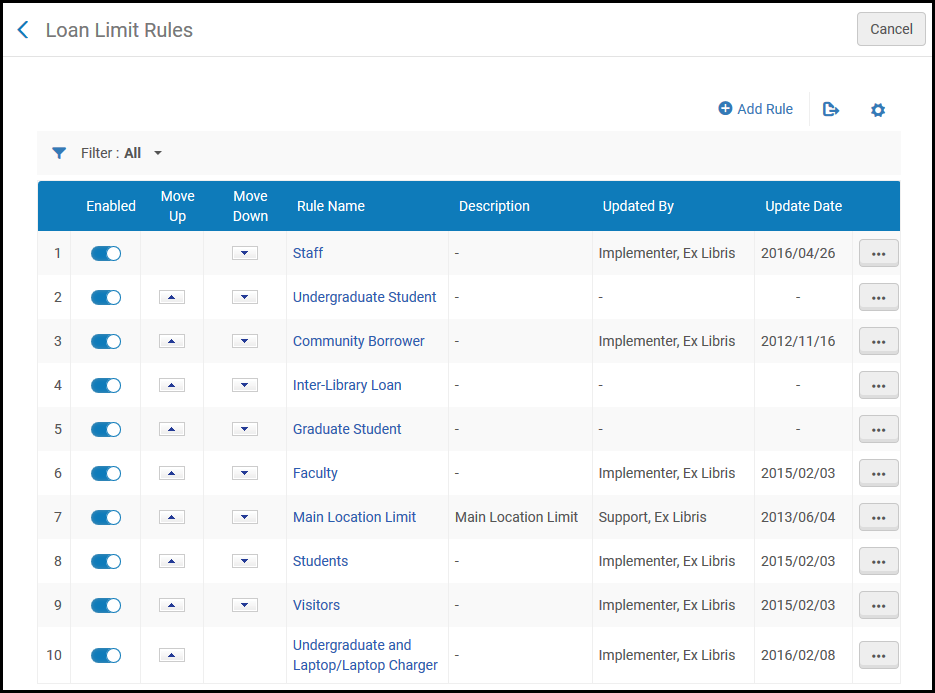
Las reglas de límite de préstamo se pueden configurar solo a nivel institucional. Select the required institution from the Configuring filter on the Fulfillment Configuration page.
Se pueden efectuar las siguientes acciones en esta página:
- Add Loan Limit Rules (see Adding Loan Limit Rules).
- Edit Loan Limit Rules (select Edit from the row actions list).
- Duplicate Loan Limit Rules (select Duplicate from the row actions list and modify the relevant fields).
- Delete Loan Limit Rules (select Delete from the row actions list).
Adding Loan Limit Rules
Se puede agregar una regla de límite de préstamo. Las reglas que se definen se aplican a todas las bibliotecas en la institución.
-
On the Loan Limit Rules page (Configuration Menu > Fulfillment > Patron Configurations > Loan Limits), select Add Rule. Se abrirá la página Límite de préstamo.
If you want to create a copy of an existing loan limit rule, select Duplicate from the row actions. Una vez que se haya copiado la regla de límite de préstamo, se puede modificar según sea necesario.
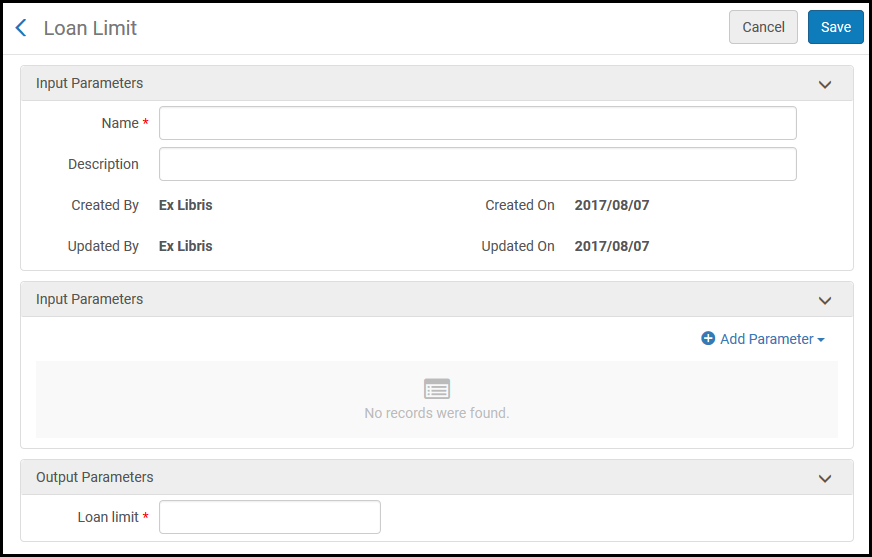
- Under Input Parameters, enter a name and description of the loan limit rule.
- Under Input Parameters, specify the components of the input parameter (Name,Operator, and Value). A set of input parameters may look like this:Library=ArtLibrary.
- Select Add Parameter. El conjunto de parámetros de entrada se agrega a la lista de parámetros de la regla de límites de préstamo.
-
Repetir los dos pasos anteriores para añadir todos los parámetros requeridos para la regla.
At least one input parameter must be fulfilled for the rule to be applied.
- Under Output Parameters, enter a loan limit – the maximum number of items that a patron can borrow according to the loan limit rule. Si se introduce 0, todos los préstamos se bloquean.
-
Select Save to store the new rule.
- El orden de las reglas no es importante. Todas las reglas que coinciden con los criterios son verificadas por el sistema. Si se excede un límite definido por cualquiera de las reglas, el nuevo préstamo no se crea.
- En el caso de préstamos ilimitados, no cree una regla de límite de préstamos que se aplique al préstamo.
