
Configuración de préstamos
Configure physical fulfillment rules.
This page describes how to configure loans including automatic loan renewal rules, overdue and lost loan profiles, etc. For links to all the main fulfillment documentation pages see Fulfillment.
Configuring Block Preferences
- Administrador general del sistema
- Administrador de servicios al usuario
Watch the Overdue and Lost Loan Profiles video.
Las preferencias de sanción permiten controlar cómo se gestionarán los distintos escenarios en los mostradores de circulación dentro de la institución según el estado de un ejemplar o de un usuario. For more information on blocking users, see Blocking and Unblocking Users. When an item is blocked it can't be loaned to (or requested by) the user; see Creating a Request from the Institution. For details on policies for loan recall requests, see here.
El siguiente puede ser un escenario típico:
Un usuario lleva un libro a un mostrador de circulación e intenta sacar prestado el libro. When the circulation desk operator enters the book's ID into the system, it is discovered that the book was requested by another patron, preventing the user from borrowing it. Depending on the block preferences and the staff member's permissions, the block may be overridden.
For configuring user blocks including demerits, consortial blocks, overdue loans, etc., see Configuring User Blocks.
The block preferences that are defined for the institution appear on the Block Preferences page (Configuration Menu > Fulfillment > Physical Fulfillment > Block Preferences).
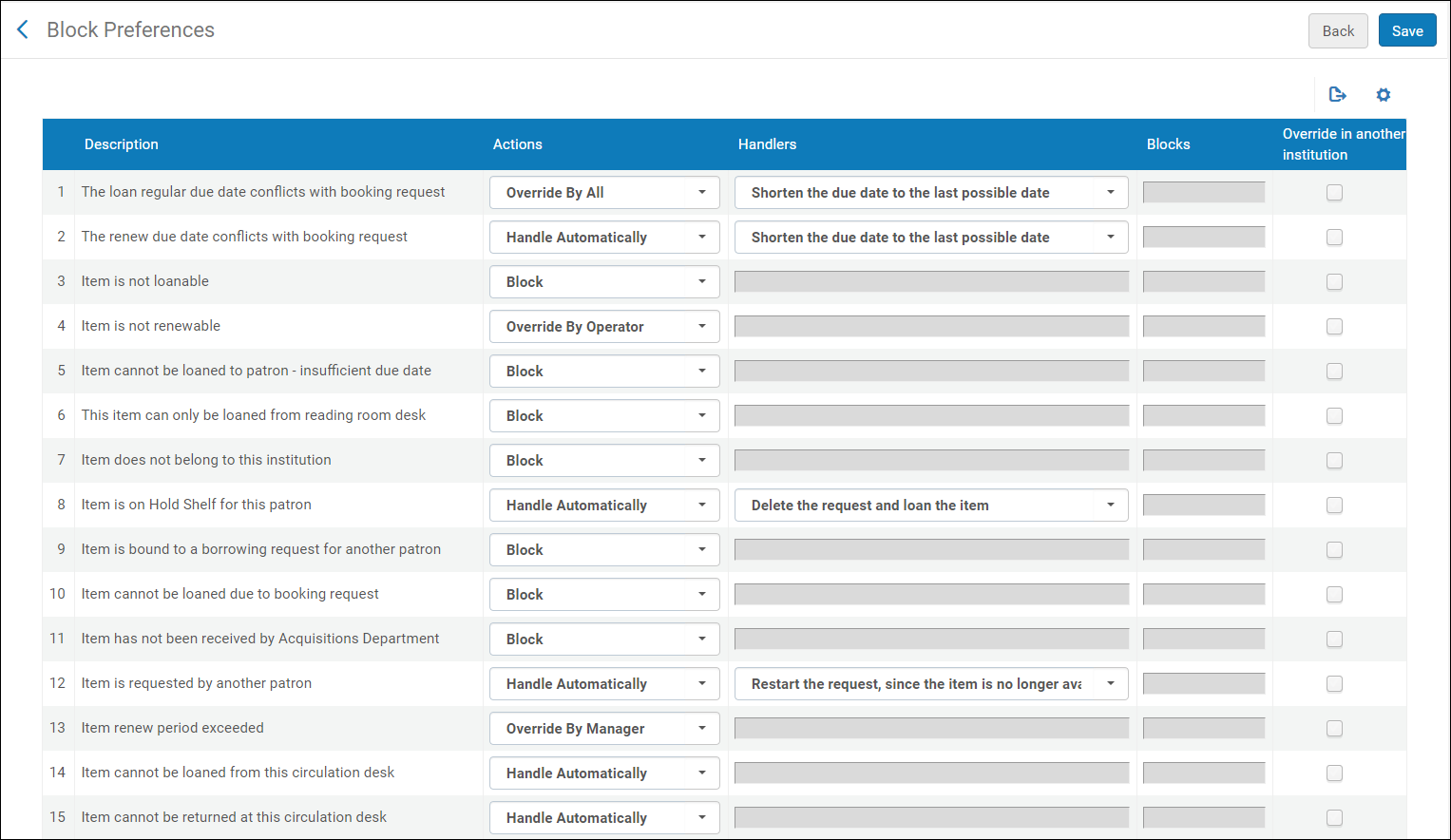
- Las preferencias de sanciones se pueden configurar solo a nivel de institución. Select the required institution from the Configuring filter on the Fulfillment Configuration page.
- The Not Renewable – Item Has Request(s) entry indicates the system behavior when there are title level requests on the renewed item. Select Handle Automatically to permit request renewal when title level requests exist for the loaned item that is being renewed. Seleccionar cualquier otra opción para rechazar la renovación del préstamo cuando existan solicitudes a nivel de titulo para el ejemplar prestado que se está renovando. Este parámetro también controla el comportamiento del sistema cuando se intenta renovar material que se ha enviado para una solicitud de préstamo de recursos compartidos (mediante la renovación de solicitudes de recursos compartidos) y existen solicitudes a nivel de título para el recurso. If you select Handle Automatically, it means that renewal requests are automatically accepted and the shipped material is automatically renewed to the requested new due date even though there are title level requests for the resource. Seleccionar cualquier otra opción para rechazar las solicitudes de renovación.
- The Item cannot be loaned to patron – insufficient due date block indicates that the item cannot be loaned because the due date does not allow the item to be returned. For example, this block appears when an item's due date is in the past, or when an item is due tomorrow but delivery of the item cannot be completed for three days.
La lista de preferencias de sanción está predefinida. You cannot add or delete a block preference, but you can modify a block preference's settings. Las preferencias que se define se aplican a todas las bibliotecas en la institución.
Editing Block Preferences
Los detalles que se pueden modificar se configuran con los siguientes campos en la página Preferencias de panel de herramientas:
Actions – Defines the global action to perform in a given scenario
- Handlers – Defines the action to perform automatically when the Action field is set to Handle Automatically or one of the Override by optionsLos gestores solo se pueden editar cuando existe más de una opción entre la que elegir para una acción.
- Blocks – Defines which types of transactions to block (Loan,Renew, or Both)
Las acciones disponibles son:
- Block – The item is blocked, and the patron cannot borrow the item.
- Override by Manager – The block on the item can be overridden only by a staff member with the Circulation Desk Manager role at the current circulation desk.
- Override by Operator – The block on the item can be overridden only by a staff member with the Circulation Desk Manager or Circulation Desk Operator role at the current circulation desk.
- Override by All – The block on the item can be overridden by any staff member with either the Circulation Desk Manager, Circulation Desk Operator, or Circulation Desk Operator –Limited role at the current circulation desk.
- Override in Another Institution- This option may be used by Fulfillment Network members to configure whether the block may be overridden by staff in another institution if the block happens when the member's item is being loaned at the circulation desk of another member institution.
- Handle Automatically – Specific actions are to be performed by Alma. In some cases, these actions are specified in the Handler field, and are predefined by Ex Libris. Handler options can be configured only if you select Handle Automatically or one of the Override by options. In other cases, such as for block descriptions “Item cannot be loaned from this circulation desk” and “Item cannot be returned at this circulation desk”, the Handler field is empty. When the Handler field is empty, choosing Handle Automatically enables the activity to occur with no block. For example, if “Item cannot be loaned from this circulation desk” is defined with the Handle Automatically action, then an item from Library B which is not defined as “Circulate For” in Library A can be loaned (with no block) while at a circulation desk of Library A.
- The block preferences Item has not been received by Acquisitions Department,Item cannot be loaned due to booking request,Item cannot be loaned to patron - insufficient due date,A resource sharing request must be renewed by the resource sharing library, and Item does not belong to this institution contain only a single Action (Block), which cannot be overridden.
- The block preference Not Renewable - Item has Requests is relevant only if PATRON_PHYSICAL = Yes on the Loan Recalls Mapping Table page (see Configuring Loan Recall Requests).
- When working with external users, the block preference Patron is Expired indicates that the patron has expired in the external system, and the block preference Patron is not Active indicates that the patron is not active in the external system.
- When selecting Item cannot be loaned from this circulation desk,Item cannot be returned at this circulation desk, or Not Renewable – Item has Requests, no Handler options are available when Handle automatically is selected. En esos casos, Alma ignora la sanción y el ejemplar se puede prestar.
- Selecting an override action for the Item is Not Renewable preference causes the Override button to appear on the warning box from the Renew option on the Action button of the Manage Patron Services Loan tab. It does not affect the Renew Selected or Renew All buttons.
Las descripciones de las preferencias de sanción son:
| Nombre de sanción | Descripción | Acciones disponibles | Gestores |
|---|---|---|---|
|
La fecha de vencimiento normal del préstamo está en conflicto con una solicitud de reserva
|
El préstamo se bloquea cuando la fecha de vencimiento normal (determinada por los TOU, por ejemplo) entra en conflicto con el inicio de una solicitud de reserva anticipada existente.
|
|
Acortar la fecha de vencimiento a la última fecha posible
|
|
La fecha de renovación del vencimiento está en conflicto con una solicitud de reserva
|
La renovación de un préstamo existente se bloquea cuando la fecha de vencimiento renovada normal (determinada por los TOU, por ejemplo) entra en conflicto con el inicio de una solicitud de reserva existente.
|
|
Acortar la fecha de vencimiento a la última fecha posible
|
|
El ejemplar no se puede prestar
|
El préstamo de un ejemplar se bloquea como resultado de la configuración de los servicios al usuario. Los Términos de Uso aplicables contienen una política de Se Puede Prestar con el valor Falso.
|
|
|
|
El ejemplar no se puede renovar
|
La renovación de un préstamo se bloquea como resultado de la configuración de los servicios al usuario. Los Términos de Uso aplicables contienen una política de Se Puede Renovar con el valor Falso.
|
|
|
|
El ejemplar no se puede prestar al usuario - fecha de vencimiento insuficiente
|
Bloquear
|
||
|
Este ejemplar solo se puede prestar desde el mostrador de la sala de lectura
|
Si la política "Se puede prestar" de un ejemplar tiene un valor de Solo en la sala de lectura, y se intenta prestar desde un mostrador de circulación no definido como mostrador de sala de lectura, el préstamo se bloquea.
|
|
|
|
El ejemplar no pertenece a esta institución
|
Bloquear
|
||
|
El ejemplar está en la estantería de reservas para este usuario
|
El préstamo se bloquea para un ejemplar cuando está en la estantería de reservas.
|
|
Borrar la solicitud y prestar el ejemplar
|
|
El ejemplar está asociado a una solicitud de préstamo de otro usuario
|
Checkout is blocked for an item because it was already requested by a different patron via Resource Sharing.
|
|
|
|
El ejemplar no se puede prestar porque tiene una solicitud de reserva
|
Bloquear
|
||
|
El Departamento de adquisiciones no ha recibido el ejemplar
|
Bloquear
|
||
|
El ejemplar está solicitado por otro usuario
|
El préstamo de un ejemplar a un usuario se bloquea cuando existe una solicitud activa de otro usuario para el ejemplar. La sanción no tiene efecto si la solicitud no está activa. La sanción tampoco tiene efecto si el ejemplaro se encuentra en otro proceso, por ejemplo, un préstamo.
|
|
Reiniciar la solicitud, debido a que el ejemplar ya no está disponible.
|
|
El ejemplar está solicitado por la biblioteca
|
El préstamo está bloqueado para un ejemplar que se solicita para un proceso interno de la biblioteca.
|
|
Reiniciar la solicitud, debido a que el ejemplar ya no está disponible
|
|
Se excedió el periodo de renovación del ejemplar
|
La renovación de un préstamo se ha bloqueado como resultado de la Configuración de servicios al usuario. Los Términos de uso aplicables contienen un valor para la política de Periodo máximo de renovación que ya se ha cumplido para este préstamo.
|
|
|
|
El ejemplar no se puede prestar desde este mostrador de circulación
|
|
|
|
|
El ejemplar no se puede devolver en este mostrador de circulación.
|
|
|
|
|
Un ejemplar con el mismo título (ejemplares adjuntos al mismo registro bibliográfico) fue prestado recientemente a este usuario.
|
Reloaning an item is blocked as a result of the fulfillment configuration. The applicable Terms of Use contains a Reloan Limit policy with value Other.
|
|
|
|
Item of the same title (items attached to the same bib record) is already on loan for this patron
|
Loaning an item is blocked as a result of the fulfillment configuration. The applicable Terms of Use contains a Reloan Limit policy with value Other.
|
|
|
|
El préstamo no se puede renovar debido al estado del préstamo
|
La renovación de un préstamo se bloquea cuando el estado del préstamo es Perdido, Reclamado como devuelto o Devolución solicitada. Nótese que las sanciones para los ejemplares pérdidos no se pueden ignorar.
|
|
|
|
El ejemplar está en la estantería de reservas para otro usuario
|
El préstamo se bloquea para un ejemplar que actualmente está en la estantería de reservas para un usuario distinto. Si el paso del proceso "Estante de reservas" de la solicitud ya ha caducado, la solicitud se cancelará (el motivo de la cancelación será "Ha vencido el plazo para recoger el recurso del estante de reservas") y el ejemplar se prestará al nuevo usuario.
|
|
Reiniciar la solicitud, debido a que el ejemplar ya no está disponible
|
|
Item is on expired hold shelf for another patron'
|
El préstamo se bloquea para un ejemplar que actualmente está en el estante de reservas para un usuario distinto, aunque haya vencido.
|
|
Cancelar la solicitud vencida para activar el préstamo
|
|
El ejemplar con el mismo título (ejemplares adjuntos al mismo registro bibliográfico) ya está prestado a este usuario. Se prohíbe un préstamo paralelo.
|
Loaning an item is blocked as a result of the fulfillment configuration. The applicable Terms of Use contains a Reloan Limit policy with value Parallel.
|
|
Cancele la solicitud debido a que el ejemplar ya no está disponible
|
|
La política del prestador no es compatible con renovaciones
|
Resource sharing loan cannot be renewed because the lender's policy does not allow renewals.
|
|
|
|
Los límites de efectivo del usuario se han excedido
|
Prestar y/o renovar un ejemplar se bloquea para un usuario con una cuenta actual que excede el límite permitido para ese grupo de usuarios (según lo configurado en la pestaña Usuarios). Seleccionar la/s acción/es deseada/s para sancionar desde la columna Sanciones: Prestar, Renovar o Ambos.
|
|
|
|
La tarjeta del usuario ha caducado
|
Prestar un ejemplar se bloquea para un usuario con un registro de usuario caducado.
|
|
|
|
El usuario no está activo
|
Prestar un ejemplar se bloquea para un usuario con un registro de usuario inactivo.
|
|
|
|
Límite de préstamo del usuario excedido
|
Prestar y/o renovar un ejemplar se bloquea para un usuario con préstamos actuales que exceden el número permitido para ese grupo de usuarios (según lo configurado en la pestaña Usuarios).
|
|
|
|
Los límites de vencimiento del usuario se han excedido
|
Prestar y/o renovar un ejemplar se bloquea para un usuario con préstamos vencidos que exceden el número permitido para ese grupo de usuarios (según lo configurado en la pestaña Usuarios). Seleccionar la/s acción/es deseada/s para sancionar desde la columna Sanciones: Prestar, Renovar o Ambos.
|
|
|
|
El usuario excedió el límite de solicitudes de devolución vencidas
|
Bloquea el préstamo o la renovación de un ejemplar para un usuario con solicitudes de devolución vencidas que exceden el número permitido para ese grupo de usuarios (según lo configurado en la pestaña Usuarios). Seleccionar la/s acción/es deseada/s para sancionar desde la columna Sanciones: Prestar, Renovar o Ambos.
|
|
|
|
No renovable - El ejemplar tiene solicitud/es
|
Bloquea la renovación de copias adicionales de un ejemplar cuya devolución se ha solicitado.
|
|
|
|
El ejemplar está actualmente prestado a otro usuario
|
|
For self-check machines, the loan is blocked as if the block preference is set to block.
See also Waiving Fines and Fees.
|
|
|
Una solicitud de recursos compartidos debe ser renovada por la biblioteca de recursos compartidos
|
Bloquear
|
||
|
El ejemplar no ha sido recibido por el operador de recursos compartidos
|
|
Realizar recepción automática de recursos compartidos
|
|
|
No se ha alcanzado el periodo de tiempo en que está permitida la renovación del préstamo
|
La renovación está bloqueada. The ‘Time frame when loan renewal is allowed' policy allows renewals only when near the due date.
|
|
|
|
El usuario no dispone de rol de cliente o el rol ha caducado
|
|
Note that requests are not blocked in Alma. The rationale behind this is to allow patrons to place the request, but when they come to pick up the item, to force them to pay/return/solve the reason for their blockage before receiving the requested item. However, you can still create blocks on requests by creating blocks manually: when configuring a block manually, you choose which actions are blocked.
The Block Preferences page contains the following similar settings:
- The loan cannot be renewed due to the loan status – Used when an item's status is Lost,Claimed Returned, or Recalled.
- Not Renewable - Item has Request(s) – When multiple copies of an item are checked out and a recall request recalls only one of the items, the other items that have not been recalled cannot be renewed.
- On the Block Preferences page (Configuration Menu > Fulfillment > Physical Fulfillment > Block Preferences), locate the block preference that you want to edit.
- In the Actions column, select a different action, as needed. Las listas de acciones disponibles están predefinidas y cambian en cada situación. Note that many scenarios have only one action,Block.
- In the Handlers column, select a different handler, as needed. Las listas de gestores disponibles están predefinidas y cambian en cada situación. Nótese que no todas las situaciones tienen las opciones de gestor. A handler is displayed only if the Handle automatically action or one of the Override by actions is selected.
- In the Blocks column, select the type of transactions that you want to block (Loan,Renew, or Both). Nótese que muchas situaciones no permiten esta opción y las sanciones aplican tanto a préstamos como a renovaciones.
- Select Save to store the modified block preferences in the system.
Configuring Automatic Loan-Renewal Rules
- Administrador general del sistema
- Administrador de servicios al usuario
Automatic loan-renewal rules define the conditions under which items are renewed by the Notifications - Send Courtesy Notices and Handle Loan Renewals job. Also see the parameter auto_renew_loan_days(see Configuring Other Settings), which sets the number of days before a loan is due that an automatic renewal attempt triggers.
The Notifications - Send Courtesy Notices and Handle Loan Renewals job attempts to renew loans according to the defined auto-renewal rules. Para que el préstamo se renueve con éxito, dependerá de otras condiciones, como los términos de uso y las retiradas que hayan.
If the Notify Automatic Renewals checkbox (Configuration > Fulfillment > Fulfillment Jobs Configuration) is marked, then the Automatic Loans Renew Notice is sent for the renewals (see Letters).
Aun cuando las normas permitan la renovación, esta puede evitarse en situaciones como las siguientes:
- El usuario no dispone del rol de usuario o el rol ha caducado.
- El registro de usuario caduca antes de la fecha de renovación.
- La fecha de vencimiento ya se configuró como la fecha de vencimiento renovada.
- El usuario no está activo.
- La tarjeta del usuario ha caducado.
- El usuario ha excedido los límites de devoluciones vencidas.
- El usuario ha excedido el límite de efectivo.
- El ejemplar no se puede renovar.
- El ejemplar tiene un estado que impide la renovación.
- Se ha excedido el periodo de renovación del ejemplar.
- La renovación del préstamo está en conflicto con una solicitud de reserva y la fecha de vencimiento se debe acortar.
- El ejemplar no se puede prestar porque tiene una solicitud de reserva.
- El ejemplar no se puede renovar porque tiene una solicitud del ejemplar.
- La regla de auto renovación está ajustada como falso.
- Un error general causó el fallo en la renovación.
Los préstamos que no se renuevan porque hay solicitudes pendientes se renuevan automáticamente cuando las solicitudes de sanciones se cancelan o se realizan por otro ejemplar, si las políticas de la biblioteca y el estado del usuario permiten que se realice la renovación. Los préstamos que son un resultado de las solicitudes de préstamos de recursos compartidos no se pueden renovar utilizando esta tarea.
If a loan was handled by this job but renewal was prevented due to one of the other reasons mentioned above, it is not included in future instances of the Notifications - Send Courtesy Notices and Handle Loan Renewals job, unless its due date has changed.
For details, see Notifications – Send Courtesy Notices and Handle Loan Renewals.
You configure automatic loan-renewal rules from the Automatic Loan Renewal Rules page (Configuration Menu > Fulfillment > Physical Fulfillment > Auto Loan Renewal Rules).
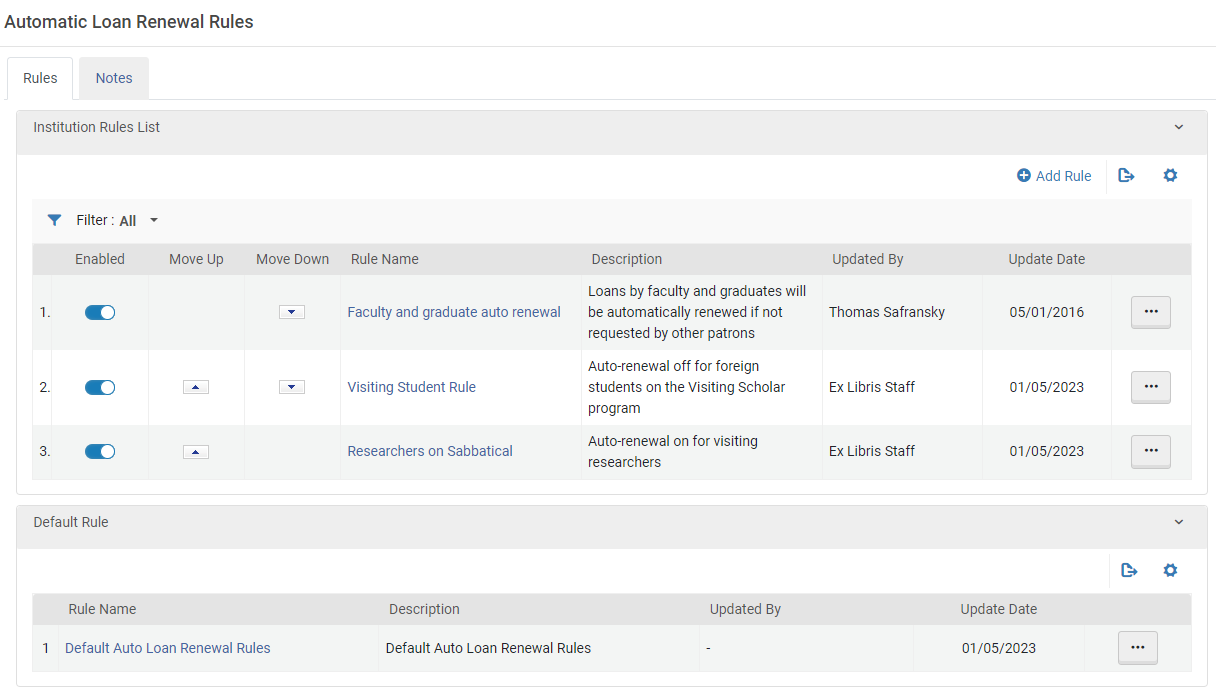
Se pueden efectuar las siguientes acciones en esta página:
- Adding automatic loan-renewal rules (see Adding Automatic Loan-Renewal Rules, below)
- Editing automatic loan-renewal rules (select Edit from the row actions).
- Enabling or disabling loan-renewal rules
- Duplicating automatic loan-renewal rules (select Duplicate from the row actions and modify the relevant fields)
- Deleting automatic loan-renewal rules (select Delete from the row actions).No se puede eliminar o deshabilitar la regla de renovación automática de préstamos por defecto.
Añadir reglas de renovación automática de préstamos
Puede añadir nuevas definiciones de reglas de renovación automática de préstamos en la institución. Estas se aplican a todas las bibliotecas de la institución.
Alternatively, select Duplicate in the row actions list to duplicate an existing rule and then edit it (select Edit from the row actions).
- On the Automatic Loan Renewal Rules page (Configuration Menu > Fulfillment > Physical Fulfillment > Auto Loan Renewal Rules), select Add Rule. The Automatic Loan Renewal Rule Editor page appears.
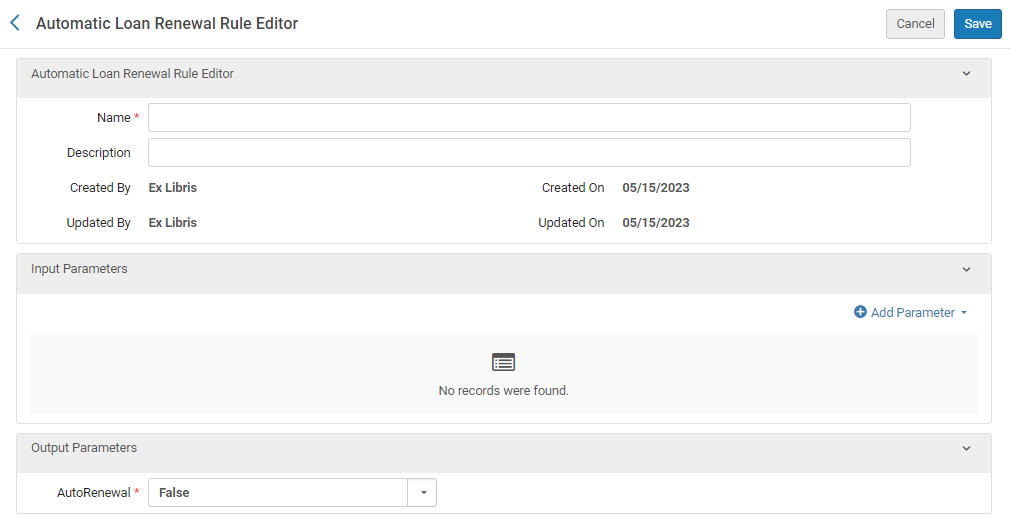
- Introducir un nombre (requerido) y una descripción (opcional) para la regla nueva.
- In the Input Parameters section, select Add Parameter. Se abre un cuadro de configuración de parámetros.
- Under Name, select one of the categories of input parameters for which you want to specify conditions that must be met in order for this rule to apply. Solo puede crear un conjunto de condiciones para cada categoría de parámetro de entrada, pero puede incluir muchos valores para cada parámetro. For example, for the Location parameter, you can select multiple locations in a number of different libraries, or include all locations except for the law library and the art library. Las siguientes categorías de parámetros están disponibles:
- Library – The library that owns the item
- Location – The location of the item within the library, such as the Asian collection or the multimedia center
- User Group – The user group of the patron who has the item on loan
- User Statistical Category – A statistical category that is attached to the user (see Managing Users)
- Under Operator, select the required Operator. (Select InList or NotInList if you want to select multiple values for the parameter.)
- If the Value field appears, select the value or values of the parameter that define the condition that must be met.
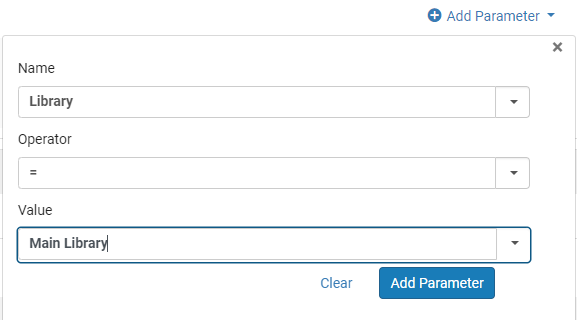
- Select Add Parameter. El parámetro se añade a la lista de parámetros de entrada para la regla.
- To add additional input parameters for the rule, in the Input Parameters section, select Add Parameter, and then repeat the previous steps. When you are finished, a set is created between one and four parameters. For example, a set of input parameters may look like this:Item owner = Art Library; User group = Graduate student. En esta caso, la regla de renovación automática se aplicará solo para los ejemplares de la Biblioteca de Arte para que se presten a estudiantes de posgrado.Se deben cumplir todas las condiciones de los parámetros de entrada para que se aplique la regla. Si no se cumplen, se aplicará la regla por defecto.
- Under Output Parameters, select whether auto renewal should be implemented (True) or not (False).
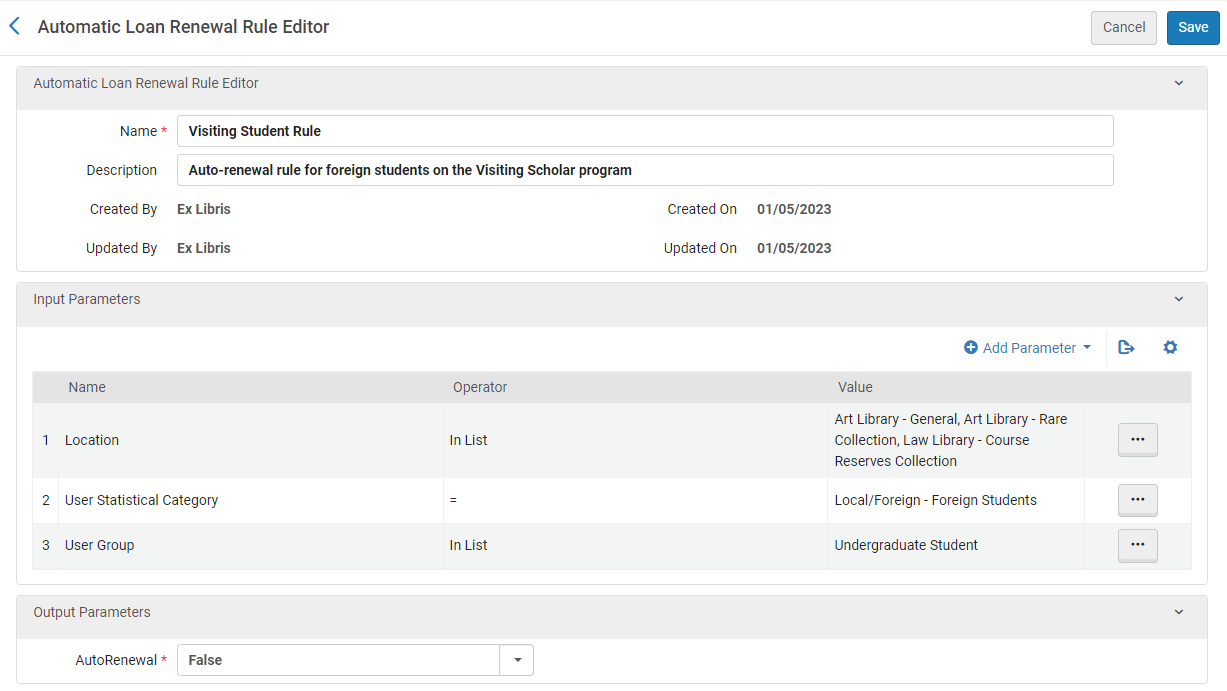
- Select Save.
- If you have defined more than one rule, on the Automatic Loan Renewal Rules page, you can use the Move Up and Move Down arrows to set the order of the rules. El orden de las reglas es importante, puesto que el sistema aplica la primera (y solo la primera) regla válida y habilitada. Si no se encuentra la regla apropiada, el sistema utiliza la regla por defecto.
Configuring Overdue and Lost Loan Profiles
- Administrador general del sistema
- Administrador de servicios al usuario
Esta configuración se aplica a las instituciones.
Los perfiles perdidos y vencidos controlan los préstamos vencidos de largo plazo y los convierte en préstamos perdidos cuando sea relevante. Los perfiles envían recordatorios de manera progresiva al usuario, además de crear cargos y sanciones del usuario. La configuración del perfil permite flexibilidad para que se apliquen las reglas en función del tipo de préstamo y de la cantidad de tiempo que el préstamo está vencido. Se pueden configurar las notificaciones, hasta cinco cartas se pueden crear fácilmente dentro del perfil. Si se ha configurado el perfil para crear una multa, la cantidad para la multa se ajusta por el tipo de perfil y por la política de los Términos de Uso que sean relevantes.
Los perfiles se pueden configurar con uno o más de las opciones siguientes:
- La ejecución se basa en el número de días después del día de vencimiento o de un cambio de estado específico.
- Los préstamos se pueden seleccionar por los estados en particular, materiales o tipos de ubicación.
- Las notificaciones enviadas se determinan por el formato de envío de cartas.
- Se pueden enviar hasta cinco tipos de notificaciones por defecto, pero se pueden crear más si es necesario.
For more information on use cases and configuration options for overdue and lost loans, see Managing Patron Services at a Circulation Desk.
Se puede configurar el criterio de acuerdo con el que Alma:
- Envía un aviso al usuario de que tiene un préstamo vencido
- Marca préstamos vencidos o perdidos
Se configuran estos criterios y sus acciones asociadas utilizando los perfiles. Alma runs a daily job (Loans - Overdue and Lost Item) to process overdue and lost loans, which, according to the list of profiles, determines the loans for which warnings are sent and those that are defined as lost.
The letter sent depends on the setting of the switch_to_overdue_and_lost_loan_new_job customer parameter. When this parameter is set to true, the notification sent is the Ful Overdue and Lost Loan Notification Letter. In this case, a single notification is sent to each patron for all overdue items whose criteria match a particular profile, listing all of the overdue items in that profile. Por ejemplo:
- El perfil de notificación 1 envía un mensaje de notificación por todos los ejemplares que llevan tres días de retraso.
- El perfil de notificación 2 envía un mensaje de notificación para todos los ejemplares que llevan cinco días de retraso.
When the Loans - Overdue and Lost Item job runs, the notification is sent, once after three days and again after five days (once for each matching profile).
If the switch_to_overdue_and_lost_loan_new_job customer parameter is set to false, the notification sent is the Ful Lost Loan Letter, and a separate letter is sent for each overdue item.
The switch_to_overdue_and_lost_loan_new_job customer parameter must be set to true for user blocks to be applied. For more information, see Configuring Other Settings.
For information about configuring these letters, see Configuring Alma Letters.
You configure overdue and lost loan profiles on the Overdue and Lost Loan Profile List page (Configuration Menu > Fulfillment > Physical Fulfillment > Overdue and Lost Loan Profile).
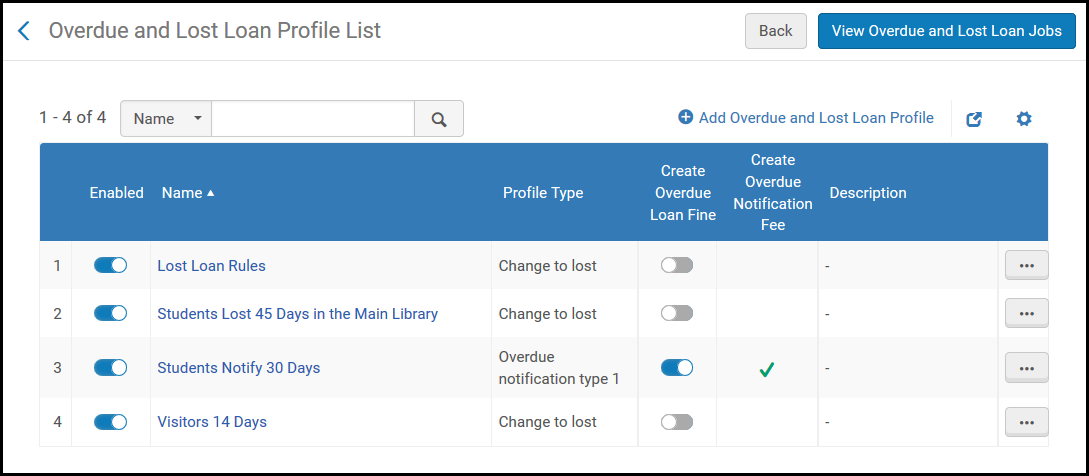
Se pueden efectuar las siguientes acciones en esta página:
- Add an Overdue and Lost Loan Profile (see Adding an Overdue and Lost Loan Profile).
- Add an Overdue and Lost Loan Notification Profile (see Adding an Overdue and Lost Loan Notification).
- Edit a profile (select Edit from the row actions list).
- Duplicate a profile (select Duplicate from the row actions list and modify the relevant fields).
- Delete a profile (select Delete from the row actions list).
- Run a profile (select Run Now from the row actions list) to create the overdue or lost loan notifications on demand.
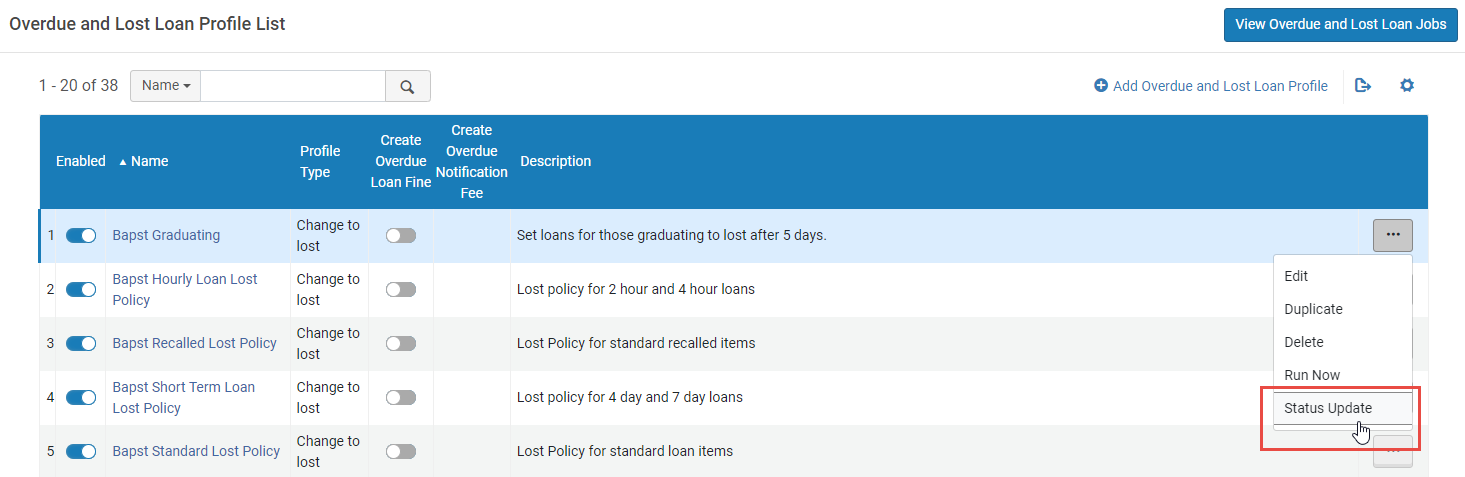
- Run a status update (select Status Update from the row actions list). Este proceso ejecuta el perfil sin enviar una notificación y sin aplicar las cuotas o sanciones. Esto se utiliza durante una migración a Alma o al añadir un nuevo paso de Perfil de préstamos vencidos y perdidos. The status update does not mark any loans as lost. En el caso de una migración donde se enviaron las notificaciones desde otro sistema, los préstamos afectados se marcan para impedir que reciban las mismas notificaciones una segunda vez cuando la tarea se ejecute de nuevo. Por ejemplo, si crea una nueva regla que envía un aviso a los préstamos que llevan tres días de retraso, el nuevo perfil detecta todos los préstamos que ya llevan tres o más días de retraso, incluidos los préstamos que pueden llevar 30 días de retraso. To prevent this and ensure the profile sends notices only for loans that become three days overdue after the profile has been created, use this option when defining the new profile. (See also Loans Overdue Notification Status Update below.)
- Permitir o deshabilitar los perfiles de préstamos vencidos y perdidos.
Adding an Overdue and Lost Loan Notification
Se pueden añadir perfiles de avisos de préstamos vencidos y perdidos a una institución. Estos perfiles determinan los criterios por los que el sistema envía avisos de vencimientos para préstamos. Los avisos no afectan el estado del préstamo; informan al usuario del número de días sobre el que el préstamo se considera perdido. Una notificación individual de un ejemplar vencido o perdido por tipo de notificación puede enviarse al usuario listando todos los préstamos vencidos o perdidos del usuario.
Se pueden configurar 5 tipos de notificaciones y sus correspondientes cartas. Después de configurar los tipos de notificación, se configuran los perfiles que activan estos tipos de notificación.
- On the Terms of Use Management page (Configuration Menu > Fulfillment > Physical Fulfillment > Terms of Use and Policies), filter by Terms of Use Type = Loan.
- Select Edit from the row actions list for the relevant Terms of Use. Aparecerá la página de Detalles de los Términos de Uso.
- Locate the relevant Overdue Notification Fine Type entry on the bottom of the page, and select Add Policy from the row actions list. Se muestra la página de Detalles de la política.
- Enter a Name and Value in the relevant fields, and ensure that Value Type = Other.
- Select Save. Se añadirá la política a la notificación del tipo de multa en la página de Detalles de Términos de Uso.Additionally, the configured Terms of Use appears on the Fulfillment Configuration Utility page (Fulfillment > Advanced Tools > Fulfillment Configuration Utility) when you enter a Patron Identifier and Item Barcode.The amount configured for Overdue Notification Fine Type 1 is charged if a profile configured with Overdue Notification Fine Type 1 is triggered. Lo mismo se aplica para otros tipos de multas.For details on configuring the Overdue and Lost Loan Notification Letter that is sent to patrons, see Configuring Letter Labels. Modify the fields additional_info_*_type1,inform_you_item_below_type1, and charged_with_fines_fees_type1 to change overdue notification type 1, and so forth.
Adding an Overdue and Lost Loan Profile
Se puede añadir un perfil de préstamo vencido y perdido para una institución. Este perfil determina el criterio por el que los préstamos se consideran perdidos. For these loans, Alma changes the status to Lost, creates the relevant fines and fees, and sends an invoice (for the replacement fee) to the borrowing patron.
- On the Overdue and Lost Loan Profile List page (Configuration Menu > Fulfillment > Physical Fulfillment > Overdue and Lost Loan Profile), select Add Overdue and Lost Loan Profile. Aparecerá la página del Registro de Perfil de Préstamo vencido y perdido.If you want to create a copy of an existing overdue and lost loan profile, select Duplicate from the row actions list. Una vez se haya copiado el perfil, se puede modificar según las necesidades.
Página del Registro de Perfil de Préstamo vencido y perdido - Introducir el nombre del perfil y una descripción del perfil (si se desea), y especificar el criterio por el que un préstamo vencido se considera un préstamo perdido. Tenga en cuenta que, si no selecciona estados, grupos de usuarios, bibliotecas, ubicaciones, políticas de ejemplares o tipos de material específicos, el perfil se aplicará a todos los anteriores.
- For the Loan Status field, the Loan status should not be used. The Normal status applies to a regular loan. For more information on loan statuses, see Viewing Loan History.
- The profile is activated for loans that meet all the conditions specified in the profile (that is, a Boolean AND operator operates between fields).
- Si el perfil se establece para que marque el préstamo como perdido, el préstamo se considera un préstamo perdido. If the profile is set to mark the loan as overdue, then a notice is sent and blocks/fines are created, as per the profile configuration.
- The Library field refers to the item's current location. Si el ejemplar está en una ubicación temporal, esta es la ubicación temporal. Si el ejemplar no está en una ubicación temporal, esta es la ubicación permanente.
- If a due date is changed on an already overdue loan, an overdue fine is created before the due date is updated (similar to the renewal process) to make sure that a potential overdue fine is not automatically dropped. This behavior is determined by the overdue_at_change_due_date parameter. See Configuring Other Settings.
- Por defecto, el perfil de préstamos Vencido y Perdido filtra los préstamos según el Grupo de usuarios en el momento del préstamo. Si prefiere que la tarea utilice el grupo de usuarios actual del usuario, comuníquese con el servicio de asistencia de Ex Libris.
- To enable the profile, select the Active checkbox. La tarea de préstamos perdidos procesa solo perfiles activos. Se puede activar/desactivar el perfil en cualquier momento en la página de la Lista de Perfiles de Préstamo vencido y perdido.If an Overdue and Lost Loan profile is not enabled, you can still run it by selecting Run Now from the row actions list.
- For setting the criteria for a Lost profile, in the Profile Type field, select Change to Lost. The Send Notification,Create Fine and Create Block fields disappear (they are not relevant for this selection). For setting the criteria for notification profiles, in the Profile Type field, select an Overdue Notification type (1 through 5).
- For an overdue notification, select Send Notification to send the patron a notification letter matching the selected Profile type.
- For an overdue notification on an item that is overdue and not returned, select Create Overdue Loan Fine to apply an overdue fine for the item when the job runs. For the notification to be generated, the fine must also be created in the Terms of Use, under the relevant Overdue Notification type (1 through 5) policy.
Se trata de una multa diferente a la política de multas vencidas que se aplica al devolver el ejemplar prestado.
- For both overdue and lost notifications, select Create Overdue Notification Fee to enable a notification fee. This field is only visible and applicable when using the aggregated notification method (i.e. the switch_to_overdue_and_lost_loan_new_job parameter in the customer parameters mapping table is set to true). Al seleccionar la casilla de verificación, su institución podrá cobrar una cuota por cada carta de advertencia, en lugar de por cada préstamo.
- For both overdue and lost notifications, enter Overdue Notification Fee Amount to set the notification fee. This field appears only when the Create Overdue Notification Fee checkbox is selected. Cuando aparezca, es un campo obligatorio.
- For an overdue notification, select Create Block to impose a user block while the loan is overdue. When Create Block is selected, a Block Type appears. The values in this drop down are defined in the User Block Description page (see Configuring User Blocks Due to Overdue Loans). La sanción se elimina cuando se devuelve el ejemplar o se marca como perdido, o se borra el préstamo. Tenge en cuenta que no puede crear una sanción en un préstamo con el estado Perdido.
- In the Days After Due Date field, enter the number of days after the due date upon which the warning notification message is to be sent. Select either Days or Open Days to determine if the number of days is calculated by calendar days or by the days that the library is open.For example, if an item's due date is March 1,Days After Due Date= 14, and Days is selected, the item is considered lost on March 15. Keep in mind that 1 day = 24 hours, so that if an item's due date is March 1, Days After Due Date = 0, and Days is selected, the item is considered lost on March 2.
- In the Days After Status Date field, indicate the number of days after an update to the value of the Loan Status field that the item is considered lost. The Loan Status field refers to values such as Normal,Renewed,Automatic Renewal, and Overdue Notification. El número de días se calcula por los días del calendario.For example, if Loan Status is defined as Claim Returned and Days After Status Date is 5, then Alma checks that the current loan status is Claim Returned and that the last change of the item loan was to Claim Returned and more than five days have passed since the last item loan change. Therefore, if an item's loan status is updated on April 1 and Days After Status Date = 5, the item is considered lost on April 6. (Nótese que un valor de 0 es el mismo que si se dejara el campo en blanco).The value of this field also applies to migrated loans, according to the loan's creation date.
- When you are done, select Save. El perfil aparecerá en la página del Perfil de Préstamo vencido y perdido.
All active Overdue and Lost Loan profiles are processed by the Overdue and Lost Item job. See Viewing All Scheduled Jobs. If the overdue profile contains an Overdue Notification Fee, the fee is recorded for each user with the profile type and names of all profiles that were aggregated. If profiles of the same overdue profile type have different Notification Fee Amounts, they are not aggregated. Están separados en dos cartas. Each one of those letters creates an Overdue Notification Fine.
Al añadir un nuevo perfil o modificar el nombre de un perfil, se muestra un mensaje para solicitar al usuario que ejecute la actualización de estado. It is recommended to run Status Update for the updated profile.
Loans Overdue Notification Status Update
The Loans Overdue Notification Status Update page (Fulfillment > Advanced Tools > Loans Overdue Notification Status Update) allows the user to run the Overdue and Lost Loan job without creating blocks or fines and fees, without changing the loan to lost, and without generating notifications. The affected loans are marked to prevent the overdue and lost loan profiles from being handled again - meaning a loan fitting the criteria of lost and/or overdue notification profiles at the time of the status update do not become lost by them or trigger their notifications when the Overdue and Lost Loan job runs again. Al ejecutar esta tarea, los registros de préstamos se marcan de forma irreversible para que los perfiles coincidentes no los vuelvan a gestionar.
The Loans Overdue Notification Status Update page is only available in Alma if the 'switch_to_overdue_and_lost_loan_new_job' parameter is set to true.
Al ejecutar la tarea, aparece una advertencia indicando que los registros de préstamos se han modificado. Select Confirm to run the job.

If you want to run a status update only for a specific profile (e.g. notification profiles, but not profiles that set loans to lost), it is possible to apply the status update per profile from the Overdue and Lost Loan Profile List page (Configuration Menu > Fulfillment > Physical Fulfillment > Overdue and Lost Loan Profile) instead of using the job, which runs all profiles. To do so, in the row actions of the profile, select Status Update. (See also the list of profile actions above.)
The status update job is designed mostly for post-migration handling, so when it runs it runs for all days, even if it's configured to run for open days only. The reason is that Alma doesn't have the calendar of the past for the newly migrated account.
Consideraciones XSL de Carta de notificación de préstamo vencido y perdido
Existen hasta cinco tipos de notificaciones que se pueden usar con la Carta completa de notificación préstamo perdido y de vencimiento. Debido a que el formato de carta sencilla contiene las cinco posibilidades, puede que tenga que personalizar su carta con XSL. Por ejemplo,
- inform_you_item_below_type1 pertenece al tipo 1 de notificación Vencida
- inform_you_item_below_type2 pertenece al tipo 2 de notificación Vencida
- inform_you_item_below_type3 pertenece al tipo 3 de notificación Vencida
- inform_you_item_below_type4 pertenece al tipo 4 de notificación Vencida
- inform_you_item_below_type5 pertenece al tipo 5 de notificación Vencida
Para implementar estos tipos correctamente en la carta, sustituir la siguiente sección en la carta:
Con:
De manera similar para la additional_info_<1-5>, sustituir:
@@additional_info_1@@
<br />
@@additional_info_2@@con:
<table>
<xsl:choose>
<xsl:when test="notification_data/notification_type = 'OverdueNotificationType1' ">
<tr>
<td>
<font size="5">@@additional_info_1_type1@@</font><p><font size="2">@@additional_info_2_type1@@</font></p>
</td>
</tr>
</xsl:when>
<xsl:when test="notification_data/notification_type = 'OverdueNotificationType2' ">
<tr>
<td>
<font size="5">@@additional_info_1_type2@@</font><p><font size="2">@@additional_info_2_type2@@</font></p>
</td>
</tr>
</xsl:when>
<xsl:when test="notification_data/notification_type = 'OverdueNotificationType3' ">
<tr>
<td>
<font size="5">@@additional_info_1_type3@@</font><p><font size="2">@@additional_info_2_type3@@</font></p>
</td>
</tr>
</xsl:when>
<xsl:when test="notification_data/notification_type = 'OverdueNotificationType4' ">
<tr>
<td>
<font size="5">@@additional_info_1_type4@@</font><p><font size="2">@@additional_info_2_type4@@</font></p>
</td>
</tr>
</xsl:when>
<xsl:when test="notification_data/notification_type = 'OverdueNotificationType5' ">
<tr>
<td>
<font size="5">@@additional_info_1_type5@@</font><p><font size="2">@@additional_info_2_type5@@</font></p>
</td>
</tr>
</xsl:when>
</xsl:choose>
</table>
Configuring Short Loan Reminders and Blocks
Los préstamos a corto plazo son cualquier préstamo con una política de fecha de vencimiento definida en minutos u horas. Los préstamos a corto plazo actúan como préstamos regulares, con algunas diferencias, como se describe a continuación.
Recordatorios de préstamos a corto plazo
Hay 2 recordatorios específicos para préstamos cortos, es decir, un recordatorio de cortesía y un recordatorio de vencimiento. El comportamiento de estos recordatorios está controlado por la configuración de los siguientes parámetros:
- short_loan_courtesy_reminder- If this parameter is set, a courtesy reminder is triggered. La hora de envío de este recordatorio se basa en la hora de la fecha de vencimiento menos el valor del parámetro. It uses the existing FulUserLoansCourtesyLetter letter (see Courtesy Letter).
- short_loan_overdue_reminder- If this parameter is set, an overdue reminder is triggered. La hora de envío de este recordatorio se basa en la hora de la fecha de vencimiento más el valor del parámetro It uses the Ful Overdue And Lost Loan Notification Letter.
For both notifications, the letter is sent if the item was not returned and is not in Lost or Claim Return status. La fecha de vencimiento del préstamo puede cambiar debido a una renovación, reclamación o cambio manual de la fecha de vencimiento. Si hubo un cambio en la fecha de vencimiento, la nueva fecha de vencimiento activa la notificación. El recordatorio se envía una vez (después de crearse el préstamo). You can configure the courtesy letter with the short_loans_message label (see Configuring Alma Letters).

The letter templates include indicators for short term loans as shown in the example below (see Configuring Letter Templates).
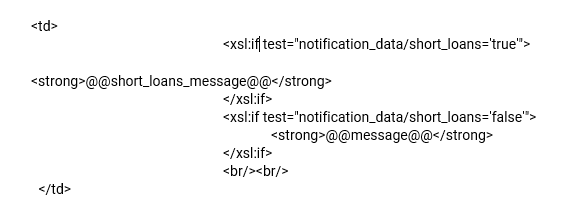
See also the Short Loan Letter that is sent to a patron when loaning an item for a short period.
Política de sanción de préstamos a corto plazo
When an overdue letter is issued, if the short_loan_overdue_block parameter is set to true, and a blocking policy is configured, an overdue block is set for the patron. For information on creating a blocking policy, see Configuring a Blocking Policy.
Préstamos a corto plazo perdidos
Short term loans are changed to Lost after running the relevant Overdue and Lost Loan profile (Configuration > Fulfillment > Physical Fulfillment > Overdue and Lost Loan Profile), in the same way as for a regular loan.
Configuring Loan Recall Requests
- Administrador general del sistema
- Administrador de servicios al usuario
Se puede configurar Alma para enviar o no una solicitud de devolución de préstamo durante las acciones del sistema. Por defecto, las solicitudes de devoluciones están habilitadas para todas las acciones. For an overview of recall requests in Alma, see Recall Requests.
You configure loan recall requests on the Request Configuration mapping table for loan recalls (Configuration Menu > Fulfillment > Physical Fulfillment > Loan Recalls Configuration). For more information about mapping tables, see Mapping Tables.
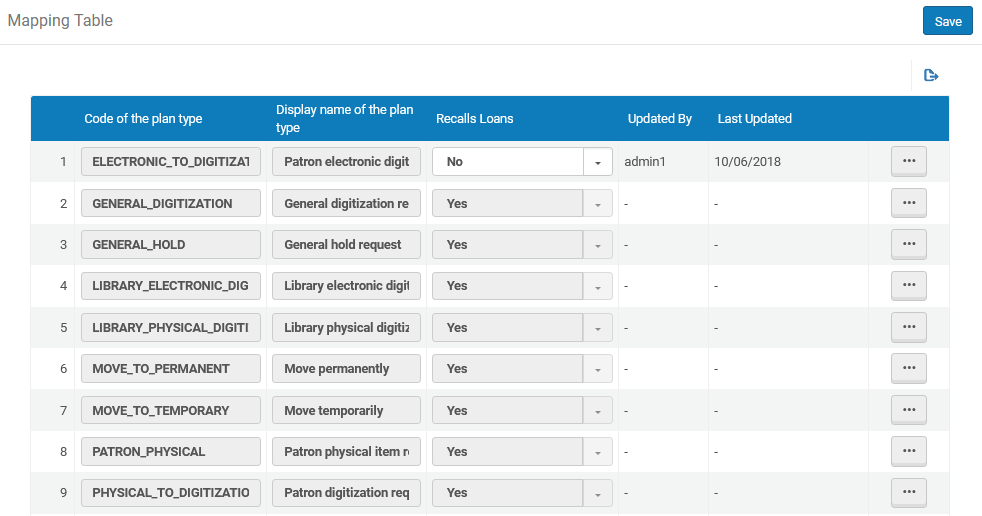
Las definiciones de los diferentes tipos son las siguientes:
|
Code |
Type |
Meaning |
|---|---|---|
|
RESERVA ANTICIPADA |
Solicitud de reserva |
Solicitud de reserva anticipada del usuario |
|
ELECTRÓNICO_A_DIGITALIZACIÓN |
Solicitud de digitalización electrónica del usuario |
Patron digitization request for electronic resource |
|
DIGITALIZACIÓN_GENERAL |
Solicitud de digitalización general |
Patron digitization request for item that is not catalogued |
|
RESERVA_GENERAL |
Solicitud de reserva general |
Patron physical item request for item that is not catalogued |
|
DIGITALIZACIÓN_ELECTRÓNICA_BIBLIOTECA |
Solicitud de digitalización electrónica de la biblioteca |
Digitization request from reading list for electronic resource |
|
DIGITALIZACIÓN_FÍSICA_BIBLIOTECA |
Solicitud de digitalización física de la biblioteca |
Digitization request from reading list for physical resource |
|
MOVER_A_PERMANENTE |
Mover permanentemente |
Request for physical item to be moved to new location |
|
MOVE_TO_TEMPORARY |
Mover temporalmente |
Request for physical item to be temporarily moved to new location |
|
FÍSICO_USUARIO |
Solicitud de ejemplar físico para el usuario |
Solicitud de ejemplar físico para el usuario. See the Note below for some important points regarding este parámetro. |
|
FÍSICO_A_DIGITALIZACIÓN |
Solicitud de digitalización del usuario |
Patron digitization request for physical resource |
|
ENVÍO_E2D_INTER |
Enviar digitalmente desde electrónico |
Internal digitization request by resource sharing staff for electronic resource |
|
ENVÍO_P2D_INTERCAMBIO_INTERCAMBIO_RECURSOS |
Enviar digitalmente |
Internal digitization request by resource sharing staff for physical resource |
|
ENVÍO_FÍSICO_INTERCAMBIO_RECURSOS |
Enviar físicamente |
Solicitud interna de ejemplar físico del personal de intercambio de recursos |
|
RESTORE |
Restaurar ejemplar |
Restore an item from temporary location |
|
DIGITALIZACIÓN_ELECTRÓNICA_PERSONAL |
Solicitud de digitalización electrónica del personal |
Staff digitization request for electronic resource |
|
DIGITALIZACIÓN_FÍSICA_PERSONAL |
Solicitud de digitalización del personal |
Staff digitization request for physical resource |
|
TRÁNSITO_PARA_REUBICACIÓN |
En tránsito para reubicación |
Ejemplar físico en tránsito para reubicación |
- If the Recalls Loans value is set as No in this table for the PATRON_PHYSICAL type of request and the applicable loan Terms of Use has Is Recallable defined as Yes, the loan is not recalled. Only if Recalls Loans = Yes is the Terms of Use policy applied.
- If PATRON_PHYSICAL = Yes and the Terms of Use fulfillment policy is No Recall, items are nevertheless marked as Recalled, to prevent renewals (although the loan due date is not changed).
- The block preference Not Renewable - Item has Requests is relevant only if PATRON_PHYSICAL = Yes(see Configuring Block Preferences).
- Las solicitudes de reclamaciones se pueden configurar solo a nivel de institución. Select the required institution from the Configuring filter on the Fulfillment Configuration page.
- On the Request Configuration Mapping Table page for loan recalls (Configuration Menu > Fulfillment > Physical Fulfillment > Loan Recalls Configuration), select Customize from the row actions list for the relevant action.Customize is changed to Restore, and the Recalls Loans column is enabled for editing.
- Select No in the Recalls Loans column to disable loan recall requests for the specified action.
- Select Save. Los préstamos solicitados en devolución no se envían durante una acción específica.To re-enable loan recall requests for an action, select Restore.
After configuring a loan recall request for a specified action, ensure that the institution/library's Terms of Use has set the loan policy Is Recallable = True for requested items to be recalled (see Adding Fulfillment Policies).
Configuring Loan Process Status Names
- Administrador general del sistema
- Administrador de servicios al usuario
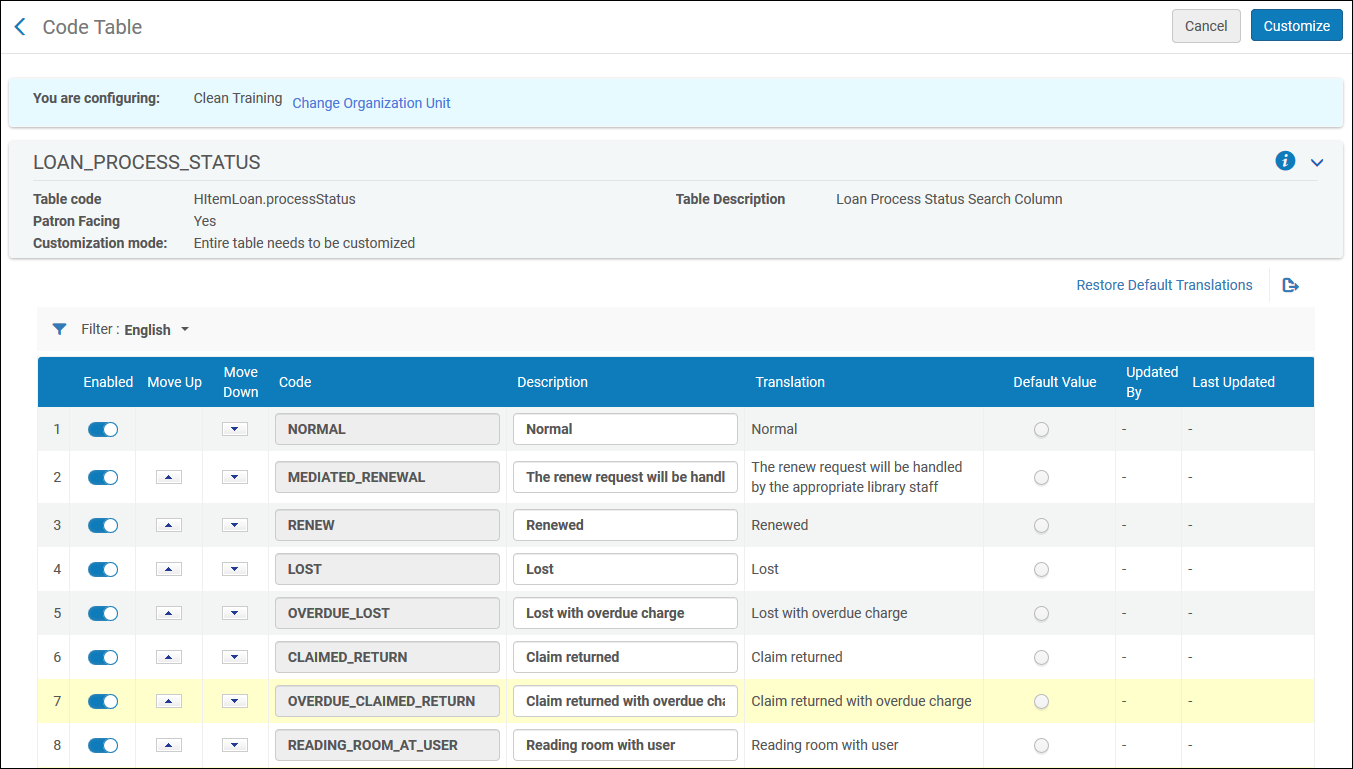
You can configure the loan process statuses that are displayed in Alma. To do this, open the Loan Status Name mapping table (Configuration Menu > Fulfillment > Physical Fulfillment > Loan Status Name). For more information about mapping tables, see Mapping Tables. La descripción se puede editar. Esta es la descripción que se muestra a través de Alma en varios despliegues de préstamos.
Page tags: article:topicFulfillmentproduct:almacontent:Documentationlang:englishFulfillment policiesTerms of UseConfigure FulfillmentItem PoliciesFulfillment UnitBlock preferencesAutomatic loan renewal rulesOverdue and lost loan profileloan recall requestsconfigure request pickup rule
