
Flusso di lavoro Fatturazione
Questa pagina descrive il flusso della Fattura dalla creazione fino al pagamento e alla chiusura. For an overview of working with acquisitions in Alma, including links to relevant sections such as Infrastructure, Renewals, Configuration, etc., see Introduction to Acquisitions. For the end to end purchasing worklfow with links to relevant sections for details see Purchasing Workflow.
The following is an illustration of the invoicing workflow which specifies how an invoice is handled, from the point of its creation to the point at which the invoice is closed. Quando una riga PO è completamente fatturata, la riga PO associata viene chiusa. If, for some reason, you do not require invoices, use a PO line that does not require a price and funds, such as Technical; see Manually Creating a PO Line.
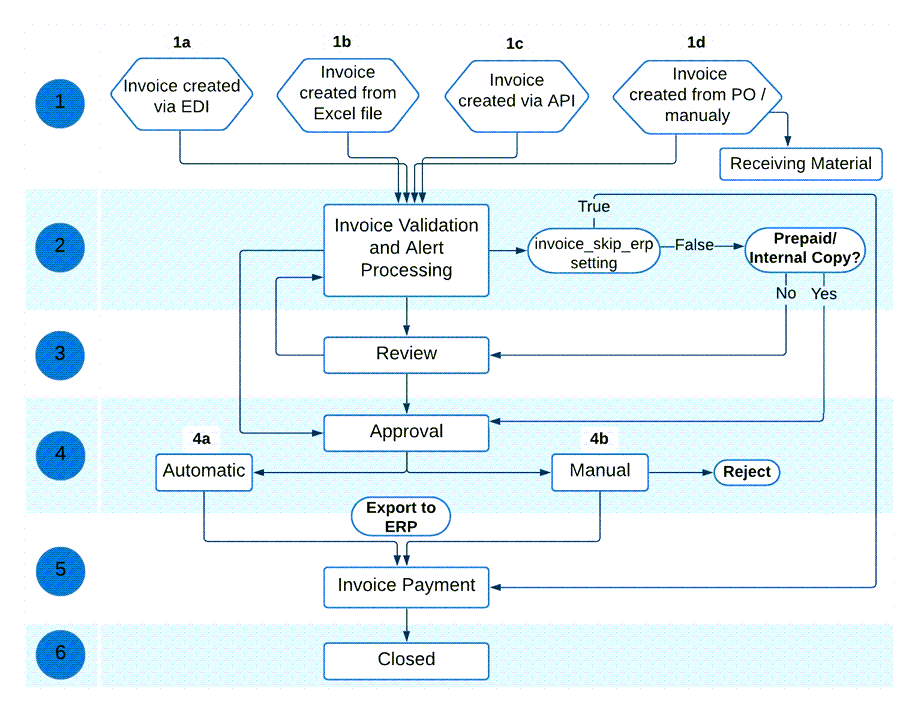
Di seguito è riportata una descrizione dettagliata dei passaggi all'interno di questo flusso di lavoro (con i numeri corrispondenti ai numeri nel diagramma). For the complete list of invoice statuses, see Invoice Statuses.
- Una fattura viene creata in uno dei seguenti modi:
- Importing an EDI message from the vendor (see Creating an Invoice by EDI)
- Importing an Excel file (see Creating an Invoice From a File)
- Creating invoices in batch via the Create Invoice API (see Batch invoicing in Alma in the Ex Libris Developer Network)
- Using a PO or manually (see Creating an Invoice From a PO or Manually). After creating an invoice using a PO or manually, you can choose to move directly to the Receive New Material page (see Receiving Material).
For invoices imported using EDI, if all PO lines in the EDI file that are assigned to this invoice are owned by the same library, then that library will be the owner of the invoice. Se tutte le linee PO assegnate all'istituzione non sono per la stessa biblioteca, la Fattura avrà l'istituzione come proprietaria.It is not possible to bulk add a new or existing invoice to a set of PO lines.After an invoice is created (whether through importing an EDI/Excel file, manually or API), you can change the Owner. - La Fattura viene elaborata per determinare se vi sono elementi che richiedono particolare attenzione in base a regole preconfigurate da un amministratore. Questa elaborazione viene eseguita automaticamente dal sistema.Se ci sono fascicoli di dati che richiedono attenzione, lo stato della Fattura viene impostato su In revisione e la Fattura viene inviata per revisione (fase 3). For information on this manual activity, see Reviewing Invoices. Se non è presente alcun fascicolo dati e le regole preconfigurate stabiliscono che la Fattura può essere elaborata automaticamente, la Fattura passa alla fase 4.
- If invoice_skip_erp = true on the CustomerParameters Mapping Table page (indicating that the invoice is not to be sent to the ERP; see Configuring Other Settings), the invoice proceeds to the payment stage of the workflow (step 5).
- If invoice_skip_erp = false on the CustomerParameters Mapping Table page (see Configuring Other Settings), the invoice is set to Ready to be Paid and proceeds accordingly in the workflow.
- La fase di revisione nel flusso consente al revisore di aggiungere informazioni mancanti alla fattura o di correggere eventuali informazioni errate nella fattura. Quando il revisore seleziona Salva e Continua nella pagina di revisione della Fattura, la Fattura torna al passaggio 2 del flusso, dove viene rielaborata per determinare se ci sono elementi che richiedono un'attenzione particolare. Se i dati del fascicolo sono ancora presenti, la fattura torna in revisione. Se tutti i fascicoli di dati sono stati risolti, lo stato della Fattura viene impostato su In Approvazione e la Fattura procede al passaggio 4. Invoices that have been closed or sent to the ERP can be sent back to the review stage, to enable editing of the invoice (see Setting Invoices Back to Review).
- Per le Fatture con 10 o più righe di ordine d'acquisto, quando si aggiorna la Fattura, le righe di ordine d'acquisto correlate vengono re-indicizzate. This is done by a background job that appears in the Monitor Jobs page. L'Utente che ha effettuato gli aggiornamenti che hanno innescato questa re-Indicizzazione appare come l'operatore.
- È anche possibile modificare determinati campi nelle righe di una Fattura chiusa. For more information see Creating Invoices.
- The invoice is either automatically approved and sent to the next stage of the workflow (Ready to be Paid), or awaits the appropriate library staff person's manual approval before continuing with the workflow.
- Se le regole di approvazione preconfigurate da un amministratore stabiliscono che la fattura può essere approvata automaticamente, la fattura passa alla fase 5.
- Se le regole di approvazione preconfigurate da un amministratore determinano che è necessaria l'approvazione manuale, la fattura viene inviata per l'approvazione manuale. For information on this manual activity, see Approving Invoices. When the person performing the manual approval selects Approve on the Invoice Information page (accessed from the Approve Invoices page), the invoice status is set to Ready to be Paidand the approved invoice is ready to be sent to the payment system or ERP. (Se la persona rifiuta la Fattura, questa viene restituita alla fase di revisione – vedi punto 3).
- The invoice reaches the payment stage, in which the invoice awaits payment processing, either through Alma or through the institution's ERP system. (For information on setting up your external system to receive invoices from Alma and running the job that exports invoices from Alma to this external system, see Financial Systems).
- If the handle_invoice_payment parameter in the Acquisitions Configuration Other Settings menu is set to true, the invoice status is set to Waiting for Payment so that the institution itself can manage the payment of the invoice, either automatically through the import process (see https://developers.exlibrisgroup.com/alma/integrations/finance), or manually by an operator (see Working with Invoices Waiting for Payment).
- Se il parametro handle_invoice_payment nel menu Altre impostazioni della Configurazione acquisizioni è impostato su false, la Fattura viene chiusa (stato Chiuso) senza In attesa del pagamento (indipendentemente dal fatto che venga inviata o meno a un sistema ERP).
When a negative amount is entered for the invoice's amount, a refund is granted to the user (see theTotal Amount field description in Invoice Details Page Fields). - La Fattura viene quindi chiusa (stato Chiuso). Alma checks whether the PO lines associated with the invoice are fully invoiced and paid. Le righe PO associate alla Fattura vengono chiuse se sono ricevute/attivate e la Fattura è stata pagata o inviata al sistema ERP. If the PO line's items are not yet received/activated, the PO line remains open.
Invoice Statuses
Una fattura può avere uno dei seguenti stati:
- In Review- The invoice was created but not yet reviewed.
- In Approval- The invoice is waiting for manual approval.
- Ready to be Paid- The invoice was approved and is ready to be sent to the ERP.
- Waiting for Payment- The invoice was approved and sent to the ERP (or skipped the ERP if the institution does not use one).
- Closed- The invoice is paid and closed.
Page tags: article:topicinvoicinginvoiceproduct:almacontent:Documentationlang:englishinvoice statusinvoice stage
