
EDIベンダー注記フィールドを設定
受入方法を設定するには、次のいずれかの役職が必要です:
- 発注・受入オペレーター
- 統括システム管理者
ORDERSおよびCLAIMS EDIファイルでEDIベンダーに送信されるベンダー注記フィールドの説明を設定できます。
These actions are performed on the EDI Vendor Note Fields mapping table (Configuration Menu > Acquisitions > Purchase Orders > EDI Vendor Note Fields).デフォルトでは、すべての注記フィールドが有効になっています。To disable a note field or change the description, select Customize from the row actions menu.
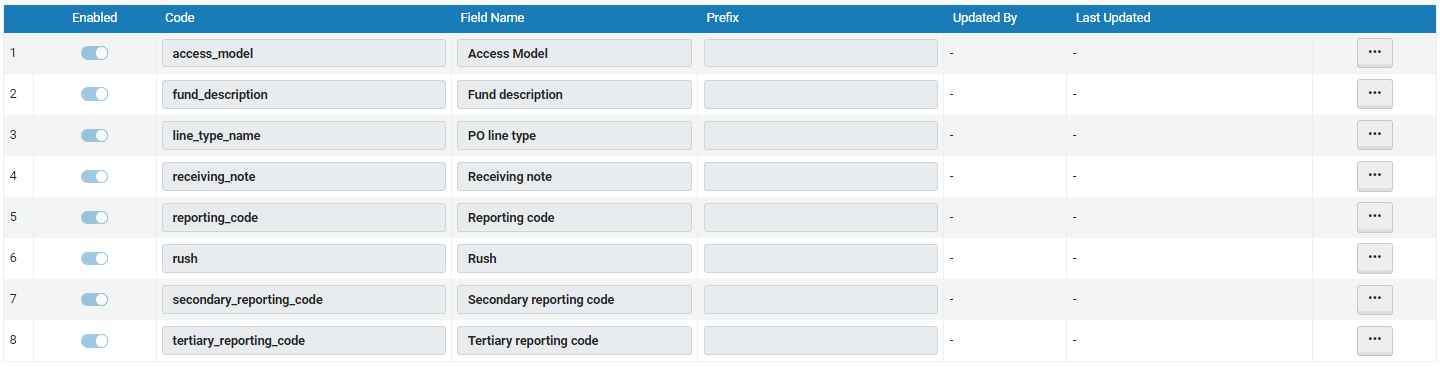
EDIベンダーメモフィールド
以下は、ベンダー注記フィールドとそのデフォルトの説明とプレフィックス情報のリストです。
|
コード |
フィールド名 |
プレフィックス |
|---|---|---|
| access_model | アクセスモデル | アクセスモデルのプレフィックス。 |
| fund_description | 資金詳細 | |
| line_type_name | 注文明細タイプ | 注文明細タイプフィールドのプレフィックス。例えば、注文明細タイプ: |
| receiving_note | 受入注記 | 受入メモフィールドのプレフィックス。例えば、受入メモ: |
| reporting_code | レポートコード | レポーティングコードフィールドのプレフィックス。例えば、レポーティングコード: |
| 急ぎ | 急ぎ | |
| secondary_reporting_code | 第2レポーティングコード | |
| territical_reporting_code | 第3レポーティングコード |
[ベンダー]ページの[EDI情報]タブでフィールドを選択できます。SeeConfiguring EDI for a Vendor.
Page tags: article:topicproduct:almacontent:Documentationlang:englishEDI Vendor FieldsEDI Vendor Note fields
