
アクセスモデルの管理
- 発注・受入オペレーター
- 統括システム管理者
アクセスモデルは、同時に使用可能なリソースの利用可否を表します。The internal access model is the information presented within the PO line's Access Model field.公開アクセスモデルは、ディスカバリーシステムでユーザーに提示されるユーザー向けアクセスモデルです。この情報は、ポートフォリオの[受入]タブに表示されます。機関は、ディスカバリーシステムで公開アクセスモデルを提示するかどうかを決定できます。For more information, see Managing Electronic Resources.The out-of-the-box information is populated with values that are sent by OASIS and GOBI when creating orders via the Real-Time Ordering workflow.The Public Access Model field on the Acquisition tab of the portfolio editor inherits this information from the PO line that created the portfolio.You can edit this field to change the access model of the portfolio.See Editing a Portfolio Using the Electronic Portfolio Editor.
アクセスモデルのコードはベンダーから提供される必要があります。
Since the vendors have different codes for the same internal access model, for instance, Unlimited Access (BU) and Unlimited Access (EA), some access models might have a different code but are otherwise identical, with the same meaning.Thus also PUR-XX and XX are identical; for example, PUR-1U is identical to 1U, and both have the internal access value of 'One concurrent user'.
The Manage Access Model page (Configuration Menu > Acquisitions > Licenses > Access Model) enables you to add, edit, or delete access models, and to configure the description that will be displayed in the Public Access Model field of the portfolio.See also Enable Display of Access Model.
アクセス モデルを編集する場合、変更が正しく保存されるように、テーブルは同じ言語で表示される必要があります。
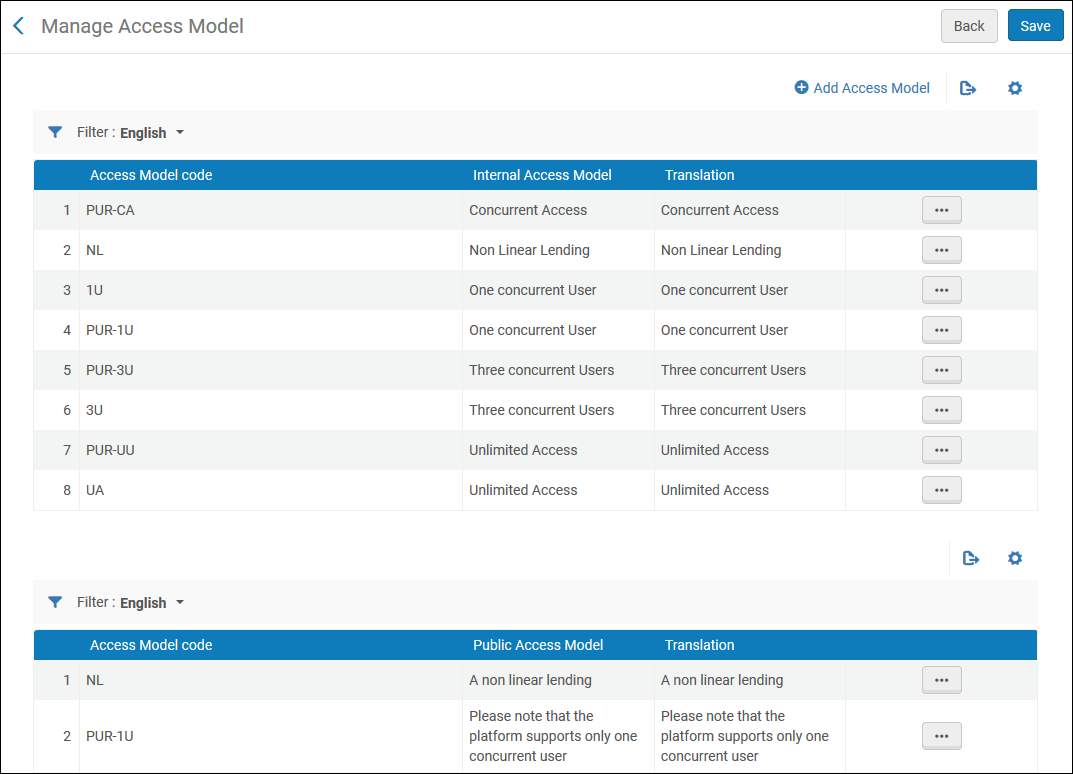
新しいアクセスモデルを追加するには:
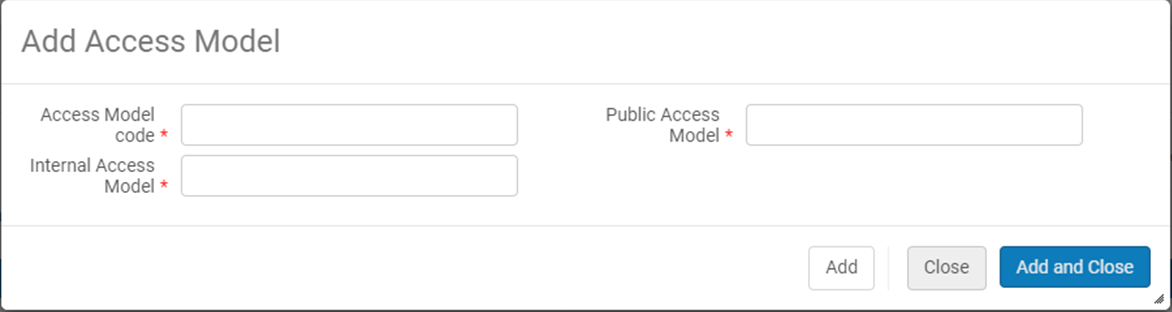
- Select +Add Access Model action.
- A pop-up window opens to enable the user to add an access model code as well as the description of the Internal Access Model(which appears on the PO Line) and the description of Public Access Model (which appears within the portfolio's Acquisitions tab) – when selecting Add and Close, the Internal Access Model and the Public Access Model will be added to the relevant tables in the screen.
アクセスモデルコードの1つを削除することを選択すると、コードと説明は内部アクセスモデルと公開アクセスモデルの両方から削除されます。
機関は、公開アクセスモデルをディスカバリーシステムのユーザーに、ユーザー向けの情報として提示するかどうかを決定できます。
For more information on access models, see Real-Time Ordering.
Page tags: article:topicproduct:almacontent:Documentationlang:englishlicense storage locationadd license storage locationedit license storage location
