
受入ジョブの設定
受入ジョブを設定するには、次の役職が必要です:
- 受入管理者
- 統括システム管理者
次の受入関連ジョブは受入ジョブ設定ページ(設定メニュー > 受入 > 全般 > 受入ジョブの設定)で設定できます:
- PO Line - Packaging job - Packages PO lines that are waiting for automatic packaging into purchase order (POs) that may be sent to the vendor.For details on PO line packaging, see Packaging PO Lines into a PO.ジョブの設定に関する詳細については、以下を参照してください。
- SUSHI Harvesting job - Harvests all COUNTER data from all active SUSHI accounts.For information on this job, and how to configure it on this page, see Managing SUSHI Harvesting.
For more information, watch the Acquisitions Jobs video.(4分44秒)
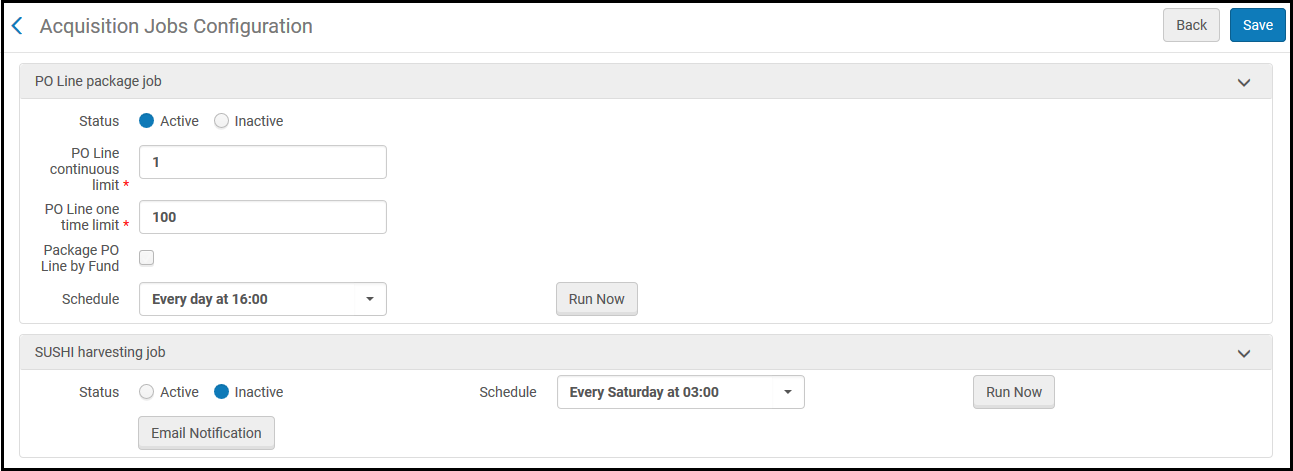
受入ジョブ設定ページ
注文明細パッケージジョブのパラメータを設定するには:
このジョブは自動注文明細パッケージにのみ関連していて、注文明細を自動的に注文書にパッケージするには、有効にする必要があります。
- 受入ジョブ設定ページを開きます。
- ステータスについては、アクティブを選択してジョブを有効にするか、非アクティブを選択してジョブを無効にします。
- 注文明細パッケージジョブスケジュールについては、ジョブを実行する時間を選択します。For more information on jobs and scheduling, see Overview of Jobs.
- すぐにジョブを実行するには、今すぐ実行を選択します。
- 注文明細連続制限フィールドに、注文書に一緒にパッケージできる連続注文明細の最大数を入力します。許容値は1~200です。
- 注文明細1回限り制限フィールドには、注文書に一緒にパッケージできる1回限りの注文明細の最大数を入力します。許容値は1~200です。
- 注文書の予算に基づいて注文明細をパッケージするには、予算により注文明細をパッケージするを選択します。
- 完了したら、保存を選択します。
Page tags: article:topicproduct:almacontent:Documentationlang:englishPO line packaging jobautomatic PO packaging
