
Advanced Search Options
The Advanced Search form contains a series of search options to assist you in building an advanced search query. These options are arranged in the following sections:
Search Terms
Search terms and options entered in this section apply to all search results (from your local catalog and EBSCO EDS search results in Encore with EDS).
The search terms section appears at the top of the Advanced Search form. This section contains input boxes for your search terms, as well as a box which displays your query as you enter search terms and options. For example:
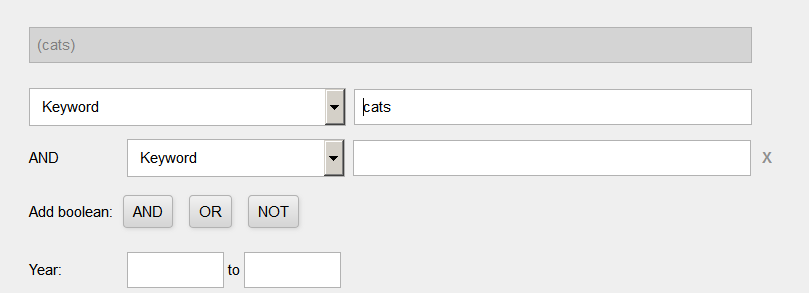
Search terms can apply to the entire index (Keyword) or to a specified slice (segment) such as Title, Subject, or Author.
You can enter multiple terms in one Keyword text box and Encore will group them. Grouped terms have the Boolean relationship AND.
The default form includes two keyword text boxes. It is not necessary to use or remove the second box. As you build your query, you can click the 'X' to the right of a search term text box to remove the corresponding term(s).
AND - Records must contain all AND terms to appear in the result set.
OR - Records must contain at least one of the OR terms to appear in the result set.
NOT - Records that include the NOT term do not appear in the result set.
In the form, OR and NOT entries are grouped by index slice, for example, a:(smith -jones). The form groups the terms by index slice regardless of the sequence in which you add an OR or NOT term.
Encore treats uppercase AND, OR, and NOT as operators. It treats lowercase "and", "or", and "not" as search terms.
Library Catalog Search Limits
When you set search limits in this section, Encore applies these search limits to results from your local catalog only; they are not applied to EBSCO EDS search results in Encore with EDS.
The Library Catalog section of the Advanced Search form allows you to limit searches by:
- Format
- Collection
- Location
- Language
- Year (appears in this section if your library does not have the Encore with EDS product)
For example:
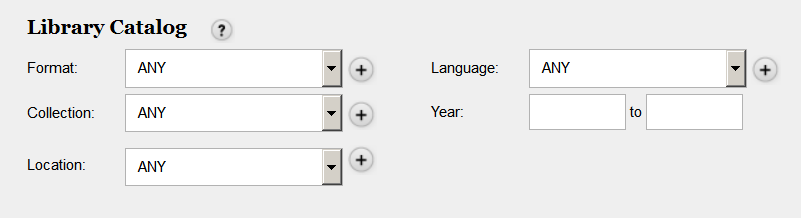
You can enter multiple values for the same limit type by clicking the '+' button next to each box. When you do so, Encore displays an additional selection box. Limits of the same type are treated as OR terms. For example, if you enter two format limits (such as one for "books" and one for "maps"), the query searches for "books" OR "maps", producing a result set that includes both books and maps.
Limits of different types are treated as AND terms. For example, if you enter a format limit of "books" and a location limit of "Music Library", the query searches for both "books" and "Music Library", producing a result set of book format items found in the Music Library location.
EBSCO EDS Limits and Expanders
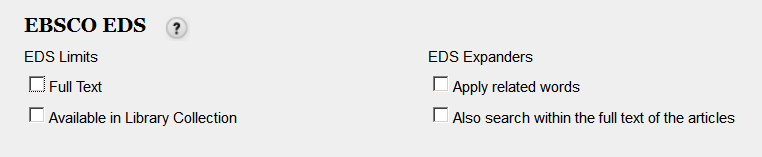
The limits and expanders in this section apply to EBSCO EDS search results only; they are not applied to search results from your local catalog or other collections.
The EBSCO EDS section of the Advanced Search form includes search limits and expanders. For example:
Limiting EBSCO Results in the EBSCO Admin App
Note that your EBSCOadmin EDS Limiter settings could impact the ability of Encore to display EDS results. Verify that your EDS Limits and Expanders are configured correctly in your EBSCO Admin App.
EDS Limits
| Limit | Description | EBSCO Setting |
| Full Text | Limits EDS results to those containing full text. |
|
| Peer Reviewed | Limits to peer reviewed EDS results |
|
| Available in Library Collection |
Limits results to available items in your EDS subscription,including:
The Available in Library Collection limiter:
|
|
EDS Limiter Resources
EBSCO offers the following additional information:
- For more information on the EDS Available in Library Collection, review the EBSCO Support knowledge base.
- For more information on the Full Text and Available in Library Collection limiters and how they interact when used at the same time, refer to the following EBSCO FAQs:
EDS Expanders
| Expander | Description | EBSCO Setting |
|---|---|---|
| Apply related words | Expands the search to words related to the search string. | This option is always offered for EDS Expanders on the Encore advanced search page. |
| Also search within the full text of the articles | Expands the search to full text within EDS articles. | If this option is configured in EBSCOadmin, the check box for this expander is pre-checked. |
