
Viewing Record Details
The record detail page displays information for an individual bibliographic record. The page provides information from attached records regarding copies, volumes, orders, and serials (current receipts and holdings), as well as links to electronic resources, such as scanned images, when appropriate. Encore displays the record detail page when you select a record from the results list.
Encore can highlight search terms on the record detail page to help show why a particular record appears in the search results. Library staff can enable search term highlighting by selecting a highlight color in the color customization area of the Administration Application.
Depending on your library's configuration, the record detail page can include the following:
Brief Bibliographic Information
This includes information, buttons, and icons similar to the browse results brief view.
Items
This is a list of items held by the library. To remove items that can't be requested, select only show available.
Browsing by Call Number
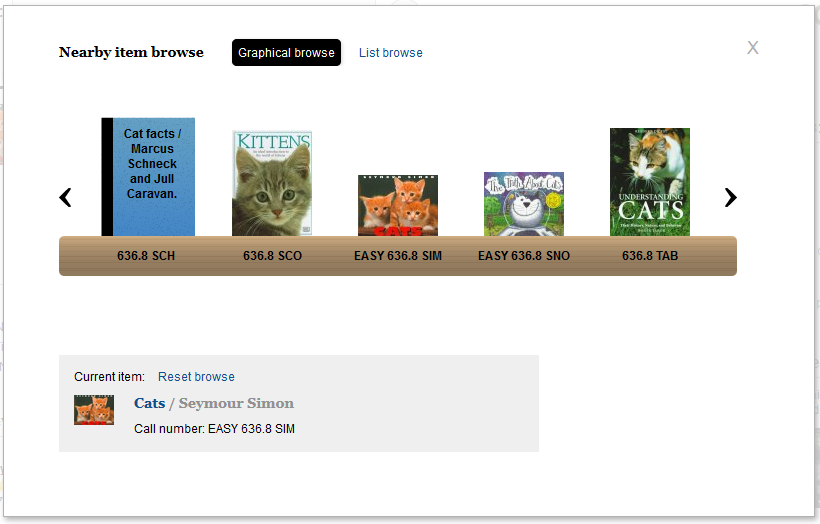
To browse nearby items by call number, select an item call number in the Call No. column. This opens a pop-up window for browsing graphically or in list form.
Copies on Order
This includes information about copies on order within the system.
Extras
These are links to enriched content, such as summaries, first chapters, or professional reviews, if your library subscribes to that material. Select a link to view the material in an overlay on the current page. After viewing the enriched content, select an area outside of the overlay to return to the results list without losing your place in the search.
Community Tags
These are item tags created by patrons.
More Details
More details about the selected record can include:
- Physical description
- Contents
- Notes
- Summary
- Subject headings (keyword links to initiate a new search)
- Alternate author (links to initiate a new search using the author's name)
- Series (links to initiate a new keyword search using the series name)
- ISBN
Google Preview
Launch a Google Books preview directly within Encore.
Ratings and Reviews
These are ratings and reviews by patrons.
You Might Also Like
This includes information about similar or related items from NoveList. This feature requires a subscription to NoveList Select.
Right Sidebar
The right sidebar contains tools to help you change or expand your search, including:
Browse Results
This provides a link to the next record in the search results list.
Other Sources
This provides links for passing your search to other search engines, so you can try to find additional resources. There's also a View MARC display link for viewing the MARC display of the record.
Suggestions
Encore suggests resources matching your search that might merit extra attention. Depending on your library's configuration, Encore suggests items that were Recently Added to the library collection or items that are frequently used by patrons (Popular Choices). Select the image or label to view detailed information about the suggested resource.
Talis Reading Lists
This provides links to the readings lists at your institution that include the resource, such as the reading lists for courses. This feature requires integration of Encore with Talis Aspire.
Custom Elements
Your library can add custom elements using Custom JavaScript.
