
Patron Alert Note
Patron Alert Notes are special patron alerts that display automatically when a patron record is opened. They help ensure that important notes and special considerations such as communication needs or difficulties are not missed by staff.
Requirements
In the Staff Client module, Web app: Display patron alert setting must be Enabled for the staff to see and edit the Patron Alert section in the Patron Registration workform.
Adding or Editing a Patron Alert Note
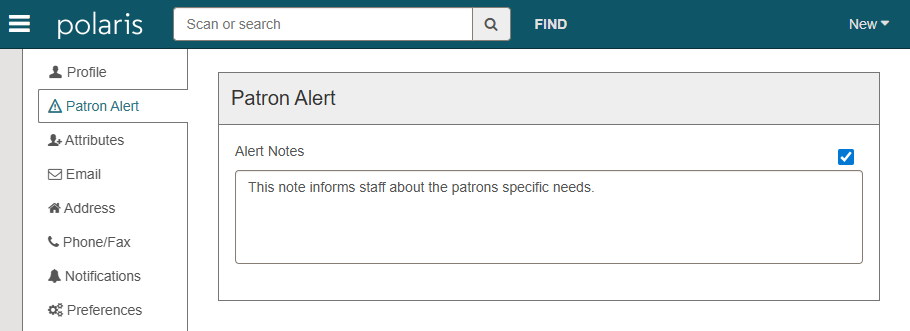
When registering a new patron or editing an existing patron record, the Patron Alert section includes:
-
A checkbox to enable the patron alert
-
A text field for entering the alert message
The alert text can be edited only when the alert is enabled.
Viewing Patron Alert Notes
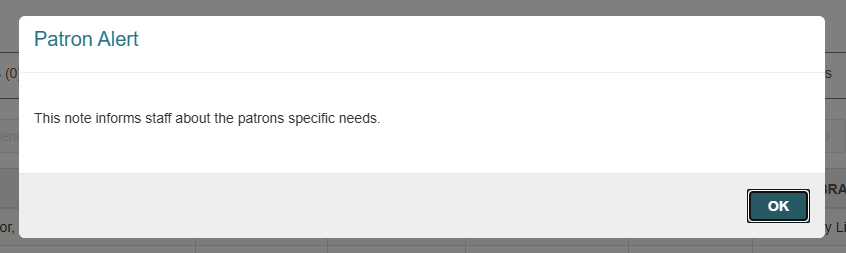
When a patron record with an alert note is opened for the first time, Leap displays an unavoidable alert dialog showing the alert text. The alert must be acknowledged before continuing.
After the alert is dismissed, a visual indicator icon appears next to the patron’s name to remind staff that a patron alert is present.
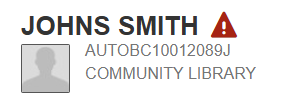
Clicking the icon will show the usual patron information, with the alert note text included.
-
Alerts do not display when switching between already open patron records.
-
Existing patron alerts that appear during checkout are unchanged.
