
SelfCheck Settings Reference
You can use self-check settings to do the following:
-
Specify the printer messages and screen messages that Polaris sends to the self-check vendor via SIP
-
Manage circulation transactions performed using self-check stations
This topic provides information on the following types of self-check settings:
Printer Message and Screen Message Settings
Note:
Printer message and screen message settings apply only to SIP self-check stations. They don't apply to ExpressCheck.
Printer message settings and screen message settings let you specify the contents of the SIP messages that are passed from Polaris to the self-check vendor during self-check transactions. The self-check vendor uses this information to determine the messages that appear on printed receipts or on screen at the self-check station.
You can configure over 200 different self-check printer messages and screen messages. Each message setting specifies the SIP message text that applies to a particular scenario during a self-check transaction.
For example, the Checkout printer message: Patron has blocks setting specifies the SIP message text that Polaris passes to the self-check vendor when the system encounters a patron with blocks during a checkout transaction.
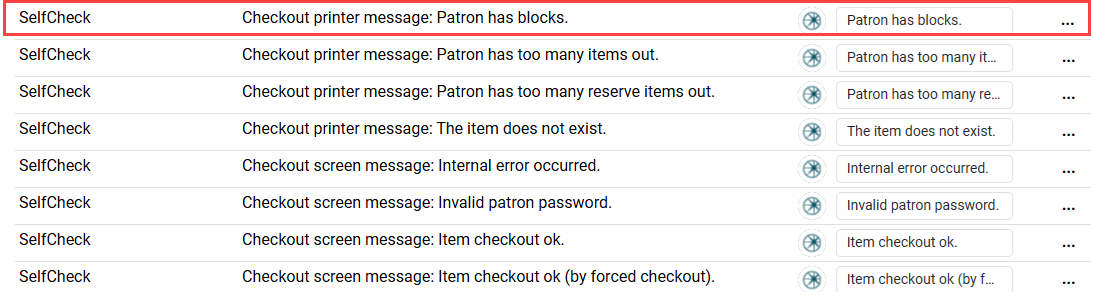
Each message setting can be configured at the system, library, or branch level.
For each message setting, you can do any of the following:
-
Edit the default message text — Type new message text in the text box.
-
Set the message to its default value — Select Options
 , and select Set to default setting. This option is not available if the message is already set to its default value.
 -
Set the message to inherit its value from its parent organization — Select Options
, and select Inherit higher level values. This option is not available if the setting is not configured at a higher organizational level.
All Other Self-check Settings
This section lists all other self-check settings in alphabetical order. Use Ctrl+F to search for a setting, and then select it to view more information.
Note:
Settings that begin with the "API" prefix apply only to transactions performed via API. Settings that begin with the "Polaris ExpressCheck" prefix apply only to ExpressCheck. All other settings apply only to SIP self-check stations.
 Allow checkouts during renewal
|
Description |
Permits a library item that is already checked out to one person, according to the system, to be checked out to another person. |
|
Organization level |
System, Library, Branch |
|
Default setting |
Yes |
Allow SIP processing
|
Description |
Enables self-check to run. |
|
Organization level |
System, Library, Branch |
|
Default setting |
Yes |
API: Block check-in for status "Claim never had"
|
Description |
Specifies whether a check-in performed using the Polaris API is blocked when the item has a status of Claim Never Had. |
|
Organization level |
System |
|
Default setting |
No |
API: Block check-in for status "Claim returned"
|
Description |
Specifies whether a check-in performed using the Polaris API is blocked when the item has a status of Claim Returned. |
|
Organization level |
System |
|
Default setting |
No |
API: Block the check-in if the item has item blocks
|
Description |
Specifies whether a check-in performed using the Polaris API is blocked when the item record has a block. |
|
Organization level |
System |
|
Default setting |
No |
Assigned staff member
|
Description |
The library staff member who is assigned the circulation transaction. |
|
Organization level |
System, Library, Branch |
|
Default setting |
PolarisExec |
Check-in: Claim Never Had, allow checkin
|
Description |
Specifies whether an item with a status of Claim Never Had can be checked in at the self-check unit. |
|
Organization level |
System, Library, Branch |
|
Default setting |
No |
Check-in: Claim Returned, allow checkin
|
Description |
Specifies whether an item with a status of Claim Returned can be checked in at the self-check unit. |
|
Organization level |
System, Library, Branch |
|
Default setting |
No |
Check-in: Item blocks, allow checkin
|
Description |
Specifies whether an item with blocks (library-assigned blocks, free text blocks, or system blocks) can be checked in using the self-check unit or sorter. |
|
Organization level |
System, Library, Branch |
|
Default setting |
Yes |
Check-out: Append you saved message to Checkout Printer message
|
Description |
Adds You Saved message to printed check-out receipts. |
|
Organization level |
System, Library, Branch |
|
Default setting |
No |
Check-out: Append you saved message to Checkout Screen message
|
Description |
Adds You Saved message to check-out screen messages. |
|
Organization level |
System, Library, Branch |
|
Default setting |
No |
Check-out: Charge options
|
Description |
If the organization has set charge policies for checkout or renewal, this parameter determines whether chargeable items can be checked out or renewed at the SIP self-check workstation. |
|
Organization level |
System, Library, Branch |
|
Default setting |
— |
Checkins ok
|
Description |
Permits library items to be checked in. |
|
Organization level |
System, Library, Branch |
|
Default setting |
Yes |
Checkouts ok
|
Description |
Permits library items to be checked out. |
|
Organization level |
System, Library, Branch |
|
Default setting |
Yes |
Default security marker
|
Description |
Type of security marker on the items. |
|
Organization level |
System, Library, Branch |
|
Default setting |
— |
Holds ok
|
Description |
Permits hold requests to be placed on items. |
|
Organization level |
System, Library, Branch |
|
Default setting |
No |
Offline ok
|
Description |
Set this to No because currently, you cannot use SIP self-check offline. |
|
Organization level |
System, Library, Branch |
|
Default setting |
No |
Patron blocks
|
Description |
Options for respecting or ignoring blocks on patron records: free-text blocks; library-assigned blocks; associated patron blocks; collection agency blocks; blocking notes; setting for maximum claims allowed. |
|
Organization level |
System, Library, Branch |
|
Default setting |
Various |
Polaris ExpressCheck: Item blocks
|
Description |
Displays the Polaris ExpressCheck: Item blocks dialog, where you can specify the conditions related to item records that block checkout and renewal transactions at the ExpressCheck station. For more information, see Setting Account and Circulation Options for ExpressCheck. |
|
Organization level |
System, Library, Branch |
|
Default setting |
Yes |
Polaris ExpressCheck options: Display
|
Description |
Displays the Polaris ExpressCheck options: Display dialog, where you can configure display options for ExpressCheck. For more information, see Setting Account and Circulation Options for ExpressCheck. |
|
Organization level |
System, Library, Branch |
|
Default setting |
Yes |
Polaris ExpressCheck options: Enable
|
Description |
Displays the Polaris ExpressCheck options: Enable dialog, where you can enable ExpressCheck and certain ExpressCheck features. For more information, see Setting Account and Circulation Options for ExpressCheck. |
|
Organization level |
System, Library, Branch, Workstation |
|
Default setting |
Yes |
Polaris ExpressCheck options: Finishing
|
Description |
Displays the Polaris ExpressCheck: Finishing dialog, where you can configure settings related to ExpressCheck receipts and the inactivity timeout period. For more information, see Setting Account and Circulation Options for ExpressCheck. |
|
Organization level |
System |
|
Default setting |
Yes |
Polaris ExpressCheck: Patron blocks
|
Description |
Displays the Polaris ExpressCheck: Patron blocks dialog, where you can specify the conditions related to patron records that block checkout and renewal transactions at the ExpressCheck station. For more information, see Setting ExpressCheck Circulation Blocks. |
|
Organization level |
System, Library, Branch |
|
Default setting |
Yes |
Polaris ExpressCheck theme
|
Description |
Specifies which theme the ExpressCheck workstation displays. This parameter controls only the web-based ExpressCheck. |
|
Organization level |
System, Library, Branch, Workstation |
|
Default setting |
Polaris |
Renewals ok
|
Description |
Permits an item to be renewed. |
|
Organization level |
System, Library, Branch |
|
Default setting |
No |
Retries allowed
|
Description |
Number of times the self-check unit attempts to resend a message to the client machine. This applies when there are network problems or if the client software goes offline. |
|
Organization level |
System, Library, Branch |
|
Default setting |
3 |
SIP default workstation
|
Description |
The workstation name used for self-check transactions. |
|
Organization level |
System, Library, Branch |
|
Default setting |
— |
SIP login password
|
Description |
The password for signing in to SIP. |
|
Organization level |
System, Library, Branch |
|
Default setting |
3MLogin |
SIP login user ID
|
Description |
The username for signing in to SIP. |
|
Organization level |
System, Library, Branch |
|
Default setting |
3MLogin |
SIP: Prefer local associations during patron lookup
|
Description |
Allows the ILS to respond to third party authentication requests with one of the patron's associated accounts depending on the requesting organization. |
|
Organization level |
System |
|
Default setting |
No |
SIP uses patron passwords
|
Description |
Enables self-check to require passwords for patrons to use self-check. |
|
Organization level |
System, Library, Branch |
|
Default setting |
No |
SIP2 extensions enabled
|
Description |
For certain vendors’ self-check units, enables specific SIP2 functionality. |
|
Organization level |
System, Library, Branch |
|
Default setting |
No |
Status update ok (can block a patron, etc)
|
Description |
Permits a patron’s status to be updated. Allows a self-check unit equipped to detect suspicious behavior (such as swapping items in a stack) to apply a block to a patron record. |
|
Organization level |
System, Library, Branch |
|
Default setting |
Yes |
System supports the block patron message
|
Description |
Displays a message when a patron is blocked from checking out material. The message may appear if a patron left his card in the SelfCheck machine or was tampering with the machine. |
|
Organization level |
System, Library, Branch |
|
Default setting |
Yes |
System supports the checkin message
|
Description |
Displays a message to check in material. |
|
Organization level |
System, Library, Branch |
|
Default setting |
Yes |
System supports the checkout message
|
Description |
Displays a message to check out material. |
|
Organization level |
System, Library, Branch |
|
Default setting |
Yes |
System supports the end session message
|
Description |
Displays a message to end the session. |
|
Organization level |
System, Library, Branch |
|
Default setting |
No |
System supports the fee paid message
|
Description |
Displays a message to pay a fee to the patron’s account. |
|
Organization level |
System, Library, Branch |
|
Default setting |
No |
System supports the hold message
|
Description |
Displays a message to put an item on hold. |
|
Organization level |
System, Library, Branch |
|
Default setting |
No |
System supports the item info message
|
Description |
Displays a message with item information. |
|
Organization level |
System, Library, Branch |
|
Default setting |
No |
System supports the item status message
|
Description |
Displays a message with an item’s status. |
|
Organization level |
System, Library, Branch |
|
Default setting |
No |
System supports the login message
|
Description |
Displays a message for a user to sign in to self-check. |
|
Organization level |
System, Library, Branch |
|
Default setting |
Yes |
System supports the patron enable message
|
Description |
Displays a message for a patron to access self-check. |
|
Organization level |
System, Library, Branch |
|
Default setting |
Yes |
System supports the patron info message
|
Description |
Displays a message with patron information. |
|
Organization level |
System, Library, Branch |
|
Default setting |
No |
System supports the patron status message
|
Description |
Displays a message with the patron status. |
|
Organization level |
System, Library, Branch |
|
Default setting |
Yes |
System supports the renew all message
|
Description |
Displays a message to renew all items checked out to a patron. |
|
Organization level |
System, Library, Branch |
|
Default setting |
No |
System supports the renew message
|
Description |
Displays a message to renew an item. |
|
Organization level |
System, Library, Branch |
|
Default setting |
No |
System supports the request resend message
|
Description |
Displays a message to resend a request. |
|
Organization level |
System, Library, Branch |
|
Default setting |
Yes |
System supports the system status message
|
Description |
Displays a message with the system’s status. |
|
Organization level |
System, Library, Branch |
|
Default setting |
Yes |
Time-out period: 000 (none) - 999 (not known)
|
Description |
Number of seconds (in tenths of a second) that the self-check unit pauses before retrying or canceling a transaction that does not receive a response from the client software. |
|
Organization level |
System, Library, Branch |
|
Default setting |
300 tenths of a second (30 seconds) |
Use error correction
|
Description |
Permits a checksum and sequence number at the end of every message sent to and from the software. |
|
Organization level |
System, Library, Branch |
|
Default setting |
No |
Use printer messages
|
Description |
Enables the printer messages to be printed on receipts. For more information about printer messages, see Printer Message and Screen Message Settings. |
|
Organization level |
System, Library, Branch |
|
Default setting |
No |
Use screen messages
|
Description |
Enables the screen messages to appear on the screen. For more information about screen messages, see Printer Message and Screen Message Settings. |
|
Organization level |
System, Library, Branch |
|
Default setting |
No |
