
Release Date: November 5, 2025
Polaris Pickup Areas Added to Hold Modification and Bulk Hold Workflows
This feature will be made visible on Wednesday (NA,CA,EU) / Thursday (SG/AP) after deployment is complete for all environments.
Prerequisities
Your library must be using 7.8 or a patched version of 7.6 or 7.7 in order to use Pickup Areas in Vega Discover.
If you are using the patch version of 7.6 or 7.7 there is one part of Pickup Areas that will not work as expected:
-
When users place holds with Pickup Areas selected the Pickup Area info that was selected will not display in the Patron Hold shelf.
Since this feature of the Pickup Areas workflow was added we now highly recommend that you update directly to Polaris 7.8 if able at this time before implementing Pickup Areas for your library.
Polaris Patrons can now use Pickup Area functionality for all Hold workflows. When viewing existing holds, pickup areas that were previously selected now display in the Pickup Location information. Clicking the Pickup Location edit link allows patrons to change both Pickup Locations and Pickup Areas as available for existing holds. When creating a Bulk Hold in the search results or Bookmark Lists patrons can select a Pickup Area if available for the selected Pickup Location. The Pickup Location and Area will apply to all holds selected in the Bulk Hold workflow.
Format Level Cover Image and Metadata Updates
This feature will be made visible on Wednesday (NA,CA,EU) / Thursday (SG/AP) after deployment is complete for all environments.
We have made the following updates to our Syndetics Cover Image logic and workflows:
-
Our book cover logic now uses metadata and identifiers (now including international identifiers) from the newest edition of each format tab using the following order of precedence:
-
Monograph Works
-
Configured custom 856 Cover URLs
-
ISBN
-
EAN/IAN
-
ISSN
-
UPC
-
-
Serial Works
-
Configured custom 856 Cover URLs
-
ISSN
-
ISBN
-
EAN/IAN
-
UPC
-
-
-
In the Search results, Full resource view, and View All views for lists and showcases when a user clicks a format tab Vega will update to the book cover from the newest edition of that format of the work.
-
In the Full Resource View, the displayed series info and summary for each format tab is also updated on format tab click to match the series and summary info from the newest edition of that format of the work.
-
An issue was fixed during this work where both ISBN and UPC was sent to Syndetics for some works causing incorrect covers to appear. Now only one identifier is sent for each format edition.
Author Image Coverage Updates
To provide Author and other Agent profile images and biographies in Vega Discover we use the Syndetics Unbound integration by sending ISBNs of related works for an Author as well as the Author name to look for an author image and biography in the Syndetics database. We have updated our author calls to provide up to three ISBNs where the agent is the primary author of a work in order to improve our author image and bio coverage.
Related Resources Showcases Improve for Limited Collection Sites
Premium/Consortia libraries with collection sites configured with Limit Content scoping will no longer see suggestions outside of their configuration. This accommodates the needs of customers that have legal restrictions for minors. No changes needed for collection sites that already apply Limit Content scoping. This change does not apply to collection sites not using Limit Content scoping.
Sierra Hold Workflow for Holds with Limited Pickup Locations
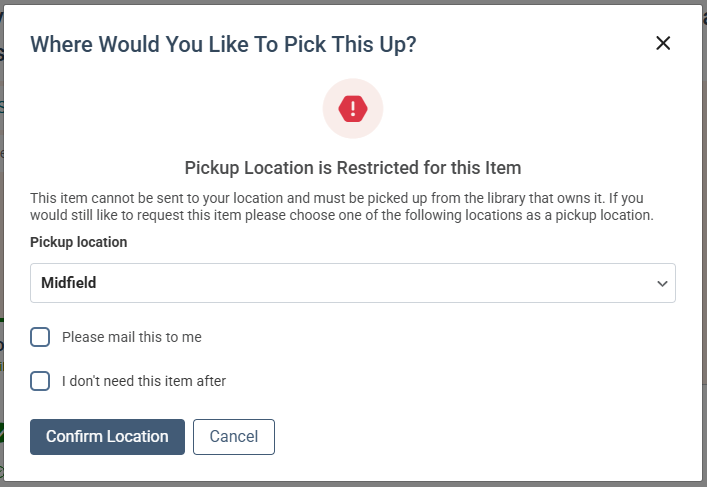
For Sierra libraries that have materials that can only be picked up at specific locations users were previously encountering an error after selecting a pickup location where the material could not be sent for hold fulfillment.
A new hold workflow was added for these types of materials. When a patron selects a pickup location that cannot be used to pickup a material, Vega Discover will now alert the user that the Pickup Location is restricted for the item and will offer the limited list of pickup locations where the item can be picked up in a second hold step allowing the user to decide if they want to pick up the item at an available location or cancel the hold.
Vega Central Request Interface Updates (available to our development partner, SearchOhio)
On the login screen for the Vega Central Request Interface a default Institution is no longer selected and users must select their Home Library before logging in.
BUG FIXES
Empty Sierra Mat Type causes Discover to return no search results
Sometimes when Sierra Library Vega Discover search results contained a title where an edition had no configured Material Type a null pointer exception resulted in no search results. This problem has been fixed.
Refine Search Results Option on Mobile Devices
A Refine button can now be used on the Advanced Search page on Mobile devices. A duplicate refine action was removed from the Basic Search on Mobile and now only one refine link is displayed on that screen on mobile devices
Translation Improvements
Our Translations team will add translations as part of the release, so that new strings will automatically be updated with the appropriate translation with every monthly release going forward.
Release Date: November 20, 2025
BUG FIXES
Unidentifiable Patron Records
A problem occurred for some libraries with unidentifiable patron records. Unknown patrons are now properly handled as errors and are considered invalid.
Vega Central Request Interface Passthrough Search Fix
Users encountered a 'No Results Found' message for search results when redirected from a passthrough search from their local catalog into the Vega Central Request Interface (CRI). This problem also affected copied search results links that were pasted into a new tab or otherwise bookmarked. This problem has been fixed and links into a Vega CRI search results page now load the correct results.
Vega Central Request Interface - Search Lost on Login/Logout Fix
In a Vega Central Request Interface catalog logging and or logging out was causing the previous search to be cleared. This no longer occurs and Vega remembers your search upon login and logout taking you back to the correct results.
