
Release Date: October 7, 2025
Edition Level Metadata Display Enhancements
This feature will be made visible on Wednesday (NA,CA,EU) / Thursday (SG/AP) after deployment is complete for all environments.
Translation strings will be available in the Release Notes archive on Right Answers.
Several enhancements have been made to the display of works in Vega Discover in order to provide clearer workflows for patron researchers.
-
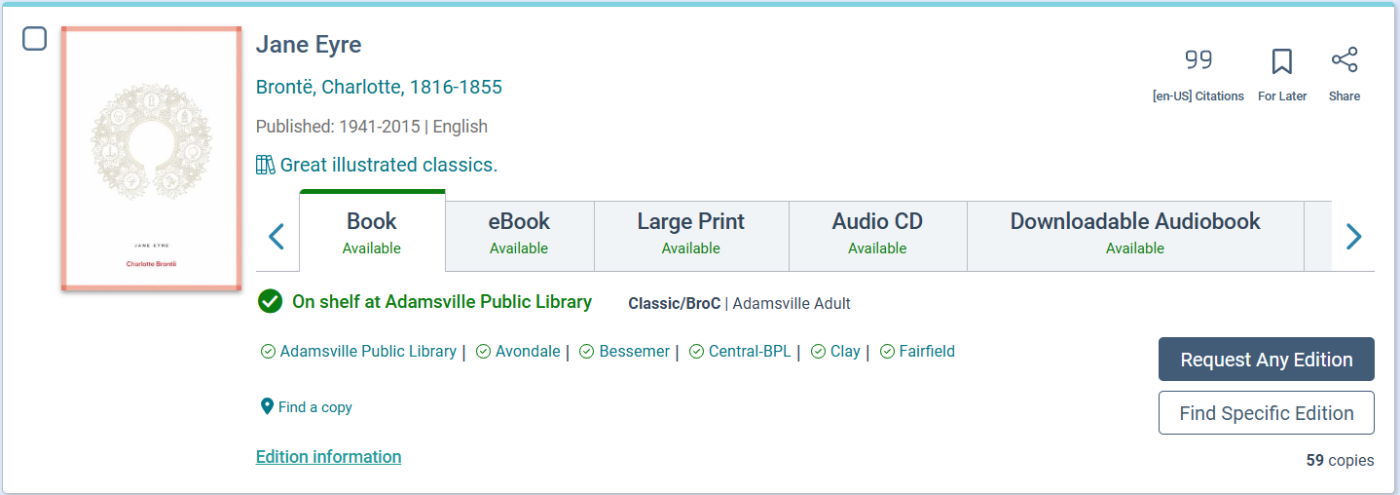
A button has been added to the Search Results and Full Resource Pages for each format of a work with the default label of, "Find Specific Edition". This button will open the Full Resource Page with the user focus scrolled to the expanded Edition Table for the selected format of a work.
-
The Place Hold button displayed at the format level of works in the search results and full resource pages default text has been updated to, "Request Any Edition".
-
The Edition level Place Hold button has been updated to read, "Request Edition"
-
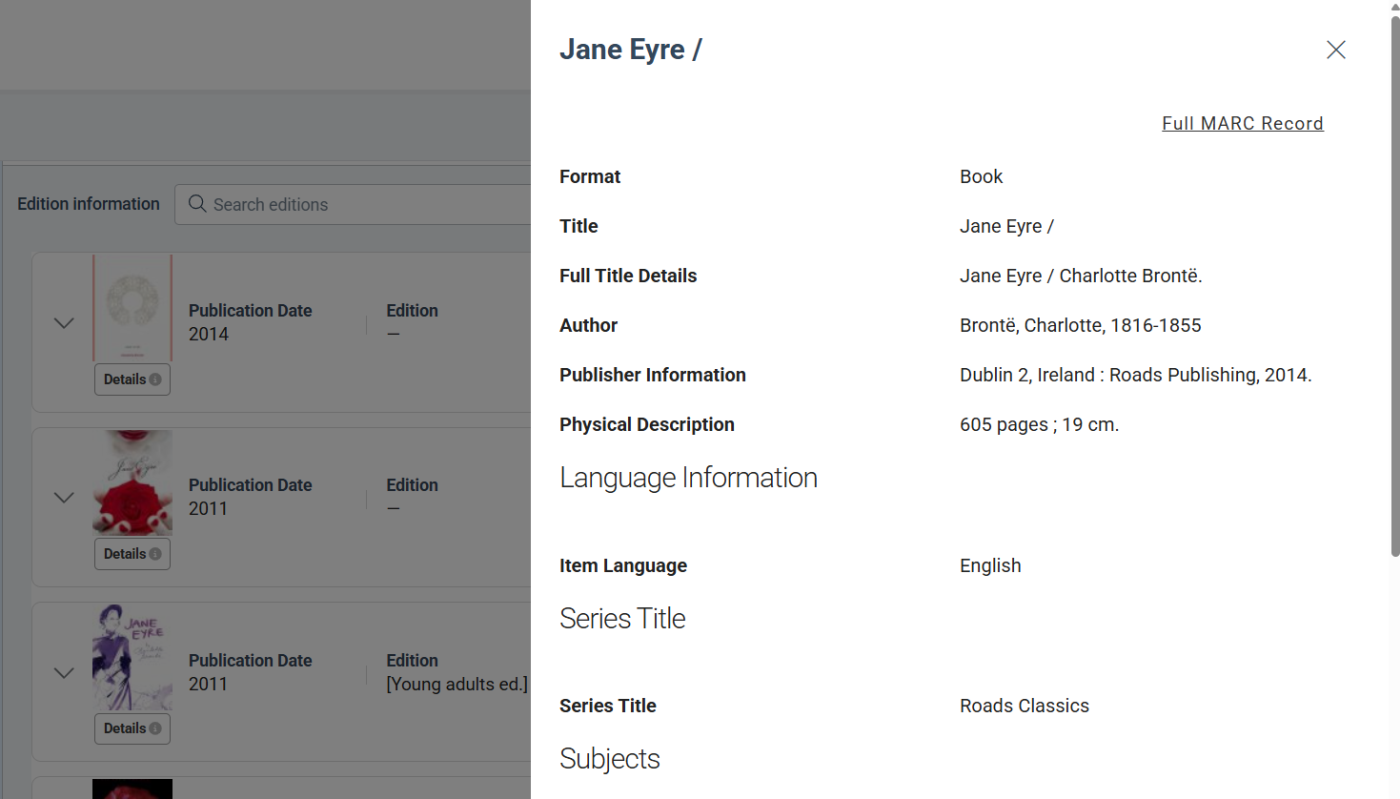
The Edition Table has been enhanced to display a cover image for each edition providing a visual cue to users looking for a specific edition of a title.
-
The Edition level Details info button that previously displayed as a round question mark is now a button under the cover image in the edition table with the default text of, "Details".
-
Clicking the Details button opens a descriptive view of the given Edition that has been enhanced to include many previously un-displayed metadata fields.
-
The Details view has also been enhanced with a "Full MARC Record" link at the top right side of the view that will display a MARC record when one is available. Note that non-MARC content ingested into Vega Discover (OAI, econtent) will not have a MARC view.
New Strings have been added to the translation files that can be used to customize/translate all new buttons and labels.
Edition Details Labels
"editionDetailsAccessibilityInfo": "Accessibility Information",
"editionDetailsAccessibilityNote": "Accessibility Note",
"editionDetailsAccumulationNote": "Accumulation and Frequency of Use Note",
"editionDetailsActionNote": "Action Note",
"editionDetailsAddedTitle": "Added Title",
"editionDetailsAddlFormNote": "Additional Physical Form Available Note",
"editionDetailsAlternateTitle": "Alternate Title",
"editionDetailsAuthor": "Author",
"editionDetailsAwardsNote": "Awards Note",
"editionDetailsBibliographyNote": "Bibliography, etc. Note",
"editionDetailsBindingInfo": "Binding Information",
"editionDetailsBiographicalNote": "Biographical or Historical Data Note",
"editionDetailsCaseFileNote": "Case File Characteristics Note",
"editionDetailsChronologicalTerm": "ChronologicalTerm",
"editionDetailsCitationNote": "Citation/References Note",
"editionDetailsComputerFileTypeNote": "Type of Computer File or Data Note",
"editionDetailsContributors": "Contributors",
"editionDetailsControlNumbers": "Control Numbers",
"editionDetailsCopyVersionNote": "Copy and Version Identification Note",
"editionDetailsCopyrightStatusNote": "Information Relating to Copyright Status",
"editionDetailsCorporateName": "Corporate Name",
"editionDetailsCumulativeIndexNote": "Cumulative Index/Finding Aids Note",
"editionDetailsCurriculumObj": "Curriculum Objective",
"editionDetailsDataNote": "Data Quality Note",
"editionDetailsDissertationNote": "Dissertation Note",
"editionDetailsDocumentationInfoNote": "Information about Documentation Note",
"editionDetailsElectronicNote": "Note (electronic)",
"editionDetailsEntityInfoNote": "Entity and Attribute Information Note",
"editionDetailsEntityType": "Type of Entity",
"editionDetailsEventNote": "Date/Time and Place of an Event Note",
"editionDetailsExhibitionsNote": "Exhibitions Note",
"editionDetailsFacetedTopicTerm": "Faceted Topical Terms",
"editionDetailsFormerTitleNote": "Former Title Complexity Note",
"editionDetailsFullLanguageDetails": "Full Language Details",
"editionDetailsFullMarc": "MARC",
"editionDetailsFullMarcRecord": "Full MARC Record",
"editionDetailsFullTitle": "Full Title Details",
"editionDetailsFunction": "Function",
"editionDetailsFundingNote": "Funding Information Note",
"editionDetailsGeneralNote": "General Note",
"editionDetailsGenre": "Genre",
"editionDetailsGeographicName": "Geographic Name",
"editionDetailsGeographicNote": "Geographic Coverage Note",
"editionDetailsIsbn": "ISBN",
"editionDetailsIssn": "ISSN",
"editionDetailsIssuingBodyNote": "Issuing Body Note",
"editionDetailsItemLanguage": "Item Language",
"editionDetailsLanguageAccMaterial": "Accompanying materials in",
"editionDetailsLanguageAccTranscripts": "Accompanying transcripts for audiovisual materials in {language}",
"editionDetailsLanguageAccessibleAudio": "Accessible audio in",
"editionDetailsLanguageAccessibleVisual": "Accessible visual language (non-textual) in",
"editionDetailsLanguageCaptions": "Captions available in",
"editionDetailsLanguageIncludesText": "This edition includes text in",
"editionDetailsLanguageInformation": "Language Information",
"editionDetailsLanguageInterTranslatedFrom": "Intermediate translations text translated from",
"editionDetailsLanguageIntertitles": "Item has intertitles in",
"editionDetailsLanguageLibrettos": "Librettos language is",
"editionDetailsLanguageNote": "Language Note",
"editionDetailsLanguageOrigAccMat": "Original accompanying materials in",
"editionDetailsLanguageOrigLibrettos": "Original librettos language is",
"editionDetailsLanguageOrigTranslatedFrom": "Original text translated from",
"editionDetailsLanguageSubtitles": "Item has subtitles in",
"editionDetailsLanguageSummary": "The summary is in",
"editionDetailsLanguageSungSpoken": "Sung or spoken text in",
"editionDetailsLanguageTableOfContents": "Table of Contents is in",
"editionDetailsLinkingEntryNote": "Linking Entry Complexity Note",
"editionDetailsLocalNotes": "Local Notes",
"editionDetailsLocalSubjects": "Local Subjects",
"editionDetailsLocationOfOriginalsNote": "Location of Originals/Duplicates Note",
"editionDetailsLocationOtherMaterialsNote": "Location of Other Archival Materials Note",
"editionDetailsMeetingName": "Meeting Name",
"editionDetailsMethodologyNote": "Methodology Note",
"editionDetailsNamedEvent": "Named Event",
"editionDetailsNotes": "Notes",
"editionDetailsNumberingNote": "Numbering Peculiarities Note",
"editionDetailsOccupation": "Occupation",
"editionDetailsOriginalVersionNote": "Original Version Note",
"editionDetailsOwnershipHistory": "Ownership and Custodial History",
"editionDetailsParticipantNote": "Participant or Performer Note",
"editionDetailsPersonalName": "Personal Name",
"editionDetailsPlaceName": "Hierarchical Place Name",
"editionDetailsPrefCitationNote": "Preferred Citation of Described Materials Note",
"editionDetailsPublicationsNote": "Publications About Described Materials Note",
"editionDetailsPublisherNumber": "[zh-CN] Publisher or Distributor Number",
"editionDetailsReportNote": "Type of Report and Period Covered Note",
"editionDetailsReproductionNote": "Reproduction Note",
"editionDetailsRestrictionsNote": "Restrictions on Access Note",
"editionDetailsScaleNote": "Scale Note for Visual Materials",
"editionDetailsSeriesTitle": "Series Title",
"editionDetailsSourceOfAcqNote": "Immediate Source of Acquisition Note",
"editionDetailsSourceOfDescNote": "Source of Description, Etc. Note",
"editionDetailsStudyProgramNote": "Study Program Information Note",
"editionDetailsSubjects": "Subjects",
"editionDetailsSummary": "Summary",
"editionDetailsSupplementNote": "Supplement Note",
"editionDetailsSwissCollections": "Swiss Collection Codes",
"editionDetailsSystemDetailsNote": "System Details Note",
"editionDetailsTermsNote": "Terms Governing Use and Reproduction Note",
"editionDetailsTopicalTerm": "Topical Term",
"editionDetailsUncontrolledTerm": "Uncontrolled Index Term",
"editionDetailsUniformTitle": "Uniform Title",
"editionDetailsUpc": "UPC",
"editionDetailsWithNote": "With Note",
"editionDetailsWorkLanguage": "Work Language",
New Find Edition and Request Buttons
"findSpecificEdition": "Find Specific Edition",
"requestAnyEdition": "Request Any Edition",
"requestEdition": "Request Edition",
Details Button hover and Display String
"showDetailsPopup": "Show details popup"
"itemDetails": "Details"
Non-Circulating Materials Display
This feature will be made visible on Wednesday (NA,CA,EU) / Thursday (SG/AP) after deployment is complete for all environments.
Translation strings will be available in the Release Notes archive on Right Answers.
Several changes have been made to support the clear display of Non-Circulating materials to patrons and limit the display of request buttons for these materials.
How Non-Circulating Materials Display
-
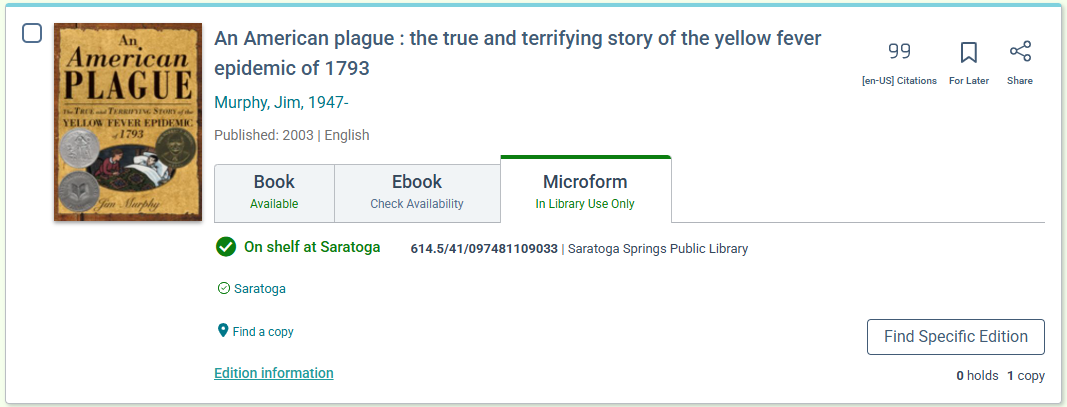
Non-Circulating Materials are considered available for In Library Use Only and are not eligible for requests.
-
In the Location Drawer, items that are considered Non-Circulating will display an "In Library Use Only" string in addition to their current status.
-
For Sierra the status of 'o' will display as configured and an additional string will not display to avoid redundant information.
-
In the Editions Table, in the expanded Item level view, items that are considered Non-Circulating will display an "In Library Use Only" string in addition to their current status.
-
If all materials in a format group of a work are considered Non-Circulating then a Green "In Library Use Only" string will appear as the status on the format group tab.
Ways to Define Non-Circulating Materials
-
Polaris Item level Non-Circulating checkbox.
-
You should run a full MARC extraction to apply existing non-circulating flags to the Vega Discover Catalog.
-
-
For Sierra in the Item Status Mapping settings, the status of 'o' should be set to Suppress Get It and Available.
-
New Non-Circulating Settings configuration in Vega Admin
-
Sierra libraries can use this setting to select Locations where all materials are considered Non-Circulating.
-
Polaris libraries can use this setting to select Locations and/or Item Collections where all materials are considered Non-Circulating.
-
Material Type Settings Request Setting
-
The Material Type Settings have been updated by changing the column previously labeled, "Request Bibs With No Items" to now read, "Request Setting".
-
The Request Setting has three options
-
Allow Request on Bibs with no items - this causes a request button to display for format groups where none of the editions have items attached. This also causes the 'On Order' string to display as the status for this material.
-
Disallow request on bibs with no items - this causes the request button to be suppressed for the format group tab and all editions that do not have items.
-
Non-Circulating Material - This causes the request button to be suppressed for the format group tab and all editions that are of this material type or TOM. This also causes the 'In Library Use Only' string to display as the status for this material.
New Strings have been added to the translation files that can be used to customize/translate all new buttons and labels.
-
"inLibraryUseOnly": "In Library Use Only",
-
"tabsInLibraryUseOnly": "In Library Use Only",
MEEP WINNER: Use ILS Bib Record Lists for Showcase Creation
This feature will be made visible on Wednesday (NA,CA,EU) / Thursday (SG/AP) after deployment is complete for all environments.
Translation strings will be available in the Release Notes archive on Right Answers.
The Showcases tab has been enhanced with a workflow that allows libraries to access bibliographic record lists that have been created in the ILS. At the top right of the Showcases tab a new button appears with default text of, "Create from ILS List". A create showcase form will appear that allows staff users to select (Sierra) or enter a list ID (Polaris) to identify a list they would like to use to populate a showcase. The form contains all other expected settings for a showcase.
Once the showcase is saved the following things occur.
-
The user is taken to the showcases list tab view and the new showcase should load.
-
A matching bookmark list with the same name is created at the same time and can be viewed in the Bookmarks tab.
-
The list and showcase now exist as Vega Discover content and can be modified by adding and removing bookmarks, changing the name, publishing, unpublishing and deleting.
If the ILS version of a list is updated and you would like to refresh the content of an existing ILS list Showcase and Bookmark list you can edit the showcase and use a "Sync With ILS" button to resync all materials. Note that this action completely resets both the bookmark list and showcase to match the ILS version of this list and any changes made in Vega Discover will be overwritten.
ILS Showcases can be used in the same ways as bookmark list showcases: generate code for a website, share a link, use on home page configurations, LX and Promote templates, and Vega Web.
New Strings have been added to the translation files that can be used to customize/translate all new labels.
"customShowcaseILSList": "ILS List",
"customShowcaseListSyncModalConfirmBtn": "Sync List",
"customShowcaseListSyncModalConfirmMsg": "Syncing will overwrite the showcase with what is currently in the ILS.",
"customShowcaseListSyncModalErrMsg": "Failed to sync with ILS list",
"customShowcaseListSyncModalTitle": "Sync Confirmation",
"customShowcaseListSyncModalWarningMsg": "Existing items may be removed from the list",
"customShowcasePolarisRecordIdNotFoundError": "Record Set ID not found. Double check the ID is correct.",
"customShowcasePolarisRecordIdRequiredError": "Record Set ID is required.",
"customShowcasePolarisRecordSetId": "Polaris Record Set ID",
"customShowcaseSierraListRequiredError": "ILS List is required.",
"customShowcaseSyncWithIls": "Sync With ILS",
"customShowcasesCreateFromIlsList": "Create from ILS List",
Vega Central Request Interface Updates (available to our development partner, SearchOhio)
For libraries that use the Vega Central Request Interface for Rapido CB Interlibrary Loans the following changes were made:
Patron Info Popup
The Patron Info popup was updated to only display the Patron Name and Login/Logout button.
Patron Bookshelf
The Patron bookshelf was updated to not display Patron Holds or Checkouts information.
Facet Results: Load More Functionality
Translation strings will be available in the Release Notes archive on Right Answers.
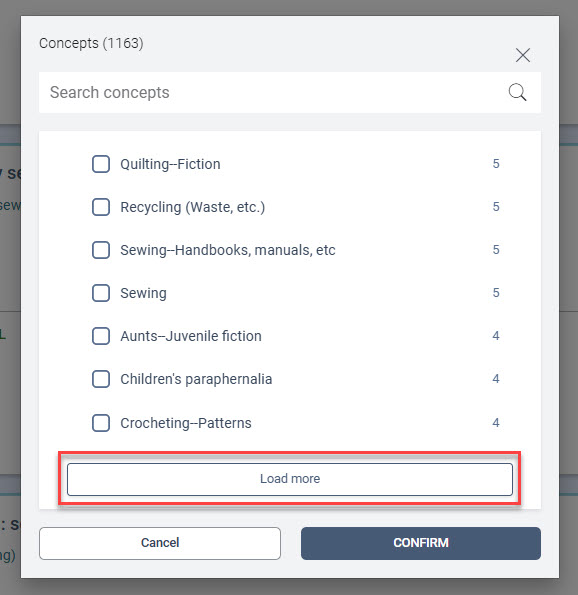
You can now view up to 100 facet results in the All Facets view using the scrollbar.
-
Once you've scrolled through the initial 100 facets, a Load More button will appear.
-
Clicking Load More adds 100 additional facets below the currently visible list.
-
You can scroll up to revisit previously loaded facets and down to view newly added ones.
-
The Load More button will move to the bottom of the newly added facets.
-
If the page is refreshed, the facet list will reset to the initial 100 results.
"loadMore": "Load more",
Citations
Citations are turned off by default. Use the Experience Settings as described below to enable citations globally or at the collection site level.
Translation strings will be available in the Release Notes archive on Right Answers.
Citation Options
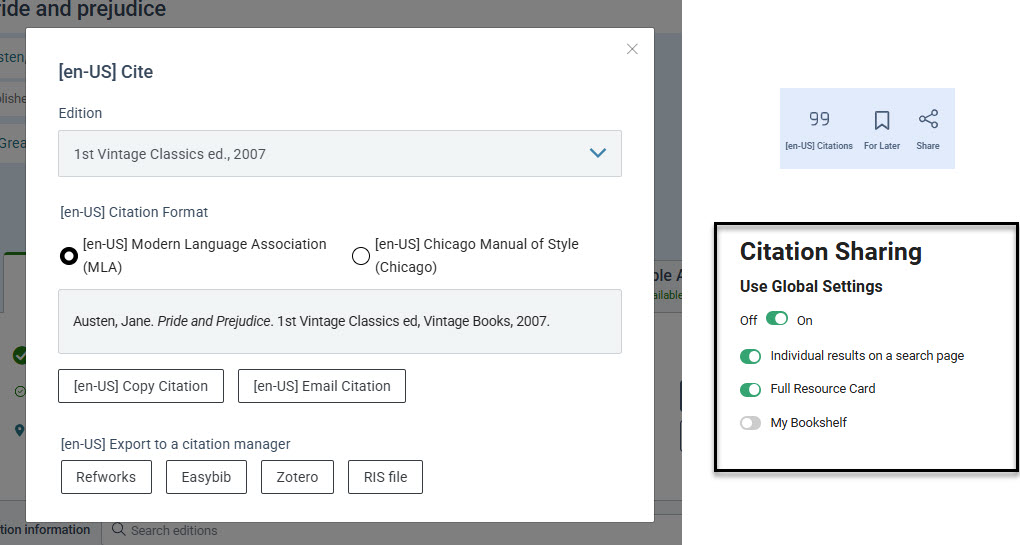
Patrons can now choose which edition to cite from the roll-up menu, including both Chicago and MLA citation styles. Citations can be copied and pasted directly into a document or emailed for future reference.
Citation Icon
The icons on the search results and full resource card are updated:
-
The Options icon moves to the left and is renamed Citation with a new icon
-
The Bookmark icon stays in the middle
-
The Share icon moves to the right
Translation Support
In the example below, [en-US] has been added to the translation string to demonstrate where in the feature the text is customizable.
"citationMailingBtnLabel": "Citations",
"exportCitation": "Export citation",
"exportCitationCopyBtn": "Copy Citation",
"exportCitationCopyMsg": "Citation Copied!",
"exportCitationEmailAddress": "Email Address",
"exportCitationEmailBtn": "Email Citation",
"exportCitationEmailFailedMsg": "Failed to send email.",
"exportCitationEmailInvalid": "Email format is not recognized.",
"exportCitationEmailSuccessMsg": "Email Sent",
"exportCitationFooterHeader": "Export to a citation manager",
"exportCitationFormatChicago": "Chicago Manual of Style (Chicago)",
"exportCitationFormatMla": "Modern Language Association (MLA)",
"exportCitationFormatsLabel": "Citation Format",
"exportCitationModalTitle": "Cite",
"zoteroCollapseTitle": "Vega Discover supports Zotero citation integration through",
Visibility Controls
Show or hide citations using the Experience settings. Citations visibly follow the same logic as Social Media Sharing. Settings can be configured at the main site level and can be overridden at the collection site level by disabling Global Settings..
Text Updates to Experience Settings
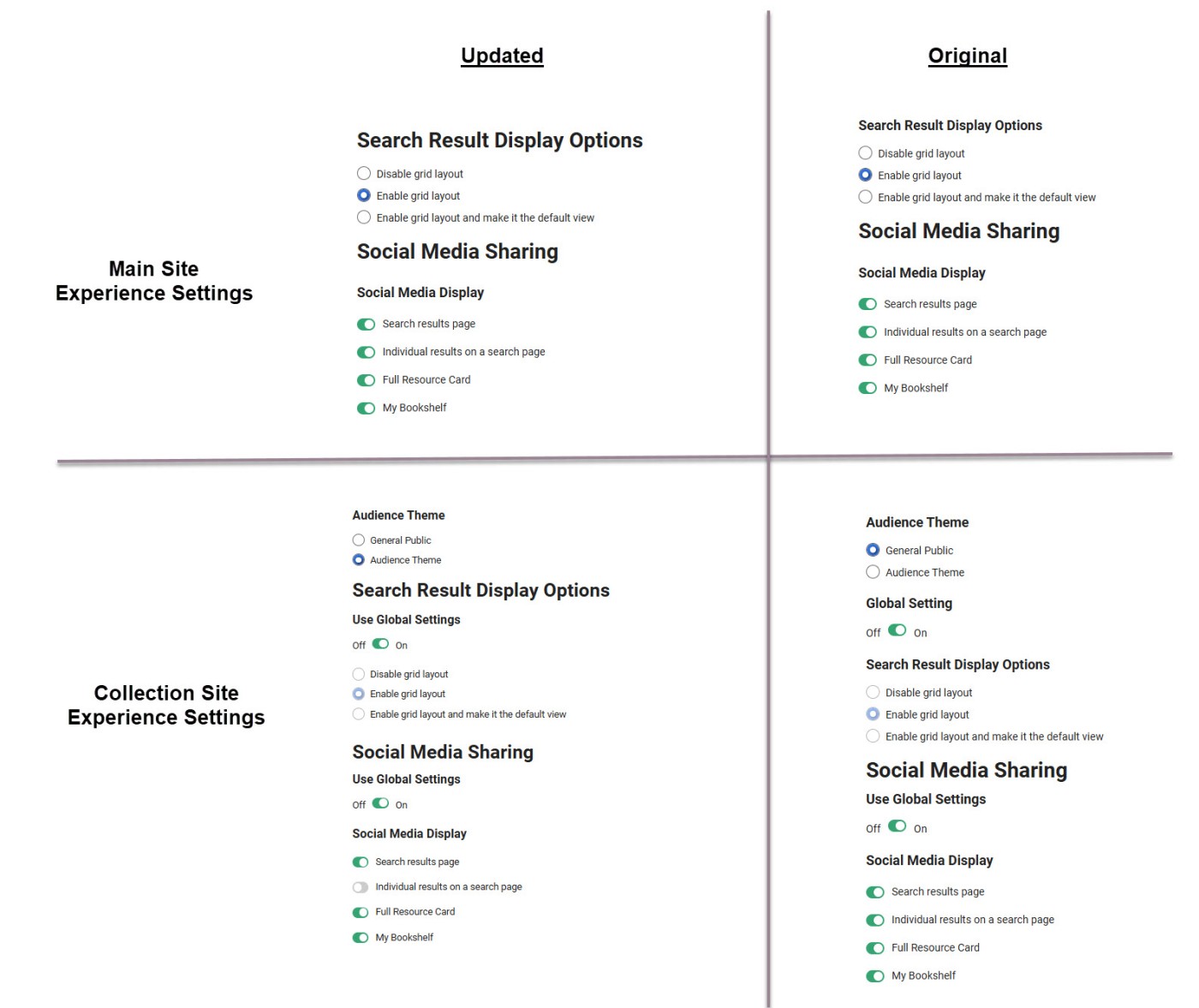
We’ve made user experience improvements to the Experience Settings on both the main site and collection sites. Font sizes have been adjusted to better emphasize which settings correspond to specific feature functionalities. These changes make it easier to navigate and configure your search experience.
BUG FIXES
Showcase Search Results Limited to Initially Loaded Titles
Previously, when searching within a showcase created from a saved list containing more than 40 titles, search results were limited to the first 40 titles initially loaded on the page. Patrons had to manually scroll to load the full list before all titles became searchable.
This issue has been resolved. The search functionality now indexes and searches up to 700 titles, without the need to scroll and load additional items.
Translation Coverage Update: facetMoreFormats
Translation strings will be available in the Release Notes archive on Right Answers.
Recent updates to the facetAllFormats string did not include a corresponding update to the facetMoreFormats string, resulting in incomplete translation coverage.
To address this gap, we've added the following strings. For consistency and easier identification, all new strings begin with the prefix "facet".
"facetAllCollections": "All Collections",
"facetAllConcepts": "All Concepts",
"facetAllFormats": "All Formats",
"facetAllLanguages": "All Languages",
"facetAllLocations": "All Locations",
"facetAllPersons": "All Persons",
"facetAllPublishers": "All Publishers",
"facetFewerAgeGroups": "Fewer Age Groups",
"facetFewerCollections": "Fewer Collections",
"facetFewerFormats": "Fewer Formats",
"facetFewerLanguages": "Fewer Languages",
"facetFewerLiteraryForms": "Fewer Literary Forms",
"facetMoreAgeGroups": "More Age Groups",
"facetMoreCollections": "More Collections",
"facetMoreFormats": "More Formats",
"facetMoreLanguages": "More Languages",
"facetMoreLiteraryForms": "More Literary Forms",
