
Release date: October 6, 2026
Features
Interlibrary Loan using WorldCat Discovery
Sierra version 6.6+ is required for Interlibrary Loan request workflows. Polaris requires 7.6+ versions.
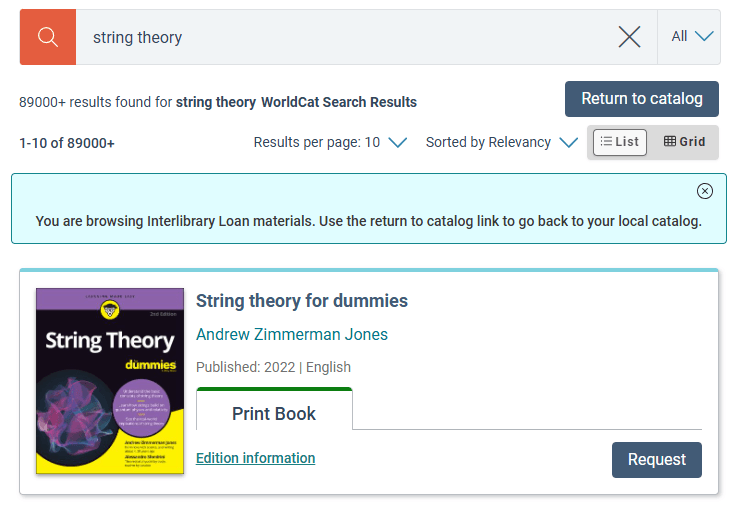
An integrated Interlibrary Loan workflow is now available for both Sierra and Polaris libraries that have a Worldcat Discovery subscription. This configuration can be made at the Main Site and Collection Site levels. When configured, an Interlibrary Loan search option appears in Vega Discover search results that will launch the current search query in WCD and return those results in Vega Discover, simplifying the interlibrary loan process for both patrons and staff. Requests made for materials are passed to the ILS ILL requests queue in Sierra and Polaris for review and fulfillment by Interlibrary Loan Librarians. In Polaris requests are sent to the patron pickup location branch queue. A details page is provided through the Title and Edition information link allowing users to view more information about the title such as Publisher, edition, etc. Only the data provided by WCD Search API is displayed. Requests sent to the ILS will include Title, Author, ISBN/ISSN/LCCN, OCLC No, Edition, Publisher, Format and Date information if available from WCD. All new messages, strings, and buttons can be customized using language strings.
Before configuring the new WorldCat Third-Party connection OCLC requires that your library fill out this form: OCLC Mutual Customer Access Authorization Form and email it to legal@oclc.org. Then OCLC will turn on API access for your WCD subscription and you can continue configuring in Vega Discover Third Party Connections for WorldCat.
Configuration settings allow institutions and/or each member library to control whether the WCD search option displays in their collection site and whether ILL requests are allowed. The workflow can also be set to display only for Staff Users if the library wants to maintain tighter control over ILL requesting. Vega Discover’s Patron Assist functionality for staff also allows staff users to place ILL requests on behalf of patrons during Patron Assist sessions. ILL configuration in the ILS will control patron user rules.
hCaptcha Bot Prevention in Patron Registration
An invisible CAPTCHA was added to the Patron Registration workflow to provide protection from automated bots by analyzing user behavior in the background without requiring a manual checkbox click. It tracks user actions like mouse movements, typing speed, and browsing history as soon as a visitor lands on the page. Instead of a checkbox, it activates silently when a user clicks a site button (like "Submit" or "Login"). Real humans pass instantly without interruption while bots will fail to pass and receive an error/block.
As a result, Bots are prevented from creating patron accounts and gaining access to patron features using the Patron Registration workflow. The feature is automatically applied to all Patron Registration forms and requires no library configuration or third party subscription.
Captcha Error Strings added to translations:
"patronRegFormCaptchaError": "There was a problem verifying this registration session, please try submitting again.",
"patronRegFormCaptchaUnavailable": "We couldn't load the verification check, possibly because of an ad blocker or privacy extension. Please disable it for this site and reload the page."
Vega Central Request Interface Availability Details
Libraries using the Vega Discover CRI and participating consortia borrowing libraries using the Rapido integration for Vega Discover are now able to display the Location, Call Number, Availability Status, Requestability Status, library address, and contact info related to copies from participating Rapido CRI Pod libraries in the same location you would find Item Details in Vega Discover catalogs.
Vega CRI libraries should request help from Clarivate in configuring this feature in the new Availability Details section of the Rapido Configuration.
Polaris Sync with Discover for Account Linking Option
This feature requires that your library is using Polaris 8.1+
A new optional setting in the Vega Discover Admin Account Linking settings allows Polaris libraries to sync Vega Discover Account Linking for Patrons with the Polaris ILS Account Links that provide access for linked accounts to pickup holds.
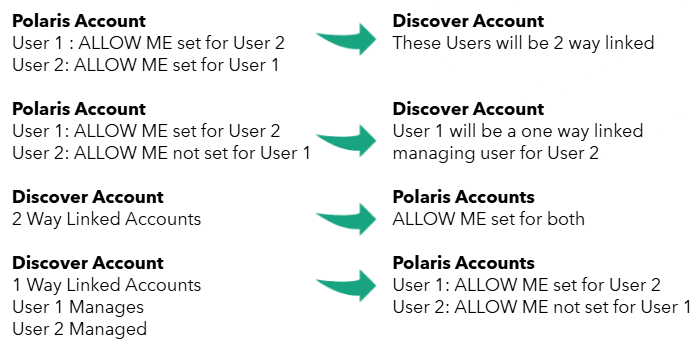
When enabled, the first time a patron logs in Vega will look for any Polaris ILS links and create them in Discover. Discover will also push any existing account links to Polaris. Afterward, when a patron adds a link Discover will push this link to Polaris. When a patron logs in or refreshes the page Vega Discover will also check Polaris for new links that were added by staff. In the future a Vega API will be used with Vega Mobile to provide these links to Solus for synchronization. Enabling and disabling this feature can result in link disparities. Changes made during periods when this sync is off may be missed, if the setting is turned on, off, and then back on.
Option to Display Location for Linked Accounts
A setting has been added to the Vega Discover Account Linking configuration that causes the patron location to display next to their name for linked accounts associated with your account. This location displays when a managing account is selecting and viewing linked accounts in Vega Discover Account portal, when selecting a linked account to place a hold for, and when selecting a linked account to circulate econtent to.
To Configure: In the Account Linking section of the Discover Admin settings a "Display Linked Account Location" setting can be toggled on to turn on this display. This setting is off by default.
Pickup Location used for Linked Account Holds
When a managing patron places a hold for a managed linked account, the linked account's preferred pickup location is selected by default in the Hold workflow when the managing user selects that patron.
Fines & Fees Displays Branch
The Fines and Fees Display in the Account Portal now includes information about the Branch where each fine was accrued. For consortias or multi-library systems this information can be useful to patrons when interpreting their fines that have been accrued across multiple library branches.
Linked Account Circulation for BorrowBox
Managing Patrons can circulate BorrowBox materials to their managed linked accounts. This update completes the ability for Managing Patrons to circulate econtent for all existing econtent vendor integrations to their managed linked accounts.
Bookmarks Lists Filtering Standardized
The Account Portal Bookmarks view now behaves as expected and in concordance with other views.
In the Bookmarks view of the Patron Account Portal
-
The 'Bookmarked items available now" widget ALWAYS display ONLY available items and cannot be toggled to display unavailable materials.
-
The Bookmarks page filter is no longer defaulted to "Available" and all bookmark and lists are displayed by default.
-
When a user applies the Available filter to the Bookmarks view, lists that have 0 available items are filtered out of the view and do not display.
Fixes
Accessibility Updates
Accessibility updates were made throughout the Vega Discover patron interface to address accessibility issues discovered in our 2026 3rd party audit performed by Deque. All Accessibility reports in Vega Discover were completed in this release. As a result Deque can re-evaluate our accessibility standards and issue a new VPAT which willwe publish in the Knowledge Portal.
Note that another Accessibility Audit will be performed ahead of the April 2026 DOJ dates for conformance set in the USA.
Accessibility Updates applied inthe following categories:
-
Link Purpose (In Context)
-
Descriptive Labels
-
Label in Name
-
Visible Labels
-
Semantics
-
Headings
-
Titles on Pages
-
Focus Order
-
Reading Order
-
Keyboard Navigation
-
Custom Controls
-
Name, Role, Value
-
Reflow
-
Resize 200%
-
Text Spacing
Bug Fixes
-
Edition Level Holds Supported in Patron Assist Mode
-
Vega Discover CRI patron names display as expected in Discover CRI
-
Patron Account info can be saved without an email address
-
Patron can change Preferred Contact Method to phone.
-
Missing Translations were added for
-
"portalConfirmPasswordIsRequired" : "Password confirmation is required."
-
"portalCurrentPasswordIsRequired" : "Current password is required."
-
"portalNewPasswordIsRequired" : "New password is required."
-
-
The Send button translation for saved searches was mapped to the sendButton string.
-
Patron Registration Fixes
-
Patrons registered at the collection site level assigned correct Branch Location for Site configuration.
-
Patron Code applied as configured for Polaris registered patrons.
-
City field in form allows periods
-
Polaris UDFs configured in form appear correctly in form.
-
Patron Registration can be submitted when UDFs are included in form.
-
Polaris Patron Registration uses configured country from ILS
-
Patron Registration birthdate uses configured date display from Vega Discover localization settings
-
